Graham Spencer

917 posts on MacStories since January 2011

Former MacStories contributor.


Mountain Lion’s Gatekeeper

Mountain Lion’s Gatekeeper

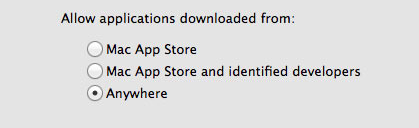
When the Mac App Store launched just over a year ago, many feared that it was the beginning of the end for running apps that weren’t approved by Apple on OS X. Jump forward a year and a bit and Apple has announced Mountain Lion, the next version of OS X that is set to launch this summer. One big feature of Mountain Lion is what Apple is calling Gatekeeper. It’s a new setting, aimed at both security and peace of mind. Essentially Gatekeeper will be giving users three options for controlling what apps run:

  • Only allow applications from the Mac App Store to run
  • Allow Mac App Store apps and those from identified developers
  • Allow any app to run

By default, the second option is chosen, allowing apps from the Mac App Store to run, as well as those from identified developers. What’s an identified developer? It’s someone that has registered as a developer with Apple and receives a personalised certificate. They can use that certificate to sign their apps, so that Gatekeeper will allow the app to run. It also means that if the app is found to be malicious, Apple can order Gatekeeper to remove that app from any Mountain Lion machine. Mac developers Panic have written a long blog post explaining the feature in great depth, explaining how it works, why it’s needed and why Apple chose to implement it in this way.

The simplest thing Apple could have done would have been to make the Mac App Store the sole source for Mac apps, in the same way the App Store is the sole source for iOS apps, shutting off every other app distribution venue in the process. While this would have immediately solved the problem, you would have seen developers’ heads bursting into flame and flying across the room in rage. Why?

Although security is a vital feature for Apple, developers, and users alike, being unable to run unsigned code cuts a lot of really great things off at the knees. You wouldn’t, for example, be able to just download and run an open source project unless it had been submitted to and reviewed by the App Store. Highly disruptive software (think Napster or BitTorrent) may have not been able to exist on the Mac platform since it would have been likely to run afoul of Apple’s App Store guidelines. Major vendors such as Adobe and Microsoft might have withdrawn their support for the platform, being unwilling to cede 30% of their revenue to App Store distribution.

It isn’t all good news though, Panic is concerned that Apple may be implementing an “artificial gulf” between App Store apps and non-App Store Apps by restricting some new features to only those distributed on the Mac App Store.

There remains one thing that is of concern to me. Despite these great strides forward, Apple is walking a dangerous line with regard to features that are only available to App Store distributed apps. The two most prominent examples are iCloud and Notification Center. Cabel asked Apple if, thanks to Gatekeeper and Developer ID, App Store-only features would be eventually be available to signed apps that were not distributed through the App Store. There was some shuffling of feet and a “we have nothing to announce at this time”. It didn’t sound particularly optimistic.

Gatekeeper will no doubt be a hot topic of discussion in the coming months and we’re likely to see all sides of the debate argue about what Gatekeeper represents. ZDNet, for example, has labelled the feature as a “tool that restricts what the user runs, rather than a security tool that sorts the wheat from the toxic chaff”. Macworld also has an in-depth hands on article with Gatekeeper that is well worth the informative read.


Permalink

Apple Releases Messages Beta, An Early Taste Of Mountain Lion

Update: I’ve included initial impressions of the new Messages app for OS X below the break. Links also added to our OS X Mountain Lion coverage.

Apple has today released a developer preview of Mountain Lion, the next version of OS X. We have full coverage of that in this article, but in short, a big part of this release will be how iOS and OS X continue to merge and interweave. One aspect of that will include Apple removing the iChat app from OS X and replacing it with a new app, simply called Messages.

The new app will allow users to chat with someone using either their Apple ID or phone number, that should ring a bell because that’s exactly what iMessage does. It’ll also retain the traditional chat services such as AIM, Yahoo, Google Talk and Jabber - so don’t worry about your old iChat handle, it’ll continue to exist.As should be expected, Messages will keep conversations synced across all your devices.

Download Messages Beta and get a taste of what’s coming in OS X Mountain Lion. When you install Messages, it replaces iChat. But iChat services will continue to work. And Messages brings iMessage to the Mac — just like on iPad, iPhone, and iPod touch running iOS 5. Here are the features you can expect with Messages:

  • Send unlimited iMessages to any Mac, iPad, iPhone, or iPod touch.*
  • Start an iMessage conversation on your Mac and continue it on your iPad, iPhone, or iPod touch.
  • Send photos, videos, attachments, contacts, locations, and more.
  • Launch a FaceTime video call and bring the conversation face-to-face.
  • Messages supports iMessage, AIM, Yahoo!, Google Talk, and Jabber accounts

Better yet, a Messages beta is now available from Apple’s website. Just note that it will replace your install of iChat. Jump the break for some first impressions and screenshots.

[Via The Loop]

Read more


Apple Adds Screenshots And Promo Codes To The iBookstore For Publishers

The iBookstore now has support for screenshots and promo codes, according to an iTunes Connect letter that was sent to content publishers today and that TUAW obtained. Content publishers are now able to giveaway 50 free codes that redeem a copy of a book they are selling on the iBookstore — something developers on the App Store have long been able to do. No doubt it will be helpful for publishers trying to get their books reviewed and for when they want to run promotional give-aways.

The other big change is that publishers can now also submit screenshots of the book. This new feature will be most useful for multi-touch books that are created with the iBooks Author app. Like the App Store, Apple is specific about the dimensions and formats it will accept for this: 1024 x 768 or 768 x 1024 in RGB, formatted as either .jpeg, .jpg or .png.

Apple has also made a minor change to how pre-orders are handled on the iBookstore. From now on, publishers need not upload a cover or any other assets until two weeks prior to publication, but can still offer the product for pre-order.

[Via TUAW]


Fair Labor Association Begins Its Inspections Of Apple’s Suppliers

The first inspections by the Fair Labor Association began today at Foxconn City in Shenzhen according to an Apple Press Release issued just a short time ago. It is the beginning of special, voluntary, audits of Apple’s final assembly suppliers that was announced earlier in January this year when Apple joined the Fair Labor Association.

“We believe that workers everywhere have the right to a safe and fair work environment, which is why we’ve asked the FLA to independently assess the performance of our largest suppliers,” said Tim Cook, Apple’s CEO. “The inspections now underway are unprecedented in the electronics industry, both in scale and scope, and we appreciate the FLA agreeing to take the unusual step of identifying the factories in their reports.”

A team of labor experts led by FLA president Auret van Heerdan will interview thousands of employees at Apple’s suppliers about working and living conditions, health, safety, working hours, compensation and communication with management. Inspections of the facilities and reviews of procedure documentation will also be undertaken in the FLA assessment.

An initial report with early findings and recommendations will be released by the Fair Labor Association and will be followed up by inspections of the Quanta and Pegatron facilities later this Spring. Apple’s full press release is located after the break.

Image via Wired.

Read more


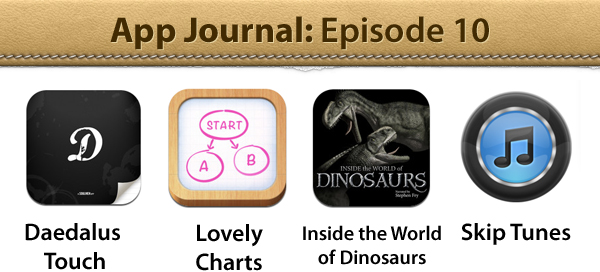
App Journal, Episode 10: Daedalus Touch, Lovely Charts, Inside the World of Dinosaurs, Skip Tunes

App Journal is a series aimed at showcasing apps we have enjoyed using on our iPhones, iPads, and Macs, but decided not to feature in a standalone, lengthy review here on MacStories. App Journal is a mix of classic reviews, app recommendations, and a diary of our experiences with apps that still deserve a proper mention.

After a two month period of inactivity, the App Journal is back and we’ve got some cool apps to share. From text editing to beautiful diagrams and (gasp) dinosaurs, make sure you don’t miss Episode 10 of App Journal, brought to you directly from the MacStories Team, good coffee, and, why not, Italy’s snow.

If you’ve got apps to recommend, our Tips inbox is just a click away up in the site’s toolbar. Enjoy!

Federico Viticci - Daedalus Touch

When Cody reviewed the first version of The Soulmen’s Daedalus Touch for iPad back in May, I was intrigued by the app’s unique take on portable text editing and document management, but ultimately didn’t pull the trigger on a purchase as I didn’t believe I needed yet another take on Dropbox and text editors. Cody wrote:

Daedalus is interesting. Everything you create in Daedalus becomes a sheet, which exists under a topic sheet that creates a stack. It reminds me of writing a screenplay or developing a report with a cover sheet, but what’s more interesting is how you navigate between these sheets. A majority of the interactions in Daedalus involve pinch-to-zoom actions, which is a bold navigation choice that’s almost pulled off perfectly. You zoom in and out of stacks, and are able to browse between multiple sheets with simple flicks.

After seeing The Soulmen release a couple of updates to bring new functionalities and improve support for things like external hardware keyboards and system clipboard, I thought I could give the app a shot, especially considering it’s on sale at $2.99 on the App Store. In our review, Cody detailed how Daedalus Touch is different from the majority of text editors available on iOS as it allows you to navigate multiple stacks of documents through touch-based interactions based off gestures such as swipes and pinches to navigate in and out of sheets and paper stacks. Having used Daedalus, I think what’s really cool is that – attention to detail and elegant design/typography aside – Daedalus allows you to sync different Dropbox folders independently, meaning you’ll be able to, say, keep your standard notes in a first stack and your book writing project (with additional notes, chapters, and maybe drafts) in another stack. What I’d like to see in a future version of Daedalus Touch is support for more file formats (.md would be a good choice) and automatic sync to avoid the need of hitting “Save” every time.

If you’re looking for a different take on Dropbox-powered text editing, Daedalus Touch is an interesting option at $2.99 for a limited time. Read more


The Magic Money That Apple Made From Thin Air

The Magic Money That Apple Made From Thin Air

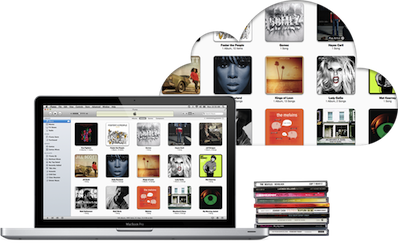
Jeff Price of TuneCore is happy and a little surprised, finding out their first royalty payments from the new iTunes Match came in at $10,000. He writes in a blog post that “this is magic money that Apple made exist out of thin air for copyright holders”. The service has effectively monetized the existing behaviour of consumers, giving more money to artists and copyright holders whilst the consumer just continues to listen to their music, not doing anything “new”.

A person has a song on her computer hard drive.  She clicks on the song and plays it.  No one is getting paid.  The same person pays iTunes $25 for iMatch.  She now clicks on the same song and plays it through her iMatch service.  Copyright holders get paid. Same action, same song, one makes money for the copyright holder, and one does not. This is found money that the copyright holders would never have gotten otherwise.

It may not be a complete windfall as Jeff points out, but it has something - something that if iTunes Match didn’t exist, you wouldn’t get at all. Something is better than nothing.

The music industry needs innovation. Services like iMatch, Spotify, Simfy, Deezer and others are bringing that innovation—it will take some time to learn which are the ones consumers want.  But in the interim, seeing an additional $10,000+ appear out of the thin air for TuneCore Artists by people just listening to songs they already own is amazing!

Permalink

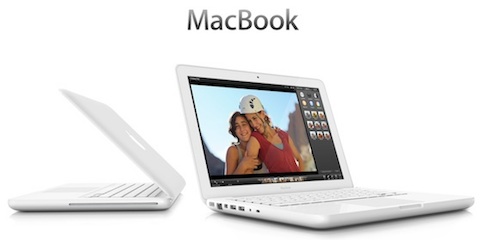
Apple’s White MacBook Reaches “End Of Life”, Educational Sales To Stop

Several months after halting sales of the white MacBook to consumers, Apple is now completely stopping sales of the MacBook. When it stopped selling the entry-level MacBook to consumers back in July of last year, Apple continued to offer it to educational institutions, but it has now notified resellers that it has now classified the MacBook as “End of Life”.

With that MacBook now discontinued entirely, Apple’s laptop lines include just the  MacBook Pro and MacBook Air models. It isn’t known when Apple stopped manufacturing of the MacBook, but it was likely a few weeks ago, with Apple just waiting for final supplies to dwindle down.

[via MacRumors]


Sprint Q4 2011 Results: 1.8 Million iPhones Sold, 45% Of New Customers Bought iPhone

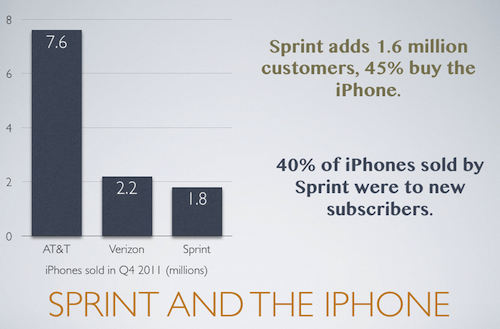
Sprint has just announced their Q4 2011 financial results, revealing that they sold 1.8 million iPhones. 40% of those iPhones sold were to new Sprint customers, a high percentage and one that was needed for Sprint. After continued losses, Sprint needed to add more customers to its network and in Q4 it achieved 1.6 million new users - meaning 45% of those new subscribers signed up with an iPhone.

“Our strong fourth quarter performance illustrates the power of matching iconic devices like the iPhone with our simple, unlimited plans and industry-leading customer experience,” said Dan Hesse, Sprint CEO

It follows the financial results from Verizon and AT&T a few weeks ago where it was revealed that Verizon sold 2.2 million iPhones and AT&T sold 7.6 million iPhones.

View the full Sprint press release after the break.

Read more


Evernote For iOS Gets Some Nice Improvements In 4.1.8 Update

The Evernote iOS app today got a little bit better with 4.1.8 update, bringing some nice additions and improvements. We’re big fans of Evernote here at MacStories, but their iOS app isn’t as good as it could or should be. Thankfully today’s update (although minor) directly addresses some of my complaints which makes me optimistic that the team is hard at work on making Evernote for iOS a truly great app.

Perhaps the best improvement for me is the “better editing, copying, pasting and more”, which translates to faster editing and improved preservation of styles. I’ve been plagued with some weird lag issues when editing large notes, particularly when copying and pasting, so this is much appreciated on my part.

Also new is “predictive note titles” which means Evernote now uses contextual information to create a more appropriate title if you leave the field blank - so no more “Untitled Notes”. Instead it will look at calendar events, location, note contents and other info to create a contextual title that is far more useful and informative. Similarly handy is the new, easier method of sharing a notebook on the iOS app. Now you just need to go to the notebook list, tap on the desired notebook and you’ll see a share icon in the top right corner of the screen.

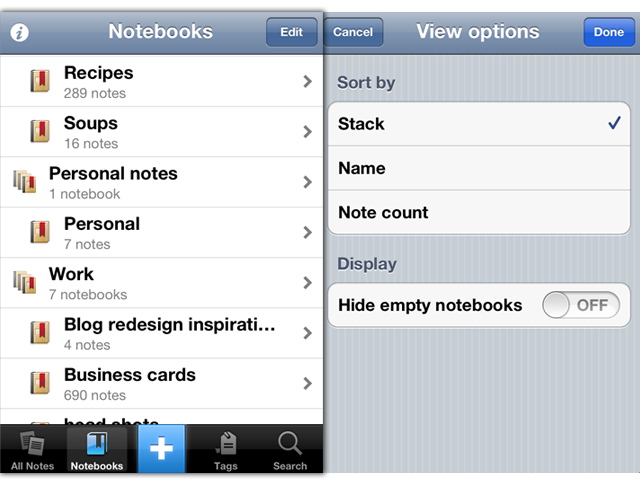
Notebook Stacks, which work well on the desktop are now better represented on the iPhone. They have existed but were hard to enable, now, viewing notebooks will use the Notebook Stacks view as default. Finally this update also includes the standard bunch of bug fixes and also improved stability - including faster and more reliable synchronisation. Now, if only we could get a new design for the iPad app…

For more information the Evernote Blog covers all these new features and improvements to the app in a little more detail.