Graham Spencer

917 posts on MacStories since January 2011

Former MacStories contributor.


Daisey’s Lies Take Us Two Steps Backwards

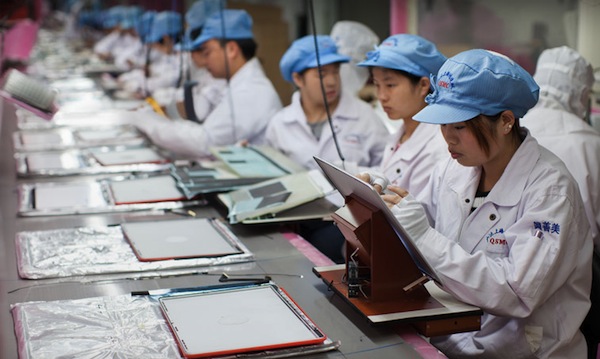
Taking a noble cause one step forward, and then two steps back. That’s what I think Mike Daisey has done with his spinning of the truth and lying in creating his monologue ‘The Agony and Ecstasy of Steve Jobs’. I have no doubt that a significant part of Daisey’s intentions were noble in creating the show, particularly when he was starting — but all that was wasted, when, in the pursuit of a perfectly dramatic story, he started to make things up. His play was meant to be a serious, considered, sobering look at the ugly, hidden side of how our Apple devices are made. But because he made details, people and stories out of thin air – particularly the ones that plucked the hardest on our hearts – he has ultimately trivialised the real human suffering that does exist in the factories of a developing country. And the worst atrocity was Daisey hiding these stories and instead calling them as facts — because now that the truth has been revealed, the play (and the original This American Life podcast, where he adapted the show into an hour long episode) has been discredited severely.

Most of all, I feel anger and frustration towards Daisey. After initially deciding to tackle a serious humanitarian issue, he surrendered to greed, using dramatic licence to sensationalise the story. His greed has likely set action on the humanitarian issue backwards, not forwards as I think he did set out to do.

With this retraction so heavily publicised, many may be under the impression that there are no under-age workers, that there aren’t people poisoned by chemicals, or that there aren’t terrible living conditions in dorms at Foxconn. Daisey created stories and people that personified these facts, to advance his story in a dramatic way. But whilst those individual stories might not be true, those circumstances, those injuries, that mistreatment of workers is unfortunately still a fundamental truth that exists. Now that the story is all about Daisey’s lies, the ugly truth that Daisey had initially tried to shine a light on has been relegated to insignificance again.

Max Fisher over at The Atlantic epitomises my fears surrounding this pretty much perfectly in this paragraph (though his whole article is also worth a read):

How receptive will they be the next time a reporter writes about how Chinese laborers are forced to stand for so long they struggle to walk, or that some workers weren’t even given gloves to handle poisonous chemicals? Will they believe the reports that say Chinese manufacturers could fix a number of these problems simply by rotating shifts or allowing workers to organize to ask for gloves, neither of which would cost them (or American consumers) anything? Will they bother to listen to the human rights NGOs who say that American consumers can help fix the problem simply by choosing to buy products that are manufactured under better conditions? Or will they think back to Mike Daisey, and wonder who else might be lying to them?

The Truth of the Situation

So what is the truth of the situation? This is an important question given the retraction and media circus surrounding Daisey’s lies. The answer is one we should keep reminding ourselves of, because the truth of the matter is that, whilst Apple is ahead of its competitors in working conditions, safety and anti-discrimination, they are still well behind what is considered acceptable in developed countries. Here are some statistics, lifted directly off Apples own Supplier Responsibility Progress Report from earlier this year:

  • 24 facilities conducted pregnancy tests, and 56 facilities did not have policies and procedures that prohibit discriminatory practices based on pregnancy.
  • 93 facilities had records that indicated more than 50 percent of their workers exceeded weekly working hour limits of 60 in at least 1 week out of the 12 sample period.
  • 67 facilities used deductions from wages as a disciplinary measure.
  • A total of 6 active and 13 historical cases of underage labor were discovered at 5 facilities.
  • 78 facilities had at least one instance where a workstation or a machine was missing the appropriate safety device such as a gear guard, pulley guard, or interlock.
  • 99 facilities had noncompliance in some aspect of their fire prevention, preparedness, and response, such as unmarked fire extinguishers and insufficient fire drills.

I also highly recommend listening to Act 3 of This American Life’s Retraction episode, which further delves into what the truth of the situation really is.

Let’s be Realistic

China is still a developing nation and as is mentioned in Act 3 of This American Life, it would be unrealistic to expect equal standards of a Foxconn factory and one in the US. But we are still a long way off from that threshold of what is an unrealistic expectation of Foxconn and other Apple suppliers - and of Apple itself. They may be doing more than most companies, and we should congratulate them for that, but also stress it is not yet enough. There are still unacceptable breaches of supplier responsibility, as Apple has set out themselves in their reports. Apple, like it does in its products, should always strive upwards to improve its record on the issue.

We should also be putting pressure on other consumer brands to step up to the level of transparency that Apple offers with its supplier responsibility reports and encourage them to do better than Apple at improving standards. Finally, we should be educating each other on the issues, whether it be pointing out what is fact and what is fiction from Daisey’s monologue or discouraging pointless arguments for Apple to move its entire manufacturing base to the US (also see Act 3 of This American Life for a great explanation).

The revelation of Daisey’s lies should not be a cause for relief or celebration. It’s a sad revelation that a man had to further dramatise the sufferings of other human beings in order to get the rest of us to listen and feel sympathy. It’s time we pay attention to the facts ourselves, and make sure we don’t just ignore them.

Firefox 11 Released, Features Add-On Sync, New Developer Tools

It’s been about a year since Mozilla shipped Firefox 4 and outlined its intentions to move toward faster and more frequent releases of Firefox. They’ve sure delivered upon that, yesterday releasing Firefox 11 with a handful of notable new features for both consumers and developers.

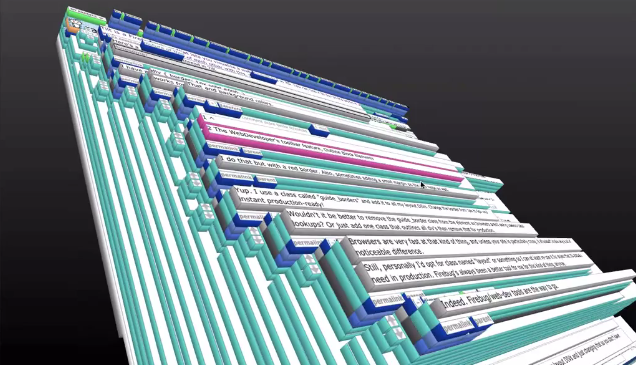
For users, the big new feature is add-on sync. It effectively allows users the option to keep their add-ons in sync across computers. This is an opt-in feature that is available in the Sync tab of the Preferences window. Meanwhile  developers can utilise a new ‘Page Inspector 3D View’ that literally turns a website into a 3D model that highlights how the particular webpage elements are constructed on top of each other.

While developer tools like “view source” have always been useful to learn about how to develop a page, the 3D View more clearly illustrates how the parts of a website are structured. After selecting “3D” View in Page Inspector, just hover your mouse over the elements to get more information about each piece you select.

Firefox 11 also features a ‘Style Editor’, allowing developers to edit CSS stylesheets and view their changes take effect instantly and live - all “entirely within the browser”. It’s sure to make it easy for developers to iterate quickly and efficiently. Once done developers can save the updated stylesheet to their computer.

Jump the break for a short video that demoes the new Page Inspector 3D view. You can download Firefox 11 here.

[via Firefox Blog]

Read more


Quick Review: Steps

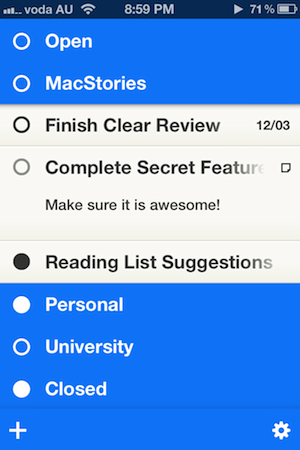
Nearly a month ago, Cody reviewed Clear. It was a new todo app from Realmac Software and Impending, and we called the app “delightful and clever” thanks to its refreshing take on how a todo app could work. Around that time I was let into the beta of another new todo app for the iPhone, and for the past month I’ve been using it intermittently — between giving Clear a go myself, using Things, and using nothing (as I so frequently revert to). That new todo app, Steps, debuted on the App Store last week and it shares many similarities to Clear - particularly in its minimalistic design and strong colour scheme.

Whilst preparing this review, I found myself in a bit of a dilemma. See, I kept constantly and subconsciously comparing Steps with Clear. As I said, they are quite similar because they both target the segment of the todo app market which aims to be super simple and minimalist. I felt as if I wrote this review as a comparison between the two, I would belittle the accomplishments of Steps, because whilst I think it’s a great little app, I also like the “delightfulness” of Clear a lot. But I think because the two apps are so similar in purpose and goal, it would be remiss of me to just ignore the excellence of Clear. So jump the break to see how Steps compares and how the two apps do diverge in some details.

Read more


Apple Reveals The 25 Billionth App Downloaded & Winner Of $10,000 iTunes Gift Card

Apple has just issued a press release noting that the App Store hit 25 billion downloads (on Saturday) with the 25 billionth app downloaded being Where’s My Water? Free. The app was downloaded by Chunli Fu of Qingdao, China - that lucky person has won a $10,000 iTunes gift card for being the person who downloaded the 25 billionth app.

“We’d like to thank our customers and developers for helping us achieve this historic milestone of 25 billion apps downloaded,” said Eddy Cue, Apple’s senior vice president of Internet Software and Services. “When we launched the App Store less than four years ago, we never imagined that mobile apps would become the phenomenon they have, or that developers would create such an incredible selection of apps for iOS users.”

View the full press release here or below the break. Be sure to also read our run-down of the apps that Apple have featured in the new “all-time top” section and the trends they show.

Read more


Square Wants To Get Rid Of Old POS Systems With Its New Square Register App

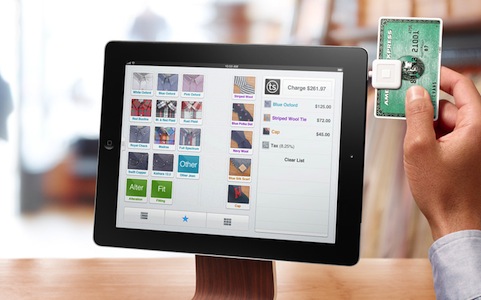
Mobile payments company Square has today stepped up its game of disrupting payment services with its new Square Register app and service. Directly targeted at retailers, merchants and small business owners, this new iPad app is aimed at replacing the old clunky registers and point-of-sale (POS) systems with the infinitely more flexible and appealing iPad accompanied with the Square reader.

“I truly believe POS, as you know it today, is dead,” says Megan Quinn, director of products at Square. “This will bring Square to an entirely new, small-market audience (bricks-and-mortar stores).”

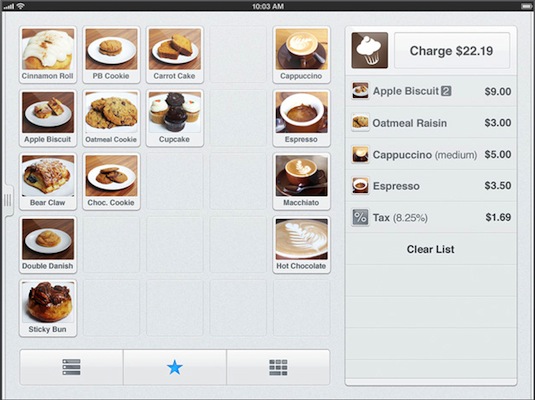
Integrating support for their existing Card Case app, Square Register can recognise when customers arrive at their store, as well as send the Card Case app information about the business for new customers who haven’t been before. The actual app itself has a main transaction screen that lists “favourite” items (this is completely customisable), but if there are thousands of items, that isn’t a problem either because there is also a list view available. The app has support for loyalty programs to reward loyal customers and customers don’t necessarily have to pay by card, with the app also supporting some cash drawers that can be connected up.

For the business owner or manager, Square Register can require a PIN for staff to access certain functions and custom permissions can be given to staff. The service also offers powerful analytical tools with interactive charts so you can view when the store is busiest and what days may be under performing. Square Register is available for free, with the standard 2.75% processing fee for all card transactions processed through Square, just the same as their existing apps.

[via TechCrunch, USA Today]


Apple: 25 Billion Apps Have Been Downloaded From The App Store

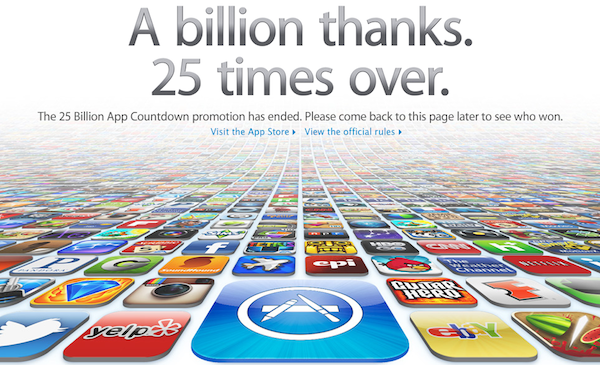
Apple announced a short time ago that 25 billions apps have been downloaded from the App Store since it launched in mid-2008. Apple has updated their homepage with the above graphic and slogan of  “A billion thanks. 25 times over” and the App Store Twitter and Facebook accounts have also publicised the milestone. Interestingly, the graphic used by Apple varies depending on whether you are viewing an international version of Apple.com (such as Japan) or whether you see the standard US website.

Apple will announce within a few days, who the lucky winner of a $10,000 iTunes voucher will be. Users could enter the competition by either simply downloading an app or filling out a form on Apple’s website - the winner will be the person who downloaded the 25th billion app or the person who first filled out the form after the 24,999,999th app had been downloaded but before the 25th billion app.

In Apple’s previous App Store and iTunes competitions, Eddy Cue (Senior Vice President, Internet and Software Services) has called the winner and congratulated them on winning. Shortly after this has happened Apple releases a press statement announcing the download milestone and who the winner was. When Apple ran the competition to mark 10 billion apps downloaded, the winner initially hung up on Cue, thinking it was a scam call.


February 2012 In Review

February sure went by quickly, but that certainly doesn’t mean there was a shortage of news, reviews and editorials - in fact it was quite the opposite. After a pretty big January with their education announcement and financial earnings, Apple didn’t slow down in February. They released new ads, previewed Mountain Lion, continued the PR battle over supplier responsibility and confirmed the (presumed iPad keynote) media event for March 7th. February was also a big month for Apps with an updated Tweetbot for iPhone and new Tweetbot for iPad, Clear, Photoshop, Vimeo 2.0 and VLC amongst others. Whilst we continued to focus on providing you, our readers, with great editorial content we discussed topics such as the iPad as a PC, supplier responsibility, greed and iOS 6 wishes amongst others.

Jump the break to view the full review of February 2012. You can also view January 2012 in Review here.

Read more


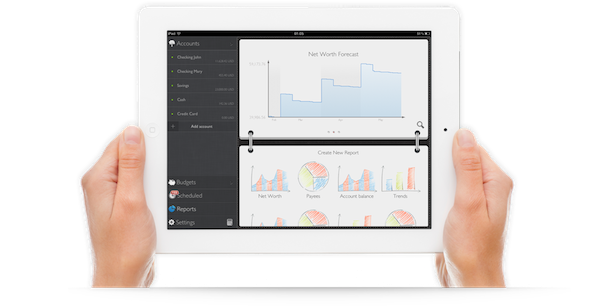
Exploring MoneyWiz: Complete Personal Finance Control On Your iPad

It wasn’t originally a New Year’s resolution to keep better track of my spending, but by the way things have turned out, it almost seems as if it was one. Early in January I began looking for a good Mac app for exactly this task. Originally I had hoped that Saver, an app I reviewed last year had since released an iPad app that I had not heard about – I really liked the app but wanted it on the iPad or Mac. Unfortunately Saver is still iPhone only, so I looked around a bit longer, asked around and tried a few apps on the Mac. I wasn’t thrilled with what I found. They all seemed a little to complex for what I wanted, so I kept looking. I forget how, but I eventually stumbled upon MoneyWiz which is available on the iPad and iPhone (at the time it was called SilverWiz). The developers haven’t yet released a Mac version (they’re working on it and expect to launch it in Spring this year), but they did give me an early look at the recent update to MoneyWiz for iPad (version 1.3), which launched late last week.

MoneyWiz for iPad does a couple of things: it keeps track of your expenses, allows you to set budgets (and track your progress), and provides you with the ability to create reports on various aspects of your financial situation. More importantly, I found MoneyWiz to be very flexible, not overly complex like some of the Mac apps I tried, and, at the same time, full of a wealth of features that should be sufficient for most individuals. Read more


Adobe Photoshop Touch Review

When I first heard that Adobe was bringing Photoshop to the iPad sometime last year, I was sceptical. I presumed it would be a very limited app compared to the powerful desktop app, or maybe just a slightly improved version of Photoshop Express. At best I thought it might give you some good editing tools to fix and correct photographs, perhaps with some layer support and effects. I didn’t think Adobe could pull off creating a great tablet version of Photoshop, and I wasn’t sure the iPad would be a good fit for the tasks in Photoshop.

So when I finally got to try out Adobe Photoshop Touch, I was intrigued to see what Adobe had accomplished. After a couple of hours playing around in the app (it accidentally went live yesterday, then Adobe pulled it) I’ve come away very impressed with what Adobe has accomplished. Photoshop Touch is a powerful and capable version of Photoshop for the iPad, without a doubt. To me, it is the latest iPad app that has demonstrated that the iPad is for more than “content consumption” — that’s just an old myth now.

It’s the apps that make the iPad great and Photoshop Touch is perhaps the prime example of the potential of the device and how flexible it is at becoming a great machine for a whole slew of different tasks, from reading, to writing, to viewing to editing and now, to using Photoshop for more than just basic photo edits. Sure, Photoshop Touch is still not as powerful as the desktop version, in fact it’s quite a distance away from reaching such parity — but it all comes down to the car Vs. truck analogy that Steve Jobs rather famously explained. Photoshop on your Mac or PC is still available for when you need to do complicated and advanced tasks, but for a lot of other tasks, you could probably migrate to the iPad and Photoshop Touch.

Enough with the introduction, let’s dive into our review of Photoshop Touch.

Read more