

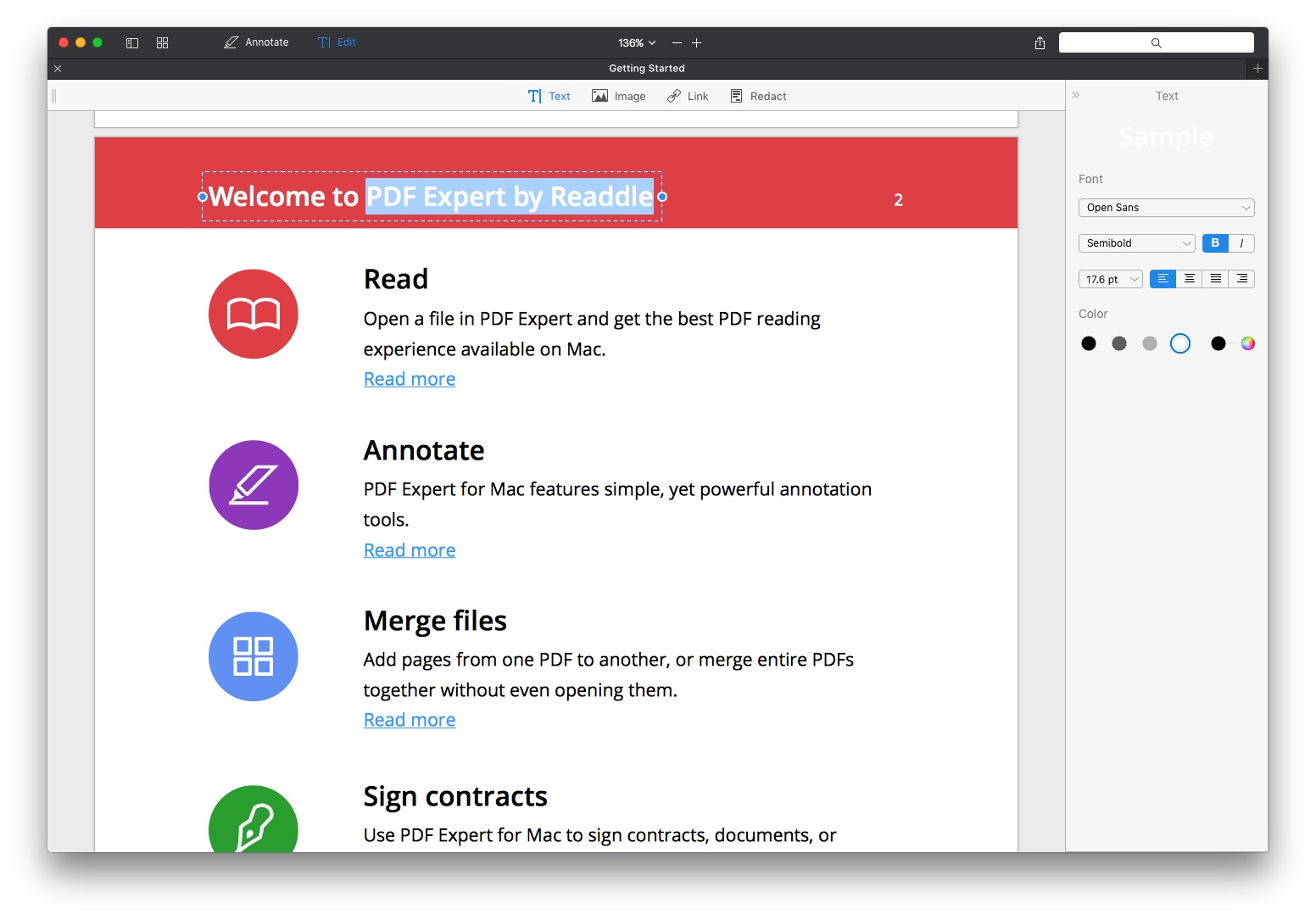
PDF Expert launched on the Mac last November, and in my initial review I was pretty effusive, impressed at the level of functionality, polish, and speed for an initial release. At the time I even called it “a better Preview for PDFs”, and had made PDF Expert the default application for viewing PDFs on my Mac. Nine months later, and it all still rings true. Better yet, Readdle is today launching a big version 2 update for PDF Expert which makes it an even better and more powerful app. Now you can now edit text, images, and outlines in PDFs, as well as password-protect your PDFs in PDF Expert 2.
Enter the Studio Turning Deus Ex and Lara Croft Into Awesome Mobile Games→
Andrew Webster, writing for The Verge:
With the Go series, Square Enix Montreal has carved out its own niche, creating something unique in the game development space. Studios often fall into one of two camps: on the one side you have the massive, 1,000-person teams that create blockbuster games, and on the other there are the tiny indie studios that build creatively ambitious games with few resources. Square Enix Montreal straddles the line between those two extremes. It has the resources of a big company, but the size and some of the creative freedom of an indie. It’s a studio that can make weird new games but attach them to hugely popular franchises.
It is great to see that Square Enix Montreal has found success in its series of Go games built on the larger franchises of Hitman, Tomb Raider and now Deus Ex. The first two Go mobile games, Hitman Go and Lara Croft Go, are genuinely great and feature a lot of creativity – so it is great to see they have continued to invest in this (critically-acclaimed) series with yesterday’s launch of Deus Ex Go. This is particularly the case when so many other large mobile game publishers are instead focusing on churning out what are largely uninspired free games with in-app purchases.
To that end, Webster notes in his story that Square Enix Montreal has made some indie hires that suggests it fully intends to stay the course on its current approach to mobile games:
Outside of Deus Ex Go, Square Enix Montreal isn’t saying what it’s working on right now. But the studio has made a few recent hires that hint at desire to keep the indie-like feeling it has carefully cultivated. Those pick-ups include Teddy Dief, an artist and designer best known for his work on the crowdfunded hit Hyper Light Drifter, and Renaud Bédard, the sole programmer on seminal puzzle-platformer Fez, who most recently worked at Below developer Capy Games in Toronto. Both were tempted to join by the idea of combining the creative freedom of an indie studio with the structure and resources of a big publisher.
Apple’s Presentation at Black Hat Now Available to Watch in Full→
Ivan Krstić, Apple’s Head of Security Engineering and Architecture, gave a presentation at the Black Hat conference a few weeks ago, and it is now available to view in full on YouTube.
With over a billion active devices and in-depth security protections spanning every layer from silicon to software, Apple works to advance the state of the art in mobile security with every release of iOS. We will discuss three iOS security mechanisms in unprecedented technical detail, offering the first public discussion of one of them new to iOS 10.
HomeKit, Auto Unlock and iCloud Keychain are three Apple technologies that handle exceptionally sensitive user data – controlling devices (including locks) in the user’s home, the ability to unlock a user’s Mac from an Apple Watch, and the user’s passwords and credit card information, respectively. We will discuss the cryptographic design and implementation of our novel secure synchronization fabric which moves confidential data between devices without exposing it to Apple, while affording the user the ability to recover data in case of device loss.
It was at this presentation that Apple announced that it would launch a bug bounty program for those who discover vulnerabilities in its key products. Also discussed by Krstić during his presentation is how the Secure Enclave Processor enabled Apple to adopt a new approach to data protection, as well as a new security feature in iOS 10 that makes iOS Safari JIT “a more difficult target”.
(via MacRumors)
Microsoft Office for iPhone Gets Drawing Support→
Tom Warren, writing for The Verge:
Microsoft was quick to optimize its Office suite of apps for the iPad Pro and Apple’s Pencil stylus, but the company held off on any inking support in Office for iPhone. Starting today, Microsoft is updating Word, Excel, and PowerPoint for iPhone to include a new drawing tab option. Just like the Windows and iPad variants, Office on iPhone will now let you use your finger to write, draw, and highlight documents.
Another great update for Word, Excel and PowerPoint on iOS.
Because space is limited on an iPhone screen, these drawing features are a little hidden. So in order to access these drawing features on the iPhone you’ll need to tap the icon on the top navigational bar that looks like an A with a pencil cutting through it. That will trigger a pop-up on the bottom half of the screen. From there, on the top-left of the pop-up should be a drop-down menu, tap that and choose “Draw”.
Apple Responds to Australian Banks’ Request to Collectively Boycott and Negotiate Over Apple Pay
Late last week Apple made a preliminary submission to the Australian Competition and Consumer Commission in relation to the request for permission from various Australian banks to boycott Apple Pay and collectively negotiate with Apple. Apple’s submission is comparatively brief at just three pages, but it clearly highlights the approach Apple will take in opposing the banks’ request.
In its submission, Apple is quick to highlight the collective dominance of the banks in Australia which account for 66% of credit card balances in Australia, whilst characterising itself as the “new entrant to the Australian market” having only launched Apple Pay in November 2015.
The other angle of attack from Apple is more surprising, and in the submission it appears quite clear that Apple is asserting that the closed nature of the NFC antenna in the iPhone is pivotal to maintaining the security of its users.
Now they ask the ACCC for explicit permission to negotiate with Apple as a collective group. The goal of which is to force Apple and other third party providers to accept their terms, allow them to charge consumers that choose to use Apple Pay, and force Apple to undermine the security of its mobile payment service by opening access to the NFC antenna, placing at risk the consumer experience of a simple, secure, and private way to make payments in store, within, applications, or on the web.
Apple notes that it will make a further, more comprehensive submission, at a later date. But a key purpose of this prelimary submission was to persuade the ACCC that the banks should not be given any interim approval, and that the ACCC should take the “normal 6 month statutory period for assessment”.
A few other interesting tidbits from Apple’s submission:
- Apple’s discussions with Australian banks in relation to Apple Pay began in “late 2014”. Apple Pay launched in the US in October 2014.
- One of the applicant banks “has refused to even enter into a confidentiality agreement with Apple to allow for preliminary discussions about the terms under which it would participate in Apple Pay”.
- Apple argues that “interim authorisation of a collective boycott will have a lasting and irreversible impact on the adoption of Apple Pay and other third party wallets, and the Australian payment market”.
- Apple suggests that Apple Pay is not a competitive threat to the banks; “Unfortunately, and based on their limited understanding of the offering, the applicants perceive Apple Pay as a competitive threat”.
- Apple writes “These banks want to maintain complete control over their customers”, I would wager the banks would say the exact same thing about Apple.
(via AFR)
Pocket Casts 6

When it comes to podcast apps on iOS, we are really spoiled for choice. There are many options, but I would say that there are four podcast apps in particular that rise above the rest; Apple’s own Podcasts app, Overcast, Pocket Casts, and Castro. Narrowing that field of four to determine which is objectively the best is an almost impossible task from where I stand. Instead, which one is best will depend entirely on which app’s design and feature set most closely aligns with how you want to manage and listen to podcasts.
Keeping that in mind, just over a week ago was the release of a major new version of Pocket Casts. Now on version 6 for iOS, Pocket Casts is the podcast app that has been around the longest (out of those four listed above), first launching in January 2011. It’s also the one with the most cross-platform support, running on iOS (iPhone and iPad), Android, Windows Phone, and on the web.
So, what’s new in Pocket Casts 6? The tl;dr version is that the user interface has been redesigned in various ways, most notably with the addition of a dark theme and “up next” queue improvements. There are new audio effects to trim silences and volume boost for those podcasts which sound too quiet. The iPad version now supports multitasking (Split View and Picture in Picture), and whilst it isn’t noticeable to users, almost the entire app has been re-written in Swift.
Homescreen.me Adds Track, Follow and Notifications→
Homescreen.me, which we first covered in June, has today received a big update which significantly enhances the utility of the website. Préshit Deorukhkar writes:
Ever wondered how your Homescreen has evolved over time? What if you could go back in time and see which apps you were using a month ago? Well, now you can.
You can now browse all your Past Homescreens on the site. All the screenshots that you’ve uploaded since you signed up here are available for your perusal. So go ahead, take a trip down memory lane.
I love this feature, and although I’ve only uploaded four Home screens to Homescreen.me so far, I look forward to regularly uploading my Home screen and seeing how it changes over a longer period of time. I’m still hoping that the folks at Homescreen.me implement a reminder system that sends me an email once a month reminding me to upload a new Home screen. But until that happens, I’ve created a recurring reminder in Due.
The other big new feature to come to Homescreen.me is the ability to follow your favorite users. Home screens from the people you follow will appear on the Timeline page of Homescreen.me. Also, because Homescreen.me is a website that you may only visit occasionally, you’ll also get an email notification for when someone you follow posts a Home screen.
 Q&A
Q&A
Question: Similar to Overcast’s playback controls that allow you to speed up podcasts, I’ve gotten hooked on watching videos on my MacBook Air at speeds faster than standard 1x to burn through them more quickly. As my Air ages, though, I’ve been considering switching to an iPad Pro, but I’m still unsure if there’s a...
Member Requests
Question: I have a web URL. How can I turn the content to an image and share it? I need to be able to choose the Safari Reader view of the whole webpage. (Sharehong, @hxueh)
 Federico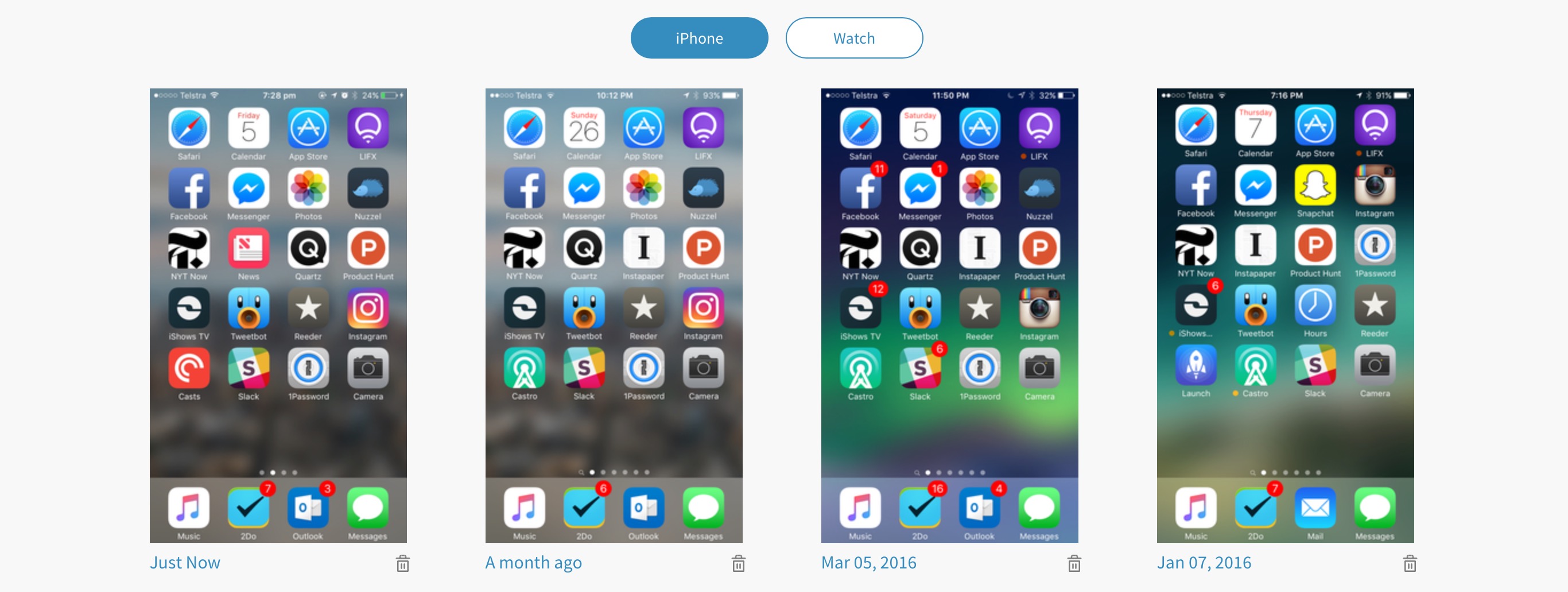
While Workflow can open URLs in Safari View Controller and activate Reader automatically with the Show Web Page action,...