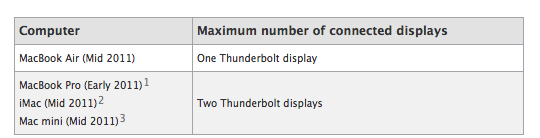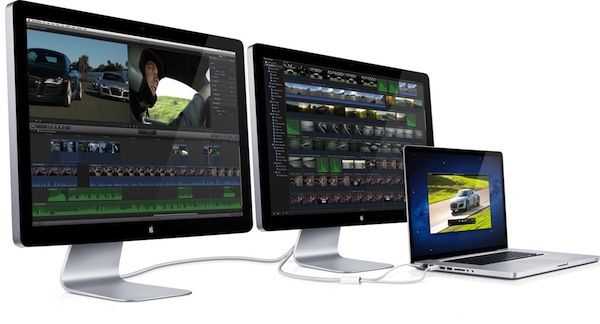
With a new support document [via] posted earlier this afternoon, Apple details some of the connection options for the 27-inch Thunderbolt Display, now shipping to customers who bought it after it was announced, and close to retail availability. The document in particular outlines some daisy-chaining options for the display and different Mac models, specifying which ones can connect to multiple monitors at once. For those users who want to daisy-chain Thunderbolt devices and a display, Apple recommends to connect the Thunderbolt Display to a Thunderbolt port on a Mac, and start daisy-chaining off that for “best performances”.
A note of interest from this document is that Mini DisplayPort displays won’t work if connected to the Thunderbolt Display, thus removing any possibility of daisy-chaining with old Mini DisplayPort interfaces and the newest Thunderbolt.
Mini DisplayPort displays will not light up if connected to the Thunderbolt port on an Apple Thunderbolt Display (27-inch).
MacBook Air (Mid 2011): Supports one Thunderbolt display.
MacBook Pro (Early 2011): Supports two Thunderbolt displays. The 13” MacBook Pro has a different “expected behavior” in that the screen will turn black if a second Thunderbolt Display is connected.
iMac (Mid 2011 and Late 2011): Supports two Thunderbolt displays. iMac (27-inch, Mid 2011) with two Thunderbolt ports supports a total of two Thunderbolt displays “regardless of which Thunderbolt port each display is connected to”.
Mac mini (Mid 2011): Supports two Thunderbolt displays. Mac mini with AMD graphics can support a HDMI compatible device on its HDMI port when using two Thunderbolt displays.
The support document is available here. The 27-inch Thunderbolt Display still reports shipping times of 2-3 weeks on Apple’s online store.
Update: As 9to5mac points out, Apple mentions a “late 2011 iMac” model with support for two Thunderbolt Displays – Apple released EDU iMacs back in August, but those computers don’t have a Thunderbolt port. They are, however, labelled “late 2011” in this knowledge base article.
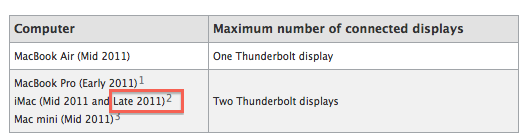
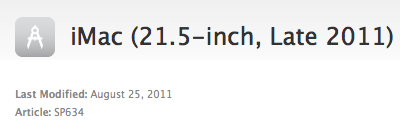
The “products affected” section of the support document does mention the same “21.5-inch, Late 2011” from the knowledge base article, which might suggest this could be a copy error on Apple’s end.

Update #2: As expected, Apple has removed the “Late 2011” mention from the Thunderbolt support document.