

Here are today’s @MacStoriesDeals on iOS, Mac, and Mac App Store apps that are on sale for a limited time, so get them before they end!
Posts tagged with "mac"
#MacStoriesDeals - Monday
The State Of iCloud-enabled Apps

Three months after the public launch of iCloud, I thought it’d be interesting to check upon the App Store and see how many developers have decided to enable iCloud integration for documents & data storage in their apps.
iCloud went live alongside iOS 5 and OS X 10.7.2 on October 12th, two days ahead of the iPhone 4S’ launch. In retrospect, iCloud’s public debut wasn’t without its issues and hiccups, but it was relatively smooth in the following days and Apple acted promptly to restore interrupted services for its users. Looking back, it’s just weird how many times iCloud Mail has been down, and continues to be unstable, whereas iCloud sync (for apps and data) has been fairly responsive and, at least on my side, always up. This says a lot about priorities, I guess.
In 107 days since iCloud went live, and 235 since Apple’s announcement at WWDC ‘11, it appears the majority of third-party developers are still considering whether or not iCloud is something worth investing their time – and customers’ money – or not. Those who have successfully implemented iCloud have done so in ways that require minimal user interaction, most of the times enabling sync capabilities through a single setting switch. Others have tried more complex solutions, often having to come up with separate tools to enable iCloud. Especially on the Mac, the fact that only apps sold through the Mac App Store can be directly integrated with iCloud isn’t helping developers who are still selling apps both on Apple’s App Store and their own website. Overall, there seems to be a shared trend among developers choosing to wait for Apple to clarify specific aspects of iCloud sync, improve the platform and fix some bugs that may prevent certain applications from being iCloud-enabled without requiring a major restructuring of the codebase on their end. Turning an iOS or Mac app into an iCloud-enabled app hasn’t turned out to be the 1-click process many, including me, wrongfully assumed when iCloud was previewed at WWDC last year.
Every app has its own way of storing local documents and user data. Some apps prefer keeping the original source of a document intact, say a .txt file, whilst others may apply their own file format to store documents and data internally in a proprietary database or multiple files, such as Evernote’s take on XML. There are pros and cons: keeping a universal file format such as plain text gets you more benefits in data portability; writing your own database structure allows you, as a developer, to do things exactly the way you want. What does this mean for iCloud?
Without getting too technical (also because my knowledge on the subject can only get you so far before I suggest you go read the developer documentation), the developers I’ve talked to explained that in the way iCloud syncs file, there may be some incompatibilities with apps that are based on complex databases and libraries. Apps that simply want to sync .txt files across multiple devices might be easier to port to iCloud, but then again there are always some aspects to consider such as conflicts, renaming a file, or getting a timestamp for the modification date when multiple devices are accessing iCloud. That’s not to say implementing iCloud is technically impossible for apps that are based on libraries, and not easily exportable files: below, I’ve collected some examples of apps that do just that, and quite cleverly too. However, getting to enable iCloud and make it reliable enough so that all kinds of apps can work with it without frustrating the user (who, in theory, never has access to the inner workings of iCloud) while at the same time providing the functionalities he or she expects. Read more
#MacStoriesDeals - Friday

Here are today’s @MacStoriesDeals on iOS, Mac, and Mac App Store apps that are on sale for a limited time, so get them before they end!
xScope 3: Measure. Inspect. Test.

Any designer will tell you how important image sizes and spacing are to their craft – graphics, the web, etc.. Measuring each element can take tedious time unless you have all the right tools. There are ‘measuring’ and ‘location’ tools out there, but none work better or have more bells and whistles than Iconfactory’s (and Artis Software) xScope. xScope 3.0 is out today and it brings over 70 new features to its already complete pixel toolkit.
xScope 3.0 (Mac 10.6 and higher) is a huge update to version 2.x with two components: a Mac side and an iOS side for the iPad, iPhone and iPod touch. If you feel a little bewildered at first with all these new features, be sure to use the useful in-app help, as it outlines everything and answers many questions. I’ll cover some of the great new highlights of version 3.0.

The most notable feature of xScope 3.0 is the Mirror tool. Remote viewing lets you easily view the contents of any Mac desktop window on your iPhone, iPad or iPod touch with the accompanying iOS app (via iTunes, Free). Once xScope for Mac is open, launch the iOS app and it will find your Mac over Wi-Fi and ask you to pair them together.

Once paired, the Pin & Lock tool lets you move the Mac window anywhere, always staying in focus on iOS. The iOS app has a chromeless UI: there’s no overlaid chrome to get in the way while you’re working. Multiple iOS devices can connect and view the same window on a single Mac, which is great for demos or meetings. Read more
#MacStoriesDeals - Thursday

Here are today’s @MacStoriesDeals on iOS, Mac, and Mac App Store apps that are on sale for a limited time, so get them before they end!
#MacStoriesDeals - Tuesday

Here are today’s @MacStoriesDeals on iOS, Mac, and Mac App Store apps that are on sale for a limited time, so get them before they end!
Thomas Brand On The History of Camino→
Thomas Brand On The History of Camino
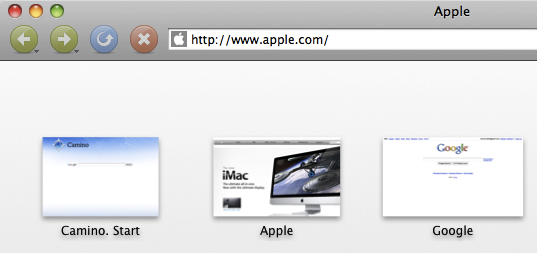
Thomas Brand has published a detailed overview of Camino’s timeline and unfortunate demise earlier this year due to Mozilla’s decision to officially discontinue Gecko embedding, which Camino uses. For those not familiar with it, Camino was the advanced browser in the early days of OS X when Safari wasn’t out yet and IE was still the only decent choice for Mac users.
Even though I still have Camino installed on my computer it fails to qualify as a reliable alternative browser less than two months since its last update. I am saddened that Camino must die in the effort to save Firefox, a browser that has gotten just a bloated as the Netscape Suite it once replaced. By losing Camino we will not only see the end of a browser that once made the Mac great, but the end of development community focused solely on the advancement of a Macintosh only application.
As written on Camino’s blog back in March, the future beyond version 2.1 (current release) is “unclear”.
#MacStoriesDeals - Monday

Here are today’s @MacStoriesDeals on iOS, Mac, and Mac App Store apps that are on sale for a limited time, so get them before they end!
#MacStoriesDeals - Friday

Here are today’s @MacStoriesDeals on iOS, Mac, and Mac App Store apps that are on sale for a limited time, so get them before they end!