Posts tagged with "mac"

Plants vs. Zombies Now Available In The Mac App Store

While we’re still waiting for Bejeweled 3 to become available on the iPhone and iPad, PopCap Games has released its hugely popular “Plants vs. Zombies” in the Mac App Store. You can find it here at $9.99.

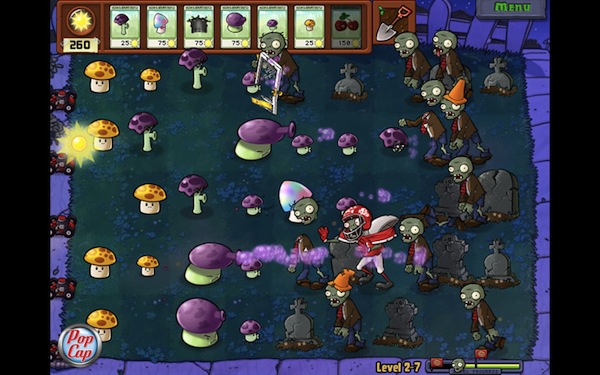
The game, successful on the iOS App Store and firmly positioned in the first spots of the paid software charts, looks like a straight port of the iPad version, made bigger to run on every Mac’s screen. That means you’ll find the 49 zombie-killing plants you know and love, 26 different types of zombies to block from accessing your house and all the strategies and skills you’ve already implemented on the iOS platform. The game, for those unaware of its addictiveness, revolves around the concept of killing a horde of zombies marching towards your property using only seeds, powders and bombs released by…plants. Colorful graphics and funny sound effects, together with a great gameplay, made this game an absolute must-have for iPhone and iPad owners.

Perhaps Plants vs. Zombies for Mac won’t generate the same sales numbers of the iOS counterpart, but if Angry Birds is of any indication – it really looks like users are willing to pay again to play their favorite iPhone games on OS X. Go download the game here, and don’t forget to play The Cranberries’ “Zombie” every once in a while. Just to get in the right mood.


MacStories Product Review: AViiQ Portable Laptop Stand

The big bulky laptop stands of yesteryear have gone the way of the dinosaur. Forget about fans, large plastic shells, or sometimes gimmicky USB connections. Laptop stands need to be simple and portable, rethinking what we traditionally think of as once shelf-worthy home and messenger-bag solutions. You should not be compromised by the tools you carry, and if you ask AViiQ, the solution needs to be lightweight and reconfigurable.

Read more


MagicWand Connects Magic Trackpad and Apple Keyboard

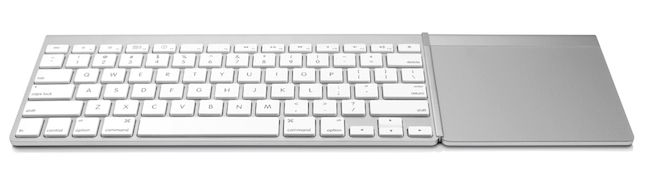
The MagicWand, a new accessory from Mac-only company TwelveSouth, aims at transforming your desk into the setup you’ve always dreamed of by connecting the Magic Trackpad you know and love with the Apple Bluetooth Keyboard. With the MagicWand, the Magic Trackpad and the keyboard will become a single input device you can use with any Mac anywhere you are – on your desk, sofa, kitchen, and so forth.

The concept of a unified keyboard and trackpad isn’t new to Mac aficionados. In the past months, we covered the BulletTrain Express, a product that puts the two pieces of hardware onto a single aluminum surface. The concept of the MagicWand is similar, but the experience looks more streamlined and easier to set up. Plus, you don’t have to buy a dedicated keyboard or additional trackpad as you just have to set up the accessory to connect Apple’s devices.

TwelveSouth’s promo video and product page detail some of the scenarios for the MagicWand, such as Photoshop “two hands at a time” or browsing photos on your Mac from the comfort of your couch. The idea, again, is interesting and elegant enough in typical TwelveSouth’s fashion.

The MagicWand will cost you $29.99 with free shipping for a limited time (United States only). Check out the MagicWand’s official page for more info, and video after the break. Read more


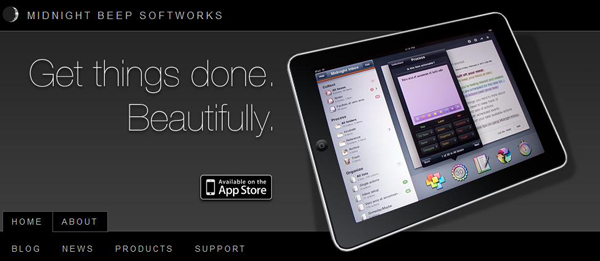
Midnight Inbox Touch - Get Things Done. Beautifully.

Today Midnight Beep Softworks released a major update to Midnight Inbox™ Touch, a GTD app for iPad. Midnight Inbox™ Touch is a professional-grade GTD productivity app and it’s now $9.99, compared to Thing’s $19.99 and OmniFocus ($39.99). The total system for an iPhone, iPad, and a Mac is only $35. There’s even a free version for Mac, Inbox Classic, if you want to save a few bucks and use an older version. Read more


#MacStoriesDeals - Tuesday

You can always tell when an holiday passes, app prices jump back up! Here are today’s deals on iOS, Mac, and Mac App Store apps that are on sale for a limited time, so get ‘em while they’re hot!

Read more


Free Utility Gives Spotify for Mac Global Hotkeys

Spotify, the music streaming service that’s struggling to launch in the US, comes with a nice desktop Mac app that allows you to access the service’s online library, social features and playlists created by you or shared by other users. The app, in spite of its beautiful design and ease of use, doesn’t provide an option to control playback with the keyboard, and if you try to use the Mac’s default media keys iTunes will open instead.

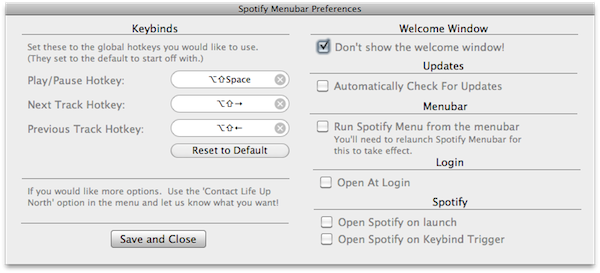
Spotify Menubar, a free utility developed by Life Up North, gives your Spotify for Mac a bit of keyboard shortcut love with controls to trigger play and pause, previous and next track, and so forth. The app runs in the menubar, and can force Spotify to launch on login or open on keybind trigger. It’s really simple and starightforward, and enables you to pause streaming without interfering with iTunes.

You can download Spotify Menubar here.


Portal 2 Available For Pre-Order Now

Well after some delays, Portal 2 is now finally available for pre-order for an expected release of April 18th.  Mac users can pre-order the game for US$44.99 on Steam or at selected retail shops, some of which have special pre-order offers;

Special pre-order offers vary at participating outlets around the world and include a variety of dollars off and/or exclusive in-game content for those who reserve the game for purchase before it is released the week of April 18. These include $5 off the full price, exclusive in-game skins for the coop bots (Atlas and P-body), and more.

Read more


Sparrow for Mac Update: Faster, AppleScript Support

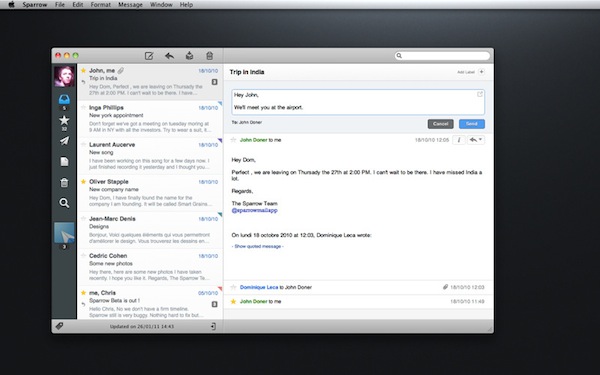
Since its release in the Mac App Store last week, Gmail desktop client Sparrow has been sitting among the top paid software charts and has gained a huge userbase. The app is clean, minimal and it perfectly blends the typical Gmail environment into a Mac-like package that reminds us of Tweetie. I like Sparrow, and although general IMAP support is still nowhere to be seen I have been using as my default email client for the past week (I use Gmail on a daily basis, more specifically Google Apps).

The developers are working hard on making Sparrow a full-featured email app for the desktop, and this begins today with the first update – available now in the Mac App Store. Sparrow 1.0.1 comes with improved sending speed for outgoing messages (it used to takes a few extra seconds to send an email in version 1.0), a finally-working menubar mode, basic AppleScript support – which I’ll make sure to try out. Loading times of conversation threads have been improved as well.

Sparrow 1.0.1 is available here. We look forward to version 1.1, which should bring IMAP compatibility and more.