Posts tagged with "iphoto"

Fuel Collective’s ImageGlitch Destroys JPEGs, TIFFs

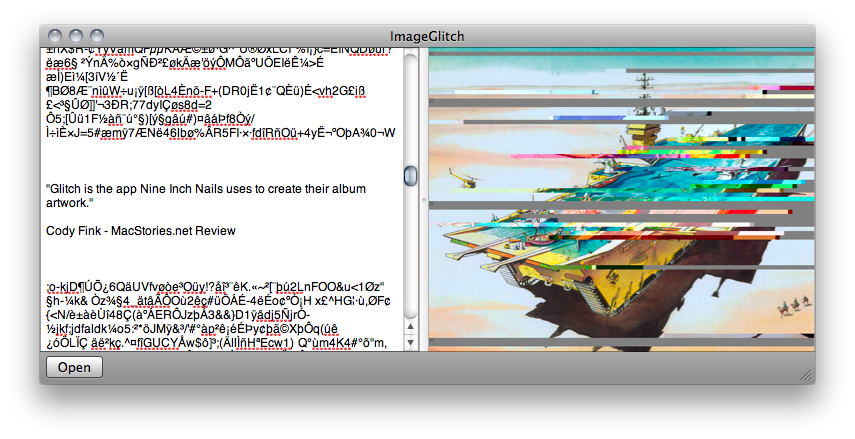
If you’re designing for a Trent Reznor project, Fuel Collective’s ImageGlitch literally achieves the task by having users delete lines of code from the image’s code makeup. A glitchy app will have glitch results: you can’t just delete any line of code, but some fidgeting in the text editor allows you to suddenly edit out lines, alter color, and completely screw up any of those vintage family photos you’ve saved to your hard drive. I don’t know how safe this is, but it’s recommend that you back up anything before you start deleting data from those image files. I might try it to create some new graphics for a site I’m working on, but I think Fuel Collective has already beaten’ me to the punch.

Download the destructive image editor in the Mac App Store for $.99.

Access Extra Content and Perks

Founded in 2015, Club MacStories has delivered exclusive content every week for nearly a decade.

What started with weekly and monthly email newsletters has blossomed into a family of memberships designed for every MacStories fan.

Learn more here and from our Club FAQs.

Club MacStories: Weekly and monthly newsletters via email and the web that are brimming with apps, tips, automation workflows, longform writing, early access to the MacStories Unwind podcast, periodic giveaways, and more;

Club MacStories+: Everything that Club MacStories offers, plus an active Discord community, advanced search and custom RSS features for exploring the Club’s entire back catalog, bonus columns, and dozens of app discounts;

Club Premier: All of the above and AppStories+, an extended version of our flagship podcast that’s delivered early, ad-free, and in high-bitrate audio.

Learn more here and from our Club FAQs.


Apple Releases iPhoto 9.1.1

A few minutes ago Apple released an update to iPhoto ‘11, which adds new email features and improves the overall stability of the app. The new version is available now on Software Update or on Apple’s website.

Full changelog below.

- Adds a preference allowing photos to be emailed using an external email application

- Adds “Classic” and “Journal” themes to email.

- Photos attached to an email can now be sized to Small, Medium or Large

- Improves reliability when upgrading a library from an earlier version of iPhoto

- iPhoto now correctly preserves the sort order of Events after upgrading a library

- Event titles displayed in headers can now be edited in Photos view

- Addresses a problem that could cause duplicate photos to be added to a MobileMe album

- Scrolling overlay now correctly displays ratings when photos are sorted by rating

- Photos are now sorted correctly when a rating is changed and photos are sorted by rating

- Fixes a problem that could cause text formatting controls to become inaccessible when editing a calendar

Access Extra Content and Perks

Founded in 2015, Club MacStories has delivered exclusive content every week for nearly a decade.

What started with weekly and monthly email newsletters has blossomed into a family of memberships designed for every MacStories fan.

Learn more here and from our Club FAQs.

Club MacStories: Weekly and monthly newsletters via email and the web that are brimming with apps, tips, automation workflows, longform writing, early access to the MacStories Unwind podcast, periodic giveaways, and more;

Club MacStories+: Everything that Club MacStories offers, plus an active Discord community, advanced search and custom RSS features for exploring the Club’s entire back catalog, bonus columns, and dozens of app discounts;

Club Premier: All of the above and AppStories+, an extended version of our flagship podcast that’s delivered early, ad-free, and in high-bitrate audio.

Learn more here and from our Club FAQs.


FlickrExport 4.0 for iPhoto and Aperture Released

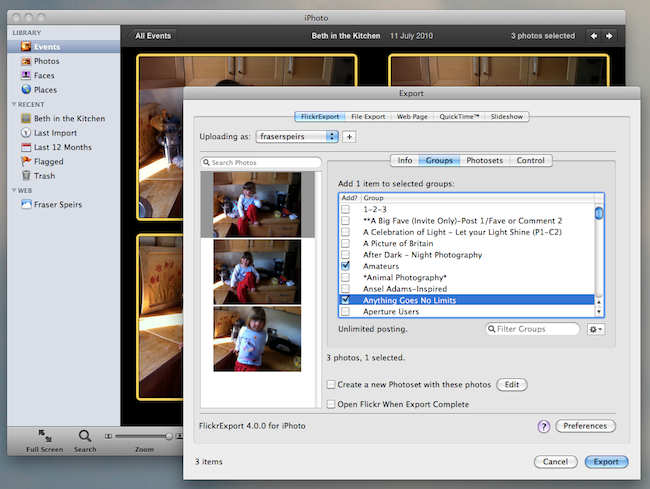
FlickExport by Connected Flow is a popular plugin for Apple’s iPhoto and Aperture which allows users to upload photos to online photo sharing service Flickr without having to leave the app. Today Connected Flow announced the release of a major update to FlickrExport, which reaches version 4.0 and, among a number of overall performance improvements and a simplified user interface, adds several new functionalities to an already powerful and full-featured package.

FlickrExport for iPhoto adds the possibility to upload videos, while both the iPhoto and Aperture versions got support for multiple Flickr accounts. All you have to do to add a new account is open FlickrExport’s window (which will sit on top of iPhoto or Aperture) and log in with your Flickr credentials. Switching between accounts is as easy as selecting one in a dropdown menu. Both versions are now also capable of uploading photos to multiple photosets, a much requested feature in version 3.x. Last, FlickrExport for iPhoto finally lets you edit a photo’s license once the photo is uploaded. Read more

Access Extra Content and Perks

Founded in 2015, Club MacStories has delivered exclusive content every week for nearly a decade.

What started with weekly and monthly email newsletters has blossomed into a family of memberships designed for every MacStories fan.

Learn more here and from our Club FAQs.

Club MacStories: Weekly and monthly newsletters via email and the web that are brimming with apps, tips, automation workflows, longform writing, early access to the MacStories Unwind podcast, periodic giveaways, and more;

Club MacStories+: Everything that Club MacStories offers, plus an active Discord community, advanced search and custom RSS features for exploring the Club’s entire back catalog, bonus columns, and dozens of app discounts;

Club Premier: All of the above and AppStories+, an extended version of our flagship podcast that’s delivered early, ad-free, and in high-bitrate audio.

Learn more here and from our Club FAQs.


iPhoto 9.1 With Calendars Support Now Available

A few minutes ago Apple released an updated version of iPhoto, which reaches version 9.1 and adds support for Calendars, a feature that mysteriously went missing in the first iteration of iPhoto ‘11. Apple already announced an update with Calendars support was on its way.

Check out the official changelog below:

This update adds several new print product options to iPhoto ‘11. It also improves overall stability and addresses a number of other minor issues.

- Provides the ability to create and order calendars in iPhoto.
- Additional letterpress holiday greeting card themes are now available.
- Fixes an issue that prevented videos downloaded from MobileMe or Flickr from importing correctly into iPhoto events.
- The update is recommended for all users of iPhoto ‘11.

You can download the update in Software Update or at Apple’s support page for iPhoto 9.1.

Access Extra Content and Perks

Founded in 2015, Club MacStories has delivered exclusive content every week for nearly a decade.

What started with weekly and monthly email newsletters has blossomed into a family of memberships designed for every MacStories fan.

Learn more here and from our Club FAQs.

Club MacStories: Weekly and monthly newsletters via email and the web that are brimming with apps, tips, automation workflows, longform writing, early access to the MacStories Unwind podcast, periodic giveaways, and more;

Club MacStories+: Everything that Club MacStories offers, plus an active Discord community, advanced search and custom RSS features for exploring the Club’s entire back catalog, bonus columns, and dozens of app discounts;

Club Premier: All of the above and AppStories+, an extended version of our flagship podcast that’s delivered early, ad-free, and in high-bitrate audio.

Learn more here and from our Club FAQs.


iPhotoSync Lets You Effortlessly Transfer Photos Between iPhoto Libraries

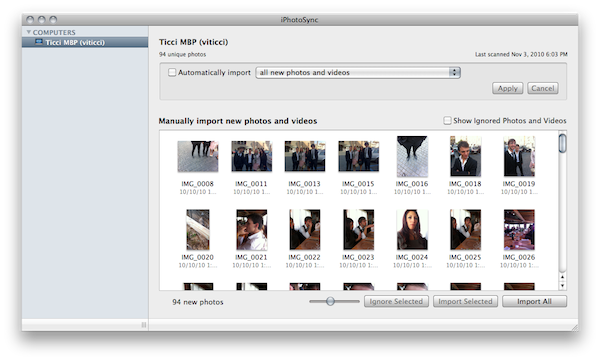
If you have recently upgraded to iPhoto ‘11 (I bet many of you have) and you still haven’t found the time to set up that Dropbox-based library synchronization between all your computers you read about on some blog or forum board, perhaps you’d like to wait to give iPhotoSync a try. I was indeed about to drop my entire iPhoto library in Dropbox, but then I realized that iTunes (apps and music) was my priority, so I went for a local sync option. iPhotoSync is an app that can run in the background as an “agent” and allows you to sync iPhoto libraries across multiple Macs running on the same local network.

Developed by Haystack Software (the same guys behind Arq for Mac) and completely compatible with the latest iPhoto versions, iPhotoSync is really simple: make sure you have two Macs running iPhoto and iPhotoSync on the same local network, fire up the app on both Macs, let the iPhoto libraries communicate with each other. For instance, you’ll be able to pull all the new photos from another Mac’s iPhoto library, automatically sync photos added to a specific event, automatically sync photos added in the last month. Basically, iPhotoSync transfers photos back and forth.

Read more

Access Extra Content and Perks

Founded in 2015, Club MacStories has delivered exclusive content every week for nearly a decade.

What started with weekly and monthly email newsletters has blossomed into a family of memberships designed for every MacStories fan.

Learn more here and from our Club FAQs.

Club MacStories: Weekly and monthly newsletters via email and the web that are brimming with apps, tips, automation workflows, longform writing, early access to the MacStories Unwind podcast, periodic giveaways, and more;

Club MacStories+: Everything that Club MacStories offers, plus an active Discord community, advanced search and custom RSS features for exploring the Club’s entire back catalog, bonus columns, and dozens of app discounts;

Club Premier: All of the above and AppStories+, an extended version of our flagship podcast that’s delivered early, ad-free, and in high-bitrate audio.

Learn more here and from our Club FAQs.


Apple Addresses Data Loss Issue with iPhoto 9.0.1 Update

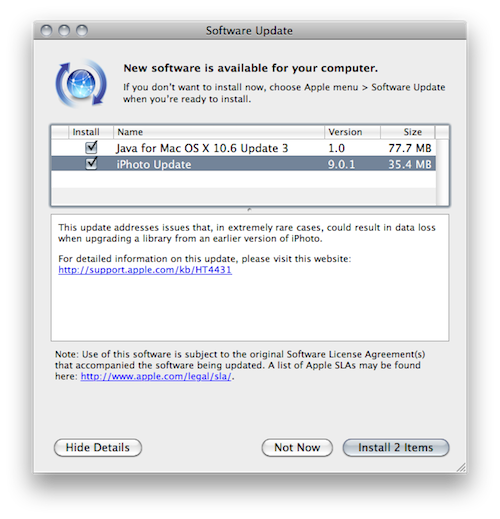
A few hours ago Apple released an update to iPhoto, version 9.0.1, aimed at fixing issues with data loss, as reported by many blogs and users on Apple’s discussion boards.

This update addresses issues that, in extremely rare cases, could result in data loss when upgrading a library from an earlier version of iPhoto.

Further information about the download (35MB) are available here.

Access Extra Content and Perks

Founded in 2015, Club MacStories has delivered exclusive content every week for nearly a decade.

What started with weekly and monthly email newsletters has blossomed into a family of memberships designed for every MacStories fan.

Learn more here and from our Club FAQs.

Club MacStories: Weekly and monthly newsletters via email and the web that are brimming with apps, tips, automation workflows, longform writing, early access to the MacStories Unwind podcast, periodic giveaways, and more;

Club MacStories+: Everything that Club MacStories offers, plus an active Discord community, advanced search and custom RSS features for exploring the Club’s entire back catalog, bonus columns, and dozens of app discounts;

Club Premier: All of the above and AppStories+, an extended version of our flagship podcast that’s delivered early, ad-free, and in high-bitrate audio.

Learn more here and from our Club FAQs.


iPhoto ‘11: Calendars Are Coming Back

One of the most talked “non-features” of iPhoto ‘11 is the lack of support for calendars. A very appreciated functionality in iPhoto ‘09, Apple decided to not include it in the first release of iPhoto ‘11.

Read more

Access Extra Content and Perks

Founded in 2015, Club MacStories has delivered exclusive content every week for nearly a decade.

What started with weekly and monthly email newsletters has blossomed into a family of memberships designed for every MacStories fan.

Learn more here and from our Club FAQs.

Club MacStories: Weekly and monthly newsletters via email and the web that are brimming with apps, tips, automation workflows, longform writing, early access to the MacStories Unwind podcast, periodic giveaways, and more;

Club MacStories+: Everything that Club MacStories offers, plus an active Discord community, advanced search and custom RSS features for exploring the Club’s entire back catalog, bonus columns, and dozens of app discounts;

Club Premier: All of the above and AppStories+, an extended version of our flagship podcast that’s delivered early, ad-free, and in high-bitrate audio.

Learn more here and from our Club FAQs.


Tip: Emptying iPhoto ‘11 Trash Doesn’t Delete Items Permanently

So I’m playing around with iLife ‘11 (which I consider a great update so far, both graphically and feature-wise) and I just noticed this: unlike iPhoto ‘09, if you delete a file from iPhoto ‘11 library and then empty iPhoto’s trash, that item won’t be deleted permanently. In fact, you’ll still be able to restore it from OS X trash. Read more

Access Extra Content and Perks

Founded in 2015, Club MacStories has delivered exclusive content every week for nearly a decade.

What started with weekly and monthly email newsletters has blossomed into a family of memberships designed for every MacStories fan.

Learn more here and from our Club FAQs.

Club MacStories: Weekly and monthly newsletters via email and the web that are brimming with apps, tips, automation workflows, longform writing, early access to the MacStories Unwind podcast, periodic giveaways, and more;

Club MacStories+: Everything that Club MacStories offers, plus an active Discord community, advanced search and custom RSS features for exploring the Club’s entire back catalog, bonus columns, and dozens of app discounts;

Club Premier: All of the above and AppStories+, an extended version of our flagship podcast that’s delivered early, ad-free, and in high-bitrate audio.

Learn more here and from our Club FAQs.