

Happy New Years! Here’s some great deals for today on iOS & Mac apps that are on sale for a limited time, so get ‘em while they’re hot! Read more
Posts tagged with "iPhone"
#MacStoriesDeals - Friday
MacStories’ 2010 Roundup: Top 8 Apps for Kids

Welcome to another MacStories’ 2010 Roundup! In this new series, we collect the best apps released in 2010 for the Mac, iPhone and iPad — apps we have or will feature here on MacStories. Only the best apps, both free and paid. Apps you shouldn’t miss.
Do your kids often ask you do play with your iPads or iPhones? I know my 3.5 year old son does, he’s always asking me! Entertain your little ones with these iOS apps and games, great for toddlers, preschoolers, and big kids at heart.
Why 8? Because we tried and tried to narrow it down to 5 but we couldn’t do it! So, we have collected our top 8 apps for kids released this year. We think they are great apps you should go install right now. We could have included more, but we wanted to bring some of the best to your attention, not just the “pretty good” ones.
So jump after the break, and check our Top 8 list of kid’s apps for iOS.
The iPhone Heart Monitor
Modern technology has changed so much in just the last few years; everything has gotten smaller, cheaper and better. It’s really amazing, when I was a child in the 80s, everything was still analog, big and had square edges. A 2 foot by 1 foot ‘ghetto blaster’ was considered portable music and a portable TV was black and white and weighed 20 pounds.
The future is here now and Apple’s iPhone is the flux capacitor to the future, or at least in this case an Electrocardiography device (ECG). This is by far one of the coolest implementations of an iPhone and a third party accessory. For one thing, it’s not just for the medical world, it will also be a consumer accessory as well; the iphonECG is going to officially be announced ay CES next week. Attach the iphonECG case, open the monitoring app, and place the contacts against your chest (heart). Remember when I said everything gets “smaller, cheaper and better”? Here’s one of the first ECG devices ever created.
Welcome to 2011: A Tech Odyssey.
[via MobileCrunch]
#MacStoriesDeals - Thursday

iOS apps are back! Here’s some great deals for today on iOS & Mac apps that are on sale for a limited time, so get ‘em while they’re hot!
Life Size Designer iPhone Cookie A Huge Success In Japan
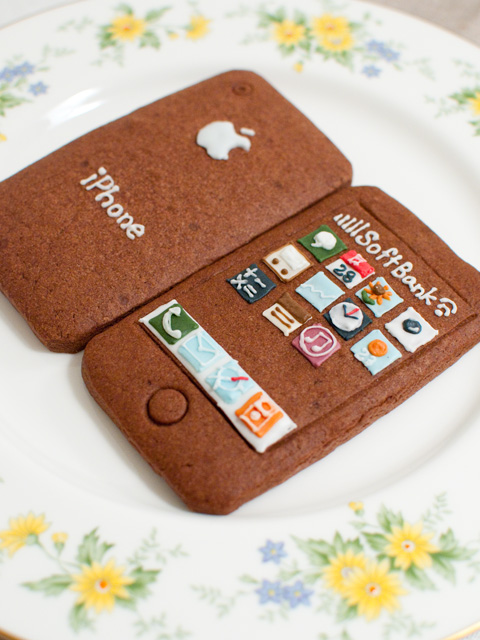
While I can bake some mean snickerdoodles when Christmas comes around, I hate to admit than anything even related to frosting is a bit of a sore point in my baking expertise. Which means I probably could never work for the Green Gables bakery in Japan, whose intricate artwork on their iPhone cookie look-a-likes has become a popular hit. Individually packaged as to not damage the cookie, presentation is everything – the creator wishes that you’ll admire this tasty piece of art before indulging yourself to the unique tasty treat. The cookies have been around for a while, and pictures shared on the Internet fueled everyone’s inner geek to buy these one of a kind cookies that Apple Inc. themselves could have baked. I can imagine Johnny Ive in an apron mixing the dough and baking batches of these things.
My request is that Apple themselves import these cookies overseas and sell them at the mothership if possible, but even Cupertino might have trouble since there’s a 2 month waiting period. Just look at this way: that iPhone cookie has a wait time as long as the real iPhone when it first came out!
The European Commission Has Decided: Universal micro-USB Charger For Smartphones
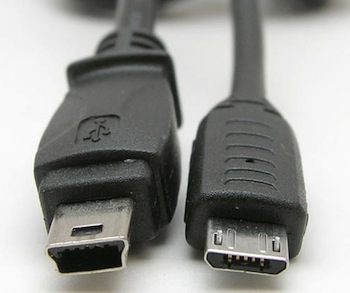
Back in August, the European Commission formally approved a policy that required all smartphones to adopt a standard, universal micro-USB charger instead of dedicated ones shipped by all major smartphones companies such as Apple, LG, Nokia and Samsung. Today, the European Standards Organization Cen-Cenelec-Etsi officially approved the request from the European Commission (Ansa news agency, italian) and published the standards that smartphones makers will have to adopt in Europe starting January 2011.
The European Commission is now expecting the first generation of standard micro-USB-enabled smartphones to become available “in the first months of 2011”. This includes devices from the 13 companies that signed the agreement in 2009: Apple, Motorola, LG, Nec, Nokia, Samsung and Sony Ericsson are among those companies.
Put simply, this change will allow users to charge their smartphones using a single, universal micro-USB connector. According to the European Commission, this will lead to a better user experience and less environmental damages thanks to the lack of multiple and different chargers.
It is unknown whether Apple will introduce a micro-USB charger in the next generation iPhone and iPad 3G (data-enabled devices are included in the new policy, too), although it seems likely at this point. Apple might as well delay the availability of universal chargers in its devices until 2012, but the European Commission seems to believe all major companies will agree to the policy and update their charging systems. If Apple will have to introduced a micro-USB charger in Europe, we speculate that the U.S. market will face a similar change as well.
Update: A Minimal App For Simple Sharing
On our iPhones and iPads, we run Twitter clients. Be it Twitter, Twitterrific, Osfoora or some beta app no one knows about, many of us rely on these standalone apps to share links, thoughts and comments on Twitter. We do the same for Facebook (even if there’s no official app for iPad, third party clients are well known in the App Store), LinkedIn and other social networks. The problem: some would like to have the possibility to forward some status updates to other social networks they’re subscribed to (and likely have some friends on) without having to copy the message every single time in a new app. A few people I know use hashtags on Twitter to beam a tweet to Facebook or Google Buzz, but I don’t like the option. Next time I want to share the same message on Twitter and Facebook, what should I use?
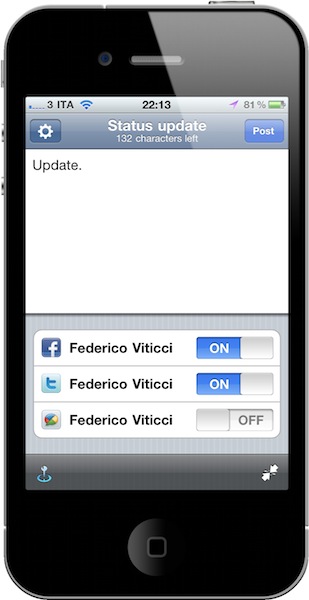
Update is a neat $0.99 utility for iPhone which lets you do one thing: write down a status update and choose the social networks you want to send it to. Everything happens in one screen. That’s it. Once you’ve authorized the supported services (Twitter, Facebook, Google Buzz, LinkedIn and Hyves) in the settings, you’ll get a simple on/off menu in the compose window to choose the active services. Type, and share. You can tell the app to grab your location data or shrink URLs contained in the message. You can’t attach pictures, but I guess this is one of the non-features that make Update a great app: it’s simple and focused on text messages. If you need more, go download a dedicated client.
I like the developers’ approach with Update. It’s available at $0.99 in the App Store, and even if it’s not the app for everyone I surely appreciate its simplicity. Recommended.
Discourse, The Beautiful Dictionary App
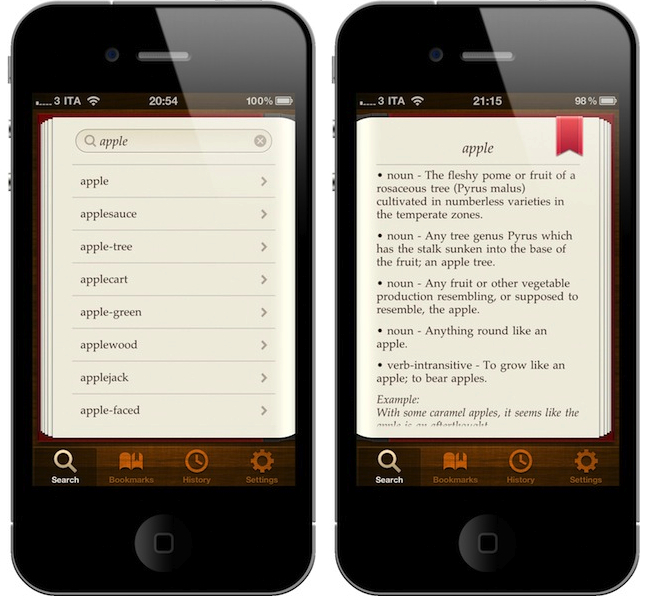
The iOS platform doesn’t lack great dictionary apps. From Terminology for iPhone and iPad (both of them reviewed on MacStories) to the dozens available for free on the App Store, users can stay assured there’s a way to check on word meanings, references and, at best, thesaurus with an app. After all, it would be strange otherwise.
Still, there’s always room for better. So developer Emilio Palàez (also known for his Notified app in Cydia) and designer Mathieu White set out to create the most beautiful and easy to use dictionary app for the iPhone. Discourse, which we previewed on MacStories a few weeks ago, is now available. As I expected when running the beta version, Discourse is pretty great. Read more
#MacStoriesDeals - Wednesday

iOS apps are back! Here’s some great deals for today on iOS & Mac apps that are on sale for a limited time, so get ‘em while they’re hot!