We have many great deals for #MacStoriesDeals’s Cyber Week 2012. Be sure to check our Cyber Monday 2012 page for more ongoing deals!
You can find us as @MacStoriesDeals on Twitter. Happy Holidays from the MacStories Team!
The first alarm app for families.
We have many great deals for #MacStoriesDeals’s Cyber Week 2012. Be sure to check our Cyber Monday 2012 page for more ongoing deals!
You can find us as @MacStoriesDeals on Twitter. Happy Holidays from the MacStories Team!
We have a ton of great deals for the Cyber Monday 2012 edition of #MacStoriesDeals. Be sure to check our Black Friday 2012 page for more ongoing deals!
You can find us as @MacStoriesDeals on Twitter. Happy Holidays from the MacStories Team!
We have a ton of great deals for the 2012 Black Friday edition of #MacStoriesDeals. Keep checking back as we will be updating this post throughout the holiday.
You can find us as @MacStoriesDeals on Twitter. Happy Thanksgiving from the MacStories Team!
Black Friday is getting close, expect the deals to get better everyday until Friday! Here are today’s @MacStoriesDeals on hardware, iOS, and Mac apps that are on sale for a limited time, so get them before they end!
Read more
Some people think Apple will eventually “dumb down” OS X and make it a “more casual” platform not suited for power users.
I disagree.
I covered this recurring theme in a section of my Mountain Lion review:
I think the Mac power user will be just fine using Mountain Lion. In practical terms, Mountain Lion’s new features and design choices haven’t hindered my ability to install the apps I want, run macros to automate tedious tasks, or fly through applications using keyboard shortcuts. I prefer Scrivener to Apple’s Notes app, I rely on Keyboard Maestro to be more efficient, and I keep my notes in Dropbox rather than iCloud. On the other hand, I can jot down a quick todo in Reminders knowing instantly that it will “just work”, and I can pick up any conversation I was having on my iPhone thanks to Messages on my Mac. Making the entire operating system more cohesive and refined hasn’t diminished the relevance and utility of third-party software on my Mac; if anything, it’s made the key apps and functionalities I rely on better.
The argument usually goes something like this: iOS is so successful, Apple will eventually make Macs more like it. Plus, Gatekeeper and Sandboxing are signs that this will happen.
Usually, this piece by Rands in Repose is cited as a somewhat obvious confirmation to the fact that Apple is not afraid of “cannibalizing itself”.
This argument needs to be deconstructed on multiple levels. Read more
Here are today’s @MacStoriesDeals on hardware, iOS, and Mac apps that are on sale for a limited time, so get them before they end!
Read more
Here are today’s @MacStoriesDeals on hardware, iOS, and Mac apps that are on sale for a limited time, so get them before they end!
Read more
Just yesterday I wrote extensively about URL schemes and, specifically, x-callback-url in my review of Pythonista:
I believe that, going forward, Pythonista and other similar apps will show a new kind of “scripting” and task automation built around the core strenghts of iOS. As we’ve seen, x-callback-url is a standard that leverages a part of iOS – URL schemes – to achieve simple, user-friendly and URL-based inter-app communication that can be used in a variety of ways. Looking ahead, there’s a chance rumored features such as XPC will bring more Mac-like functionalities to iOS, but developers will still find new ways to make iOS more powerful without giving up on positive aspects such as increased security and the simplicity of the app model.
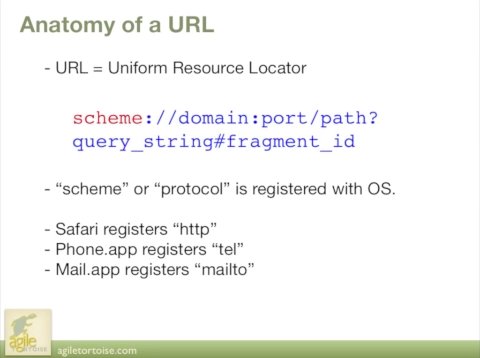
My workflow focused on x-callback-url, a protocol created by Agile Tortoise’s Greg Pierce. Thanks to 360|iDev, you can now watch a free session video of Greg Pierce himself explaining the basics of URL schemes on iOS as well as techniques to properly implement his specification, x-callback-url, to allow for more advanced inter-app communication, such as the one I’m using with Pythonista.
If you’re a developer and you’re interested in knowing more on the subject, check out the free video here.
Here are today’s @MacStoriesDeals on hardware, iOS, and Mac apps that are on sale for a limited time, so get them before they end!
Read more