Posts tagged with "iOS"

Explor: It’s Like Ping, For Apps

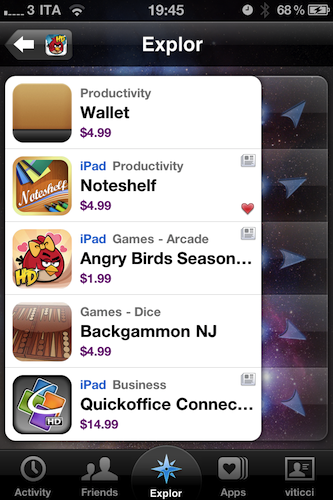
I’ve never been a loyal user of “app discovery” tools for iOS: I’m talking about those apps that help you find out about new apps and share the results with your friends. Sort of meta, I know, but apparently there’s a huge market for these things now that the iOS App Store has crossed the mark of 300,000 apps available for the iPhone. In the sea of applications that’s inundating our inboxes, it seems like there’s plenty of room for alternatives to the default App Store app.

Explor, a free app by Hello,Chair released today, is the latest (and possibly greatest) addition to iOS software discovery panorama that comes with interesting features I haven’t seen anywhere else. Read more


An Artist’s Tool: Learn Music & Train Your Ear With Capo

Capo is one of the brilliant Mac apps that often gets overlooked because of its niche value for musicians that have the will to not just follow tabs on a reading sheet, but to actually tear apart songs and learn them by ear. Capo intrinsically is an odd product in this respect – if you’re learning music by ear, why do you need an aid? I’ll tell ya: there’s nothing like being able to scribble all over a song, create your own tabs, and actually study what’s in front of you. You might want to fondle iTunes as you replay parts and study tracks, but you can ditch the pen and paper as you mark an important bridge, analyze the song’s chord progression, and figure out new riffs.

Read more


How To Set Up A VPN Server On Your Mac and Access Everything Remotely With An iPhone

Last weekend I decided that I wanted to try to set up a VPN server on my MacBook Pro running Snow Leopard 10.6.6. What’s that? – you may ask. A Virtual Private Network (VPN) is a type of Internet connection that allows users to establish a secure connection between a computer or a mobile device and a server. The cool thing about the secure connection is that all traffic is “tunneled” through a cryptographic system that makes it almost impossible (let’s say very difficult) for hackers or people who want to take a peek at your Internet traffic to access your data. There are several implementations of VPN out there, but the main concept is that through a secure connection multiple computers and devices can stay on the same local “virtual network”. Read more


TweetDeck Teases New App That Will “Raise The Bar” On iOS

Popular service TweetDeck has announced this morning that a major update to their official iOS app is in the final stages of testing and it will be a completely revamped version of TweetDeck for iPhone and iPad. Ready to be submitted to the App Store “in the next couple of weeks”, the new iOS TweetDeck will apparently put huge focus on iOS 4 compatibility and Retina Display graphics, as well as the possibility to create “flexible” columns blending status updates and messages coming from Twitter and Facebook.

This totally new, fully iOS4-compatible TweetDeck app has been built completely from scratch. It is not only the most powerful and flexible mobile app we have ever produced, but also the most jaw-droppingly beautiful. This is the app your retina display has been crying out for.

A major new feature of iOS TweetDeck will be totally flexible columns. You want to create a column blending your Mentions and some Twitter Lists? No problem! Always wanted to see your Facebook feed and Twitter DMs in a single column? We’ve got you covered! New iOS TweetDeck puts you in control of your columns, giving total flexibility over which feeds appear in which columns. Your social world has never been so personal.

TweetDesk says the Android app has been insanely successful (in spit of fragmentation issues) and set new standards for the service on mobile platforms. The new iOS iteration promises to “raise the bar” for iPhone and iPad apps – something we’re pretty sure several users are looking forward to after the whole Twitter Quick Bar debacle.

Whether or not TweetDeck will prove itself to be the answer to an official Twitter client clearly shifting the focus to promoted tweets and ads, we’ll have to wait and see.


iPad 2 Launch Details Roundup

There has been an avalanche of information regarding the iPad 2 launch since the Apple event last week so if you are confused, unsure or just want a refresher on the launch details just jump the break for a full roundup of all the important details!

Also be sure to check out our iPad 2 roundup to get all the details what exactly is new and awesome about the iPad 2.

Read more


iOS Multitasking: It Doesn’t Need To Be PC-like

In a recent article on his personal blog, Lukas Mathis argues that the iPad’s multitasking doesn’t actually help people get things done and focus more as it forces you to constantly switch between apps. He writes:

a task (or an app) on a computer, and a task performed by a human don’t map to each other one-to-one. In fact, a single task performed by a human can easily make use of several applications running concurrently on a computer.

For example, right now, I’m typing this text in Notational Velocity, and I’m looking at the New York Times in a browser. The computer is showing me two windows at the same time. It is multitasking. I, however, am not. I’m absolutely focused on writing this essay. In fact, the computer’s multitasking is precisely what allows me to focus on writing my essay. I can type text into this window while looking at the Times article in another window without being forced to interrupt my task, and consciously switch between apps.

This is a common point being raised by people curious to try out iOS, but afraid it won’t help them be productive: “can I see multiple apps at once”? No, with iOS you can’t. And the way I see it, there’s good reason to enforce this implementation. First off, let’s consider the devices iOS runs on: iPhone, iPod touch, iPad, Apple TV. The Apple TV 2nd gen doesn’t exactly have apps and I don’t understand why would anyone want to see multiple photos and movies at once. The iPhone and iPod touch? The screen is so small (in spite of high resolution) I honestly can’t believe some people are exploring the possibility of seeing multiple apps on a single screen. It doesn’t make sense. Read more