

Here are today’s @MacStoriesDeals on iOS, Mac, and Mac App Store apps that are on sale for a limited time, so get them before they end!
Posts tagged with "iOS"
#MacStoriesDeals - Thursday Night!
PhotoForge 2 Released, Brings Powerful Image Editing to iOS
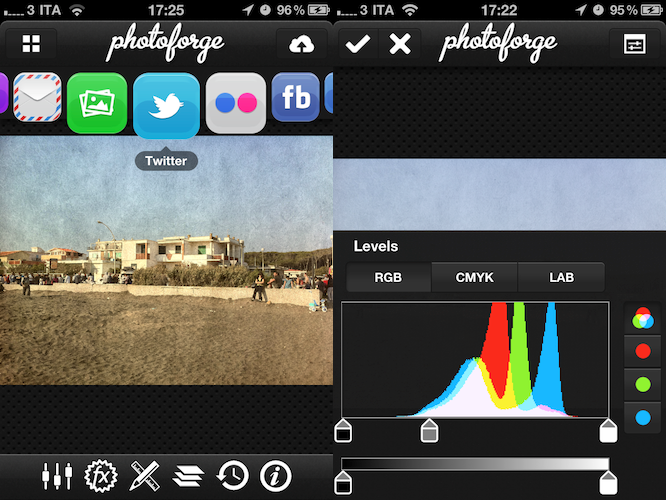
Announced last week as a successor to the popular lightweight image editing software for iPhone and iPad PhotoForge (which we reviewed here), PhotoForge 2 is a complete rewrite of the original app, sporting a completely new UI, more image editing features, new export options and a faster engine to bring semi-professional editing to the iPhone. In spite of the iPad version being advertised in the launch promo video, PhotoForge 2 is available today at $0.99 on the iPhone, with the iPad version coming in the next weeks as a Universal update. The GhostBird Software developers have decided to make PhotoForge 2 a standalone app, as the App Store doesn’t come with an upgrade policy and they felt that version 2.0 was worth paying a separate price. Indeed, the app sports several new functionalities and paying $0.99 now with the promise of an iPad update for free relatively soon sounds like a great deal. Plus, once the iPad update comes out the app will be priced at $2.99 for the remainder of May, although the full retail price is $4.99. That means you can get the app now and save $4, or wait for the iPad update and still save $2. The app has started propagating this morning in iTunes and is available here.
PhotoForge 2 is a full-featured image editing app for iOS, perhaps the most powerful available on the App Store. Whilst I can’t go through all the features now as I’ve played with the iPhone app for less than an hour (but we’ll make sure to have a full review once the iPad app is released), I can say there’s a notable difference when using the PhotoForge 1 and this 2.0 update. PhotoForge 2.0 has got a whole new interface revolving around the concept of “docks” (like the standard OS X one) that are basically a list of icons and buttons to navigate through the various image editing functions. Once you load a photo from your Camera Roll and start a new project, you can tap on the FX button in the bottom toolbar to scroll through a series of effects to apply to your photo in real-time, most of them being similar to the ones offered in apps like Instagram and Camera+. In PhotoForge 2.0, photos fit to screen by default, but you can double-tap them to edit them at full resolution looking at all pixels on screen. As I said effects are applied in real-time, with a loading bar at the top showing progress – on the iPhone 4, everything is quite smooth and responsive, though I expect the iPad 2 version to be a little snappier given the A5 processor. There’s lot of stuff to play with in PhotoForge 2.0, including layers, exposure control, brightness and contrast, or standard RGB levels. It feels like a mini Photoshop version, ported to a smaller screen with controls rewritten for multi-touch. Of course, you can’t expect all the functionalities of Photoshop to be available in PhotoForge 2.0, but this thing does undoubtedly have more options and settings than the average iOS photo editor. You can tweak opacity and blend modes, create and duplicate layers or fill a new one with color, copy and paste masks or apply sharpening and noise reduction.
Because the feature list is huge and I’ve only been playing with the app this morning, here’s a list of functionalities for comparison’s sake:
- Curves & Levels with RGB, CMYK and LAB colorspaces.
- Sharpening & Noise Reduction
- HSL & Channel Mixer controls
- Brightness & Contrast, Exposure, Vibrance
- White Balance, Shadows & Highlights
- Auto Exposure & Auto White Balance
- Precise Image Cropping and Resizing
- Customize your film, lens, flash and much more to create amazing looking photographs with the Pop! Cam add-on
- Great Black & White and Sepia filters
- Lomo, Gothic, Dreamy and 3D
- Crystallize, Pointallize and Impressionist.
- Bulge, Pinch & Twirl
PhotoForge 2.0 is meant for both for professional and casual users (thanks to an intuitive interface), and I have a feeling the iPad counterpart, with larger real screen estate, will make image editing even better as I’ve noticed editing on the iPhone can be sometimes a little frustrating because of the smaller screen – meaning, when applying some effects or setting other options there’s a chance you won’t see the full image in front of you, and the iPad should fix this issue. However, I was impressed by the sharing functionalities of PhotoForge 2.0, which include Flickr, Tumblr, Facebook and Twitter sharing, FTP and Dropbox uploading, or standard emailing and saving to the Camera Roll. The selection of services is really impressive and the Dropbox addition quite welcome, though I’d like to see direct CloudApp integration as well.
As it stands now, I think PhotoForge 2.0 is the most powerful and beautiful image editor for iPhone. The iPad version is something I’m really looking forward to, and while you wait you should get the app here at $0.99. It’s simply a great update.
WordPress iOS App Updated with Stats, Quick Photo, Fixes
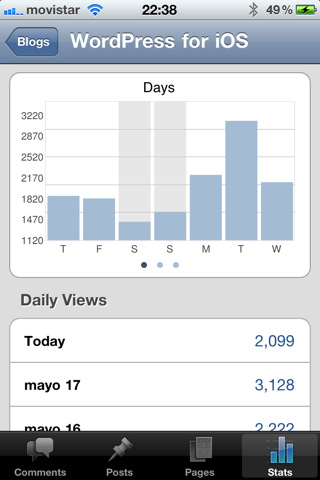
The official WordPress app for iOS, available for iPhone and iPad and often criticized by many (including me) for its proverbial instability and lack of poweruser-oriented features, has been updated earlier today to include a new button to quickly insert a new photo – they call the feature Quick Photo – as well as stats for your WordPress blogs. The new Quick Photo functionality only works on the iPhone for now, and WordPress notes in the 2.8 changelog this may be the last update that supports older systems running iPhone OS 3. Quick Photo is clearly oriented to those users who maintain a photo-centric blog, as it’s meant to let you snap a picture as quickly as possible without even selecting the destination blog first. Stats, on the other hand, are a welcome addition that are enabled by default on WordPress.com blogs, but require the installation of the standalone plugin or Jetpack on self-hosted WordPress.org blogs. The WordPress developers write on the iOS blog:
Finally you’re able to check your blog’s statistics on the go. There are charts for Daily, Weekly, and Monthly page views, swipe over them to see the others. You can also see Daily Views by date, as well as top Post Views, Referrers, Search Terms, and Clicks for the past 7 days.
Last, the update also introduces localizations for 10 languages (Japanese, Italian, Portuguese, Spanish, Swedish, Hebrew, German, Dutch, French, and Croatian) and bug fixes. WordPress says they’ve fixed 3/4 of the problems reported by users in the previous version, released in March. Get the app here.
#MacStoriesDeals - Wednesday

Here are today’s @MacStoriesDeals on iOS, Mac, and Mac App Store apps that are on sale for a limited time, so get them before they end!
#MacStoriesDeals - Tuesday

Here are today’s @MacStoriesDeals on iOS, Mac, and Mac App Store apps that are on sale for a limited time, so get them before they end!
#MacStoriesDeals - Monday

We’re back! Here are today’s @MacStoriesDeals on iOS, Mac, and Mac App Store apps that are on sale for a limited time, so get them before they end!
Cloud Connect for iOS Gets 3.0 Update, Brings Finder Integration
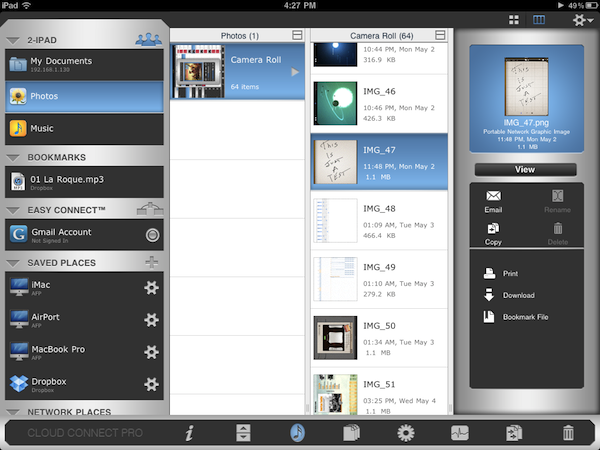
When it comes to remotely accessing your computer, AirPort Extreme station, FTP, Dropbox or WebDAV servers, Cloud Connect Pro is a staff favorite here at MacStories. Not only the app provides a full-featured solution to connect to all kinds of machines, servers and online services, it also offers a neat way to browse files and media in a Finder-like view for iPhones, iPod touches and iPads. We have covered the app a few times in the past, and I was impressed when Antacea managed to port the whole tablet experience to the iPhone.
The latest 3.0 update, however, makes things look much better with some UI refinements, a new audio player, a proper PDF viewer and some stability enhancements. The app retains all the functionalities of the previous versions, but introduces some welcome features and little touches throughout the whole package that add a new layer of accessibility, communication with iOS built-in tools, and more. For example, Cloud Connect 3.0 can directly play music stored in the iPod.app library, or visualize photos and videos from the camera roll. Songs can be sent to the new audio player’s playlist, which sits at the bottom of the app and displays album artwork, a list of songs waiting in the queue, as well as an AirPlay button to beam music to external speakers. Speaking of which, gone is the hideous Mac-like dock, leaving room for a more minimal bar of icons. Browsing files and folders in Cloud Connect has been improved, too: alongside the (great) column view, the developers have implemented icon-based navigation to tap your way around the filesystem. What’s cool is that you can switch between views with a tap in the toolbar, and a new button in the column view allows you to bookmark, copy, download & compress or delete any file or folder. On top of that, this new version allows you to browse songs and media from the camera roll using your Mac’s Finder by connecting to the “iPad” device under the Shared tab once Cloud Connect is running. This is by far the easiest way to import photos and music off an iOS device and onto an OS X machine I’ve tried, with Cloud Connect acting as a bridge between the two. It works great.
The app could still use some UI polish (I personally can’t stand those blue and grey tones), but I can see why Antacea decided to focus on adding and refining features for now. The lack of a serious PDF viewer, for example, was a major disappointment in Cloud Connect 1.0: the new PDF viewer introduced in version 3.0 is quite fast and responsive, lets you create bookmarks and search for text within a document.
Other features in Cloud Connect 3.0 include Google Picasa support, possibility to use a Mac or PC as a gateway to connect to other Easy Connect computers, and RDP for HP printers only. At $24.99 in the App Store, Cloud Connect doesn’t come cheap but it’s powerful, easy to use and works both on the iPhone and iPad. The app keeps getting better on each release, and I’m looking forward to some serious design improvements in the next version. For now though, Cloud Connect surely is one of the best ways to manage your remote and local connections. Read more
Castlerama Takes On Epic Citadel with Unreal Engine for iOS

If you were one of those who followed or watched Apple’s September 1, 2010 media event – where, among other things, iOS 4.1 and Game Center were officially unveiled – then you most definitely remember Epic Games’ Mike Capps and Steve Jobs talking about a revolutionary game that would set new technical standards on iOS devices. The game was based on the popular Unreal Engine ported to iOS, and on stage it was presented as a work-in-progress demo called Epic Citadel, also released for free on the App Store. The demo was impressive: there was nothing to do besides wandering around a medieval village, but the graphics, the lightning and the details were impressive. Tech-wise, everything about Epic Citadel was amazing. And as you may know, the game evolved and eventually became a real adventure with a plot and sword fights: Infinity Blade, based off the Unreal Engine and Epic Citadel’s first-person setting, was a huge success on iPhones and iPads.
As the story goes, however, other developers have tried to implement the Unreal Engine powerful set of tools in their games. The latest entry in the Unreal Engine-based game market is Castlerama by the Codenrama development studio, a first-person game with a striking resemblance to Epic Citadel and its environment. Castlerama seems to offer different landscapes though, as well as its own control scheme based on two virtual analog sticks displayed on screen.
The developers also explain their decision to accept “compromises” in order to make the game run on new devices like the iPad 2 and older units like the iPhone 3GS:
While developing Castlerama, we had to face the fact that newer devices such as iPhone4s and iPad2s are very different from their predecessors, iPhone3GSs and iPads, in that the former have twice as much memory. In order to have the app run on all devices, we had to compromise quite a bit, pushing the old devices to their limits (risking crash if other applications are left running) while keeping the new devices well behind their capabilities. In the future we believe we will have to develop two versions for each application.
Castlerama is available for free in the App Store as a universal download. With more games supporting the Unreal Engine coming out in the near future, it’ll be interesting to see how Castlerama will manage to provide a unique experience for iPhone and iPad owners. In the meantime, check out the app’s demo video and a walk down the Epic Citadel memory lane below. [9to5mac via TouchArcade]
Read more
Google News Goes Local on Mobile Browsers

With an official post on Google News’ blog, Google has announced that starting today in the United States, Google News will be able of displaying location-based content on iOS and Android mobile browsers. By giving access to your location information in iOS Safari, Google News will find news relevant to where you are in the US with a new section called “News near you.”
To use this feature, visit Google News from the browser of your Android smartphone or iPhone. If this is the first time you are visiting Google News on your phone since this feature became available, a pop-up will ask you if you want to share your location. If you say yes, news relevant to your location will appear in a new section called “News near you” which will be added at the bottom of the homepage. You can reorganize the sections later via the personalization page.
The updated section is available now on news.google.com, but it’s restricted to the United States. Remember you’ll have to grant Safari access to your location, otherwise the feature won’t work.