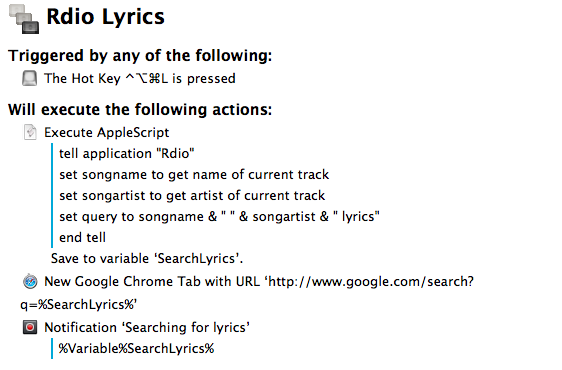
In spite of the existence of various Mac apps to display lyrics of a song that’s currently playing in iTunes or Rdio, I often find myself having to manually look them up through a web browser. It’s not uncommon to see a dedicated lyrics app being unable to fetch lyrics for a certain song, and, unsurprisingly, that always seems to happen when I’m in the mood for learning new lyrics. Having to Google lyrics and type a song’s name is a tedious process that ought to be automated, so that’s what I did. Read more
Posts tagged with "automation"
Search For Rdio Lyrics with Keyboard Maestro
Quickly Append Browser URLs To Evernote with Keyboard Maestro
I often come across webpages and interesting links that I can’t check out right away, but that I also don’t want to send to Instapaper, Pinboard, or my OmniFocus inbox. They are, put simply, “stuff to check out”; I append these URLs to an Evernote note carrying the same name:

As I detailed in my review of Drafts 3.0 for iOS, appending text from an iPhone or iPad is easy with Agile Tortoise’s app and a combination of Evernote actions and browser bookmarklets, but I had to think of an equally straightforward workflow for the Mac. Unfortunately, the lack of a Drafts app for OS X forced me to resort to AppleScript to achieve the same kind of functionality, but the deal was (partially) sweetened by the new features introduced in Keyboard Maestro 6.0, released back in May.
Save Keyboard Maestro Macro Screenshots with Keyboard Maestro→
Patrick Welker goes all meta with a macro to save Keyboard Maestro macros as screenshots – a new feature of version 6.0.
Share To Flipboard Magazines From Drafts
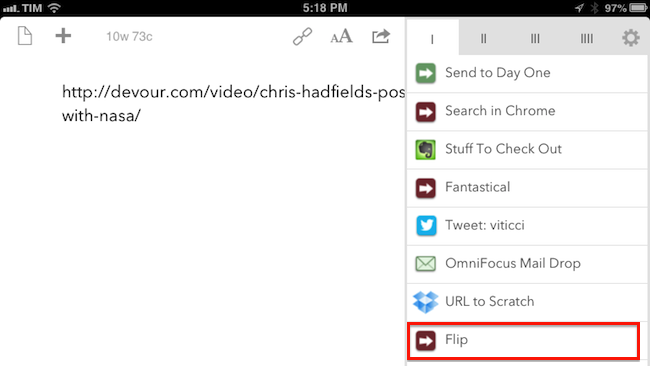
I’m a big fan of Flipboard’s magazine feature, which was introduced earlier this year with version 2.0 of the app. By leveraging Flipboard’s existing presentation style – capable of re-formatting web articles, videos, and photos with a beautiful print-like layout – magazines allow anyone to put together a collection of interesting links that others can subscribe to, read, and share. I am subscribed to dozens of Flipboard magazines and I send links to my Games one on a daily basis.
Most of my automation tips stem from minor annoyances with default solutions, so yesterday I decided to create a simple, yet effective Drafts URL action to easily open Flipboard’s share interface without having to read a webpage in the browser. Read more
Infinitesimal Bits of Time→
Adam C. Engst, in his overview of Keyboard Maestro 6:
In fact, many of my macros are utterly simple and obvious — I could type “cheers… -Adam” at the end of every email message I send, or I could press Control-period. Just because I’m saving only a few seconds doesn’t mean that it’s not worthwhile, when added up over tens of thousands of messages. Similarly, much as I love LaunchBar and use it heavily for many things, because I set F1 to open BBEdit via Keyboard Maestro, switching to BBEdit via F1 is a third of the work of LaunchBar’s Command-Space, B, Return. Those infinitesimal bits of time are like the energy drain from glowing lights on otherwise inactive electronics — meaningless in the individual instance, but vast in their overall impact.
According to Keyboard Maestro, I have saved 420 hours since I started using it 635 days ago.
Philips Releases Hue 1.1, Announces IFTTT Integration→
I keep being intrigued by Philips’ smart lighting system. Philips released an official API with iOS SDK in March, and today’s update brings great new features such as geofencing, which you can use to automatically activate your hue lights as you walk in or out of your house.
In terms of automation, hue is now officially integrated with IFTTT, which should allow for some interesting “workflows”. Examples mentioned by Philips include changing the color of your lights based on Instagram pictures, the weather, or your favorite sports team. I can’t wait to get a hue set and start playing around with IFTTT triggers.
You can read more on hue/IFTTT integration here.
How I Resize and Rename Images with Automator, Name Mangler, and TextExpander
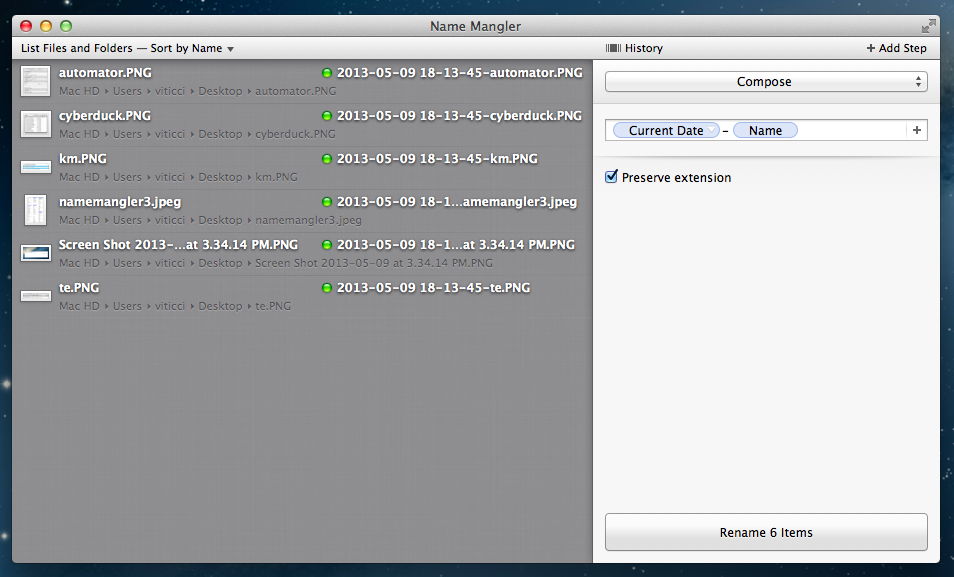
A few weeks ago, while I was preparing my coverage of Apple’s Q2 2013 earnings call, I grew tired of my system to resize and rename images on OS X, so I rebuilt it from scratch using Automator, Name Mangler 3, and TextExpander.
When I create images for MacStories, I either keep them at a single size between 600 and 650 pixels, or use two separate versions: the original larger size, and a smaller one that links to the full version. In either case, images are uploaded to our CDN with Cyberduck, which I have been using for years and that has never failed me. Until last month, the process of duplicating the larger image and saving it to a smaller size was entirely manual – something that, I later realized, was surprising considering I try to automate as many aspects of my daily workflow as possible. I decided to fix this before the Apple earnings call because I knew Excel was going to export our charts as large PNGs – but, mostly, because it really didn’t make sense to keep on manually clicking menus and selecting sizes after all these years of writing for MacStories. Read more
Mac Power Users on iOS Automation→
A great episode by David and Katie on a topic that I cover frequently here at MacStories. I especially liked the focus on Drafts, which has become an essential part of my workflow thanks to the addition of Evernote actions.
Drafts 3 Review: Better iOS Automation and Workflows
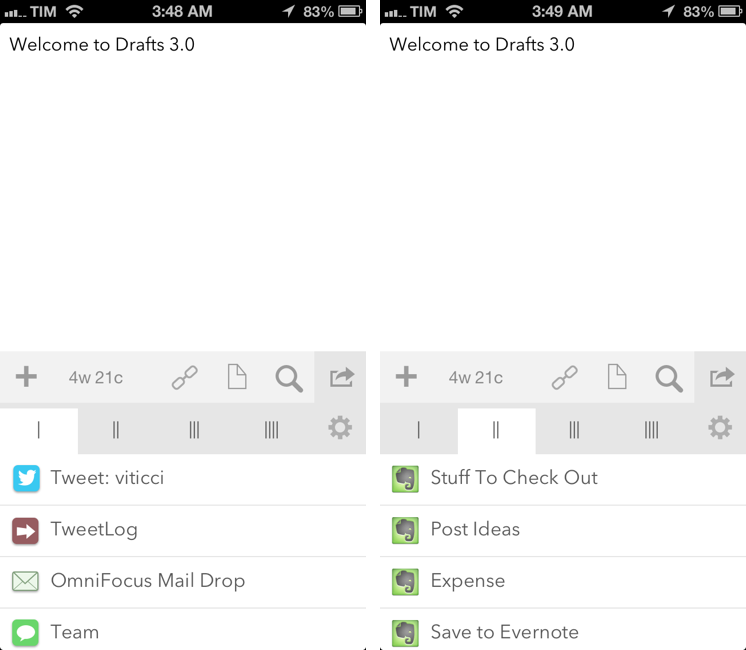
In just a little more than a year, Agile Tortoise’s Drafts has gone from being a quick notepad for small bits of text to a full-featured solution for launching apps, using web services, and chaining multiple apps together – always with a focus on text. With version 2.5, released in January, developer Greg Pierce expanded upon Drafts’ existing support for URL schemes to let users build their own actions and share them with others; in the process, he also updated Drafts to handle advanced operations such as customizable Dropbox write access, strftime timestamps, and deeper x-callback-url support.
Drafts 3.0, released today, is a major update that refines several aspects of version 2.5 and brings powerful new features such as Evernote and Message actions, better action and draft management, tighter Reminders integration, and a way to backup and restore entire sets of actions.
I have been testing Drafts 3.0 for the past month, and, even more than Drafts 2.5, it has become an essential part of my daily workflow.