Launch Center Pro for iPad Review

Launch Center Pro

Launch Center Pro

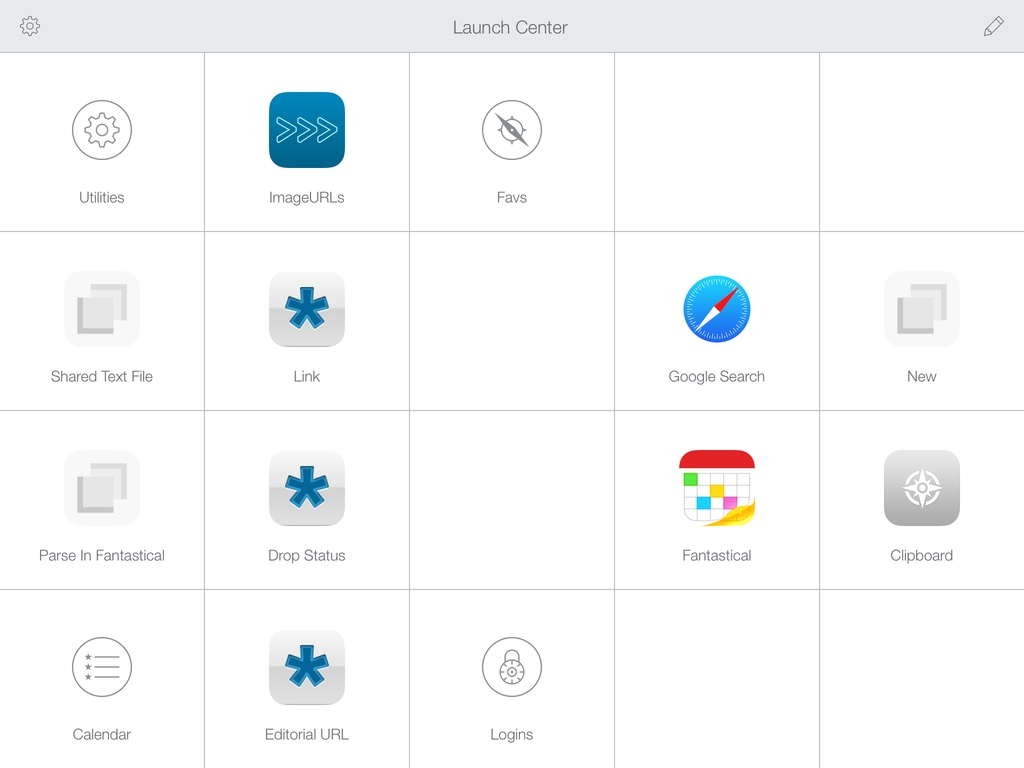
Contrast’s Launch Center Pro, the app that started the small revolution of iOS automation in June 2012, arrives today on the iPad with a new version (sold separately at $4.99) that takes everything you know about Launch Center Pro for iPhone and scales it up to the bigger screen. Launch Center Pro for iPad doesn’t do anything dramatically different from its iPhone counterpart: you can create custom actions, play around with Dropbox and clipboard integration, and do all the things that were possible in Launch Center Pro 2.1 – only now on your iPad too.

Finally.

Read more


Facebook Paper

Today, Facebook has announced Paper, a dedicated iPhone app to “explore and share stories” through Facebook. The app is coming out on February 3, and it takes a photo-centric approach at, essentially, displaying updates from your News Feed alongside “stories” (i.e. links and photos) recommended by a new curation team inside Facebook. The app uses full-screen, edge-to-edge layouts, relies on gestures for navigation, and it’s highly reminiscent of Flipboard for iPhone, both in terms of basic principles (status updates intermixed with news content) and the gesture to open and close “stories” (watch the promo video, and you’ll see).

I’ll save thoughts on the motivation and execution for the future, but, today, I’m skeptical. Facebook has a history of standalone apps that provided better, more elegant functionality than the main iPhone client (like Facebook Camera) which haven’t received enough attention. Aside from the name (this isn’t going to be awkward at all) and Flipboard-esque layout, I feel a disconnect. This app looks too beautiful for the kind of content that is shared on Facebook. Looking through my News Feed on a daily basis, what I see isn’t the hip mix of beautiful landscapes and inspiring moments that Facebook is advertising, but a chaotic mess of drunk selfies, memes, clubbing photos, and low-quality pictures of dinners or other family events. There is the occasional gorgeous photos, but does that justify a standalone, magazine-like approach to News Feed content?

What I’ve seen so far reminds me a lot of the beautiful News Feed that Facebook announced and never really shipped to users. A great idea in theory…which most people’s News Feeds don’t deserve. Of course, this time it may be different: Paper’s team includes Mike Matas (you can see some Push Pop Press influences in the video) and, according to The Verge, Loren Brichter contributed to the development. Facebook’s mobile numbers are growing, and perhaps the company needs to give its teams the ability to try new things that will eventually trickle down to the main experience (case in point: features of Facebook Camera later ported to the Facebook app).

I’m curious because a) I want to study the design/interaction approach taken by Matas and team and b) it appears you’ll be able to ignore status updates and browse only headlines by sources you follow or recommended by Facebook. Curation matters, and it’ll be interesting to see if and how Facebook will mix top publications with smaller independent authors. The focus on tackling “storytelling” by many companies lately is also a trend to keep an eye on, although I wonder if Paper can really become “Facebook 2.0” or “a reimagination of Facebook”.

Permalink

Highlight Important Folders by Changing Their Color with Folderol

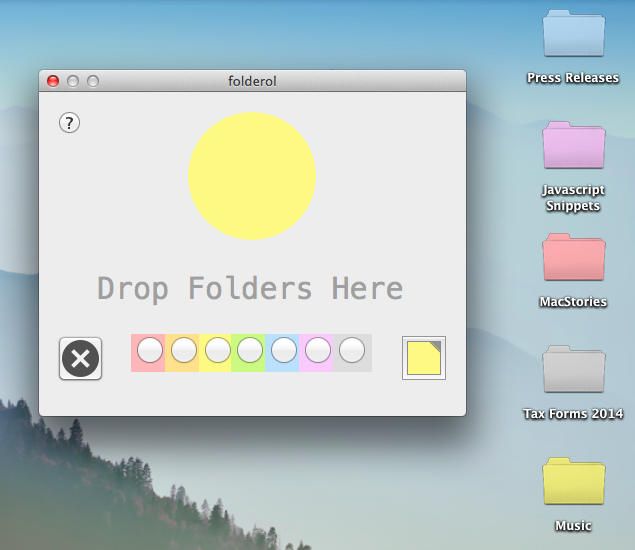
Friend of the site Erica Sadun recently released Folderol, a Mac app that simply lets you change the color of your folders on OS X. Of the many changes in OS X Mavericks is how labels are displayed; now being tags, small little colored dots next to file and folder names are all that differentiate how your stuff appears. Folderol brings back some visual distinctiveness, a feature that Apple once offered on classic Mac OSes, starting with System 6 for color Macintoshes.  Folderol’s default color palette smartly pair with Apple’s tags, but you’re free to choose your own with the built-in color picker. Download Folderol for $0.99 from the Mac App Store.

Permalink

A Simple “Open In Chrome” Keyboard Maestro Macro for Safari

My problem: I haven’t installed Flash on my Mac and I sometimes need to watch YouTube videos that require Flash Player in Google Chrome. Google’s browser is my Flash shelter: Safari is my main browser and I only keep Chrome around for Flash videos. I was getting annoyed by the process of copying a URL -> launching Chrome -> pasting the URL, so I made a simple Keyboard Maestro macro to automate everything with a hotkey. I don’t know what took me so long.

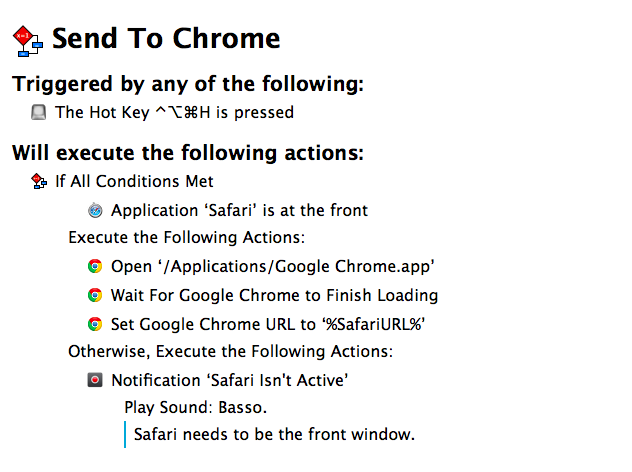
The macro checks if Safari is the front window, and, if not, it displays a notification with an error message. I do this to prevent accidental hotkey presses for URLs that I don’t want to open in Google Chrome. If Safari is the front window, however, what required a bunch of steps in AppleScript to open the current Safari URL in Chrome is a single action in Keyboard Maestro: Set Google Chrome URL, using %SafariURL% as a variable.

The two additional steps –  Open Chrome and Wait For Chrome To Finish Loading – were necessary because I discovered that, when launched with a Set URL action, Chrome wouldn’t intercept the URL sent by Keyboard Maestro and would simply display a blank tab. In this way, Chrome is launched, paused for a second as it reloads open tabs or the start tab, and then the Safari URL is opened in the current tab. If you want to open the URL in a new tab, change the Set Chrome URL action to New Google Chrome Tab.

You can download the macro here.


Transloader 2.0

Nice update to Matthias Gansrigler’s utility for iOS and OS X, which I first covered in December 2012. Transloader lets you download URLs from your iPhone on your Mac: open the iPhone app, and a URL in the clipboard is recognized and synced within seconds to Transloader for Mac over iCloud. The URL will then be downloaded locally, in the Finder, without having to open Safari. It’s a great way to start downloads remotely when you’re not at your Mac.

The new version has support for iOS 7 and it lets you store multiple links before syncing them to the Mac app. Both apps have been redesigned, and iCloud sync is as stable and fast as I remembered. Transloader can be a good companion to Command-C if you want to transfer URLs over 3G (Command-C only works over local WiFi).

Transloader for iOS is free, and the Mac app is $4.99 on the App Store.

Permalink

The New Hotel Key: Your Smartphone

Craig Karmin, reporting for the WSJ:

Guests arriving at the Aloft Hotel in Manhattan or one in Silicon Valley will soon be able to do something hotels have dreamed about offering for years: walk past the check-in desk and enter their rooms by using a smartphone as a room key.
[…]
Guests at these properties will receive a message on a Starwood app containing a virtual key, which will unlock the door with a tap or twist of their phone through the use of Bluetooth technology. The company says the iPhone 4s or newer models and the Android phones running 4.3 or newer will be compatible.

Personally, I still enjoy the interaction with staff members when I check in, which is also the reason why I always go talk to an employee when I need to buy something at my local Apple store (I tried Apple’s EasyPay feature, and it felt odd).

This is where the future is going, though, and there are several elements worth considering. Bluetooth LE has stolen the spotlight from NFC for low-power, peer-to-peer wireless transfers, and there are obvious security concerns over solutions like this, as well as home products like the Lockitron. It’s an exciting time to watch pocket computers reshape our world.

Permalink

Evernote Sync Gets Faster

Evernote CEO Phil Libin:

Synchronization is now about 4X faster than ever before. This applies to any version of Evernote that you use. Sync now often takes a couple of seconds to complete, and when you get a new phone or computer, downloading your notes will take much less time. If you have a small account, you might not notice that much of a difference. On the other hand, if your account is large, or you’ve been using Evernote for many years, or you share notebooks with other users, or your entire company uses Evernote Business, you’ll see massive improvements. All four of these things happen to be true for many early Evernote employees, so the performance gains we’re seeing at the office are amazing. That explains the rejoicing.

The performance gains are noticeable for my account, which has over 2200 notes. This is especially good news for me as I use the Evernote apps a lot when I’m on 3G, and hopefully it’ll result in better handling of large attachments as well.

See also: the technical explanation of what the Evernote engineers did.

Permalink

Why Beats Music Matters

Beats Music

Beats Music

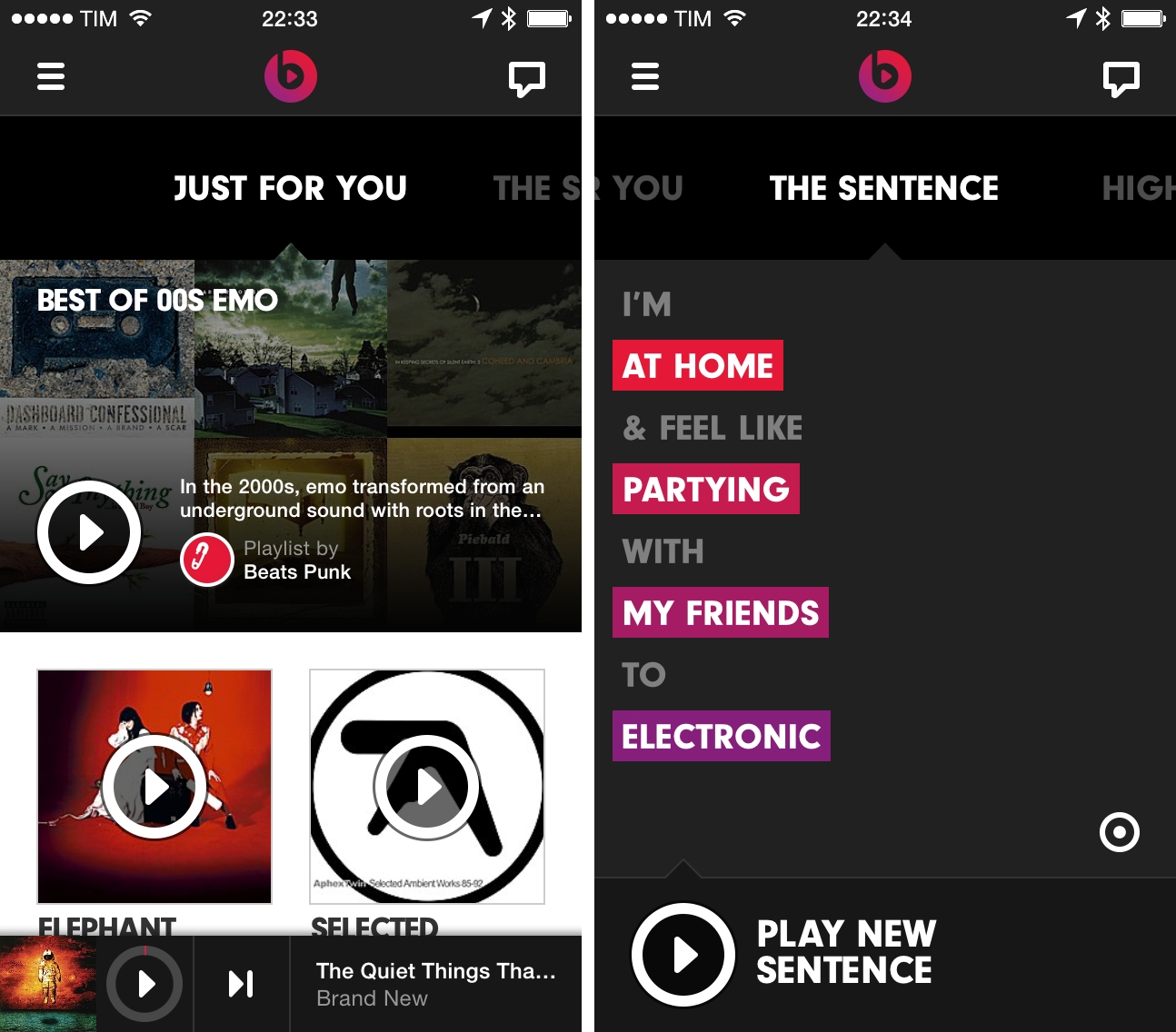
How do you treat music less like data and more like art, and make a business out of it? That’s the question Beats Music, a spin-off of Beats Electronics risen from the acquisition of MOG, wants to answer with their new music streaming and recommendation service.

I first got wind of Beats Music in December, and, when I heard the news last week that Beats Music was launching to the public, I thought I wouldn’t care. As MacStories readers and The Prompt listeners know, I’ve been happily using Rdio for the past three years: Rdio gives me all the music I want, it lets me check out New Releases and subscribe to playlists created by other users, and it’s got a Stations feature that automatically recommends music I may like based on my history and listening data collected about me. There are many reasons why I prefer Rdio over Spotify, which I’ve shared on several occasions in the past. Rdio works: you type stuff in, you get music back. If you don’t want to search, the service gives music to you with recommendations that go from “good” to “great”.

As coverage of Beats Music started coming in and cynics quickly derided the service for being part of a company that makes headphones audiophiles don’t like, I got curious. Beats Music’s CEO Ian Rogers, for instance, has a quite amazing story of being a pioneer of Internet-based music delivery and marketing, working (and touring) alognside Beastie Boys at a very young age, eventually going to work for Nullsoft, Yahoo Music, TopSpin Media, and now Beats Music.

The creation of Beats Music itself was spearheaded by Jimmy Iovine (historic music producer and co-founder of Beats Electronics with Dr. Dre), who ended up hiring Nine Inch Nails’ Trent Reznor as Chief Creative Officer of the new service because Reznor himself had been looking for a new take on music streaming services.

On a product level, Beats Music offers no free tier as it is a paid-only service that delivers 320kbps MP3 streams and promises to pay artists higher royalties thanks to the lack of cheaper, ad-supported streams. When I went to check out Beats Music’s website, I found an honest, well-written FAQ that explained the company’s vision and motivations for launching a paid service just after Spotify and Rdio extended their free tiers to tablets and desktops.

I could go on with a list of factors that contributed to piquing my interest in Beats Music. Such as the way Rogers worded his explanation of the service’s paid-only model, or how he explained their strategy to The Verge and then offered a simple screenshot as proof that ads in music may not always be the best option. Or how Reznor – for context, the guy who left his label to try “alternative” marketing campaigns that included leaving free copies of NIN songs in USB flash drives in bathroom stallssaid that “to brag about being agnostic and just providing access to music seems to me, as a culture person, as a fail” when asked about Spotify’s search and algorithm-based music platform.

As a music lover and iOS geek, it seemed silly to dismiss Beats Music just because of others’ opinions about headphones, and I’m glad I didn’t. I can’t stop using Beats Music. Read more