A History of Apple News and Rumors During CES

To those of us who follow technology news closely, this time of the year is dominated by the barrage of CES news. But it often seems as though Apple, which doesn’t attend the exhibition, also has some of its biggest days in the press – coincidentally, or not. This was brought to light again yesterday as Mark Gurman of 9to5Mac published details of a rumoured 12” MacBook Air and a timeline for the Apple Watch launch. I have no idea whether the information leaked to Gurman was timed to coincide with CES or not – it may very well just be completely unrelated.[1]

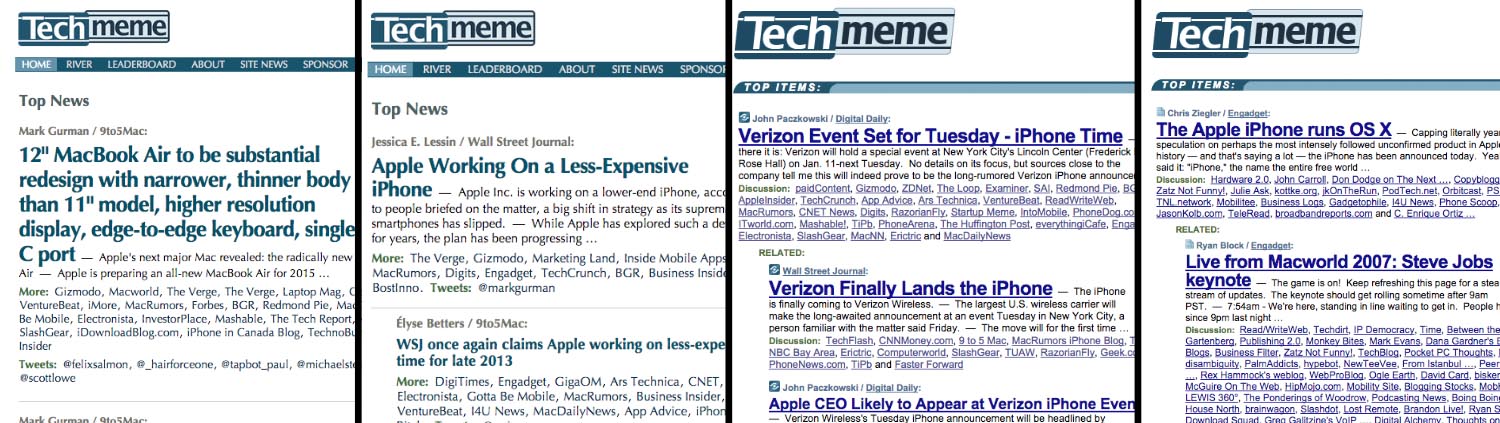
But regardless of the intention of Gurman’s leaker, I was curious to see whether Apple really did have big news days during CES in past years as I had remembered. So I ventured over to Techmeme (which links to big technology stories every day) and went into their archives to look at what was on their front page at 7:10 PM on every day of CES since 2007. Whenever a big Apple news story appeared, I made a note of it. This is the result.

Read more


The Ultimate Unofficial Dropbox Guide [Sponsor]

Dropbox isn’t just a folder, and you can maximize its potential to simplify your work and personal life.

The Ultimate Unofficial Dropbox Guide was created to help the modern knowledge worker who wants to make their digital life more organized and efficient. The guide is a comprehensive look to power-using Dropbox, whether you’re just setting up your Dropbox account or already think you’re a pro.

Sample topics include: Comprehensive walk-throughs for photo sharing; best practices for organizing your folders and documents; keeping your files secure; and automating tasks using IFTTT.

Complimentary bonus products include a handy keyboard-shortcut reference page, 15 Tips and Tricks for Families, and Photosharing Guides for you and a beginning photo guide to giv eaway to your less-savvy family members who still want to see photos of your kids.

For more information and to preview free samples, check out The Ultimate Unofficial Dropbox Guide’s website here.

Our thanks to The Ultimate Unofficial Dropbox Guide for sponsoring MacStories this week.


The 2014 Panic Report

Panic is one of my favorite software companies and I’m happy to see Cabel Sasser posting this today:

Panic is a multi-million dollar business that has turned a profit for 17 years straight.

It just hit me, typing those words, that that’s a pretty insane thing to be able to say. (And, sure, we barely qualify). Believe me, I know it won’t last forever — but wow, what a kind of crazy deal.

All the problems mentioned by Cabel in the post are related to the App Store. If you look closely, the 2014 Panic Report is also a well written summary of areas where Apple’s App Stores (plural, for iOS and Mac) could improve.

Permalink

Improving iOS 8 Keyboards

David Chartier sums up my feelings on custom iOS 8 keyboards so far:

As interesting as iOS keyboards can be, their initial implementation at the OS level is severely flawed. They’re cumbersome to setup, switching between them is needlessly tedious, and limitations make it difficult to teach users about keyboard features. As far as I can tell, all these problems require solutions and improvements from Apple at the OS level.

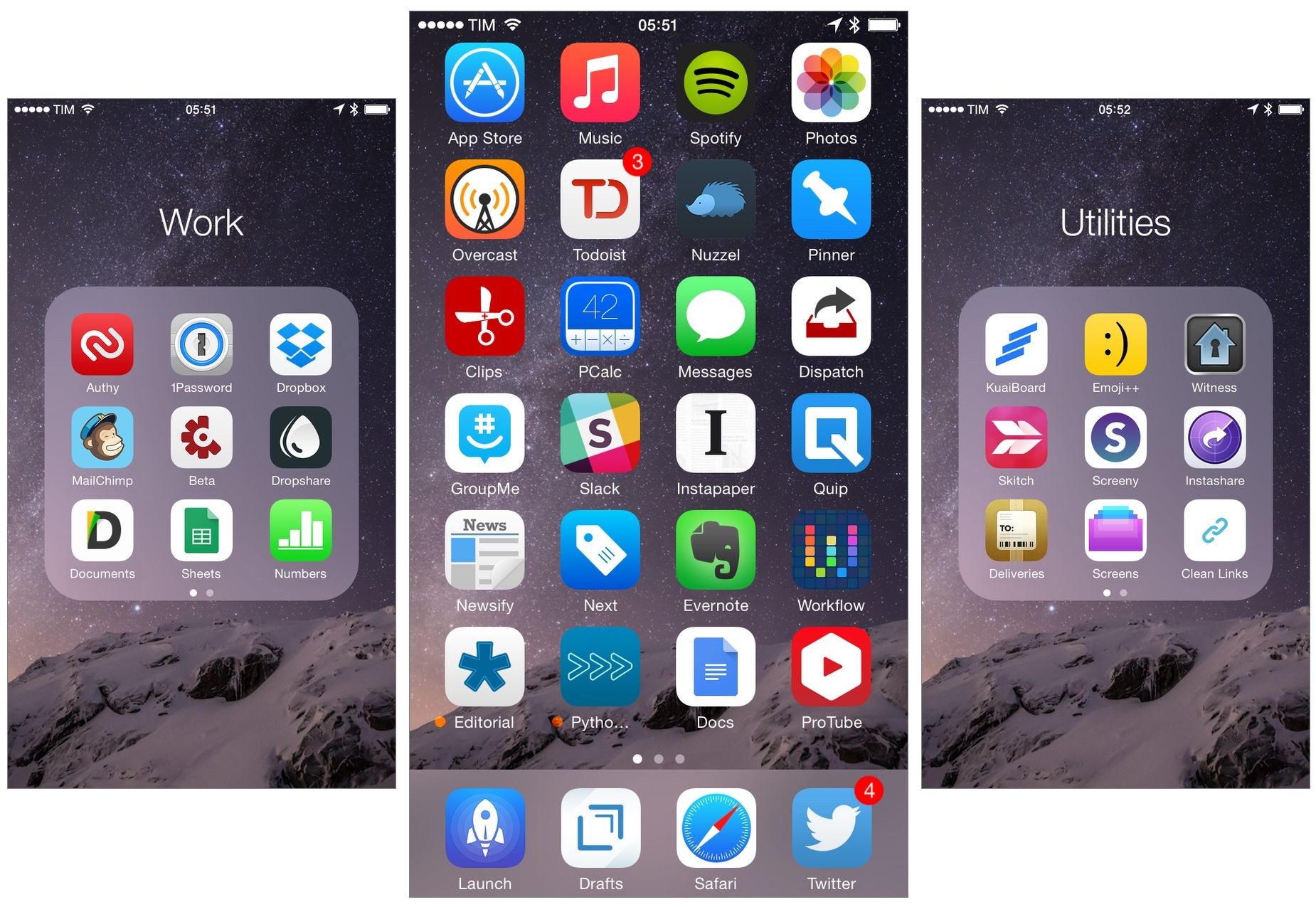
I only use custom keyboards that solve a specific problem: Clips, for copying multiple bits of text; KuaiBoard, for visual snippets; Emoji++, because it’s better than Apple’s emoji keyboard. Even with these keyboards (which I only activate when I need them – as utilities) I’ve been annoyed by the system’s tediousness in switching between them and lack of consistency.

I haven’t been able to stick with any replacement keyboard as my primary one. In the first version of iOS 8, keyboards were too buggy to be used as daily drivers, but even after fixes I can’t use a non-Apple one on a daily basis. I’d miss the system autocorrection, QuickType, dictation, and shortcuts that I’ve grown to know over the years. Hopefully Apple will soften its stance on what’s off-limits to custom keyboards with iOS 9. Personally, I quite like Apple’s keyboard – I just wish it supported multiple languages at once.

Permalink

Balance

When I started MacStories in 2009, two pillars sustained the narrative around Apple: its “attention to detail” and the “just works” aspect of its software. Since iOS 7, it feels like those pillars have begun eroding at a quicker pace.

Read more


Connected: The Illusion of Choice

At the end of 2014, Stephen and Myke reflect on what proved to be a wild year in technology.

I wasn’t available for episode 20 of Connected, but Myke and Stephen did a great job in recapping 2014 and what we saw in technology last year. You can listen to the episode here.

Sponsored by:

  • lynda.com: An easy and affordable way to help individuals and organizations learn. Free 10-day trial.
  • Sketchparty TV: the fun, fast drawing and guessing game for Apple TV.
  • Squarespace: Start Here. Go Anywhere. Use code WORLD for 10% off
Permalink

Virtual: Skipping the Zombie Dinner

This week Federico and Myke share their holiday experiences, before discussing what games are coming in 2015, Federico’s further time with Minecraft and Myke’s impressions of the Wii U.

And if you’re interested in getting started with Minecraft after listening to Virtual, don’t miss episode 20 of Inquisitive with John Moltz, co-author of The Visual Guide to Minecraft. You can listen to the episode here.

Sponsored by:

  • Squarespace: Start Here. Go Anywhere. Use code INSERTCOIN for 10% off
Permalink

Twitter’s Native Video Player

A post on TechCrunch from yesterday claimed to offer details on Twitter’s previously announced native video service for users, but the company refuted the rumor. According to Twitter, the details uncovered on the video.twitter.com website refer to native videos for Twitter Amplify users, another initiative announced in August 2014.

As a user of the Twitter app for iOS, I’ve noticed native Twitter videos (promoted or not) for a while now. They’re actually not terrible: they don’t have all the options of YouTube, but the play inline with a card and have essential playback controls.

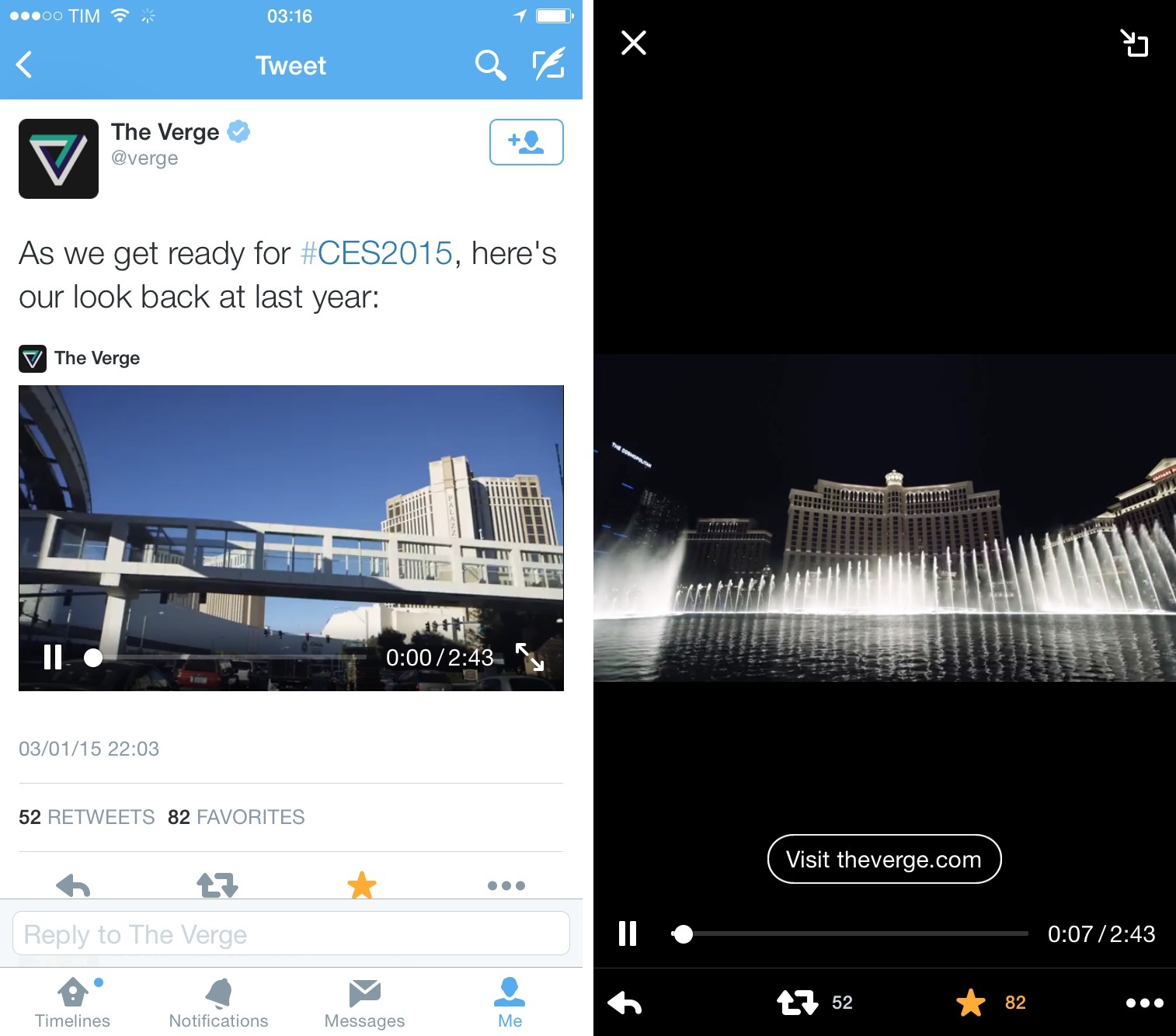
This tweet, for example:

Looks like this on the iPhone:

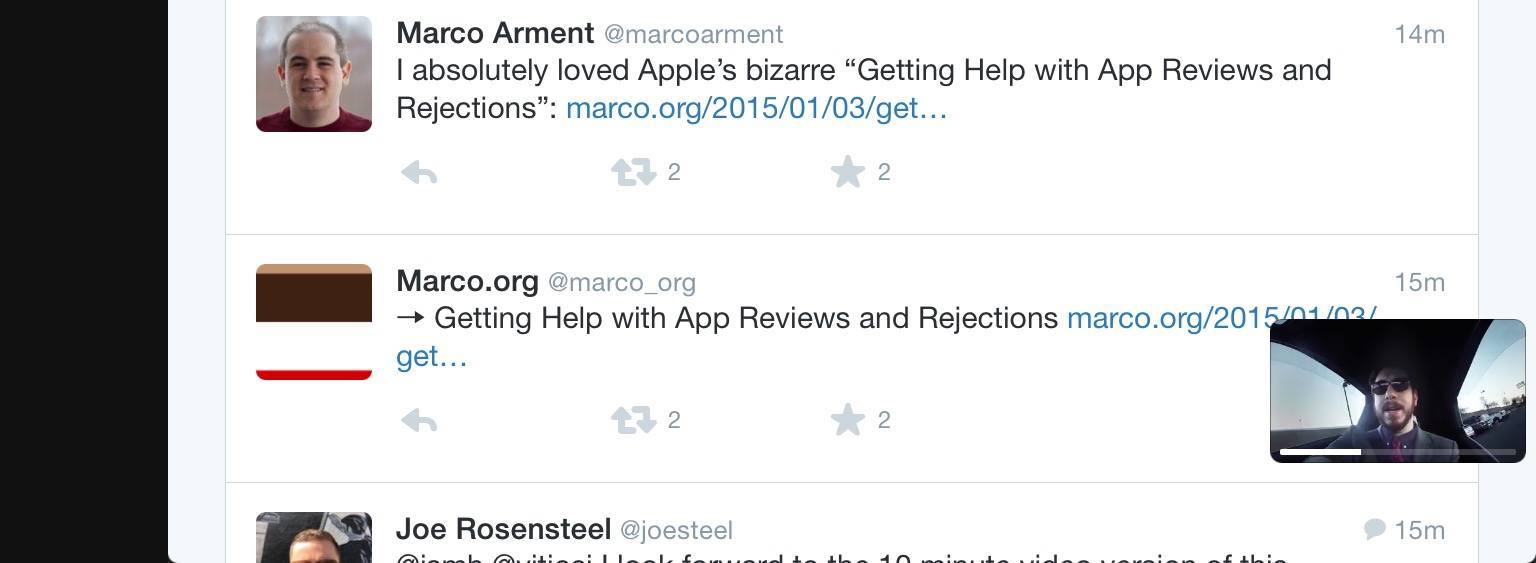
I only noticed today, however, that The Verge’s video has a button to open an associated webpage in Twitter’s inline browser, which was new to me. I also didn’t know that videos could be minimized on the iPad, just like SoundCloud audio cards can be minimized on the iPhone:

Twitter Video is expected to be rolled out in the first half of this year, and I’m curious to see what the company will do with it. As a fan of Twitter’s move towards integrated cards on mobile, I think that native videos (that are longer than Vines) have potential to integrate nicely with other media types in the timeline. It’ll be interesting to see how users and companies that are currently using YouTube will react to native Twitter videos. Considering the impact that Twitter photos had on how content is shared on Twitter, I’d keep an eye on native videos enabled for every user (not just promoted tweets or selected publications).

Permalink

My Must-Have iPhone Apps, 2014 Edition

For the past four years, I’ve been running a series called My Must-Have Apps that, once a year, collects all the apps I find indispensable to get work done on my iPhone, iPad, and Mac. Considering changes to my daily life and workflow, this year only features my must-have iPad and iPhone apps.

The iPhone has changed my professional life, and it’s a powerful and essential pocket computer that I carry with me all the time. But I prefer to get work done on my iPad.

There was a time when I thought that I could work entirely from my iPhone; after upgrading to a cellular iPad two years ago and once I began moving to an iPad-centric workflow, I realized that the tablet was the iOS device that I preferred for writing, reading, doing email, and watching movies. For millions of users, the iPhone turns into a mobile computer as soon as they step away from the comfort of a desk with a Mac. But I’ve come to realize that I’d rather have two iOS devices with me at all times – a smaller iPhone and a bigger iPad – than one that tries to do everything at once. Which is why, ultimately, I decided to go with an iPhone 6 and an iPad Air 2 this year.

In spite of my personal preference, though, I can’t deny the fact that, nowadays, it’s hard to find iOS apps – and especially utilities or productivity-related apps – that aren’t Universal. The trend of “iPad-only” and “iPhone-only” apps has been substantially downsized in recent years – none of the apps on my iPad Home screen are exclusive to the iPad at this point. So while I like and use the iPhone more for listening to music, taking pictures, or monitoring my health data, I still end up installing a text editor, a shortcut launcher, and a Python interpreter on my iPhone because they’re available and because why not. This isn’t an ideal scenario – too many developers are making iOS apps that simply scale across screen sizes without taking advantage of the unique features of each platform – but that’s beyond the scope of this series.

It was tough to compile a list of must-have iPhone apps this year: I’ve already covered most of them in my iPad article, and I don’t use the iPhone as much as my iPad. But at the same time, I realized that, for those times when I needed to work from my iPhone, those smaller iPad apps were absolutely necessary, even if not running on a screen size that I’m comfortable with. And, more importantly, I believe the article can be useful to readers who had no interest in iPad apps and my iPad workflow.

This year, I’ve only covered iPad and iPhone apps, as I practically don’t use a Mac anymore. For apps shared across my iPad and iPhone, I used the same base descriptions, with differences for the iPhone versions noted and rewritten where necessary. This is a remix and addendum to my must-have iPad apps.

In the list below, you’ll find apps organized in seven sections:

  • Work Essentials
  • Social
  • Audio and Music
  • Photos and Screenshots
  • News
  • Health
  • Utilities

At the end of the article, you’ll also find my iPhone App of the Year and a Runner-up. Each app has a direct iTunes link, and, where possible, I’ve included links to previous MacStories coverage as well.

Read more