Craig Federighi Talks Open Source Swift

Writing for Ars Technica, Andrew Cunningham interviewed Craig Federighi on Swift going open source and how Apple is approaching open development:

The Swift team will be developing completely in the open on GitHub,” Federighi told Ars. “As they’re working day-to-day and making modifications to the language, including their work on Swift 3.0, all of that is going to be happening out in the open on GitHub.”

So instead of getting a big Swift 3.0 info dump at WWDC 2016 in the summer and then digging into the Xcode betas and adapting, developers can already find an “evolution document” on the Swift site that maps out where the language is headed in its next major version.

Permalink

The Grand Unified Theory of Apple Products

Spot-on analysis by Neil Cybart on Apple’s product lineup:

At the Apple Watch introduction keynote, Apple changed its tune when explaining its product line. Instead of positioning product categories in such a way that each product played a specific role in our lives, Apple began moving down the path of consumers picking and choosing the devices that made the most sense for them. The now classic, “product profile” slide made its debut (pictured below). All of Apple’s primary products fit on one spectrum.

The message behind the slide was simple: each distinct product category possesses a different ratio of personal technology and power. The smaller the device, the more personal the technology.

Permalink

Pedometer++ Gets Smarter Step Counting on Apple Watch and iPhone

David Smith’s Pedometer++ is one of the apps that got me back in shape and I’ve always appreciated the thought and care that he puts into it.

Today, David released a substantial update to Pedometer++ with an entirely new logic to coalesce steps registered by the iPhone and Apple Watch:

You might be wondering why I don’t use Apple’s Health.app merging system for this. After extensive testing about how that works I determined that it doesn’t really do a good job for step data. The Apple Health algorithm works around the concept of a ‘priority’ device. This priority device’s steps are then used in all instances except where that device is completely unavailable. In which case the secondary devices data is used to fill in the gaps.

The concept of a fixed priority device doesn’t really work for step data. As you move between the various activities of your daily life, the best device for measuring your movement is constantly switching. Thus you need a data merging algorithm that can dynamically analyze your step data and determine which device’s data is best at any particular time.

That is exactly what Pedometer++ now does. It goes through your daily data and can dynamically determine which device to use for any particular point in your day. The result is a much richer and complete picture of your daily activity than you’d get from Health.

I’ve tried many pedometer apps for iPhone and Apple Watch over the past few months, and I’ve noticed annoying discrepancies between data recorded by my iPhone and steps measured by Apple Watch. David’s intelligent system to reconcile steps taken sounds like what I’m looking for. It’s been a while since I wanted to really check out a new watchOS app, too.

Permalink

Apple Open Sources Swift

As promised earlier this year, Apple today officially open sourced Swift, its new programming language unveiled at WWDC 2014. The now open source Swift is available on Apple’s GitHub page for everyone to try:

Swift is a high performance systems programming language. It has a clean and modern syntax, and offers seamless access to existing C and Objective-C code and frameworks, and is memory safe (by default).

Although inspired by Objective-C and many other languages, Swift is not itself a C-derived language. As a complete and independent language, Swift packages core features like flow control, data structures, and functions, with high-level constructs like objects, protocols, closures, and generics. Swift embraces modules, eliminating the need for headers and the code duplication they entail.

This is big news for developers who have been looking forward to experimenting with Swift. Interestingly, Apple has also publicly posted a repository to track the ongoing evolution of Swift, which should reach version 2.2 by Spring 2016 and version 3.0 by Fall 2016.

This document describes goals for the Swift language on a per-release basis, usually listing minor releases adding to the currently shipping version and one major release out. Each release will have many smaller features or changes independent of these larger goals, and not all goals are reached for each release.

Clearly, open sourcing Swift has been a massive effort for Apple’s teams, and they’re committing to it.

Permalink

SiriMote: Use Your Siri Remote with Your Mac

Back when I owned a 2008 MacBook and the second-generation Apple TV, I remember occasionally using the Apple TV remote with my Mac. Back then most of Apple’s laptop’s (including mine) came with a built-in infrared (IR) receiver and the functions of the Apple TV remote automatically worked with iTunes and some other Mac apps. But since then, IR receivers have gone the way of the DVD drive and, chances are, your Mac doesn’t have one. The Siri Remote for the Apple TV does still use IR for certain functions, but most of its communications are now done via Bluetooth 4.0.

But if you’d like to use your Siri Remote with your Mac, you can with SiriMote. It’s a free app from Eternal Storms Software, which also makes Yoink and Transloader, amongst other apps.

SiriMote works by pairing the Siri Remote to any Mac that supports Bluetooth 4.0 and is running OS X El Capitan. To pair the Siri Remote you’ll need to turn off your Apple TV, press the Menu and Volume Up buttons on the Siri Remote for a few seconds and pair it from OS X’s Bluetooth settings, located in System Preferences. There’s no doubt it is a bit fiddly to set up, but once it’s set up, it works great. SiriMote works by translating buttons on the Siri Remote into buttons from a keyboard (specifically, the media keys). Because it is simply emulating the standard media keys, SiriMote works with iTunes, Keynote, QuickTime, VLC and other apps that work with the Mac media keys.

Unfortunately, for now at least, the touch surface of the Siri Remote can’t be used by SiriMote. The only exception is that clicking the touch surface will emulate the Next Track media key, or Fast Forward if you hold it down. That means swiping and tapping won’t do anything when connected to your Mac.

I doubt I’ll use SiriMote regularly, but if I ever need to run a Keynote presentation from my MacBook Air, I know that I can turn my Siri Remote into one of those fancy “clickers” in less than a minute. As a free app, I can easily recommend SiriMote to any Siri Remote owner, you may not have a use for it today, but you never know what tomorrow might require.

Learn more and download SiriMote.


Apple Airs New ‘Ridiculously Powerful’ and ‘Hey Siri’ iPhone 6s Commercials

Apple shared two new iPhone 6s commercials last night, once again focusing on the more powerful hardware of this year’s iPhone model and hands-free Siri activation via voice.

In the first ad, titled ‘Ridiculously Powerful’, Apple highlights a number of apps and system features that are faster or more capable thanks to the 6s’ hardware. From 3D Touch and games to multitasking, Apple Pay, and camera improvements, the ad follows the style of the company’s “The only thing that’s changed is everything” campaign with a quick rundown of apps and use cases that are more efficient on the new hardware. Notably, the ad features Jon Favreau and closes to what resembles a Siri command for HomeKit lights, which turn off at the end of the video.

The new ‘Hey Siri’ commercial is shorter and it includes a few examples of how Siri can be activated without pressing the Home button to reply to messages, look up information on the web, play music, and more. The ad also features actress Penelope Cruz asking a question to the virtual assistant with ‘Hey Siri’.

You can watch the videos below.

Read more


Connected: The Opposite of Perfect

This week, Stephen and Federico talk about the Mac App Store, iCloud Photo Library and (sigh) iPhone 7 rumo(u)rs.

Some of my favorite topics on this week’s Connected: iCloud, Google’s intelligence for online services, and photo management. You can listen here.

Sponsored by:

  • lynda.com: An easy and affordable way to help individuals and organizations learn. Free 10-day trial.
  • Igloo: An intranet you’ll actually like, free for up to 10 people.
  • Foot Cardigan: Make giving socks as gifts fun and cool! Get 10% off any subscription using code CONNECTED at checkout.
Permalink

Daylite 6 for Mac and iOS

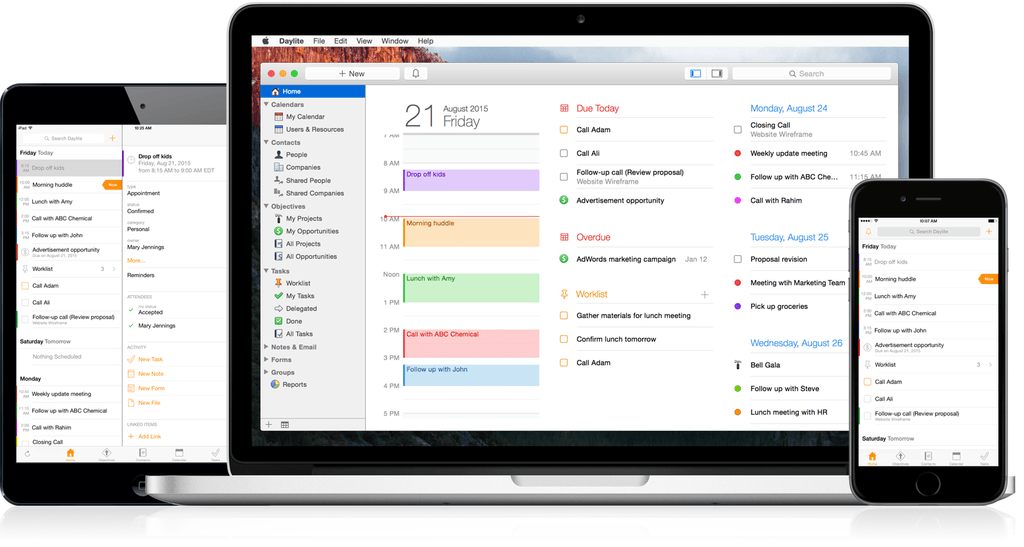
Daylite 6 was released today for both Mac and iOS, and it’s a major upgrade for the business productivity app. Already boasting a complete set of tools for managing projects, clients, and tasks for an individual or workgroup, the new version adds a slew of new features that take the app even further.

One of the major highlights of this release is the announcement of “Daylite Cloud.” Previously, centralizing a group’s Daylite data required running a copy of Daylite Server. With Daylite Cloud, it’s all handled seamlessly, allows offline access, is cheaper, and has no barrier to incorporating it into your company workflow.

The task management features of Daylite have also expanded. The constraints of the previous Pipeline/Activity Set features have been augmented by a “Task Lists” feature, allowing free-form creation of task lists that might not be assigned to a linear timeline, with complete control over ordering, a new entry interface, and additional fields for time, location, estimated time, and other details. There’s also a new “Smart Filtering Bar” for viewing tasks by details such as assigned team member, category, or keyword.

The iOS version has new goodies as well, with features including Today Widgets, full filtering capabilities, and improved editing of Daylite entries. It also adds file linking tools which allow you to snap a photo and link it to one or more items in Daylite.

If you’re a Mail.app user, also check out the Daylite Mail Assistant. It’s not a new feature, but it’s impressive. It allows you to link emails to Daylite items, schedule meetings, and share data without a chain of cc’s and forwards, all from within Mail.

For a complete rundown of all the new features, check out the announcement post on the Daylite blog. You can learn more about Daylite on the Marketcircle website.



iCloud for iOS Onboarding

Sebastian Kreutzberger has posted a plea for developers to consider implementing iCloud authentication in their apps in lieu of traditional emails and passwords. The idea is that iCloud is inherently secure and anonymized, making for a superior solution to login information reused across multiple services.

The “magic” of iCloud authentication lays in its invisibility to the user.

With iCloud an app does not need to ask the user for an email address or a password to be able to uniquely identify who is running the app (and to later spam the user in marketing campaigns).

With the built-in, invisible iCloud authentication every app (developer) automatically can get a secure, globally unique representation of the currently logged-in iCloud user from iOS itself which it then can use to replace email and password as identifiers.

I don’t know if iCloud authentication would work for every web service with an iOS app, but I certainly am annoyed by having to create online accounts for almost every app I try these days. I have relied on iCloud signup for a couple of apps so far, and the experience has been really nice. I would like to see it used more.

Permalink