
Cinder, Previously Known as LittleSnapper for iPhone. Ember Client.

LittleSnapper is a very good application, so good that it’s basically always open on my Mac and sitting into the dock. But this is an old story, you can just read our huge review about it if you missed it. What’s important about LS, and thus the reason I had to mention it here, it’s that Realmac Software, the guys behind LittleSnapper, created a social network / image sharing service called Ember (and previously known as QuickSnapper) which integrates with LittleSnapper and lets you share pictures, screenshots and stuff that you find inspiring. You can create collections, fave images, follow and unfollow people to receive updates about what they do on Ember directly in your Dashboard. It’s awesome, and a pro Ember account gives you access to lifetime LittleSnapper upgrades. Be sure to follow me on Ember to stay updated with my pictures stream.

Anyway, we’re not going to talk about LittleSnapper again. Well, actually yes - let me explain the situation. LittleSnapper was available for the iPhone too, and it was a good app in my opinion. Sure it was deeply different from the Mac version (mainly thanks to Apple’s SDK limitations) but overall, it was a damn great utility to take photos / websnaps and upload them to Ember. Eventually Realmac quit the development of LittleSnapper to focus on Mac OS X development and sold the whole LS app to BitBQ, which started working on a full porting of the old application to make it work with Ember.

The app is now out in the AppStore, it’s called Cinder and it’s free for a limited time. I’ve been testing Cinder for a few weeks now, read on to find out if it’s a worth successor to LittleSnapper.
Read more


Save Your Notes in the Menubar with QuickNote

Whether you want to jot down a quick note for yourself or save some information from the web, Mac OS X doesn’t offer a default solution for this. Well, you could leave TextEdit running all the time and create a new document everytime but that’s a low process that is likely to end up with dozens of files on your hard drive. Or, you could use Yojimbo to capture anything you want and that sounds reasonably good. But you agree with me that there must be a better way to store quick notes.

QuickNote is a new app from Snarbsoft, designed by Laurent Baumann, which runs in the menubar and allows you to easily capture text notes.

Read more


Write in Markdown with TextMate, Sync Everything with Notational

I suppose you already know what Markdown* is. For those who don’t know, let’s quote a few paragraphs from John Gruber’s Daring Fireball:

Markdown is a text-to-HTML conversion tool for web writers. Markdown allows you to write using an easy-to-read, easy-to-write plain text format, then convert it to structurally valid XHTML (or HTML)

Thus, “Markdown” is two things: (1) a plain text formatting syntax; and (2) a software tool, written in Perl, that converts the plain text formatting to HTML. See the Syntax page for details pertaining to Markdown’s formatting syntax. You can try it out, right now, using the online Dingus.

The overriding design goal for Markdown’s formatting syntax is to make it as readable as possible. The idea is that a Markdown-formatted document should be publishable as-is, as plain text, without looking like it’s been marked up with tags or formatting instructions. While Markdown’s syntax has been influenced by several existing text-to-HTML filters, the single biggest source of inspiration for Markdown’s syntax is the format of plain text email.

For further information about Markdown, be sure to visit and read everything over DF’s project page. You’ll find some good stuff to get started there.

So, Markdown is a text syntax, geared towards readbility and “publishability” for the web. Writing in Markdown is simple and I would dare to say also “fun”, as it’s very easy to learn the basics and once you’ll get the hang of it, you’ll realize how useful it is.

I managed to define a pretty straightforward yet effective workflow for writing MacStories’ posts that includes using TextMate and Notational Velocity to keep everything formatted in Markdown and synchronized to the iPhone as well. Find out how.

Read more


CoGe, Quartz Composer Powered VJ Application

Link

“CoGe is a free, open-source, semi-modular Quartz Composer powered VJ Application for Mac OSX with a solid, minimalistic look and feel. It’s an unconventional application, because has not built-in media handle feauters or effects. With the excellent Quartz Composer support, you can build your own media handlers, effects, mixer and automatization modules.”


Harmony, HTML5 Procedural Drawing Tool

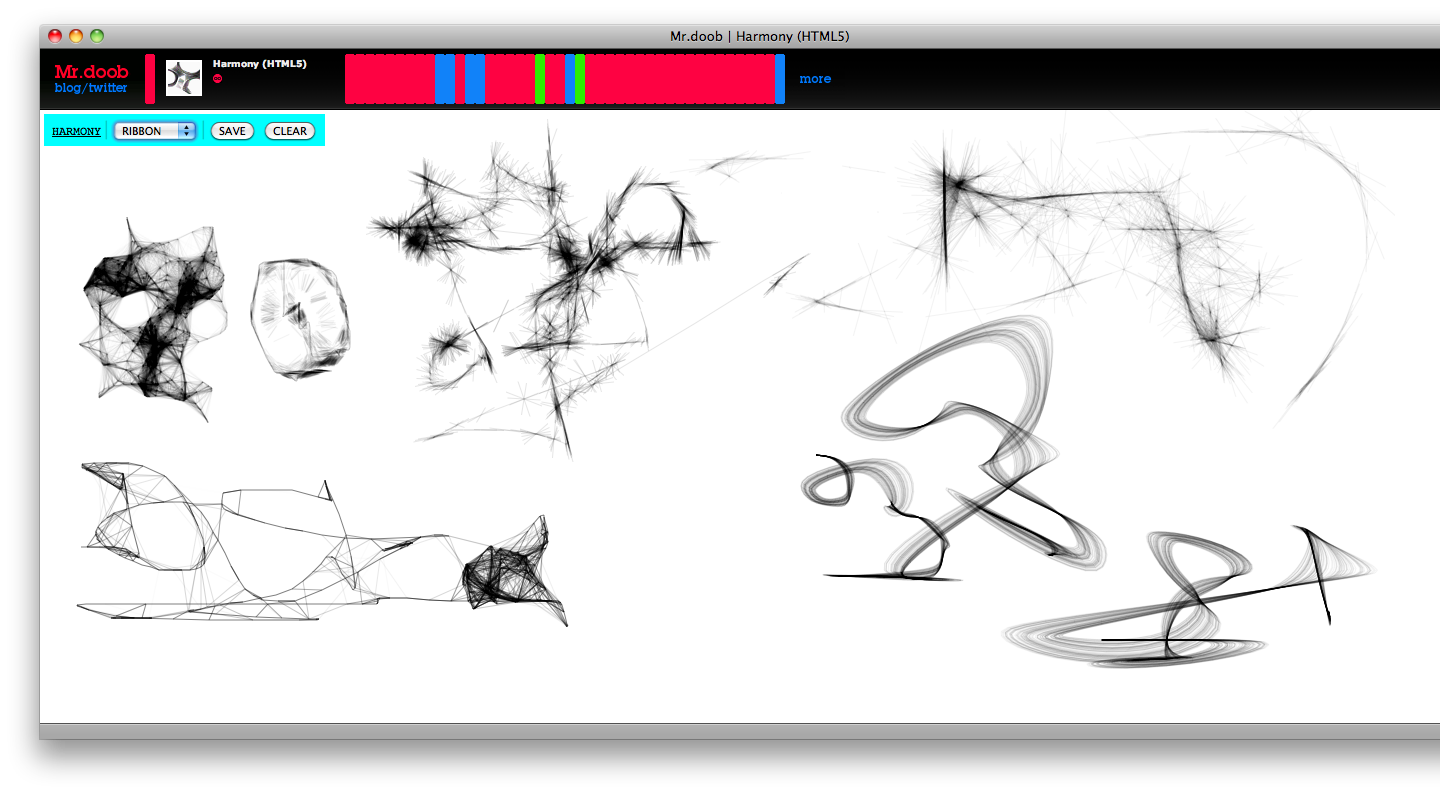
Harmony is an HTML5-based online tool that lets you draw on a white canvas using different brushes. It’s nothing more than an experiment but it’s great nevertheless. It supports a very basic multiply blending effect (as seen in Photoshop) and the developer says it’s very first attempt to reproduce the functionalities of a drawing application after playing with the <canvas> element for some weeks.

Harmony

Harmony

Also, it works best on Webkit as Firefox and Opera don’t support context.globalCompositeOperation = ‘darker’. You can save images to .png format.

An experiment, but after seeing Sketchpad weeks ago, we can’t deny that the future of webapps is very bright and promising.


Moodagent, Music by Flavor

Feeling out your music can be more trouble than it’s worth. Getting in touch with your sensual, happy, or perhaps aggressive sides might lead to a quick trip to thesixtyone, but what if I told you there’s an easier way (with local music)? Moodagent by Syntonetic is a new favorite app of mine that accomplished just this. While I was initially turned off by the low ratings on the iTunes store, I’m gonna have to knock down these preposterous 3 to 3.5 star and knock it up to a 4.5. What makes this app such a winner for me? Read on to find out.

Read more


GroceryList Winners Announced

Thanks everyone who entered the GroceryList giveaway. Also, we’d like to thank the Helium Foot developers for the licenses they gave to MacStories.

Here are the winners:

Savio Palm.

zeebe

You’ll receive the license in your inbox in a matter of a few hours. Stay tuned for other giveaways coming this week.

In the meantime, you can follow the official MacStories Twitter account as @macstoriesnet.