

“For most people, listening to music is something you do while you’re doing something else, not an activity that occupies your entire mind. By contrast, the iTunes LP requires the same kind of attention that you might give to a movie or a book. While that might appeal to the serious music fan, it’s overkill for most consumers.”
Dan Moren on the iTunes LP
Scribe Notes: Beautiful and Rich Notes for iPhone
There are so many apps to take notes on the iPhone, and we’ve covered this subject so many times that I don’t think talking about the ones we’ve featured is even worth anymore. I think the problem with note taking apps mainly resides in the lack of a real multipurpose application that lets you capture any kind of information and organize it into a unified, streamlined interface. No, don’t suggest Evernote please. And yeah, I’m not going to talk about Pastebot here, as its main function is that of capturing the clipboard and, eventually, sync it to your Mac computer. I always would have liked to have this app that could contain most every kind of data (be it photos, text or videos) and keep it stored into a single database.
Today I’d like to talk about a new application we’ve just downloaded from the App Store, it’s called Scribe Notes, it’s beautiful and it allows you to easily enter notes and organize them in notebooks. It’s cool, let’s check it out.
Reconsidering Dropzone
Dropzone is an application by Aptonic which I reviewed back in November here, and it was quite a positive review. I was impressed by the app, which was (is) a small utility that sits in the dock and enables you to perform many actions by simply activating them via drag & drop. Want to share a link? Drag it from Safari onto the Dropzone icon and boom, it shortens the URL using bit.ly and it automatically places it in the clipboard. With this same process you can install applications by dragging the original .dmg file, mount and unmount external hard drives, set desktop pictures and more. It’s extensible, it’s magical.
TextExpander Goes 3.0 - Adds Native Dropbox Support, Leaves Prefpane Format
TextExpander, the much popular utility from SmileOnMyMac that enables you to save a lot of time by assigning abbreviations to ferquently used text and images, has been updated to the 3.0 version with tons of new stuff.
First, the application is no longer a preference pane and comes in the usual .app bundle. I don’t know what’s the thought behind this, perhaps the developers wanted to give it a more “native” feeling. Alongside with the new application format, TextExpander 3 adds support for automatic Dropbox backups and sharing of snippets in the same local network; I still have to test whether this actually works with the iPhone though.
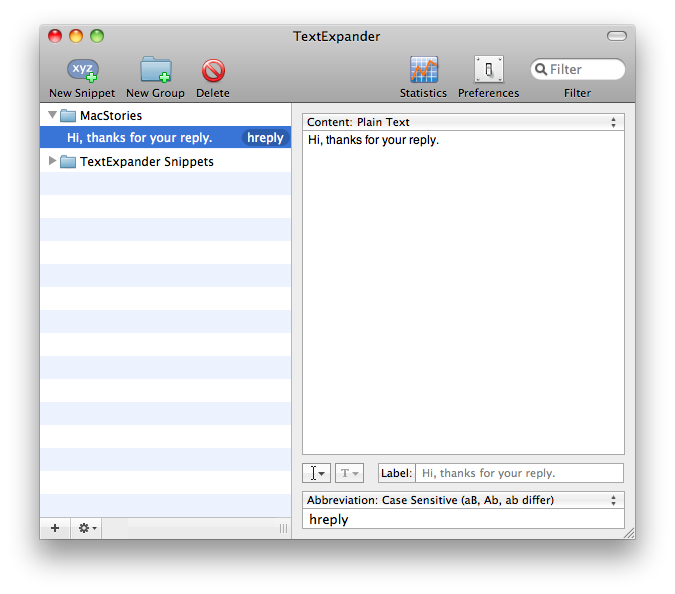
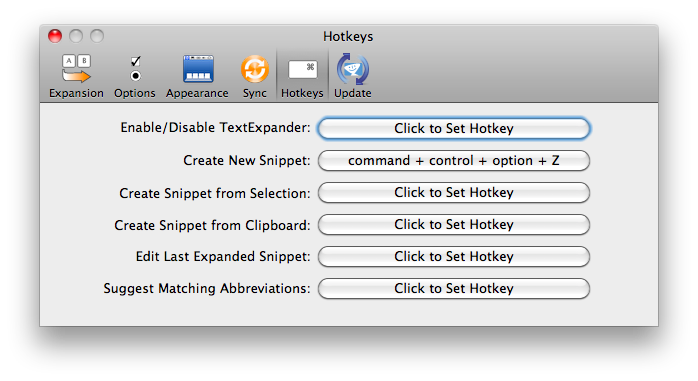
Also, with TE running in the menubar you can now search for snippets right from the icon and do some other things like edit the last expanded snippet. Last, TE 3.0 introduces support for global keyboard shortcut, meaning that you can assign a shortcut for entering new Snippets (basically, a quick entry panel) and invoke it everytime you want to add some text to your collection.
A regular license of TextExpander 3.x comes at $ 34.95, but if your purchased it after November 1, 2009 you can have it right in your Applications folder for free. Previous users can purchase a license saving $15.
Nice update.
Apple’s Long History of Lousy First Reviews
“As the Wall Street Journal reported, the mouse was considered a miss: “Useless,” said Charles L. Mauro, president of an engineering firm. “It isn’t all that easy to learn,” said Amy Wohl, president of a corporate consultancy. “I think it’s awkward,” added Clem Labine, a newspaper publisher. “Since it doesn’t get you away from the keyboard altogether, why go back and forth?”
The Mozilla & Metalab Fiasco
I guess they’re gonna publish a statement tomorrow saying that you can’t blame inspiration. And of course, we won’t believe that.
But you know, worst part is Mozilla could have used some copy for Firefox - next time choose wisely which project to rip off for.
DestroyTwitter, unMac your Client
When people think of Twitter clients on the Mac, we immediately associate with clients wrapped in the fuzzy warm blanket of Cocoa. Sometimes these clients appear as HUDs that nestle in the menubar. Professionals might turn to the popular Adobe Air client Tweetdeck to keep track of trends and various search terms. Many of us would be lifeless without Tweetie, but before we finally sink our teeth into the latest MacHeist offering, I’m going to DestroyTwitter.
Notable Quotes, Words Not to be Forgotten. Review and Giveaway.
I don’t know if it’s a fetish, but reading those famous phrases from people I vaguely remember studying in senior high has become somewhat of a daily activity. I’ll wake up in the morning and flip through a few quotes before beginning my daily routine of Mail and Tweetie 2 checkups on my iPod Touch, before nesting it back into it’s own little neat space. I’ve been playing with Notable Quotes for the last day our so, and may I say it’s fancy. Between the script, leather-bound pages, and its coffee like glow, Notable Quotes has a very expensive feel to it. I like it.
AgileWeb Solutions Posts New Mockups of 1Password for iPad
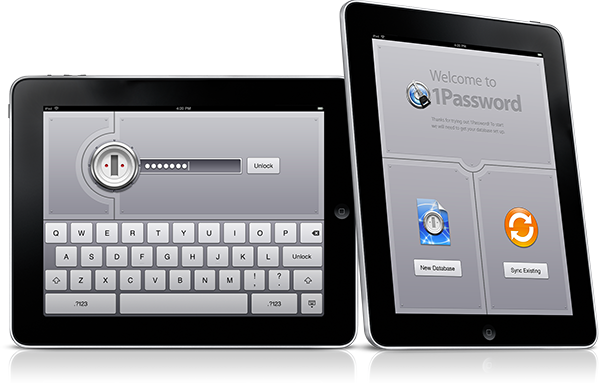
“One of the most interesting things about developing our iPad version is that we’re learning new ways to solve problems and make 1Password easier to use, but not just for the iPad. Dan says that they’ve discovered a lot so far that they want to bring back to our Mac and iPhone versions, which means all of our users will benefit from our iPad development, even if they never get an iPad.”