

Thanks everyone who entered our giveaways! Names of the winners are listed below, and you’ll receive an email / Twitter DM with the license or promo code later today / tomorrow. As a quick reminder, iPhone promo codes can only be redeemed in the US App Store. Read more
Delibar, Creating Flow with OmniFocus, JotAgent and iUseMac Bundle Winners Announced
Plex Comes To Jailbroken Apple TV
If you own an Apple TV and you’ve managed to jailbreak it, then you must be happy about this: you can install Plex on it. As noted by 9to5mac, you can turn your tiny black Apple box in a dedicated Plex device, with the media server running, say, on your home Mac. Plex is a great looking and full-featured media center for OS X which recently released a great iOS companion app.
Instructions from the developer of the hack are available here, and require some manual hacking.
Developers, Start Submitting Your Mac Apps Today
Apple is now accepting submissions for the Mac App Store. With an email sent to registered Mac developers earlier today, Apple confirmed that Mac apps can now be sent to Apple for approval.
We don’t know which developers are jumping on this today and whether Apple has refined its review guidelines following the many doubts arisen in the past weeks, but we know it’s going to be huge – right?

The Mac App Store is set to open in less than 90 days. We can’t wait.
AnyRing & Ringtone Designer Pro, Two Easy Ways To Create iPhone Ringtones
I haven’t been a huge fan of custom iPhone ringtones until I found out that Apple revised its policy about apps that allow you to edit songs on-device (the revision apparently came with the public release of the Review Guidelines) and directly export them to iTunes. When I did, I downloaded Ringtone Designer Pro for iPhone and started rolling with it.
Last week, though, I also discovered a neat app in the Cydia Store called AnyRing (BigBoss repository, $3.99) that, in a very ugly interface, lets you set any song on your iPhone as your default ringtone. Read more
Zuckerberg Is Right, The iPad Isn’t Mobile
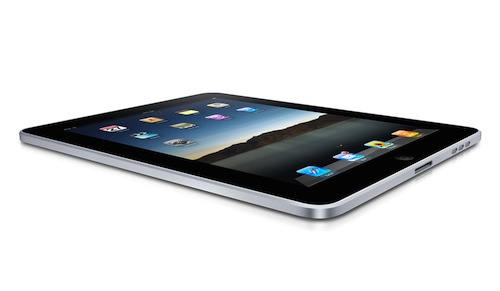
Mark Zuckerberg, at Facebook’s mobile event today in Palo Alto when asked if Facebook was building an iPad app:
“I don’t want to be rude to Apple – we all love Apple products – but this is a mobile event and we want to stay focused on that. The iPad isn’t mobile in the same way.”
This can mean quite a few things, so instead of opening Tweetie for Mac to write that the Zuck’s an asshole, let’s just think about the nature of the iPad as a device. We often refer to it as a “mobile device”; now I’m asking you to think of that 10-inch piece of aluminum and glass as a “device”.
Is it mobile? Read more
Finally, Someone at Microsoft Says Tablets Are Cannibalizing Netbooks→
Finally, Someone at Microsoft Says Tablets Are Cannibalizing Netbooks
Gavriella Schuster, general manager for Windows product management:
These are definitely getting cannibalized,” she said. “These are really a second device. But they are getting cannibalized.
Then welcome to “the third place”, Microsoft.
iPhotoSync Lets You Effortlessly Transfer Photos Between iPhoto Libraries
If you have recently upgraded to iPhoto ‘11 (I bet many of you have) and you still haven’t found the time to set up that Dropbox-based library synchronization between all your computers you read about on some blog or forum board, perhaps you’d like to wait to give iPhotoSync a try. I was indeed about to drop my entire iPhoto library in Dropbox, but then I realized that iTunes (apps and music) was my priority, so I went for a local sync option. iPhotoSync is an app that can run in the background as an “agent” and allows you to sync iPhoto libraries across multiple Macs running on the same local network.
Developed by Haystack Software (the same guys behind Arq for Mac) and completely compatible with the latest iPhoto versions, iPhotoSync is really simple: make sure you have two Macs running iPhoto and iPhotoSync on the same local network, fire up the app on both Macs, let the iPhoto libraries communicate with each other. For instance, you’ll be able to pull all the new photos from another Mac’s iPhoto library, automatically sync photos added to a specific event, automatically sync photos added in the last month. Basically, iPhotoSync transfers photos back and forth.

Facebook for iPhone 3.3 Update Now Live In The App Store

As we reported a few minutes ago, Facebook announced that an update for the Facebook iPhone app was on its way with improved Places support, new Groups interface, deals and better photo support in check-ins.
The update is now live in the App Store, although we’re getting some errors when trying to access the iTunes web preview. To download the app, just go check for updates or fire up the App Store on your iPhone or iPod Touch.
Skyfire For iPhone Now Available, Reviewed [Update x2: It’s Back]
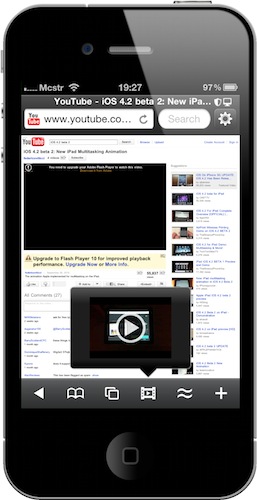
It was supposed to come out tomorrow, but SkyFire Web Browser is already available in the App Store at $2.99. Featuring SkyFire’s technology that allows you to view flash videos on the iPhone through a server-side conversion to HTML5, SkyFire for iPhone also features Facebook and Twitter sharing in-app, a Facebook “Quickview” menu to check on your Facebook wall with one tap, private browsing, tabs and a desktop user agent option.