Skyfire Coming To The iPad, Integrates Facebook & Twitter In The Browser

Remember Skyfire? The Flash browser for iPhone? Yes, the one that lets you watch Flash videos on the iPhone by quickly converting them to HTML5. In our review, we wrote that the app, besides Flash converting capabilities, also had a lot of neat features to bring an innovative browsing experience to the iPhone. Even if I’m sure many users bought it and quickly came back to Safari, Skyfire managed to gain quite a few followers. Skyfire is now coming to the iPad.

The iPad app, which according to Wired should be released “before Christmas” at $4.99, will come with even more functionalities than its mobile counterpart. Skyfire for iPad, thanks to the tablet’s larger screen, will integrate lots of social features such as the possibility to access your Facebook wall at any time, Twitter, Google Reader and a bunch of other websites all within popovers on screen. Skyfire for iPad will allow yo to quickly access your social profiles and check on links shared by your friends and people you follow, tap on them and open everything inside the browser, in additional tabs. The tab interface looks cool and well-animated, but I wonder why the developers went for an iPhone-like approach instead of mimicking the tabs seen in Mobile Safari for iPad.

Also, I don’t know why would I want to see my Facebook wall at any time in the browser. I can understand the Google Reader integration, but all these other social features sound like a useless overlay to me. Oh, and Skyfire for iPad will also have a universal Facebook Like button that will let you like any page without opening Facebook. This, admittedly, sounds pretty cool.

I’m not sure about all this social stuff in browsers (remember RockMelt?), but I’ll be keeping an eye on this new version of Skyfire. With Apple’s devices dominating encoded web video, clearly there’s not this huge need of a browser capable of converting Flash anymore. Perhaps all we need is a social browser for the tablet. [via MobileCrunch] Read more

First Free Download Shows Up in “iTunes 12 Days of Christmas” App

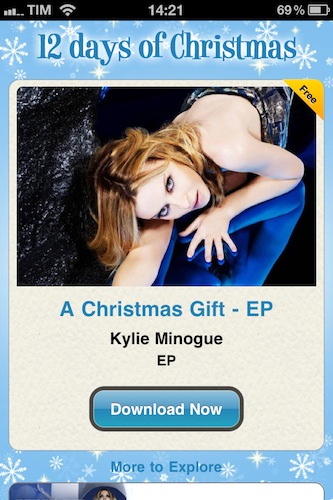
This morning my iPhone sent me a push notification to let me know that a new download was available in the “iTunes 12 Days of Christmas” app. I immediately realized that was strange, as we previously reported Apple’s annual promotion (for European users) should be running from December 26 until January 6. Why sending out a push notification on December 17?

The download is an EP by Kylie Minogue called “A Christmas Gift”, but as you can guess it seems to be an error on Apple’s end. As you tap on the download button, you’re brought to the iTunes app which returns an error and says the item is not available.

Perhaps “A Christmas Gift” will be the first free album to download on the 26. If not, well – at least the music introduction Apple put into the app this morning is pretty sweet. Read more


Twitter Just Got Its Most Beautiful iPad App. It’s Called TweetMag.

TweetMag is, without a doubt, the most beautiful Twitter app that ever landed on the iPad. Yes, TweetMag is  more attractive than Flipboard. But they are two different apps. And there’s no way I’m going to focus this review on a comparison between them.

Let me get this out quickly before I dive deeper into this piece of software that appeared on the App Store tonight: Flipboard and Tweetmag are two different products. Both in the intentions, and realization. Yes, they both aim at letting you build a”digital magazine” out of links shared on Twitter. Yes, they share some aspects of a same concept. And yes, they can live together. This is not about which app is going to kill Flipboard, the iPad app of the year. This is not a piece about the functionalities that you’ll find in both the apps, either. This is about TweetMag, a product of its own that aims at providing a new Twitter experience.

You notice how the most used words until now have been “difference”, “experience”, “product”. TweetMag and Flipboard have a lot in common, yet some aspects underlying the overall concept manage to put them on two separate roads. That’s why I’m running both of them on my iPad. Read more


Email The Cloud, Get Your Actions In OmniFocus

Email The Cloud, Get Your Actions In OmniFocus

To try out the feature, send a message to [email protected]. Within a few minutes, you’ll receive an auto-response from us which includes a “Send to OmniFocus” link.

It’s actually within a few seconds. The actionable emails came in my inbox seconds after I forwarded my items to the OmniFocus address. This is a great idea and it shows how much the OmniGroup is committed to delivering a real cloud-based GTD solution, unlike many others. Too bad this email feature works well only with plain text right now – forwarded emails will turn into lines of weird unicode characters, as also reported by Shawn Blanc.

Still, this gives you an idea of why you have to consider OmniFocus. Truly a killer product for iOS and OS X.

Permalink

My Artists 1.1 - Still My Favorite iPod Alternative

In my review of My Artists for iPhone months ago, I wrote that the app was the ultimate iPod.app replacement for me. It still is, months after its release and with lots of alternative music players available in the App Store. I never deleted My Artists from my device, and I don’t see it going away from that Music folder on my homescreen anytime soon.

My Artists fetches artists and songs already synced to your device and sitting in the iPod app but provides a completely new layout that offers more information thanks to the magic of the Internet. Not only does the app provide better artist profile pics and cover albums, it also lets you check on detailed bios and related artists.

The latest 1.1 update brings several interface improvements, especially in the main list view where the app feels more solid and crisp than ever. You can also shuffle entire albums or artists now – heck, you can even shuffle your entire library from the main view. That’s quite handy. Last, the app’s engine has been update to be faster, and more stable.

My Artists 1.1 is a nice update to an app that is still one of my favorites on the iPhone. Highly recommended. Go download it here.


Apple Releases Digital Camera RAW Compatibility Update 3.5

Earlier today Apple released a new Digital Camera RAW Compatibility Update (version 3.5) which brings compatibility for RAW formats in apps such as iPhoto or Aperture from six more cameras. The new supported models are:

  • Canon PowerShot G12
  • Leica D-Lux 5
  • Leica V-Lux 2
  • Nikon D7000
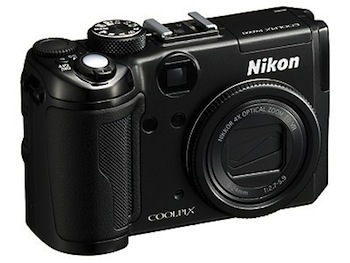
  • Nikon COOLPIX P7000
  • Panasonic Lumix DMC-GF2
  • Panasonic Lumix DMC-GH2

More information about RAW formats are available here. The update is available now in Software update or on Apple’s website.