BBC Can’t Get Apples and Blackberries To Work

We know you’re all playing with Camera+ 2.0 now, but let’s put that iPhone away for a minute and enjoy a good BBC comedy skit, shall we? In the following video, two BBC comedians have fun trying to make apples and blackberries to work because you know, they can freeze or crash sometimes.

I won’t tell you what happens in the video, you’ve got to check it out by yourself. And yes, you can go back to shooting pictures with Camera+ after this. [via TUAW]


Camera+ 2.0 Is Live In The App Store

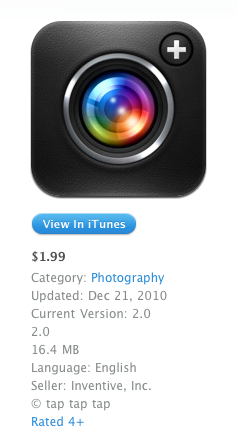
As announced by tap tap tap yesterday, here comes a new version of Camera +. Camera + 2.0 is a major update that contains a huge list of new features and interface improvements, such as a redesigned lightbox, faster start-up times, a timer shooting mode, lots of new modes and effects. From a first look at the app, it looks like one massive update – which is free for existing users.

I’m testing the app right now and I can already say the tap tap tap developers really did a great job in optimizing everything to make the app faster. The SLR screen has been removed to let Camera+ start up directly to the camera UI, just like Apple’s own Camera app. The various shooting modes are accessible from a popover menu next to the camera button, timer shooting mode will let you choose between different intervals before shooting a picture. It’s really nice. The lightbox animations are faster, each photo has its own details such as ISO and location, there are several new effects available under the in-app purchase “I love Analog” pack. You can adjust these effects with a slider, and preview them as demo.

Everything feels new and improved in Camera+ 2.0. From a first quick run, I’m seriously impressed by what tap tap tap has achieved with “just an iPhone app”. The interface design elements on screen sport some beautiful pixels, too. Most of all, Camera+ doesn’t “force you” to share anything, I see it more as a full-featured replacement of the default Camera app that allows me to edit and apply neat effects to my photos, or not. Camera+ 2.0 – but this was a strong selling point of the first version, too – lets you decide whether you want to shoot, edit and share, or just shoot better (thanks to its multiple modes) and forget about it. I like choices.

The app is available here. Expect a detailed review soon on MacStories. Full changelog and screenshots below. Read more


Apple Releases iPhoto 9.1.1

A few minutes ago Apple released an update to iPhoto ‘11, which adds new email features and improves the overall stability of the app. The new version is available now on Software Update or on Apple’s website.

Full changelog below.

- Adds a preference allowing photos to be emailed using an external email application

- Adds “Classic” and “Journal” themes to email.

- Photos attached to an email can now be sized to Small, Medium or Large

- Improves reliability when upgrading a library from an earlier version of iPhoto

- iPhoto now correctly preserves the sort order of Events after upgrading a library

- Event titles displayed in headers can now be edited in Photos view

- Addresses a problem that could cause duplicate photos to be added to a MobileMe album

- Scrolling overlay now correctly displays ratings when photos are sorted by rating

- Photos are now sorted correctly when a rating is changed and photos are sorted by rating

- Fixes a problem that could cause text formatting controls to become inaccessible when editing a calendar


SB 2 Cloud Now Out in Cydia: Automatically Upload Screenshots to Cloud App

SB 2 Cloud is a new tweak now available in the Cydia Store at $1,49 which allows you to easily share any screenshot you take on the iPhone through Cloud App. Really, it’s the simplest Cloud App client for the iPhone ever: once activated, every time you’ll take a screenshot by pressing the home and power buttons simultaneously the file will be automatically uploaded to Cloud App in the background. Just like on the Mac with Cloud set to automatic mode. The iPhone will also paste the short URL to your system’s clipboard for easy sharing.

The app doesn’t come with an actual interface or shortcuts to quickly modify the behavior of the upload. You can only enable or disable automatic upload of every single screenshots for now, and hopefully more options will be added in future updates. SB 2 Cloud shows you an upload in progress with a cloud icon in the iPhone’s status bar, and will play a sound notification once it’s complete.

SB 2 Cloud is simple, but does uploads in the background really well. Recommended for Cloud App users.


iPhone Apps and Custom Tab Bars

iPhone Apps and Custom Tab Bars

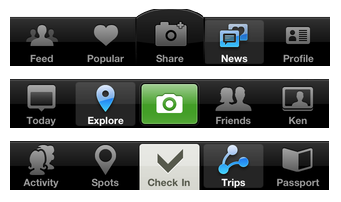
There’s been a new trend with iPhone apps to use more sophisticated custom tab bars. In case you don’t know what a “tab bar” is, it’s historically been the black bar at the bottom of the screen, which provides the main navigation for the iPhone app.

A trend started by Instagram (the first popular app to place an action button in the tab bar, not a view selector) is quickly expanding to other apps like Gowalla and Path. While I recognize this isn’t exactly ideal from a UI ecosystem standpoint (it break several of Apple’s interface guidelines), I do think that sometimes disruption is necessary as it leads to innovation. The problem is, many developers just wait for Apple to innovate.

Permalink

WordLens Founder On The Limitations Of Augmented Reality Apps

WordLens Founder On The Limitations Of AR Apps for iPhone

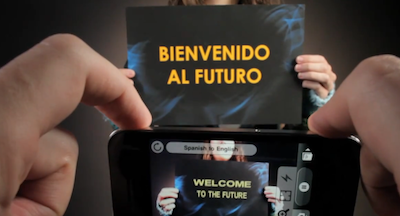
Interesting interview with Robert Scoble. Turns out on-the-fly video translations are a tricky thing to accomplish, the technology underlying the app is all custom and, hopefully, more European languages will be released in early 2011.

I’ve tested the app and it’s not perfect, but it sure looks impressive. I can’t wait for this to gain more languages and, as the founder says in the interview, the possibility to give “context” to words recognized by the camera.

That would be magical.

Permalink

Simulate Long Exposures With Magic Shutter

As the iPhone becomes just about everyone’s photographic tool of choice, developers keep inventing new ways to utilize our pocket devices in the same ways we would our DSLRs. Magic Shutter continues the trend of simply beautiful iPhone apps by simulating long exposures. Ever wanted to dabble with light photography or take one of those common but still cool blurry freeway pics? Magic Shutter allows you to blur images to achieve neat effects (suddenly that 10mph vehicle looks very fast) thanks to Flash mode and Light-painting mode. You already have an idea of the latter, but Flash mode takes a still object and records video post or pre-tail, ensuring you’ll get nifty effects for roller-coaster shots or your next NASCAR outtakes. Magic Shutter is $3 from the iTunes App Store, and makes a perfect gift for the photography buff in your family.

[Magic Shutter via Wired]


BusyToDo Syncs Tasks Through iCal & MobileMe

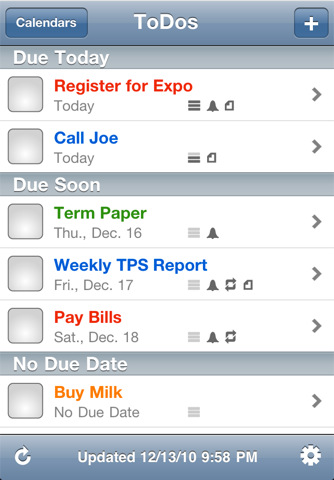
If you happen to live buried in a desktop calendar like BusyCal, assumedly it’s become your central hub for tracking the waterfall of meetings and seemingly endless to-do’s that direct your daily actions. Being mobile, we hate being tethered to our desktops or using clunky software on our phones when tasks could be simplified: BusyToDo from BusyMac free’s iCal’s To Do list and keeps your personal agenda synced across the cloud with MobileMe. Push notifications may remind you via any alarms you’ve set, and BusyToDo will update in the background as you move to other applications on your iPhone. Whether it’s checking off URLs, adding new items for next week’s agenda, or simply looking for the perfect mobile companion for BusyCal, BusyToDo is a brand new release that’s launched for $5 on the iTunes App Store.

[BusyToDo via Macworld]