What Overheating iPad? Judge Dismisses Class Action Lawsuit

Does the iPad overheat when used outside under directly sunlight or warm weather? U.S. District Court Judge Jeremy Fogol has thrown out the case, where plaintiffs claimed Apple deceptive Apple marketing. The plaintiffs argued that books “don’t shut down,” arguing Apple advertised that the iPad was able to be read “just like an open book.”  Computerworld reports that this case didn’t go very far.

“The Court concludes that these allegations are insufficient,” Fogel wrote in his order. “At the least, Plaintiffs must identify the particular commercial or advertisement upon which they relied and must describe with the requisite specificity the content of that particular commercial or advertisement.”

I’m not going to outside and roast my iPad on the sidewalk and wait for it to overheat, but with any sort of common sense (or perhaps purchasing sense) you should realize the iPad’s screen is pretty glossy and isn’t desirable to read in sunlight in the first place. The Judge has given the plaintiff thirty days to gather evidence per his request, but what could they dig up? Commenters, do you think Apple any of Apple’s advertisements or website promotions could be sufficient for this case?

[Computerworld via Macworld]



How To: Send Any Webpage From iOS To Your Mac Browser

Yesterday, I asked on Twitter if there was an easy way to send a webpage from the iPhone to the Mac. Currently, there are several iPhone apps that allow you to get links from your Mac browser onto the iPhone or iPad: most of them either work with a bookmarklet or browser extensions that, with just one click, let you “push”  webpages to iOS. Apps like Handoff (review) and Push The Page even work remotely with the iPhone on a 3G connection. But the other way around, iOS to Mac, is not just as easy to achieve.

In my Twitter poll, many followers recommended AirLink, a web service that, once installed on the Mac and iOS, allows you to send an receive webpages remotely. AirLink, however, requires you to visit a special webpage on your browser to retrieve the link you have shared. What I’m looking for, and what I’m sure others like me have dreaming of for a while, it’s a simple system that allows me to send with a few taps any webpage from the iPhone (on WiFi and 3G) to the Mac, and have a new browser tab open on the desktop. So when I get home, I’ll find the link I shared on iOS ready in my browser. It turns out though, this “simple system” wasn’t so simple to achieve but now, thanks to the help of my friend @MisterJack, I think I’ve got something here that just works and does exactly what I need. Most of all, it requires three taps to be activated. Read more


Intego’s Free Antivirus for Mac Gets 500K Downloads in 30 Days

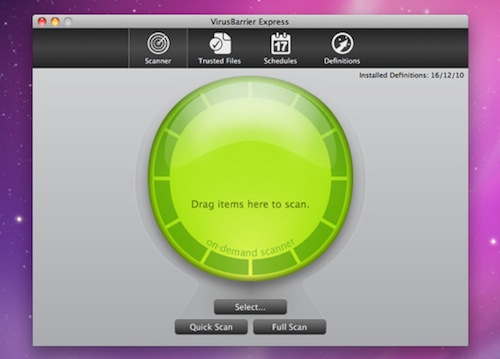
In its first month of downloads, Intego’s VirusBarrier Express, which is being distributed exclusively on the Mac App Store, has racked up an impressive 500,000 downloads. VirusBarrier Express is Intego’s free antivirus and anti-malware offering that claims to protect Mac users from viruses, Trojan horses and other malware, including Windows malware that could be accidently passed on.

Read more


iOS Developers Making Leap to the Mac

iOS Developers Making Leap to the Mac

Chris Foreman at Ars Technica reports about several iOS developers porting their apps to the Mac App Store:

These developers warned, however, that it wasn’t fair to make direct comparisons with the iOS App Store at this early stage. For one, every iOS device has access to the iOS App Store, while only those who applied the Mac OS X 10.6.6 update can access the Mac App Store. And, as Crawford pointed out, there are more iOS devices in active use than there are Macs.

Frampton compared initial sales volumes to the early days of the App Store on the iPhone. “The overall size of the market seems very similar to the early days of the iOS App Store, and in fact I get a very distinct feeling of déjà vu,” he said. “The Mac App Store market may never catch up, but it certainly has a lot of room to grow.”

“Sales tend to eventually level out and that’s yet to happen on the Mac App Store,” Comi agreed.

As more users upgrade to 10.6.6 (a friend of mine ran Software Update a week ago, almost a month after the Mac App Store introduction), there will still be a considerable userbase stuck on previous versions of Snow Leopard. That’s the problem with the Mac App Store coming as an “add-on” to the OS. However, I believe that, in the end, apps will be the reason why these people will be “forced” to upgrade to the latest SL version. The more great apps are released in the Mac App Store, the more people will say “Hey, maybe I really need to update”.

It’s not the Mac App Store as a “feature” by itself, it’s the ecosystem of a platform for great software.

Permalink

Steve Jobs Kicked In The Face In LG Optimus Pad Promotion

The LG Optimus Pad promo was just another boring tablet video that was more effects than awesome product showcase. At about a minute in, however, any morning coffee drinker would have instantly rewound the tape only to ask, “Did I just see get Steve Jobs get pummeled in the face?” We’re not kidding: In a mock game of Street Fighter (apparently called Spec Fighter), Optimus starts the match with a swift flying kick and stomach punch to none other than Apad, modeled after Steve Jobs. Tasteless? Of course. I mean, they didn’t even show the part where Jobs used his Hadouken. Video from CrunchGear after the break.

Read more


Tap-Translate Does Inline Mobile Safari Translations

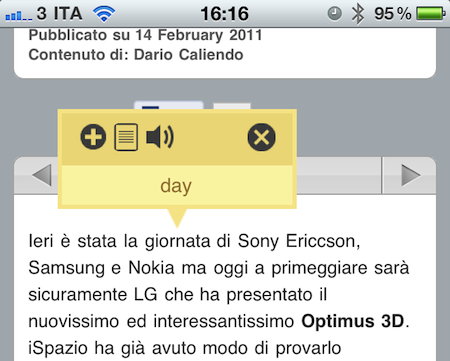
Tap-Translate, a $1.99 universal app by developer Ronen Drihem, brings an interesting approach to translations on iOS, and more specifically in Mobile Safari. Tap-Translate, in fact, isn’t exactly an “app”: it’s an app whose only function is to let you install a bookmarklet in Safari that will let you tap on a word on any webpage to get an instant translation inside a cute yellow popup menu.

It works like this: once you’ve followed the steps provided by the app to install the bookmarklet (which allows you to choose from a variety of languages), you’ll find the bookmarklet in Mobile Safari (works on any iOS device, but I’ve also tested it in Chrome and Safari on the desktop) ready to give you inline translations on tap. The translation’s popup allows you to “speak” a selected word, or jump directly to the Google Translation page. Tap-Translate can also do entire paragraphs, and be dismissed at any time. It’s fast, easy to use and convenient.

At $1.99 you could argue you’re spending money to install a bookmarklet. The thing is, Tap-Translate works really well and, most of all, it’s integrated with Safari and it’s unobtrusive. Recommended.