Week Calendar 3.0 Is A Powerful iCal Alternative for iPhone

In the past months, I’ve taken a look at different calendar applications for the iPhone and iPad that aim at bringing more functionalities (either through particular interface approaches, extended Google Calendar support, or other features) to a device’s built-in calendar software from Apple. The iOS calendar app, a tiny version of iCal for the desktop, is fast and elegant and works just fine for most users, but sometimes you want or need more from a mobile calendar or agenda. For instance, the possibility to have more views available (rather than the List, Day and Month ones designed by Apple) or “do more” with events and reminders. And while I know most of MacStories readers are huge fans of Calvetica and Cloud Calendar for the iPhone and iPad, respectively, I’m pretty sure some of you have been looking for a slightly more “powerful” or, dare I say, “geeky” alternative to Calendar.app. If so, meet Week Calendar.

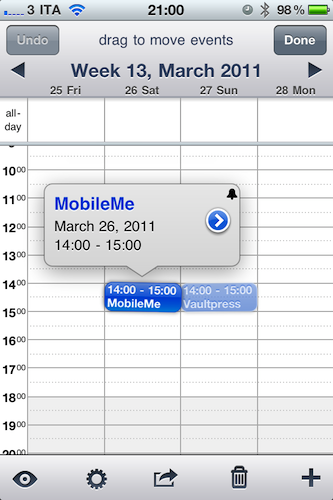
The name says it all: Week Calendar’s biggest feature is the weekly view that’s the focus of the entire experience and undoubtedly something that Apple’s calendar app really lacks. In the app’s weekly view you can pinch & zoom vertically or horizontally to show / hide hours and days, double-tap to focus on a specific event or rotate to landscape mode to gain an even broader view. Tapping on the top toolbar allows you to select a date to jump to, whilst selecting an event opens a desktop-like popup with related information. Tap on the popup, and you get to another screen with all the details you’ve entered and buttons to share, print (that’s right, AirPrint) or create a template off the event itself. You can edit an event at any time, and even display the assigned location on a map. Something that I really like about Week Calendar (well, weekly view aside): you can link contacts from the Address Book to an event. Like I said, everything’s pretty full-featured to offer a wide array of options and choices.

“Choices” seems to be a prerogative of Week Calendar: from the main screen, an iPad-like popover lets you switch between 7 different views: List + Search, Day, Week, Month, Year, Agenda, and Today. The “Go to a Day” shortcut lets you manually enter a date to open. Switching between sections and views felt fast and highly responsive to me, although I have to say I’ve only configured the app with two calendars: my personal one, and US Holidays. The app comes with this kind of optional, built-in subscriptions that you can activate from the Settings. Speaking of which, there’s a lot of stuff to choose from in there: from Time Zone support and “Week starts at” to an auto-coloring system for events with a specific title, you can stay assured the option you’re looking for has been implemented in Week Calendar. I can see how many will prefer the simplicity of an app like Calvetica, but sometimes an application for “nerds & power users” is more than welcome. Other features of Week Calendar that impressed me for the quality of the implementation were fullscreen support (you can activate it with a single / double tap and choose what UI elements to hide), possibility to cut and drag & drop events in any view for easy re-arrangement and TextExpander integration.

Week Calendar is an app that needs to be used for weeks – even months – to be fully appreciated. There’s so much stuff to play with, configure and customize it’s not really easy to fit everything into a single article – plus, I believe all these options have the added value of turning the app into a completely different experience depending on how you use calendars. So, head over the App Store now and buy Week Calendar 3.0 – at $1.99 it’s possibly the most “serious” calendar app for iPhone I’ve seen so far. Read more

HOW TO: Use Amazon Cloud Player With iOS Devices

HOW TO: Use Amazon Cloud Player With iOS Devices

One of the standout features of iCab Mobile is the ability to change the browser User Agent. In other words, this lets the website think that you are visiting from a browser other than Mobile Safari. Changing the Browser ID to “Safari 5 (Mac)” will allow users to download music using the Mobile Safari method, even if Amazon does change how it serves downloaded files.

Christina Warren notes that there isn’t a technical limitation preventing Amazon from serving content to iOS devices, but currently you have to either use an alternative browser to change the User Agent or download each song one-by-one for playback in Safari. I’m still miffed that Amazon isn’t flexing their muscle and aggressively pursuing the iOS platform at launch, considering that’s really where the market for cloud based music streaming exists. The uploading and playback tools might be a little rough around the edges, but Amazon’s integration and incentives need to give Apple a run for its money on the platform that counts.

Permalink

#MacStoriesDeals - Tuesday

If you didn’t already know, we’ve set up a new twitter account for Deals, it’s @MacStoriesDeals. We’ll tweet the daily deals there as well as exclusive weekend deals too. Help spread the word! Here are today’s deals on iOS, Mac, and Mac App Store apps that are on sale for a limited time, so get ‘em while they’re hot! Read more


Impressive Hack Wirelessly Mirrors iPad 2 To Display

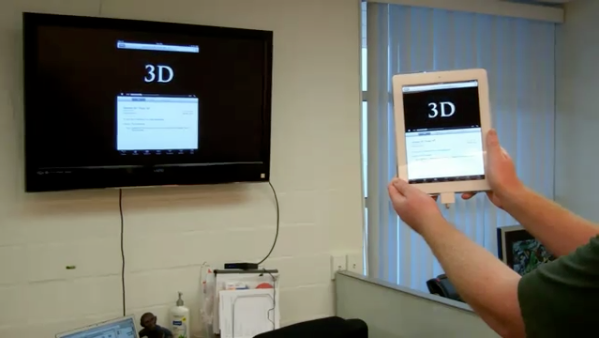
Cables suck, and if you want to kill a presentation you need to be untethered from that fifteen foot long VGA cable tethered to that overhead projector. When a client wanted to cut the cord, some ingenuity resulted in shell housing a minimum of two components and a simple usb cable. The idea revolves around the HP Wireless TV Connect and a Cooler Master Choiix Power Fort battery pack to power the transmitter used for the iPad, connected by a simple USB cable. The HP Wireless TV Connect consists of a transmitter and a receiver: the receiver is connected to the display, while the transmitter is fed power (up to two hours) using the battery. Using a wooden block for a mold, a shell was created to house the components and sit the iPad 2 on top, with enough space to connect the cord from the dock connector to the components inside. How does it work? Asides from the bulk and the two pounds added, the wireless iPad works just as you’d expect it to. We have a video after the break if you’re curious to see how it all goes down, and if you have the time and money you too could roll your own for around $275 according to the mastermind behind it all.

[Youtube (eg0voruhk) via Reddit, MacRumors Forums]

Read more


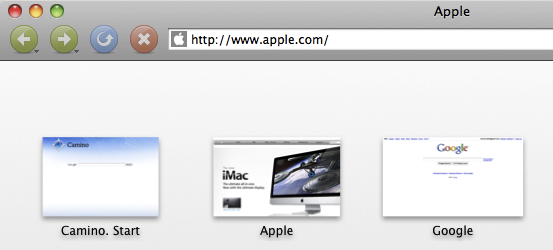
Camino’s Future Is Uncertain, Might Switch To WebKit

Camino’s Future Is Uncertain, Might Switch To WebKit

The developers of Camino, a Mac browser based on Mozilla’s engine, are not sure about what the future holds for their software. Namely, as Mozilla announced the end of Gecko embedding (a technique that allowed Camino’s devs to include Gecko into the Cocoa interface) the team is asking whether for future versions they should switch to (much more supported and widely adopted) WebKit:

As a purely community-based open source project, no one is employed to work on Camino; all Camino developers are volunteers, working on Camino in their spare time, as a labor of love. While maintaining embedding in a fork of Gecko is theoretically possible, we don’t have the manpower for a sustained effort of that kind. A more realistic option would be to port Camino to WebKit, but while this would be much easier to maintain in the future, it would require a large amount of initial work.

For what it’s worth, a very small percentage of MacStories readers use Camino, but we don’t want to see the project be discontinued just yet. I think turning Camino into a WebKit-based lightweight alternative to Safari and Chrome might actually be a great idea.

Permalink

Follows for iPhone Tracks Your Online Stats & Popularity

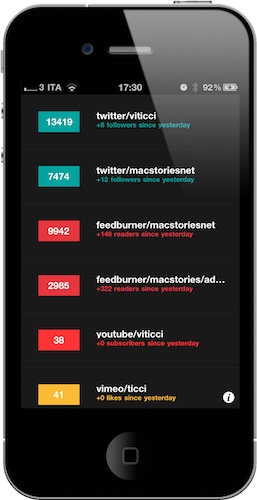
An interesting mix between third-party Twitter app Birdbrain and Ego for iOS, Follows is a new app for the iPhone aimed at collecting and displaying data from your social profiles on a variety of services. Currently, the app supports stats coming from Twitter, Facebook, Feedburner, MySpace, Vimeo, YouTube, Flickr, and LinkedIn.

While Birdbrain goes really in-depth in the way it aggregates and displays Twitter data over time and Ego is more geared towards website owners with Mint and Google Analytics integration, Follows offers a lightweight approach at gathering statistics from the supported services such as view counts, followers, visits and subscribers. From the main, dark-styled dashboard, you get a quick recap of all your online profiles with a series of tabs allowing you to get a more detailed look at numbers and graphs. It sounds complicated, but it’s not. Instead, Follows wants to be an easy way to, say, see how many people follow you on Twitter or are subscribed to your RSS feeds or, again, have liked your Vimeo videos. Plus, it’s a free app.

Once authenticated with the services (you can add multiple usernames for each one of them), everything goes into the main screen. Tapping on an item will display a different single view with additional stats (for Twitter, total amount of tweets, favorites, people you’re following) and two graphs depicting your “social growth”. The system works the same for all the services integrated into Follows. The app is fast at fetching updates and the latest version (released today) fixed an issue with the app crashing as you selected dashboard items.

Follows isn’t as full-featured as Ego (especially for bloggers) or Birdbrain when it comes to Twitter, but it gets its job done. The design is elegant and minimal, and in-app purchases allow you to remove ads and unlock “custom URL tracking”. It’s a free download in the App Store.


Doodle Jump 2.0 Adds Multiplayer

Following a series of updates that added “special edition” levels, Game Center achievements and a brand new version of the app featuring movie character Hop, Doodle Jump 2.0 was released last night with a highly requested feature: WiFi multiplayer. The new Doodle Jump doesn’t have any new levels or enemies, but it comes with Game Center integration for online multiplayer. The feature only works over WiFi with your Game Center friends; you’ll have to race to the top to see who reaches the finish line first, all in pure Doodle Jump fashion while jumping on platforms and avoiding obstacles.

Doodle Jump is one of the most popular games for the iPhone, and we’re still waiting for a proper iPad 2 counterpart to land on the App Store. In the meantime, if you’ve always wanted to compete with your friends in a Doodle Jump race, you can get the update here.


First WWDC Ticket Shows Up On eBay For A Massively Inflated Price

If you missed out on snapping up a WWDC ticket, which is very likely considering the tickets sold out in less than 10 hours, but still desperately want one you could consider swallowing your pride (and emptying your wallet) by jumping on eBay. There has been at least one developer selling his extra unactivated ticket that was supposedly meant to go to a colleague who decided he couldn’t make it out this year.

But unsurprisingly the ticket is being sold at an insanely inflated price of US$3,500 – more than double the original price of $1,599. In fact that’s nearly $2,000 more.  Whether or not the story from the seller is genuine, this ticket scalping will probably attract the attention of Apple’s legal department. But it’s unlikely to stop others from at least attempting to resell their tickets, given the incredible demand for tickets – so if you are desperate you may want to keep your eye out on eBay, Cragislist and even Twitter.

[Via TUAW]


Official Vimeo iPhone App Now Available

Popular video service Vimeo finally released its long-awaited iPhone app in the App Store, it’s free and, from a first quick test, it seems packed with functionalities. Vimeo fans have been asking for months (years?) to have the possibility to browse videos in a native interface and upload media directly from their devices, but Vimeo delivered more than expected and it definitely appears the wait was well worth it.

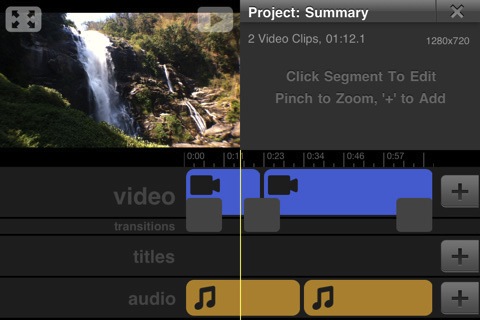
Besides letting you browse Vimeo sections, your videos, likes and tags, the Vimeo app packs a full-featured video editor that allows you to record new material and edit it with transitions, titles, audio and video trimming support. The UI is quite polished and elegant, and the app feels responsive although not just as fast as Apple’s iMovie. The fact that Vimeo, however, managed to release an uploading tool that’s also a movie editor with lots of functionalities is just great. You can combine videos together and control volume levels, add music or your own recordings from the iPod library and decide whether videos should be saved to the camera roll or uploaded to Vimeo. The Project Summary panel in the video editor gives you additional details on the video you’re editing, such as the total amount of clips you’ve inserted, duration and resolution. Even pinch to zoom is supported. Furthermore, the Vimeo app gives you control over the quality of the uploads – you can send raw footage or edited videos in SD or HD off to the service’s servers. Last, uploads can be paused and resumed. I love this feature.

The “My Stuff” tab in the bottom toolbar lets you watch your video inbox, likes and watch later queue – perfect if you usually save a lot of videos for later from the desktop browser and you want to watch them on the iPhone whenever you want. Your own videos come with the stats you know and love like daily views, likes and comment, and you can also manage those videos by sending them to a specific group, channel or album. Sharing to Facebook, Twitter, Tumblr, WordPress, Email and SMS is supported, too.

The Vimeo iPhone app looks like a real gem, and I’ll be testing it with my iPhone videos throughout the week. It’s pretty clear however that lots of work went into this app, which brings the complete Vimeo experience to the iPhone with a sweet interface and several features previously only available on the desktop web browser. You can find Vimeo for iPhone in the App Store. More screenshots below. Read more