This Week's Sponsor:

Halide

Unlock Your iPhone Camera


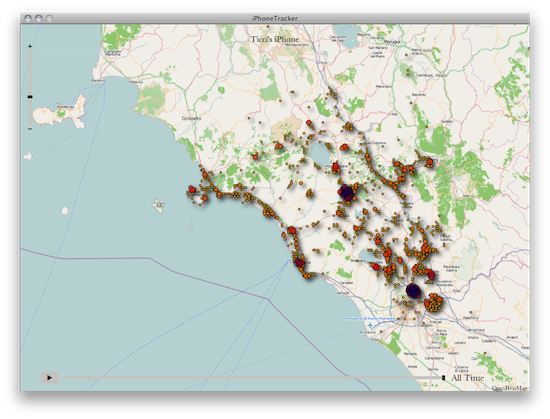
Apple, Location Services & The “Improved Traffic Service”

In Apple’s official response to the location tracking issue uncovered by security researchers last week, an interesting tidbit seems to confirm that the company is seriously committed to delivering improved mapping and navigation software to iPhone users by focusing on building a new “traffic service” to roll out publicly in the next couple of years. From the Q&A:

What other location data is Apple collecting from the iPhone besides crowd-sourced Wi-Fi hotspot and cell tower data?

Apple is now collecting anonymous traffic data to build a crowd-sourced traffic database with the goal of providing iPhone users an improved traffic service in the next couple of years.

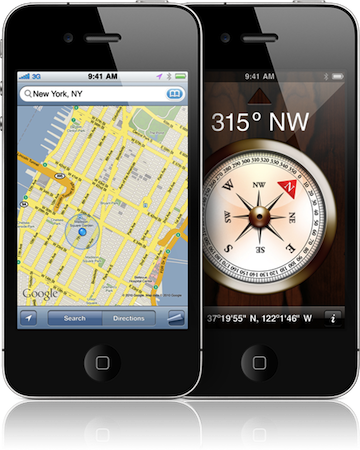
The wording of the statement isn’t clear (some suggest “traffic” may be related to “internet traffic” according to specific locations), but let’s just play along and assume it’s linked to the turn-by-turn navigation software and new mapping features for iOS devices Apple has been rumored to be working on for a very long time. If “traffic” is related to navigation and mobile maps, there’s plenty room for speculation after today’s press release: in the past years, several job listings on Apple’s website hinted at open positions in the iOS team for map engineers and navigation experts, suggesting that Apple was working on its own proprietary solution to ditch Google Maps on the iPhone, iPod touch and iPad. The acquisitions of mapping companies Placebase and Poly9 in 2009 and 2010, respectively, gave some credence to the reports that pointed at Apple willing to become the next major player in the mobile mapping scene. Read more


OneNote For iPhone Receives Solid Update

Microsoft’s iPhone client of OneNote received a solid update yesterday, its first major update since launching in January, and it improves and fixes a number of key aspects to the app that have been heavily requested by users. For those that are unaware of what OneNote is, it is a note-taking application that comes bundled with some versions of the Microsoft Office Suite and many compare it to Evernote, which is very similar in purpose.

Central to the 1.1 update has been improving the navigation of the app so that its users can get to and from parts of the app easier and quicker. As a result there is now a simplified sign-in screen, a home button to quickly return to the notebook view and just generally faster syncing and app performance. Furthermore users can now email notes to themselves or others and deletion of notes has also been revised to be simpler.

Microsoft has certainly not been resting on its laurels in recent times and has been making a concerted effort to produce quality apps for the iOS ecosystem of apps. The recent Bing iPad app is one such example of Microsoft developing quality software for iOS, as is Photosynth and indeed this OneNote app, a strong companion app to the desktop client.

[Via Supersite for Windows]


iPad 2 Launching In Twelve More Countries This Week

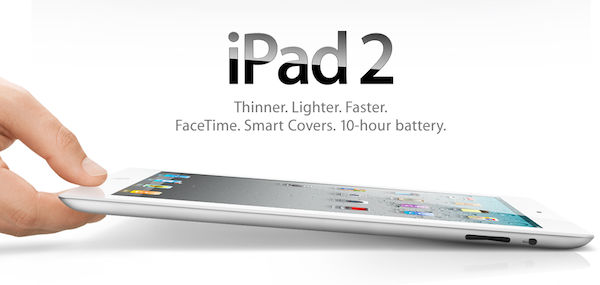
In what is a big morning for Apple Press Releases, Apple has additionally confirmed that the WiFi editions of the iPad 2 will be launching in 12 more countries this week including Japan, Hong Kong, Korea and Singapore. Japan will begin this next phase of the iPad 2 international launches, after being delayed for a month, launching the iPad 2 tomorrow on April 28.

The other eleven countries, including Hong Kong, India, Israel, Korea, Macau, Malaysia, Philippines, Singapore, South Africa, Turkey and UAE will begin selling the WiFi editions of the iPad 2 starting on April 29, this Friday. China will also get the WiFi iPad 2s next week starting May 6th. In all the countries it will be available, as always, in Apple Retail stores, Authorised resellers and online (starting at 1AM).

There is no word on why it is only the WiFi editions of the iPad 2 launching but one would suspect supply constraints, and Apple is promising further international launches of the iPad 2 in the future.


Apple Responds To Location Log Scrutiny With Extensive Q&A Response

Apple has today responded to the intense media scrutiny over the iPhone and 3G iPad location log that researchers claimed logged extensive data, by posting a lengthy Q&A response. Jump the break for the full Q&A.

In its response Apple categorically states that “Apple is not tracking the location of your iPhone” and differentiates that the location log exists as a database to of Wi-Fi hotspots and cell towers around your current location so that when requested, current location data can be given quickly without waiting on the GPS which can take “up to several minutes” to calculate. By leveraging on Wi-Fi hotspots the iPhone can triangulate its location “within seconds”, these calculations are done with a crowd-sourced database of Wi-Fi hotspots and cell tower data that is “generated by tens of millions of iPhones sending geo-tagged locations of nearby Wi-Fi hotspots and cell towers in an anonymous and encrypted form to Apple.”

A portion of the crowd-sourced data (relevant to your location) is downloaded to the iPhone, and is left unencrypted - this is what the researchers discovered. “The location data that researchers are seeing on the iPhone is not the past or present location of the iPhone, but rather the locations of Wi-Fi hotspots and cell towers surrounding the iPhone’s location, which can be more than one hundred miles away from the iPhone”.

However Apple notes there are several issues that they plan to address in a coming software update in the coming weeks. These include ceasing the practice of syncing that location cache to a computer, reduce the size of the crowd-sourced Wi-Fi hotspot and cell tower data stored on the iPhone and delete the cache when Location services is turned off. The cache will also be encrypted on the iPhone in the software update.

Apple also addresses related privacy concerns, noting that “Apple will continue to be one of the leaders in strengthening personal information security and privacy.”. In particular it states that it does build a crowd-sourced traffic database but this is anonymised, as is everything else sent to Apple and as such can not be used to identify individual users. Furthermore third parties gain access to crash logs (which are anonymised) and the iAds system can use location to target specific ads, but this information is not sent to advertisers.

Jump the break for the full Q&A.

Read more


Apple Confirms: White iPhone Tomorrow

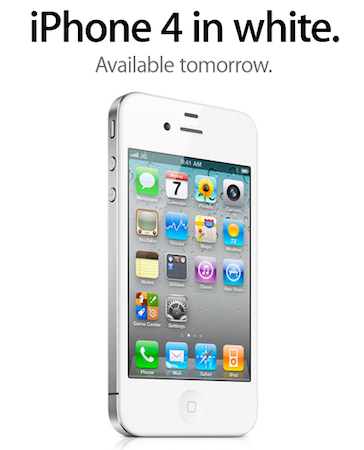
With a press release that just went out, Apple confirmed that the white iPhone is launching tomorrow. After much speculation and several units already sold in Belgium and Italy, Apple finally announced that the white iPhone will be available on Thursday, April 28, in 28 countries. In the United States, it will be available both on AT&T and Verizon Wireless. Price is the same of the black iPhone 4: $199 for the 16 GB model and $299 for the 32 GB, with a two-year contract.

The white iPhone 4 has finally arrived and it’s beautiful,” said Philip Schiller, Apple’s senior vice president of Worldwide Product Marketing. “We appreciate everyone who has waited patiently while we’ve worked to get every detail right.

The white iPhone will be available tomorrow in Austria, Australia, Belgium, Canada, China, Czech Republic, Denmark, Finland, France, Germany, Hong Kong, Ireland, Italy, Japan, Luxembourg, Macau, Netherlands, New Zealand, Norway, Singapore, South Korea, Spain, Switzerland, Sweden, Taiwan, Thailand, UK and the US.
Read more


MobileRSS for iPad Comes with New UI, Feed Management, Article Downloads

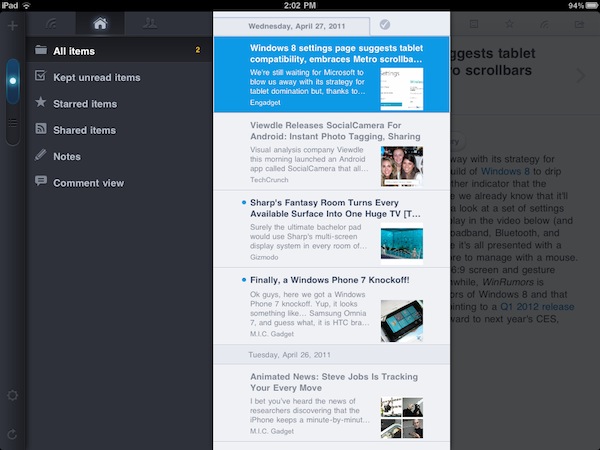
Deeply criticized by the iOS community in the past months for being too similar to Silvio Rizzi’s Reeder, MobileRSS by NibiruTech recently went under a major update and facelift. When I was told a few weeks ago to give a try to the app again, I was a little skeptical: how could there be an improvement when the previous version was so clearly inspired (to an extent, one could have called it a “rip-off”) by another app? Fortunately, my skepticism – while reasonable – couldn’t do anything about the fact that the new MobileRSS HD for iPad is a well-crafted application. Sure, it still hints at Reeder and Twitter for iPad in some interface schemes and navigation methods, but who doesn’t nowadays, honestly? The new standards created by popular apps like Twitter (panels, sliding actions, pull to refresh), Reeder (more vertical panels, popups) and Apple itself (landscape sidebars, popovers) can now be seen in hundreds of different applications from the most variegate categories. And if we refer to some of these features as “standards”, there’s nothing much to rip-off at this point.

MobileRSS Pro perhaps won’t replace Reeder and Mr. Reader on my homescreen, as the developers still have some issues to iron out (specifically with the unread items list not removing a selected read article after a refresh) and some interface changes to refine around the edges. From what I’ve seen so far, though, the app provides a very solid alternatives to the feed readers mentioned above: MobileRSS HD has got support for multiple Google Reader accounts, it lets you add and remove subscriptions thanks to full feed management (like Mr. Reader), and it’s got plenty of sharing options to forward interesting articles to Twitter, Facebook, Instapaper, Read It Later, Delicious, and email. The app allows you to choose fonts from a popup menu, as well as change font size for optimal reading. On top of that, you also have classic Google Reader options like mark as read / unread, like, share, and note. Most of these functionalities have been implemented through popup menus that, with the new default dark theme, look really good on the iPad’s screen. The app is stable, fast and reliable – pretty snappy on the iPad 2, too.

Two features that particularly impressed me in this new version of MobileRSS are swiping actions and the possibility to download full articles for feeds that only come with excerpts. In the settings, you can select websites that have truncated feeds, and tell the app to always download the full content upon opening a new unread item. MobileRSS will then display an indicator showing that the full article is being fetched, and after a few seconds you’ll be able to read the entire article without jumping to a web view. On the other hand, navigating between feeds in MobileRSS looks a lot like Twitter for iPad: the main list displays unread items, and tapping on one of them will open a second panel on the right with the RSS view. The unread list will overlay the left sidebar, and with a right swipe you can go back to the main view. A toggle on the left allows you to switch between “all items” and “unread items.”

Overall, I think NibiruTech is doing a good job in differentiating MobileRSS from other RSS apps for the iPad, yet implementing concepts and UI elements that have become standards on the platform thanks to third-party software adoption. MobileRSS HD is available at $4.99 in the App Store, and you should give it a try. Read more


iPad 2 Launching In Japan Tomorrow?

Reports today coming from the Japanese Nikkei say that the iPad 2 will eventually launch in Japan tomorrow on April 28. It had originally been a part of the first group of international countries set to receive the iPad 2 on March 25 but the devastating Japanese earthquake and tsunami forced Apple to delay the launch.

Apple hasn’t confirmed the launch for tomorrow but the Nikkei reports that it will hit the stores in “stealth”, with little publicity compared to other iPad 2 launches. A MacRumors reader also found a poster at a Softbank store that lists the white iPhone 4 as also launching tomorrow, April 28 as the launch date.

[Via MacRumors]

Read more


Zite Receives Update, CEO Discusses What’s Next

Zite, one of those ‘personal iPad magazines’ like Flipboard or the newer News.me, received an update yesterday that adds an in-app browser, better clipboard support and some much appreciated performance improvements.

TUAW spoke to the new Zite CEO, Mark Johnson, who used to work at Microsoft. He said that they were pleased with the success of the app, with positive reviews and over 100,000 downloads since launching. Customization, he says, is an oft-cited request by users and he said they are working towards adding more options and flexibility to the news sections. Interestingly, the Zite team is also working on a web version, improving the offline reading abilities and reducing the incidence of duplicate articles in the news stream.

In its initial launch, Zite received some cease and desists from various publishers around the web because of Zite’s ad removal. They have since accommodated the publishers concerns by adding a direct link and Johnson has said that this has quelled publisher’s concerns. You can download Zite from the iPad App Store for free.

[Via TUAW]


Pioneer AppRadio To Bring Apps And Deep iOS Integration To The Car

A new Pioneer car audio system is set to feature its own app system that also ties in with iOS devices and put it all on a very stylish iPad-eque front panel. The official FCC filing and a leak to CrunchGear reveals the Pioneer AppRadio, with a 6.1” display and an iOS-style home button in the center, will be loaded with specialised apps from Pandora Radio and iHeartRadio to GPS mapping software and traditional AM/FM radio.

In what is surely a sign of the times, Pioneer will not be including any optical drive in the device, opting instead for USB, RCA and S-Video inputs. CrunchGear contends in its report that the audio system will likely talk to iPhones and iPods through the USB interface for music as well as contacts and even some apps. The device also doesn’t have any internet access on its own and will likely rely on smartphones such as an iPhone to provide mobile connectivity for some of the internet apps such as Pandora.

To avoid problems surrounding distracted driving, the Pioneer AppRadio will also come with a steering wheel-mounted remote control as an option. Based on the FCC filing and the rumor, the AppRadio is believed to be “about ready” but no specific release date or pricing is yet known.

[Via Electronista]