Verizon: 2.2 Million iPhones Activated In Two Months

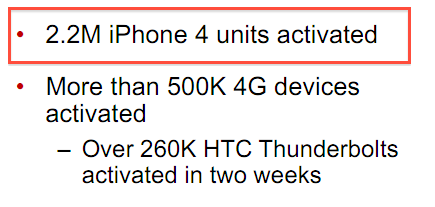
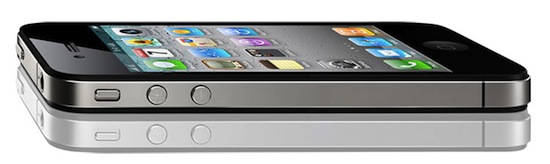
Following yesterday’s official AT&T iPhone activations for the first quarter of 2011 (3.6 million units) and Apple’s Q2 financial results (18.65 million iPhones sold), Verizon reported its Q1 2011 earnings results this morning, confirming that the company activated more than 2 million iPhones 4s since February.

As noted by Peter Kafka at MediaMemo, Verizon’s earnings results public PDF document indicates the company activated 2.2 million iPhones in two months – the device went on sale on February 10th, thus granting Verizon only two months of availability during the quarter. Apple didn’t officially disclose Verizon iPhone sales numbers at its earnings call yesterday, however they did say that adding the iPhone to Verizon’s line-up meant begin offering the device to an enormous customer base.

The CDMA iPhone is expected to be released in more countries on different carriers in the next months, but Apple hasn’t confirmed any of these plans yet. Initial speculation on Verizon iPhone sales claimed numbers were “low” and “under Apple’s expectations”, but 2.2 million units activated in 2 months seems to suggest the device has been selling strongly in the quarter.
Why A New iPhone In September Makes Sense

I’ve been thinking about this for a while now, but after seeing Apple’s terrific financial results for the second 2011 quarter it became clear to me: a new iPhone in September makes perfect sense, in spite of all the reports claiming it would be a bad choice for the company to “delay” the release of the next-generation to the Fall skipping the usual June / July timeframe. Of course Apple hasn’t confirmed any of this speculation, but if rumors and reports from well-sourced Apple journalists like Jim Dalrymple are of any indication, it really looks like we’re going to see a new iPhone in September, not this summer. And here’s why I think it’s a good plan. Read more


Apple Q2 2011 Financial Results: $24.67 Billion Revenue, 4.69 Million iPads, 18.65 Million iPhones Sold

Apple has just posted their Q2 2011 financial results. The company posted revenue of $24.67 billion, with 4.69 million iPads sold, 18.65 million iPhones and 3.76 million Macs. Wall Street consensus estimate was EPS of $5.36 and revenue of $23.34B. Mac sales saw a 28% increase over the year-ago quarter, while with 9.02 million iPods sold Apple saw a 17% unit decline. Overall, the company posted quarterly revenue growth of 83% and profit growth of 95%. International sales were 59% for the quarter, with Asia and Pacific regions featuring a 182% increase year over year. The reported iPhone sales were stronger than expected by most analysts, with a 113% increase year over year. iPhone revenues, however, grew faster than sales with a 126% increase [source]. Overall, this was the biggest non-holiday quarter in Apple’s history.

With quarterly revenue growth of 83 percent and profit growth of 95 percent, we’re firing on all cylinders,” said Steve Jobs, Apple’s CEO. “We will continue to innovate on all fronts throughout the remainder of the year.

In Q1 2011, the company posted a record revenue of $26.74 billion with 7.33 million iPads sold, 16.24 million iPhones and 4.13 million Macs. In the year-ago quarter, Apple posted revenue of $13.50 billion and net quarterly profit of $3.07 billion. The company sold 2.94 million Macs, 8.75 million iPhones and 10.89 million iPods during the quarter.

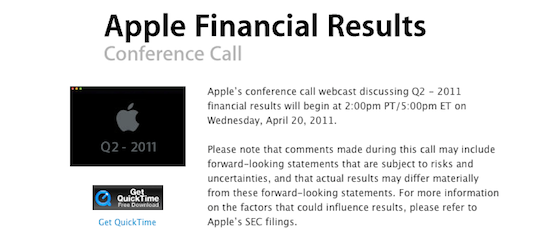
Apple will provide a live streaming audio feed of its Q2 2011 financial results conference call at 2:00 PM Pacific, and we’ll update this story with the conference highlights. Read more


Turn an Old iBook into an iPad Case

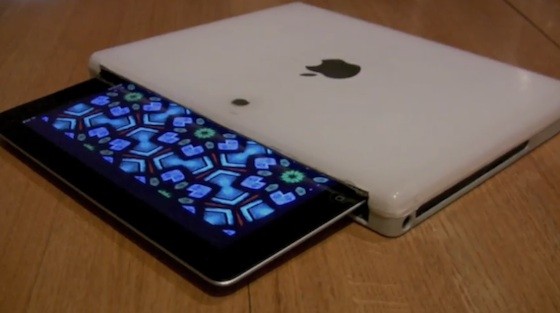
Many people with broken computers either throw them away, or send them to a recycling program. Why not keep your old iBook and use its shell to make a one-of-a-kind iPad case? Sounds difficult, right? Gary Katz, who created things such as the Personal Shoebox Apple Store and The Apple Museum - 30 Years in 2 Minutes, shows you how and it’s not that difficult. All you need is an old iBook, a Dremel tool and some free time.

Demo video after the break. Read more


RemoteTunes Brings iTunes Home Sharing to Back to My Mac

When I reviewed Hamachi for Mac a few weeks ago and called it a great, free alternative to Apple’s Back to My Mac, I noted how Hamachi – among other things – managed to successfully enable remote iTunes Home Sharing between two Macs. The iTunes Home Sharing functionality, introduced on iOS 4.3 for iOS devices and Macs on the same local network (and a long-time favorite of iTunes desktop users), allows you to share your entire iTunes library locally, wirelessly, between computers and iPhones or iPads. But wouldn’t it be great to have the same feature available on Macs connected remotely to each other? Hamachi does that out of the box, but Back to My Mac doesn’t. RemoteTunes, a $5 utility, fixes this.

Once installed, RemoteTunes will find Macs that are sharing the same Back to My Mac credentials on your network. If Back to My Mac is correctly configured, you should see a machine pop up under the Shared tab in your OS X Finder. RemoteTunes will find the remote shared library (makes sure to activate iTunes Home Sharing on the remote machine), and let you stream music between Macs using MobileMe as the communication tool. It all works in the background, and it’s basically a graphical user interface for complex SSH and DNS commands most users don’t want to mess with. I’ve tried this on a friend’s iMac (I’m no longer a MobileMe user), and I was pleased to see connections happening through RemoteTunes were stable, and reliable.

If you’re a MobileMe subscriber, at $5 RemoteTunes is a no-brainer. It won’t work with iOS devices, but it will stream music between Macs just fine.


Seamless: Transition Playing Music From Your Mac To Your iPhone

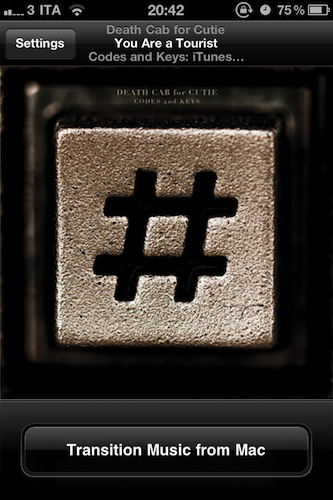
I’ve been there before: I’m working, I’m listening to some Oasis or Death Cab for Cutie on iTunes on my Mac, and iCal reminds me I have to go out. I take my iPhone, I quit iTunes, and I realize I was really liking the song I was listening to. So I’m forced to fire up the iPod app on my iPhone, find the song again, and start listening from the beginning of the track. I could manually move the on-screen cursor to the exact position the song was on iTunes, but it’s quicker this way, plus I really have to go out. Seamless, a new iPhone app by Five Details, provides the simplest solution to this problem: a button.

Once installed on the Mac (for free) and on your iPhone ($0.99 in the App Store) Seamless will communicate with your Mac to see what song is playing. If the song is found on your device’s iPod library and you’re ready to leave your computer, tap “Transition Music” and the song will quickly fade on your Mac, and magically start playing on the iPhone. Same position, same song, one button. You can do the opposite, too: you’ve just got home, with a song playing on your iPhone. Tap the button, and music will start playing on your Mac . This happens in less than a second, provided that both devices are on the same local WiFi network.

While Seamless is intriguing, clever and almost magical in its concept, there are some execution issues to iron out. For instance, I couldn’t get the app to work last night (it kept saying the “song was not present” on my iPhone, but it was) and the developer told me it’s because of a bug that won’t find songs on a synced device unless you’re playing from a playlist – not just the Music library. So I created a playlist, synced it to my iPhone, and now the app works just fine. This bug will be fixed soon with an update, I was told. And of course, the app won’t work at all if you don’t sync music – don’t expect Seamless to be able to transition music you haven’t synced on your iPhone.

As long as you keep in mind that this version might require syncing a playlist and that you can’t just transition music you don’t have on your iPhone, Seamless is a great idea. It’s simple, and it’s only $0.99 in the App Store. Check out the promo video featuring the omnipresent Adam Lisagor below.
Read more


Apple Investing In Toshiba’s New Plant for iPhone Displays

According to a report by Japanese newspaper Nikkan Kogyo Shimbun, Apple is planning to invest in Toshiba’s new LCD plant in the Ishikawa Prefecture, central Japan, for the manufacturing of iPhone displays. The report, relayed by MarketWatch, claims that Apple has picked Toshiba as the sole Japanese supplier for iPhone LCDs, effectively ceasing talks with Sharp over an investment in their facility.

The report said that Sharp was no longer a candidate for Apple’s investment. Sharp said in a statement released Wednesday that the Nikkan Kogyo Shimbun report “contradicts the facts.”

A spokesman for Toshiba’s LCD display unit declined to comment.

After Apple’s Q1 earnings call in January, Apple COO Tim Cook told the press and analysts that the company had entered a $3.9 billion component supply deal in a key area that was “an absolutely fantastic use of Apple’s cash”. Many speculated that, after flash storage supply deals and agreements, Apple identified high-resolution LCD displays as a key factor to iOS’ devices manufacturing process. Back then, speculation and Tim Cook’s own words suggested that Apple had entered a deal with three manufacturers, including Toshiba and Sharp. A month before the the Q1 financial results, Apple was indeed rumored to be discussing with Toshiba an investment in a new $1.19 billion factory – the same that Nikkan Kogyo Shimbun is mentioning today. But at the same time, several reports suggested that Apple was also considering a second investment in a $1.2 billion facility from Sharp – with over $60 billion in cash, a double investment in LCD manufacturing wouldn’t have surprised anyone. But today’s report seems to confirm that the deal with Sharp hasn’t gone through, implying that Toshiba has been chosen as the only Japanese manufacturer of iPhone LCD screens.

Apple’s Q2 earnings call is scheduled later today at 5PM ET.


#MacStoriesDeals - Wednesday

We’ll tweet the daily deals at @MacStoriesDeals as well as exclusive weekend deals too, so please follow! Here are today’s deals on iOS, Mac, and Mac App Store apps that are on sale for a limited time, so get ‘em while they’re hot!

Read more


UpdateBar for Mac Sends Status Updates To Multiple Social Networks

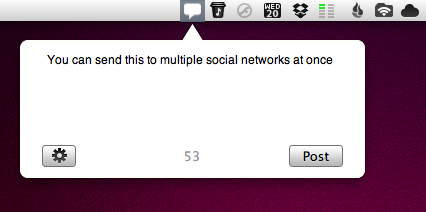
If you’re tired of using the browser to post the latest Steve Jobs spoof video on your Facebook wall, or don’t want to send quick updates using a full-featured Twitter client because you’re afraid of being distracted by the amount of content in your timeline, a new app called UpdateBar provides an easy way to post status updates on multiple social networking sites at once. Released at $0.99 in the Mac App Store, UpdateBar does one thing well: it displays an unobtrusive popup from your Mac menubar, allowing you to send a status update to Twitter, Facebook, Tumblr and Identica. You can configure these services in the settings, and choose which one to use from a dropdown menu that lists all your available accounts.

The app can shorten links using is.gd and goo.gl, and you enter your custom URL shortening service as well. There’s no way to trigger the popup window with a keyboard shortcut yet, and I hope this will be implemented in a future update. The possibility to quickly drag photos from the desktop onto UpdateBar’s window would also be a nice addition.

UpdateBar makes it easy to post updates to Twitter and Facebook. Get it at $0.99 in the Mac App Store.