ZeroNinetyNine’s Mac App Store “Bundle”

Here’s a unique offer for all you bundleheads — ZeroNinetyNine is offering “The First Mac App Store Bundle” today only. Since the Mac App Store doesn’t allow apps to be bundled and sold together, ZeroNinetyNine has found a unique way to do so by designing a holding page with all the applications in their “bundle”. Several independent developers have simultaneously dropped the price of their apps for one day sale on Mac App Store for just 99¢ per app.

One could find these price discounts by searching the Mac App Store and our own MacStoriesDeals posts, but what fun is that? Well, actually our MacStoriesDeals is great if I say so myself! ZeroNinetyNine has done the hard work for you and presented it in a well-designed page.

The apps that are included in this one-day 99¢ sale are MacPaw’s Ensoul and Hider, Coppertino’s Focus, and Apparent Software’s Blast Utility. Other apps included are Alarm Pro, Inpaint, Compartments, iResizer, Virus Barrier Plus, Washing Machine and Intego Backup Express.

ZeroNinetyNine has done a great job coordinating this independent “bundle,” there are many great apps at a great price — 99¢ a piece. This is not a one time affair either, ZeroNinetyNine will be doing these types of bundles once a month.


Gradient for Mac 1.0 Giveaway

Back in September we showed you a beta preview of Gradient by JUMPZERO. As I said before, it’s a simple yet powerful Mac app that lets you easily create CSS gradients with a beautiful user interface. Gradient was officially released yesterday and the JUMPZERO team has a little surprise for MacStories’ readers.

Gradient 1.0 is well polished for a 1.0 release — their time and effort really shows. Since the beta stage, JUMPZERO has improved some of the UI elements and improved the overall user experience. It will be a great tool for web designers looking for a simple yet intuitive way to create CSS gradients. Gradient is now in the Mac App Store for an intro price of just $4.99, get it here.

Read more


Twitterrific 4.4.3: With More Polish!

It’s been a while since we’ve covered what Ollie’s been up to in his spare time. Twitterrific 4.4.3 — a combination polish & maintenance release — launched this afternoon on the Mac and iOS App Stores. There’s a couple of new improvements here, especially in the iOS edition that’ll delight some and confuse others. So what’s in the rundown? Lots of stuff.

Read more


A Hack to Get Back “Save As”

A Hack to Get Back “Save As”

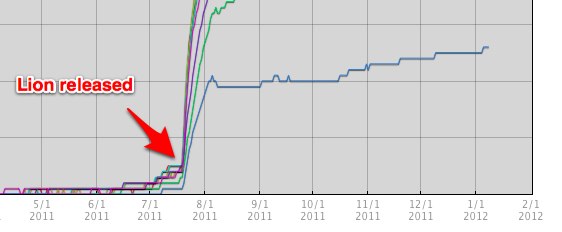
And to add insult to injury, as a keyboard junkie it’s not just the removing of “Save As” that saddens me. It is also the removal of a very handy keyboard shortcut that I used many times a day: Command+Shift+S. And so, by harnessing the power of Keyboard Maestro, I set up Command+Shift+S as a “Save As Hack”.

Shawn Blanc laments about how Lion’s Duplicate and Revert functions — replacements for the apparently outdated yet super useful Save As function — just don’t cut it when you want to save multiple versions of a document or quickly save a copy with an alternate name (I do this a lot when self-editing lab work in college). Apps like OmniOutliner work around this by offering templates (which were available before Lion mind you), but even then the Save As function offers a direct path to quickly renaming the file and shoving it in Dropbox if you have to.

Duplicate performs this function in that you physically get a new document copy presented on the desktop. The problem with Duplicate is that while it’s intended to be user friendly, it ends up making more work than is necessary. Instead of simply renaming and saving a document, you have to sit through an animation, close the original document, then rename and save the new document. I think its safe to say most Mac bloggers are inherently power-users, and have come to rely on quick keyboard shortcuts and tools that were standard up until now. While Duplicate isn’t as friendly for us, Shawn’s right: the worst part really is the lack of that shortcut key.

Shawn has a Keyboard Maestro macro available on his site for download. Alternatively, John Gruber and Ben Brooks offer a similar solution that doesn’t go as far, but brings back the shortcut irregardless through System Preferences.

Permalink

Jailbreakers: Hide the Store Button in the Music App

NoStoreButton on Cydia

NoStoreButton on Cydia

Apple’s Music app is pretty fair when it comes to finding and playing back your favorite tunes, but occasionally I’ll accidentally press the integrated Store button as I try to back out of the Albums view. In getting a Store button where I expect a back button (of course I’m probably doing it wrong), why not just remove it altogether?

If you’re jailbroken, Cydia has a self explanatory tweak that’ll do just that. Download NoStoreButton, respring, and relaunch the Music app to find the Store button hidden for good. The tweak is free to download, and iDownloadBlog walks you through the process with a video tutorial on their website.

[via iDownloadBlog]


Apple’s Australian Preliminary Injunction Against The Samsung Galaxy Tab 10.1 Overturned For Now

Apple’s injunction on the Samsung Galaxy Tab 10.1 in Australia was overturned today in a unanimous decision by the Australian Federal Court. Things are a little more complicated though, because Apple will likely appeal the decision all the way to the High Court of Australia. Consequently the presiding judge has ordered that the ruling be stayed until Friday to give Apple some time to lodge the appeal. One must also remember that this was only a temporary injunction before the full trial starts around March next year.

The Verge has gotten an official statement from Apple regarding the ruling:

It’s no coincidence that Samsung’s latest products look a lot like the iPhone and iPad, from the shape of the hardware to the user interface and even the packaging. This kind of blatant copying is wrong and, as we’ve said many times before, we need to protect Apple’s intellectual property when companies steal our ideas.

On a related note, Apple yesterday asked a German court to ban Samsung’s Galaxy Tab 10.1N - an altered version of the Galaxy Tab that was specifically designed to work around the European design registrations that Apple holds for the iPad. If Apple is successful with this preliminary injunction, it will be the fourth variant of the Galaxy Tab that they have been successful in temporarily halting sales for (previous versions are the 7.7, 8.9 and 10.1).

[Via The Verge]


Rumor: Microsoft Working On Office Apps For The iPad

Microsoft may be working on creating iPad versions of its popular Office Suite apps according to The Daily. The Daily’s sources say that the apps would likely work with Microsoft’s new online service, Office 365, and be price-competitive with Apple’s Pages, Numbers and Keynote iOS apps which are sold around the $10 price point. The move wouldn’t be completely surprising given the fact that Microsoft has already developed a number of iOS apps, including the impressive Bing iPad app.

No detail is provided in the report about how powerful the iPad versions of Office will be — nor about what kind of interface would be used. A release date is not known either, but they could potentially launch in the first half of 2012.

The report also notes that a new version of Office is also in development for OS X Lion, with a release date of next year sometime. However typically the OS X releases of Office have experienced a one year delay after the Windows version is released. Consequently, with the next version of Office for Windows not expected until sometime next year, a 2012 release for the OS X version as well would buck the recent trend of Office releases. It should also be noted that Microsoft has already signalled that an update is coming for Office for Mac 2011 that will bring support for a number of Lion features.

[The Daily via The Verge]