Review: Tyype HD for iPad

Text editors on iOS are always difficult to review. More or less everyone who writes on a computer or other digital device has a favorite mobile and desktop text editor, and is accustomed to the workflows connected to it. To give an example, I am totally in love with iA Writer. Its easy iCloud sync options, readable typography, and Focus Mode fit my needs. I don’t need Markdown, lots of different fonts, or an extensive amount of settings. I just want to write, and with iA writer I found the perfect, distraction-free environment to do so.

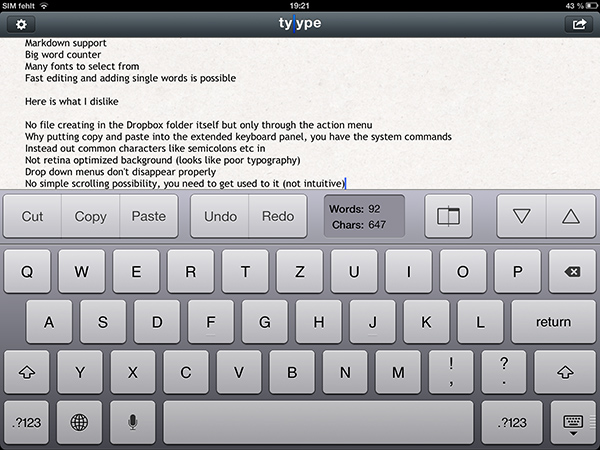
However, when I recently discovered Tyype, a new iOS text editor by Polish app development company Appvetica (who also developed apps like QRSight, an OS X QR code scanner), I got curious. Their clean, minimalist website and product video promise a text editor with easy text navigation, selection, and copying using custom gestures. Its interface seemed easy to understand, and the icon looks gorgeous. So I went ahead, downloaded Tyype HD for the iPad (which I’ll refer to as “Tyype”) and starting writing with it. Unfortunately, I have to say that Tyype does not work as great as it is shown in the demo video on the app’s website. But it’s certainly not a bad app either. Read more
Twelve South Launches “HiRise” Stand and Desk Storage System

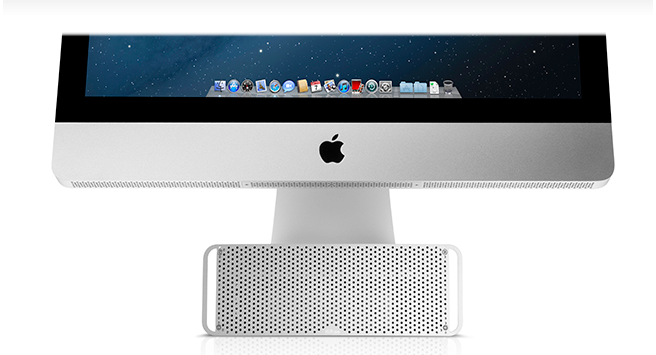
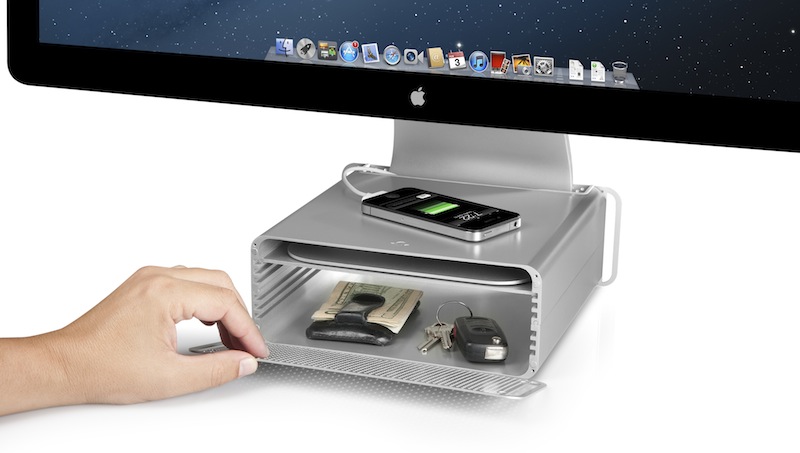
Twelve South, makers of fine accessories for Macs and iOS devices, have announced today the latest entry in their family of add-ons for iMacs and Apple displays: the HiRise. Made of aluminum and stamped steel, the HiRise is a height-adjustable stand that doubles as a storage system for your desk, so you won’t end up cluttering your workspace with keys, your wallet, or USB drives anymore.

The main purpose of the HiRise is to elevate the base of an iMac or Apple display to a more comfortable position for your preferred viewing angle. By using an internal metal “shelf”, you can adjust the height of an iMac depending on your viewing position, and, alternatively, you can use the HiRise to place an iMac and Apple display already on your desk at the same height (a minor detail that has annoyed owners of multiple displays for a long time).

It’s time to do better than a phone book!” said Andrew Green, Creative Director of Twelve South. “We see Mac users prop their beautiful hardware up on reams of copy paper and cringe. Many agree that just a few extra inches of height makes their Mac tremendously more comfortable to use. Enter HiRise for iMac. It raises your Mac to six different positions. It hides connected hard drives and keys inside. But coolest of all, its design integrates with your Mac to look like nothing else you’ve ever seen.

With a perforated, Mac Pro-like metal front plate that attaches magnetically, the HiRise can also work as a hidden, classy storage space for your desk. According to Twelve South, HiRise fits all Apple iMacs, Apple Thunderbolt Displays “and Apple Cinema Displays with metal L-shaped desk stand”.

While the main purpose of this accessory could easily be replicated with some quick DIY skills (case in point: an iPad box), Twelve South’s typical attention to detail should ensure a premium-quality product with a grade of finish and “Apple feel” that should be difficult to find in other solutions. However, the price may be a little steep depending on just how much you’d value such an accessory: the HiRise will set you back $79.99 from Twelve South’s website.

Check out more photos of the HiRise here, and a video below.
Read more


Apple: iPhone 5 Sales Top Five Million Over Opening Weekend, 100 Million iOS Devices Updated To iOS 6

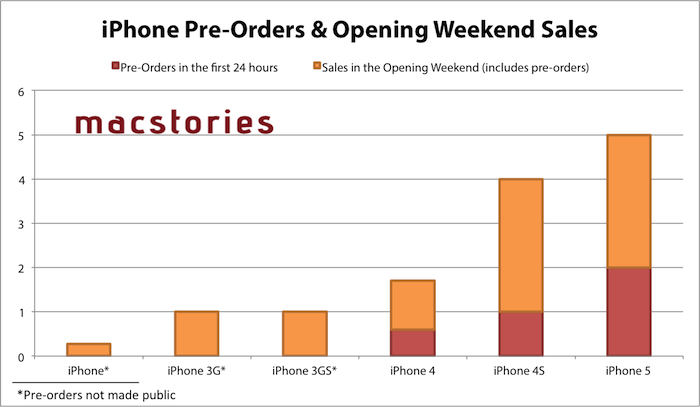
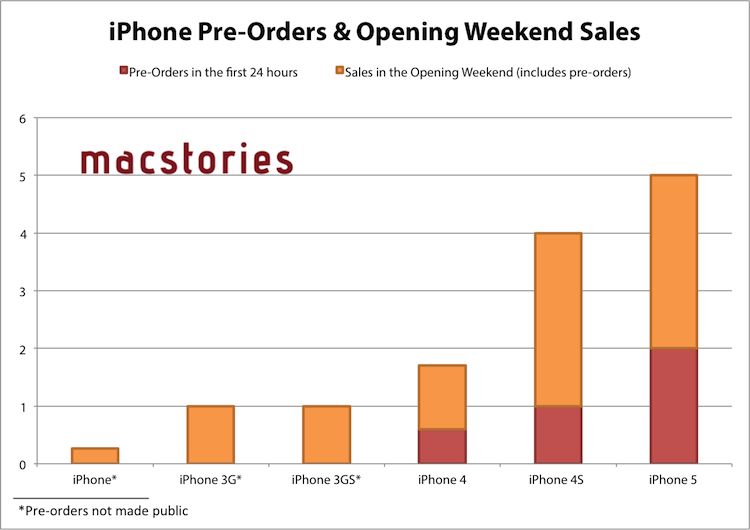
Apple has just issued a press release announcing that the iPhone 5 has sold more than five million units in its first three days of sales after launching on Friday in the US, Australia, Canada, France, Germany, Hong Kong, Japan, Singapore and the UK. Apple previously revealed that in the first 24 hours pre-orders of the iPhone 5 topped two million.

“Demand for iPhone 5 has been incredible and we are working hard to get an iPhone 5 into the hands of every customer who wants one as quickly as possible,” said Tim Cook, Apple’s CEO. “While we have sold out of our initial supply, stores continue to receive iPhone 5 shipments regularly and customers can continue to order online and receive an estimated delivery date. We appreciate everyone’s patience and are working hard to build enough iPhone 5s for everyone.”

Apple also announced in the press release that since iOS 6 launched mid-last week, over 100 million iOS devices are now running iOS 6. The latest iOS release removed Google Maps in favour of Apple’s own mapping app which has been receiving strong criticism, a new Passbook app, Facebook integration and a bounty of other more minor new features and adjustments. Our own Federico reviewed iOS 6 and you can find all our iOS 6 coverage here.

The second ‘round’ of the iPhone 5 launch will occur this Friday on September 28th, going on sale in the following countries: Austria, Belgium, Czech Republic, Denmark, Estonia, Finland, Hungary, Ireland, Italy, Liechtenstein, Lithuania, Luxembourg, Netherlands, New Zealand, Norway, Poland, Portugal, Slovakia, Slovenia, Spain, Sweden and Switzerland.


Jump the break for the full press release from Apple.

Read more


iOS 6: Messages Now Automatically Selects Last-Used International Keyboard For Each Contact

I like to think that sometimes Apple takes a look at the crazy ideas people share about iOS and OS X on Twitter, and picks a couple that they think could be neat additions to the OSes.

In April, I tweeted the following idea:

iMessage should be able of automatically switching international keyboards based on the recipient’s language.

The idea came from the fact that I’m constantly switching between the Italian and English keyboards on my devices. For most of my online communications, I use the English keyboard; for my Italian friends, family members, and acquaintances, I obviously use the Italian one. Wouldn’t it be neat if iOS could remember the last keyboard used with a contact, so that you wouldn’t have to switch keyboards every time?

Like I said, I like to think sometimes Apple listens. As @SiVola told me earlier today on Twitter, the Messages app of iOS 6 is now capable of automatically selecting an international keyboard based on the last one you used in a conversation. So, for instance, when I open a conversation with Chris, the English keyboard will be the active one; when I text my girlfriend, the Italian one will be automatically selected. No need to switch using the “globe” icon.

I tested this with various keyboards on iOS 6, and I can confirm it works. I tested on the latest version of iOS 5 to make sure as well – this is new to iOS 6 (and I hope it’s not a bug!); in my tests, it took 1-2 sent messages for iOS to “remember” the correct keyboard to use. Furthermore, Apple implemented this functionality in a way that it won’t affect the keyboard you have selected at a system-wide level: after I’ve sent a text to my girlfriend, I can open Tweetbot, and the keyboard will be in English just like I left it.

Of all the minor additions and refinements of iOS 6, this is now my favorite one. It’s the kind of detail that, to me, makes the experience more natural and fast without complicating my workflow with new menus or options to learn.

Perhaps Apple didn’t read my tweet. Or maybe someone did. Whatever the story is – thanks for this feature, iOS team.


iPad + Linode, 1 Year Later

iPad + Linode, 1 Year Later

Last year, programmer Mark O’Connor decided to swap his MacBook for an iPad and Linode. Foregoing any discussion as to whether the iPad could be considered a PC, Mark simply started doing real work with it. Using Vim as a work environment, O’Connor relied on a combination of Mobile Safari, VNC apps, email, and SSH console to work from anywhere. The article in which he described his experience and workflow took off.

One year later, O’Connor says the experiment is over. But not because he stopped using his iPad as his main device – in fact, he’s using it even more. In a follow-up to last year’s post, O’Connor says that the iPad stopped being an experiment a long time ago – having become a natural part of his setup that has allowed him to work ”on river islands, half-way up trees and on exclusive rooftop terraces”.

The 10-hour battery life, 3G connection and small form-factor of the iPad + wireless keyboard combination frees me from so much; today I can work wherever I can sit.

As he says, however, not everything’s perfect. In noting the deficiencies of Mobile Safari in terms of performances as a full desktop browser replacement (though JavaScript is much improved in iOS 6), O’Connor admits he’d be interested in checking out the Surface, Microsoft’s upcoming tablet effort.

Last but not least, the Metro vibe feels fresh and new and I’m intrigued by Microsoft’s choice to make Javascript + HTML5 a first-class way to develop for the system. I’m already looking forward to hacking my own tiles together to smooth my workflow and simplify my day.

I am no web developer or programmer. From my personal experience, however, I can say that, in the past year, I’ve seen several apps coming out for the iPad that filled some of the most glaring omissions in my workflow. Poster and Posts, two great apps to write for WordPress; OneEdit, for batch processing of images; iStorage, a decent file manager; Diet Coda, to access FTP servers and upload images; Nebulous Notes, to write plain text even faster with macros. And these are just a few examples.

The iPad is still no full Mac replacement for me. But as Apple keeps giving more great tools to developers, I am looking forward to the apps they’ll come up with to enjoy an increasingly more mature platform.

Permalink

A Reasonable Take On Apple’s Maps Problem

A Reasonable Take On Apple’s Maps Problem

Mike Dobson of TeleMapics has published a balanced, reasonable, and informative article on the various technical issues that Apple is facing with the new Maps on iOS 6.

The issue plaguing Apple Maps is not mathematics or algorithms, it is data quality and there can be little doubt about the types of errors that are plaguing the system. What is happening to Apple is that their users are measuring data quality. Users look for familiar places they know on maps and use these as methods of orienting themselves, as well as for testing the goodness of maps. They compare maps with reality to determine their location. They query local businesses to provide local services. When these actions fail, the map has failed and this is the source of Apple’s most significant problems. Apple’s maps are incomplete, illogical, positionally erroneous, out of date, and suffer from thematic inaccuracies.

Alongside his sarcasm-free explanation of many aspects of building a mapping solution, Mike offers some suggestions that are worth considering as well.

It’s a recommended read, which I suggest checking out here.

Permalink

Apple Airs First iPhone 5 TV Ads: “Physics”, “Cheese”, “Thumb” - Plus “Ears”

Today, Apple aired the first official iPhone 5 commercials. Available both on YouTube and Apple’s website, the TV ads focus on some of the marquee features of the iPhone 5.

“Physics” focuses on the design of the iPhone. It asks how’s it possible that the iPhone can be bigger, but also smaller – referring to the bigger screen of the device and its thinner form factor.

There are laws to physics, right? So explain this, how can something get bigger, and smaller? There’s more of it, and less of it. Well, I guess the laws of physics are more like, general guidelines.

“Cheese” is about Panorama. The ad shows a man trying to take a picture of a group of kids in costumes, using the iPhone’s Panorama functionality (which is not exclusive to the iPhone 5) to capture the whole group.

Every picture tells a story, of course some stories are bigger than others.

OK, guys here we go, everybody say Cheeeeeeeeeeeeeee…[breathes in]…eeeeeeeessssseee.

Got it!

The last one, “Thumb” is, again, about the iPhone’s screen, but this time from a user’s perspective. It tries to convey the message that, in spite of the taller screen, the iPhone’s display is still usable with one thumb, because Apple used “common sense” to make it bigger, but not too big.

Your thumb, it goes from here, to here. This bigger screen goes from here, to here. Now that’s either a, an amazing coincidence, or b, a dazzling display of common sense. Pretty sure its the common sense thing.

The three ads are available on Apple’s website and YouTube channel. We have embedded the YouTube versions below.

Update: Apple also posted an additional “Ears” ad for the new EarPods. The ad repeats the same message Apple explained at the iPhone 5 keynote – human ears are all different, and headphones should consider these differences.

Ears are weird. I dunno what shape that is, but its not round. So why would headphones be round? They should be shaped like this. Ear shaped. You know, so they fit in your ears.

According to initial speculation on Twitter, it appears the voiceover for the ads was done by Jeff Daniels, currently starring in the HBO show “The Newsroom”.
Read more


Great iPhone 5 Wallpapers

One downside of Apple changing the size of the display on the new iPhone is that all your iPhone wallpapers no longer fit properly without being stretched. Whilst Apple has included some new default wallpapers and made them all in the new iPhone 5 resolution, sometimes you just want a bit more choice. Thankfully quite a few people have already done the work to recreate their wallpapers for the new 1136 x 640 resolution of the iPhone 5. We had a bit of a search and found these collections and individual wallpapers that you might enjoy.

Collections

Individual Wallpapers

If you’ve made some iPhone 5 wallpapers or know of some other great ones we missed, let us know by tweeting us at @macstoriesnet.


#MacStoriesDeals - Friday

Happy iPhone 5 day! iOS 6 was released yesterday, here’s a link to all of our coverage. Here are today’s @MacStoriesDeals on hardware, iOS, and Mac apps that are on sale for a limited time, so get them before they end!
Read more