


We have many great deals for #MacStoriesDeals today. You can find us as @MacStoriesDeals on Twitter.
#MacStoriesDeals - Tuesday
Square Announces the Square Stand, Now Available for Pre-Order→
Earlier this morning, Square announced a new component of their business model tailored for small business owners, the Square Stand. Square Stand is curiously released on the heels of Business in a Box, a complete point-of-sale system featuring a cash register, optional printer, and iPad stand by Heckler Design. Combining an integrated card reader, swivel, and an accessories hub for plugging in supported hardware such as select barcode scanners, the Square Stand turns the iPad into a central sales terminal.
Ready to use in minutes, Square Stand works with Square Register, the free point of sale application, and gives merchants access to real-time analytics, robust reporting, and a delightful experience for their customers. Square Stand features an integrated card reader that keeps information secure from swipe to payment, and easily connects to the hardware accessories businesses need, including a receipt printer, kitchen printer, cash drawer, and barcode scanner. Merchants can lock their iPad in place and secure the stand to their countertop, making it easy to tilt and rotate the stand and complete orders quickly. Square Stand works with an iPad 2 or 3, with a version for iPads with Lightning connectors available later this year.
Emphasis mine: the Square Stand currently supports recent models with the 30-pin connector. The benefit of having a Square Stand is for the professional appearance, sturdier reader, added security, and integration with a wider variety of accessories, but the total cost for the new stand and Square’s recommend accessories is $796. Business owners on a budget still might be better served by Business in a Box, which offers the basics and a couple of traditional Square Readers for only $499 with a printer. Square Stand itself is expected to be available online and at retail outlets like Best Buy later this year for $299.
Siri Responds To Long Questions With Quotes On Brevity→
Phil Dzikiy:
In a quiet server-side update, Apple has given Siri the ability to respond to requests with quotes, notably to suggest that the user is being too long-winded. When asking the assistant a question — presumably one that Apple’s servers find too long or difficult to parse — Siri responds with William Strunk and Thomas Jefferson quotes alluding to brevity.
Certainly a better user experience than simply returning an error for longer questions.
Unsurprisingly, Italian Siri doesn’t come with quotes from renowned Italian authors or historical figures. Siri does have a similar behavior, though: in my tests, Italian Siri always commented on the length of my questions, and even told me how one of them was “kilometric”.
Philips Releases Hue 1.1, Announces IFTTT Integration→
I keep being intrigued by Philips’ smart lighting system. Philips released an official API with iOS SDK in March, and today’s update brings great new features such as geofencing, which you can use to automatically activate your hue lights as you walk in or out of your house.
In terms of automation, hue is now officially integrated with IFTTT, which should allow for some interesting “workflows”. Examples mentioned by Philips include changing the color of your lights based on Instagram pictures, the weather, or your favorite sports team. I can’t wait to get a hue set and start playing around with IFTTT triggers.
You can read more on hue/IFTTT integration here.
Limelight: A Beautiful Showcase of Movies for the Discerning Film Lover
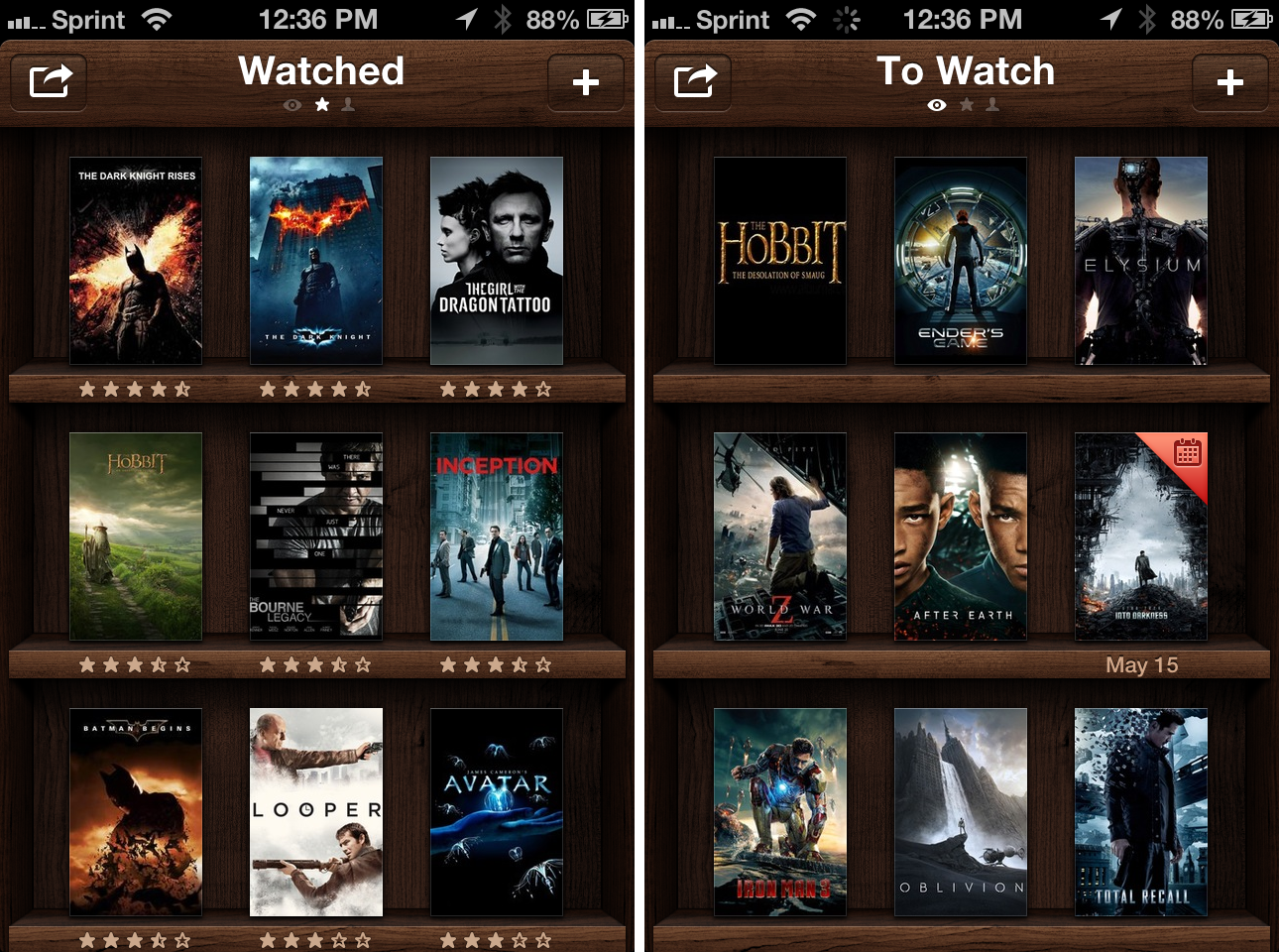
I’ve been watching more films this year, although all of them predate 2013 as I play catch up with 2012 box office hits and similarly popular movies from the past few years. But this has made a nice jumping off point for someone who’s now regularly keeping track of movies seen and unseen, helping me avoid articles from some film fanatic’s website titled, “20 best movies of ‘x’ year!” which, I’ll be frank, doesn’t help me that much.
Then there’s Limelight, a social bookcase for displaying film posters and ratings for movies you’ve seen and want to see. It’s an app that’s inherently social, meaning anyone who knows your username can follow you to discover new films and garner recommendations for their To Watch lists. Which is why I say it’s an app for discerning film lovers — for people who genuinely enjoy watching films, who want to proudly share their collections with the world. Limelight is very open – at least, it’s meant to encourage you to discover something new within its small social network. Social is mandatory.
Realmac Software Announces Analog Camera for iOS→
Analog Camera looks like it’s going to be a fun little camera app. Like Clear, the app is gesturally driven, full of fun sounds, and it looks fast. It’ll be coming to the App Store later this month.
Play Breakout In Google Search (Also On iPad)→
Drew Olanoff, writing about Google’s Breakout easter egg:
The game’s introduction was 37 years ago today, in 1976. Google decided to commemorate the occasion with a little easter egg in image search that will suck all of your free time from you. It’s good to see Google doing these kinds of things away from their normal doodle, especially since a lot of their users might not remember Breakout.
You can also play it on the iPad. I tried with Google Chrome, but Safari had much faster, smoother scrolling (I guess because of Nitro). Alas, I couldn’t find a way to get an iPhone-optimized version.
1Password 4.2 Brings 1Browser, Login, and Search Improvements
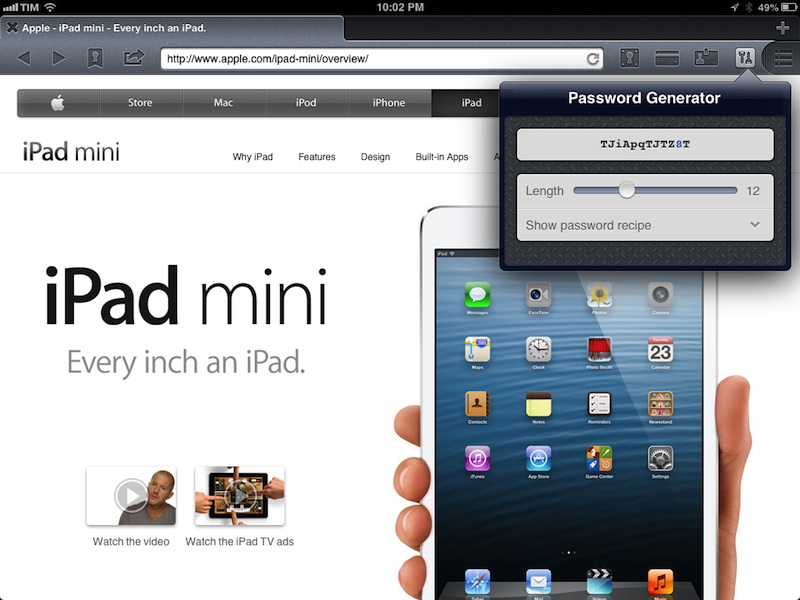
1Password for iOS, AgileBits’ excellent password manager, has been updated today to version 4.2, which brings some notable improvements for login management and 1Browser, the app’s built-in web browser for the iPhone and iPad.
On the iPad, Go and Fill bookmarks have been added to the browser, making it easier to quickly open a previously saved login and directly log into it using the (also new, and not iPad-only) auto-submit option for login filling. Bookmarks are available in a popover and they can be searched: in both bookmark and regular search, you can now expand search to all fields if you remember a piece of information of a specific item that doesn’t show up in regular search.
Bookmarks aren’t available on the iPhone’s smaller screen, but, both on the iPad and iPhone, login filling now uses the same sweet animation that was brought to the desktop extensions a while back. Combined with auto-filling and the aforementioned animation (which can be disabled in the new 1Browser settings), logging into websites with 1Password 4.2 is now a faster and more enjoyable process.
In my original review of 1Password 4, I lamented the lack of options for creating new logins from the embedded browser. While the app still won’t prompt you to save a new login, 1Browser for iPad does have the same strong password generator found elsewhere in the app, with the same amount of options to control repeated letters, pronounceability, and more. Two small touches that I particularly enjoyed while testing 1Password 4.2 were the smart clipboard detection when launching the app (1Password will ask if you want to open a URL in your clipboard) and the fact that the app will return to the Vault after closing the last 1Browser tab. I look forward to seeing if and how AgileBits will figure out a way to port the new 1Browser features to the iPhone.
Thanks to the latest updates, 1Password for iOS is reaching the same degree of functionality of the desktop app with browser extensions. In some areas, I actually prefer using 1Password for iOS: the URL scheme makes it extremely easy to find and open login items; 1Browser for iPad is a great tool; the new sharing options of version 4.2 include tappable 1Password links that you can send to your spouse or colleagues to let them easily add a shared item to their Vault.
1Password remains one of my must-have iOS apps that I use every day, and the additions of version 4.2 are welcome. The update is now available on the App Store.
#MacStoriesDeals - Monday
We have many great deals for #MacStoriesDeals today. You can find us as @MacStoriesDeals on Twitter.