How To Wrangle Outlook 2011 To Work With Gmail - May 2013 Update

I wrote MacStories’ tutorial on how to integrate Gmail with Outlook for Mac 2011 back in 2010. There’s been quite a few updates since then, and Microsoft has fixed many of the issues I mentioned in the original guide. Too, Gmail itself has been visually updated to reflect Google’s latest design trends. Even the screenshots were dated.

Instead of producing a separate article, I thought it would be best to keep the same URL so that people revisiting the tutorial would immediately see what’s new. Most of it has been completely rewritten and updated with the latest information on how to get the most out of Outlook with your Gmail account. I’ve substantially streamlined the article, cutting out filler such as the introduction and extended outro.

The new how-to is divided into two major sections, one of which is completely optional. You can read the updated guide by clicking the link below.

How To Wrangle Outlook 2011 To Work With Gmail

Permalink


How to Know When Apple Finally Gets iCloud Right

Gus Mueller:

But how are we going to know Apple has finally fixed iCloud syncing for developers and is really serious this time? And I’m not just talking about Core Data syncing, I’m also talking about the APIs developers are given to push document data back and forth. The broken stuff, the things developers laugh at Apple about and have given up on.

Here’s my short and inconclusive list of things that will let us know iCloud might be ready for real world developer use.

Gus has been trying to work with iCloud for VoodooPad since 2011. Some of the features he proposes have been requested by developers for over a year now.

I don’t think that “the Dropbox way” is a panacea for Apple’s syncing woes with third-party apps, but I do believe developers should get new tools, improvements, and fixes for iCloud.

Permalink

CriticMarkup in Marked 1.4

Brett Terpstra:

The initial release of CriticMarkup included a preprocessor for Marked 1.5+, but given the uncertain release date of the next incarnation of Marked, I wanted to make it work with the standard custom processor feature of Marked 1.4. A few adjustments to the existing script and one dependency later it’s good to go.

I use CriticMarkup whenever I need to track changes in a MultiMarkdown document. I launch Marked (from Sublime Text 2) on a daily basis to preview my articles and generate HTML, so it’s good to know the two systems can work together now.

Permalink


iTunes 11.0.3 Supports AirPlay Speaker Control Via AppleScript

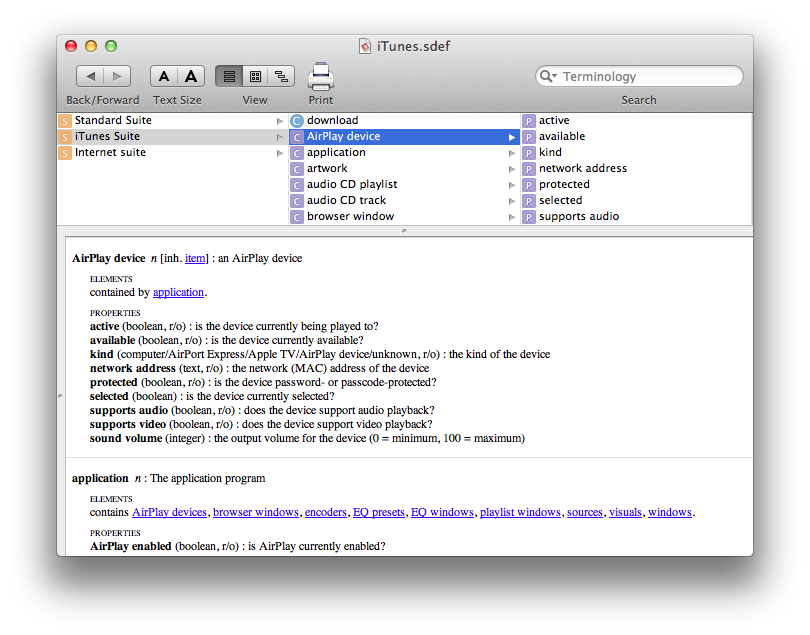
Also new in iTunes 11.0.3 is an update to the app’s AppleScript dictionary that adds support for controlling AirPlay speakers. The AppleScript additions contain several options: you can check on an AirPlay device’s name, activity, availability on the network, kind (computer, Apple TV, other AirPlay device, etc), network address, and even if it supports audio or video.

This is a particularly welcome addition as it has been requested by users willing to script iTunes’ speakers for years now. Previously, the best option was to rely on GUI scripting to enable/disable speakers; as I wrote in December, it’s good to see Apple is still actively supporting AppleScript on OS X.

Doug Adams has already put together a basic AirPlay script for iTunes 11.0.3.


iTunes 11.0.3 Brings New App Updates Screen


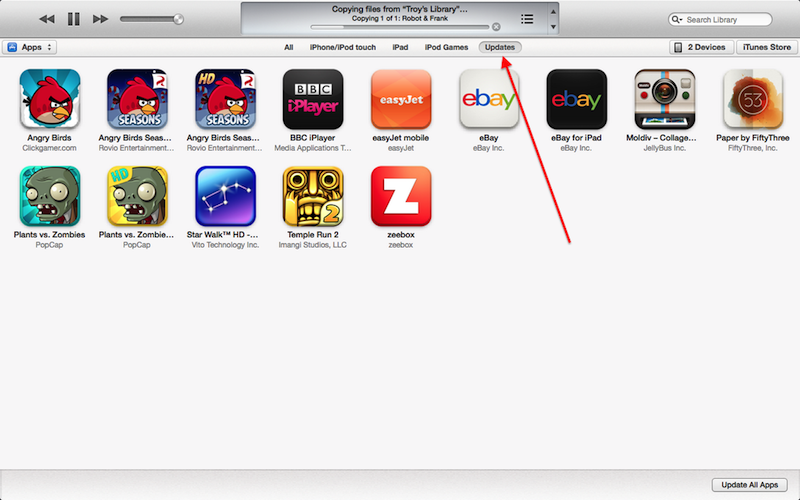
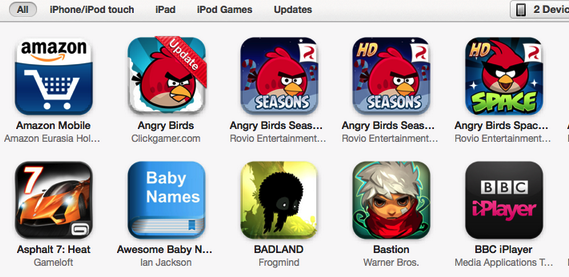
In the 11.0.3 update for iTunes released today, Apple included a new “Updates” area for iOS apps. As noted by MacStories reader Graham Robson, the Apps area of iTunes now comes with a new “Updates” tab that lists available app updates (if any); if there are no updates, the screen will say “All Apps Are Up to Date”. As with previous versions of iTunes, you can press Command+R to check for updates both in the main Apps area, as well as the new Updates tab.

When updates are available, iTunes 11.0.3 will display a red “Update” ribbon on an application’s icon, similarly to how iOS displays a blue ribbon for “New” apps on the Home screen. In iTunes 11.0.3, updates are handled by the Updates area without requiring users to open the iTunes Store anymore.

After the launch of iTunes 11 in November 2012, the Updates screen remained surprisingly unchanged. The new app updates system is a welcome change – particularly because it doesn’t force users into an iTunes Store view anymore.

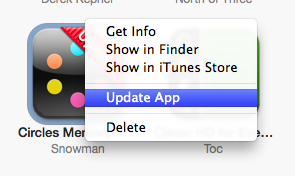
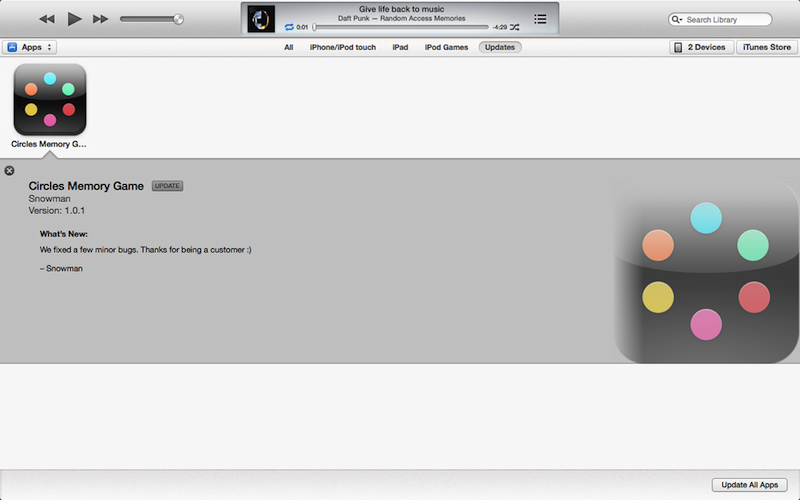
Update: Two more screenshots showing a contextual menu for apps that have an update, and the way iTunes 11.0.3 shows the changelog for an update with the same style of music albums.


Apple Releases iTunes 11.0.3 with Updated MiniPlayer, Various Improvements

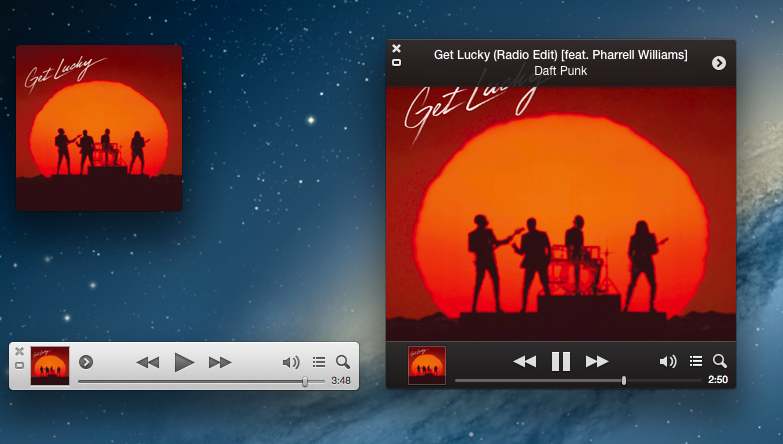
Released in late November 2012, Apple today updated iTunes to version 11.0.3. The new version, available through the Mac App Store’s Software Update panel, brings a redesigned MiniPlayer, an improved songs view, support for multi-disc albums, and performance improvements.

The biggest change of iTunes 11.0.3 is the new MiniPlayer. Sporting a progress bar, the MiniPlayer now also comes with a larger artwork view that can be activated by clicking on the artwork thumbnail in the bottom left corner. The new artwork view will turn the MiniPlayer into a widget reminiscent of desktop music controllers like Bowtie and CoverSutra, with the usual controls to adjust volume, hide/view Up Next, and access an additional contextual menu. In the image above, you can see a composited screenshot of the new MiniPlayer views.

iTunes 11.0.3 is available now on Software Update and through Apple’s website.


Pebble Adds Two-Way Communication API for Watchapps to PebbleKit

For both Android and iOS, Pebble developers can now add two-way communication to their applications for their watchapps through Pebble’s SDK, PebbleKit. The AppMessage API enables Pebble watches to send and receive data from smartphone apps for remotely controlling internet connected devices, receiving scores from your favorite sports teams, and checking in with apps like Foursquare or Facebook. iOS developers utilizing two-way communication, however, will need to have their apps whitelisted through Pebble as a part of the Made For iPhone program. In the future, Pebble plans on making that part of the process easier for iOS devs.

You can find all the details about Pebble’s developer updates, latest firmware, and new watch colors on Kickstarter.

Permalink