

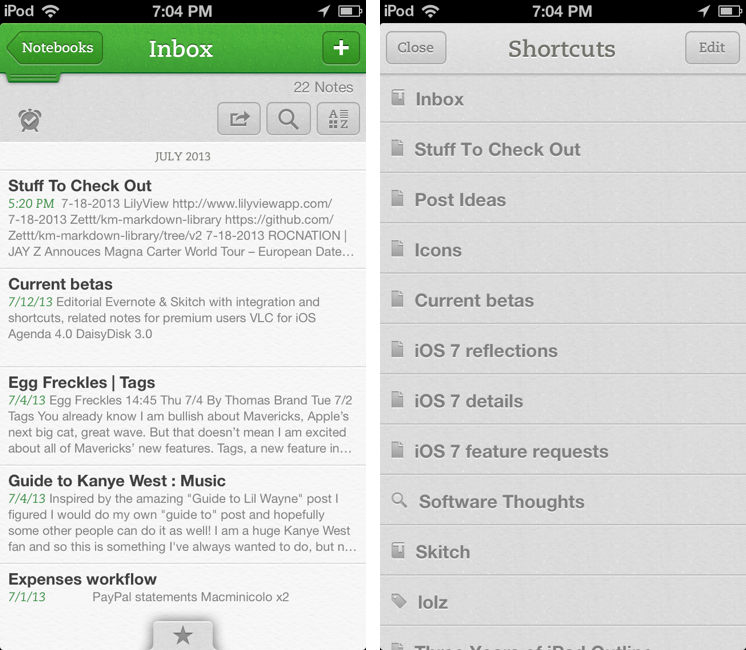
Following an update to the Mac version released two weeks ago, Evernote updated its iOS app last night to include direct Skitch integration, support for shortcuts, access to recent notes for improved multitasking, and new premium features. Read more
Evernote for iOS Gets Shortcuts, Recent Notes, and Skitch Integration
On The Surface RT and Impatience→
Nick Bilton of the New York Times writes:
Today’s consumers don’t want options. They are impatient. They want to tear their new shiny gadget from the box and immediately start using it. They don’t have time to think about SD cards or USB drives or pens or flip stands.
The surface RT didn’t allow that. Customers had to think about it.
The Surface RT had a lot of things that didn’t bode well for it. For one the name. The other was Windows RT, which I think is an even better example of what Nick Bilton is describing as far as options go.
I don’t think the Surface’s hardware ever really got in the way. An SD card slot or an available USB port don’t really interfere with what someone will do with a tablet. The kickstand and keyboard accessories are sort of the Surface’s cherry on top. The things that the Surface has on the hardware side are incentives. But I think Windows RT itself wasn’t what customers were looking for in a tablet.
On top of good hardware is an operating system that’s buggy and clumsy, getting in the way of the things people want to do. Windows RT is this cut down version of Windows that doesn’t let you install traditional desktop applications and wasn’t completely optimized for your fingers, and I think customers got fed up with this idea relatively quickly. I get what Microsoft is aiming for, the idea that you can have a tablet for both work and play that gives you a lot of choice in how you use it, but that point didn’t come across in their marketing and Microsoft’s implementation of it (like switching to the Desktop through a tile) ended up confusing people.
Microsoft said, “You can have the best of both worlds!” The result is a product that sends mixed messages about what it wants to do and what it’s really capable of. Surface RT feels like a product that had to hit some arbitrary deadline, was then rushed onto store shelves, and it shows.
The Surface RT doesn’t solve any pain points, which is the kicker. Things like the iPad take away a lot of the stuff that people don’t like about computers. People use their iPads because it instantly turns on, has great battery life, and doesn’t behave like a traditional computer. People generally don’t have to worry about maintaining their iPads. You don’t have to restart it to install updates every week, download the latest virus definitions, or run a cleaner to magically improve the computer’s performance. It’s a worry free device. The Surface RT was supposed to be Microsoft’s answer to these things — a product that sheds all of the legacy components Windows held onto for so long that would make the computer safer and easier to use — but ultimately Microsoft decided people wanted their desktops on their tablets so they could use Office, forgetting that that’s the thing people wanted to get away from. The irony is that the tablet that was supposed to offer more choice than the iPad ended being the compromised experience. That’s why it failed.
QuickRadar for Apple Radar
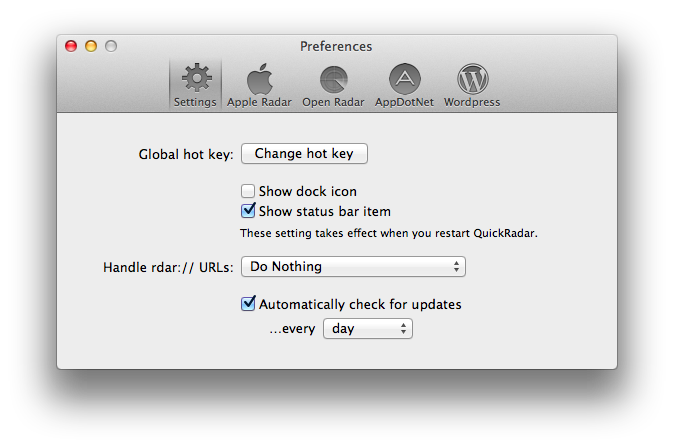
Since iOS 7’s release, I have been submitting entries to Apple’s Radar, the company’s bug tracking system. The problem with Radar is that, for some reason, it comes with an outdated and slow interface that’s prone to errors and random logouts, making the process of filing radars tedious and unpleasant. A number of apps to “fix” Radar have surfaced over the years, but lately I’ve been trying an enjoying QuickRadar. I remembered it deserved a mention here thanks to Clark’s link two days ago.
QuickRadar is a menubar app for the Mac that signs you into Apple’s Radar and that can be activated with a keyboard shortcut. Instead of redirecting you to Radar’s web UI, it lets you write your bug report in a window on your Mac, and when you click “Submit” it’ll take care of uploading the report for you without launching the website. The app can also file duplicates, handle rdar:// URLs to launch them in OpenRadar or filing them as duplicates, and it comes with sharing options for WordPress and App.net if you want to share your radar’s number with the world. Like Tokens (another app made out of frustration with an Apple-made web UI), QuickRadar uses web scraping to communicate with Apple’s bug reporter.
QuickRadar is still in the alpha stages and has some rough edges. For instance, it doesn’t support file uploads for attachments, although the developer says they’re on the roadmap. Version 0.7 was released earlier this week with improved Preferences and support for Mountain Lion’s Notification Center.
You can download QuickRadar here.
iOS 7 and New Apps→
Gedeon Maheux:
I’m sure many users are expecting developers of popular applications to simply update interface elements, compile some code and easily drop a brand spanking new version of their app onto the App Store for free. There’s little doubt that the majority of iOS 7 updates to existing apps will be free (which will please Apple), but I suspect there will be a surprising number of developers who will use the launch of the new operating system to completely re-boot their app, and why not? The visual and interactive paradigms iOS 7 mark a natural breaking off point and a perfect opportunity to re-coup costs. Some existing paid apps might even adopt an iOS 7 only strategy which means they’ll have no choice but to charge again.
This makes sense. One more reason why Apple will need to clearly and strongly highlight iOS 7 apps on the App Store.
Human Authenticity→
Great points by David Barnard:
There is nothing inherently authentic about anything created digitally. There’s nothing genuine about 0’s and 1’s and any particular sequence that describes pixels on a screen. Humans created the hardware and software that sequence those bits, and unless we’re talking about some sort of futuristic research project, everything created digitally is created for some ultimate form of human consumption.
Software doesn’t have to use realistic textures to be “physically authentic”.
VLC for iOS Returns To The App Store
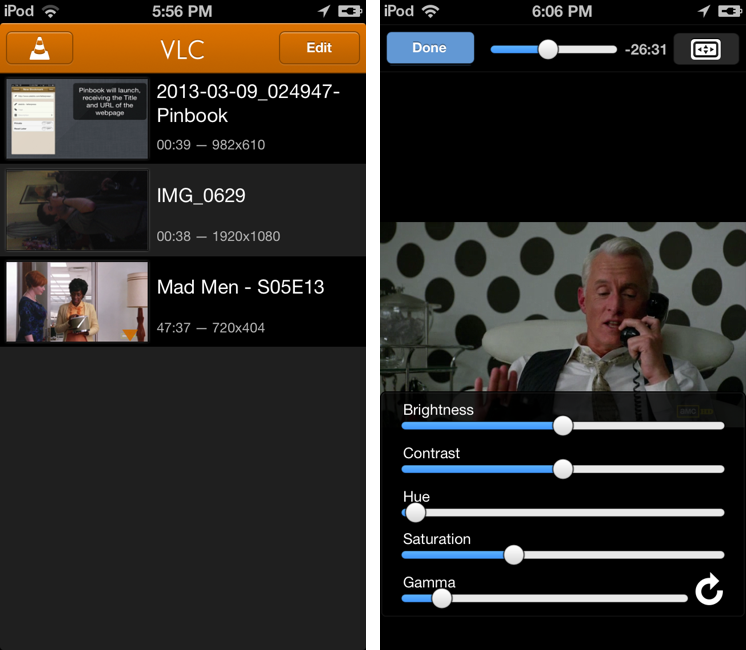
After a two-year absence, popular video player VLC is returning to the App Store with a new app for the iPhone and iPad. The new VLC for iOS will be available later today (it will start propagating at midnight in the various international App Stores) as a free download.
I’ve been able to test the new VLC for iOS for the past few weeks, and, in terms of visual appearances, the app isn’t too dissimilar from the old version that was available on the App Store in 2010. A main screen lists all your media with thumbnail previews, and you can tap on an item to start playback in a full-screen media player. However, in spite of a UI reminiscent of the old version, VLC has been completely rewritten to use modern audio and video output modules, multi-core decoding, and support for any file type supported by VLC on the desktop. In my tests, the app was able to quickly start playing any video file that I threw at it, such as .mp4 and .mkv files. Read more
The Prompt: Casually Eating Pasta Alone→
This week, the boys discuss Nokia, Logic Pro X, tinkering, and re-evaluating workflows in light of new OS releases.
It was a fun episode and I liked the in-depth discussion on workflows and pasta-eating habits. I promise I will remember to properly record audio the next time (sorry for the poor quality on my end this week). You can get the episode here.
Agenda 4.0 Review
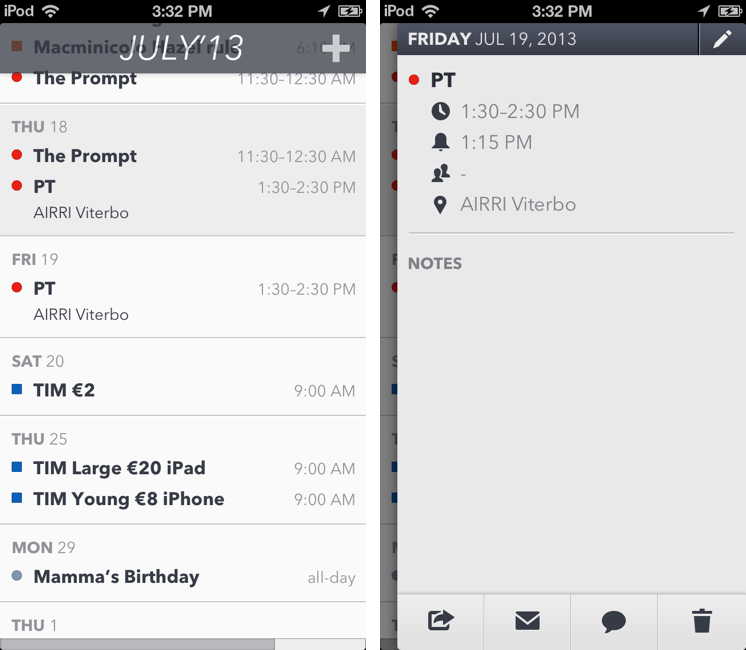
Savvy Apps’ Agenda, one of the most popular third-party calendar apps for iOS that we’ve been covering on MacStories for years, has been updated today to version 4.0, which adds a beautiful new user interface and builds upon the previous version’s app integrations, support for Reminders, and gesture-driven event management. Agenda 4.0 is sold as a separate app for $1.99 on the App Store.
I’ve had the chance to test Agenda 4.0 before today’s public release, and as I kept using the app I noticed how it was turning into a powerful complement to Fantastical, my favorite calendar client for iPhone. As I have discussed this week on The Prompt, in fact, I’m currently going through my annual re-evaluation of my workflow, and, partly because of my curiosity in regard to iOS 7, I’ve started using Apple’s Reminders on a daily basis again. Reminders are easy to use, the app is fast, and, more importantly, it’s one of the Apple apps that can sync in the background all the time with iCloud. I can integrate Reminders with IFTTT for iPhone, and, overall, I have been enjoying the simplicity and deep system-wide integration of Reminders. While I’m a big fan of Fantastical’s Day Ticker (I think it’s one of the best calendar interfaces ever shipped on iOS), Agenda allows me to view calendar events and reminders in the same list (something that Fantastical for iPhone still isn’t capable of), and with version 4.0 this list is even more polished and clear than Agenda 3.0. Read more
Use WhatsApp’s URL Scheme with Drafts, Launch Center Pro, Or A Bookmarklet
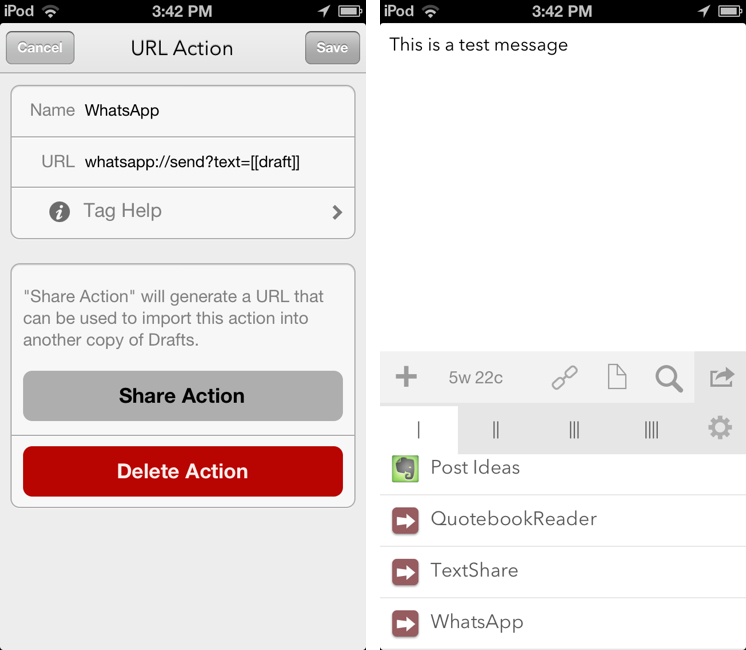
I don’t use WhatsApp much[1], but when I saw the app’s documentation last night with a mention of the URL scheme, I thought I could play around with it a little bit.
The WhatsApp URL scheme is extremely basic and there’s one part that I can’t get to work. The scheme itself is, unsurprisingly, whatsapp:// – which you can use from Launch Center Pro if you simply want to launch WhatsApp. There are also parameters to do stuff with the URL scheme: text lets you pass along a (properly encoded) text message that will be automatically inserted in the compose field of the app; abid lets you specificy an “Address Book ID” to send a message to a specific contact.
The WhatsApp team explains:
Address book ID of contact to start a chat with. If contact with this ID has only one whatsapp-able phone number, application will open a conversation with that contact. If contact with this ID has more than one whatsapp-able phone numbers, application will present a menu with all phone numbers available for chat. If contact has no whatsapp-able phone numbers, or contact with this ID does not exist, or this parameter is missing, application will present contact picker listing all contacts available for chat via WhatsApp.
I thought that something like the following URL would have let me send the text message “Test” to my contact “Alex”:
whatsapp://send?abid=Alex&text=Test
But, in practice, I wasn’t able to get the abid parameter to work. I have tried with phone numbers, percent-encoded names and phone numbers, email addresses, but I can’t get WhatsApp to recognize the abid parameter I pass along, as the app continues to present a contact picker. Therefore, for the purpose of this post, I will show you how to send text to WhatsApp, choosing a recipient from the app’s built-in contact picker. If you manage to get abid to work, please let me know. Read more