I’ve got a strange relationship with music, both in my life and on Mac OS X. Personal situations aside, my digital problem is the following: I’ve got a 100GB music library and I can’t find any real good application to manage it. iTunes is somehow slow and unresponsive sometimes (but we all know why), Vlc is too poor and outdated, I don’t like desktop controllers at all. I’ve found a good compromise in Ecoute, which is both a desktop controller and a music player itself, which is pretty great actually.
On the other hand, I could talk about a webapp that is deeply changing the way I listen to my music, but let’s leave it for later this week. So here I am today, talking about this Mac app called “Tracks” which I’ve been using for some days now.
You know, I have to be quite honest when I say that Adium was never meant for me. Some people love the customization, others love that it’s open source, but the big green duck was never cute enough to enthrall me in its myriad of customization options. While I wish Apple would step up their game and bring things such as Facebook to iChat (which in my opinion, is the most pleasurable to use), there really hasn’t been a major alternative to Adium on the Mac.
Well this is certainly changing, and new Mac users coming from Windows will be happy to know that Trillian has finally arrived in alpha.
As soon as your business grows, so does the need of backing up everything. You can’t be serious about your business if you don’t backup and save important stuff just in case something goes wrong. As soon as MacStories started growing some months ago, I began to look out for good solutions to daily back up my files and various databases, and I was looking for a cloud solution. Sure, there’s Dropbox for that. Really guys? Would you suggest Dropbox for people who need to save files with incremental backups everyday? You know that it costs a lot and that, in the best case, you have to manually drag & drop every folder inside it? (unless you create your folders in /Dropbox from the start). No, that doesn’t work for me. I need something cheap, that runs in the background as soon as I make some changes, it has to be reliable, fast and secure. The unicorn of backups, basically.
Most like every new app I’ve recently discovered, everything happened on Twitter: I don’t remember quite well, but it was some night ago when someone tweeted “this new beta of Arq rocks!”
Today I’m going to talk about Arq from Haystack Software, an application that has already become a fundamental part of my workflow.
I use Things, both on my Mac and my iPhone, as my GTD management app of choice. In case you missed the reason why, be sure to read my review. Things is awesome and guess what - it’s fully integrated with OS X. It’s got Address Book integration, it can display the iChat status of team mates, it’s got iCal support. iCal, probably one the default Mac OS X tools I use less. It’s not that I don’t like the functionalities or its purpose, I don’t like the interface and the fact that it’s not a minimal and simple way to get daily notifications. I just want an app that quickly tells me everyday what I have to do, importing stuff from Things.
Writing for MacStories, I often send a lot of .zip and photo heavy e-mail attachments to others. Unfortunately, there really isn’t a better way to privately send data (okay, Dropbox), but for those looking to increase their attachment prowess, I’d say it’s time to quit dickin’ around in Gmail and get with the program.
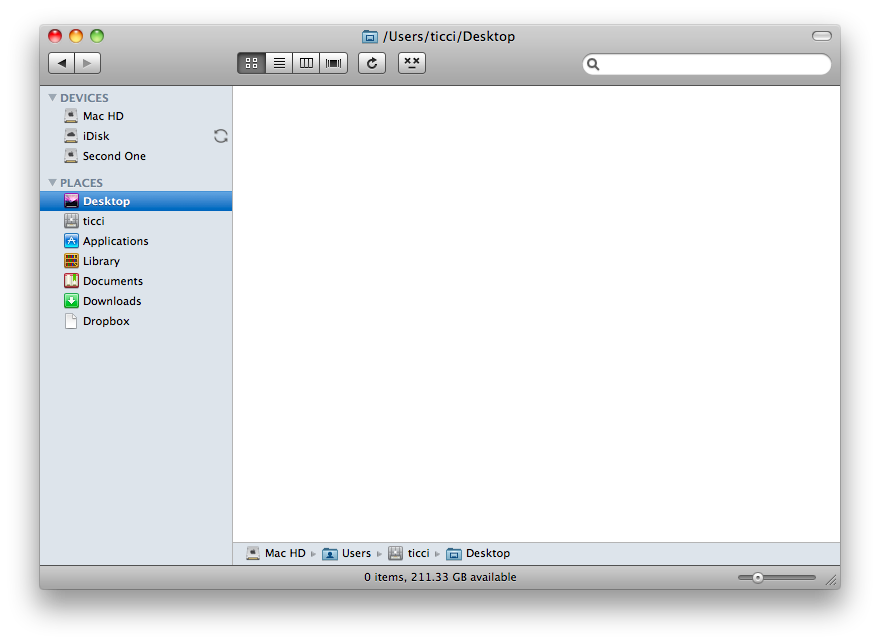
Snow Leopard’s Finder is great and fast, but sometimes it just hangs. At least for me, and though I’ve got a Macbook Pro with 4GB Ram, it happens that it should be restarted or “refreshed”.
Luckily I’ve found out these two buttons that, once dragged to your Finder toolbar, will let you refresh & restart. I’ve tested them, they work perfectly.
I think things such as Applescript and Automator scare a lot of people. While it’s an easy language, the Average Joe does not want to learn how to program. Personally I stayed away from those things for a long time, but have recently adopted them into my workflow once I made up my mind to just do it. Still, it took a weekend of reading and a week of just messing around to get comfortable going pro so to speak. Sikuli takes the idea of Automated workflows and makes it available for regular people. While it’s a simple screenshot app in it’s most basic form, more advanced users can add a ton of functionality.
Once upon a time, there was a group of guys somewhere near London that believed website analytics could have been so much more. They could have been different, focused on users. Then, it came the day that belief took shape and they crafted LiveStats, the one and only live traffic monitoring web application. And I mean “one and only”, because anything else was just nothing compared to LiveStats. The guys were called GoSquared, and maybe they didn’t realize they created a “king” back then.
LiveStats was a great tool, I’ve been using it since it first release, and it provided a great way to monitor your incoming traffic in real time. But hey, why am I talking like this? “Was”, “provided”? Because the GoSquared team has just released the 2.0 version of LiveStats, and many things have changed. LiveStats has just got a lot better.
During this past week I’ve been talking a lot about alternatives for VLC. I’ve covered MPlayer and Movist so far, and both these apps are very stable, good looking and overall promising. But what about the actual VLC? You should have heard not so long ago that the development of VLC for Mac was going under some trouble, and that the devs were talking about ceasing it.It’s not like that, fortunately.
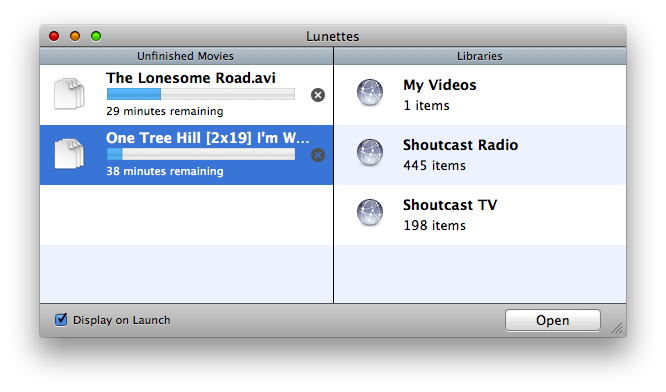
VLC is getting a new face. Its codename is Lunettes, it’s got a brand new user interface, it’s fully 64-bit enabled. It’s basically a new application. From what we can read on the official Lunettes’ wiki page:
“VLC for Mac must attract designers.We have decided to offer to designer the possibility to edit via a simple text file the look of VLC.
VLC for Mac needs a good interface to be the best Video Player.We want to make sure you’ll get the best experience ever when watching your favorites TV shows or Movies using VLC.For instance, if I am watching a TV show, and then quit Lunettes. At next launch Lunettes will offer you to go back to where you were.
Then the famous playlist fades out: It is not visible by default, and you don’t have to use it anymore.
Also in fullscreen you can now scroll through your playlists or TV channels.
And finally Lunettes is 64 bits.”
Lunettes VLC Mac
And I’ll tell you what, it works. It’s fast, it’s nice, it’s smart enough to remember where I was before I quit the app. The cool thing is, you can already head over the Github page of the project and download an early working build of Lunettes.The future of VLC has been that promising, I believe.