
Posts in notes

Twitter’s Algorithmic Timeline Option

Following a BuzzFeed report from last week, Twitter has announced today a new option to view a summary of relevant tweets on top of the regular timeline. Unlike the traditional reverse chronological order of the timeline, tweets will be reordered algorithmically in this view, which Twitter describes as a way to not miss “the best tweets”.

You follow hundreds of people on Twitter — maybe thousands — and when you open Twitter, it can feel like you’ve missed some of their most important Tweets. Today, we’re excited to share a new timeline feature that helps you catch up on the best Tweets from people you follow.

Here’s how it works. You flip on the feature in your settings; then when you open Twitter after being away for a while, the Tweets you’re most likely to care about will appear at the top of your timeline – still recent and in reverse chronological order. The rest of the Tweets will be displayed right underneath, also in reverse chronological order, as always. At any point, just pull-to-refresh to see all new Tweets at the top in the live, up-to-the-second experience you already know and love.

For now, the feature will be opt-in, meaning you’ll have to visit the Settings of the Twitter app and, if available, you’ll be able to turn on the option. “In the coming weeks”, the feature will become opt-out (it’ll be on by default) but you’ll still be able to turn it off from the Settings.

Put it another way: for now, only die-hard Twitter users will check out the new timeline option (and complain about it). In the future, most Twitter users will end up with an algorithmic summary of tweets at the top of their timeline and they won’t bother to turn it off.

I’m not particularly opposed to the idea of an algorithmic addition to the standard Twitter timeline. In fact, Twitter has been testing one for several months now, and it’s one of my favorite touches in the app:

From Twitter’s description, it sounds like the new algorithmic option is an expansion of the ‘While you were away…’ recap. I’ve found plenty of value in these summaries: especially after I’ve been away for a few hours, they come in handy to see a collection of interesting tweets that don’t necessarily contain links (and that therefore can’t be monitored by Nuzzel).

I don’t want the traditional Twitter timeline to be supplanted by a completely algorithmic feed, but I’m also in favor of testing new tools to help people use Twitter more and more easily. As I wrote before, the majority of Twitter users don’t spend hours carefully scrolling their timeline to read every single tweet; a summary is an obvious idea to show them interesting content they may have not seen.

Right now, I don’t have access to the timeline option yet, but it should be rolling out soon. It’s too bad that this option won’t likely be exposed to third-party clients via the Twitter API, but, alas, I’m not surprised by that anymore.

Low Power Mode: Perfect for Vacations

I just returned from a two week vacation1 in which I used my iPhone 6s to take hundreds of photos and videos, find places to eat, and get public transit directions to and from various places in unfamiliar cities. It was also the first time I had no concerns about my iPhone battery running out of juice before I returned to my accommodation at night, and it is all thanks to Low Power Mode.

Read more


Apple Music Launching on Sonos Tomorrow – Some Beta Impressions

With a press release, Sonos announced today that Apple Music integration, first released as beta late last year, will be available publicly tomorrow, February 10:

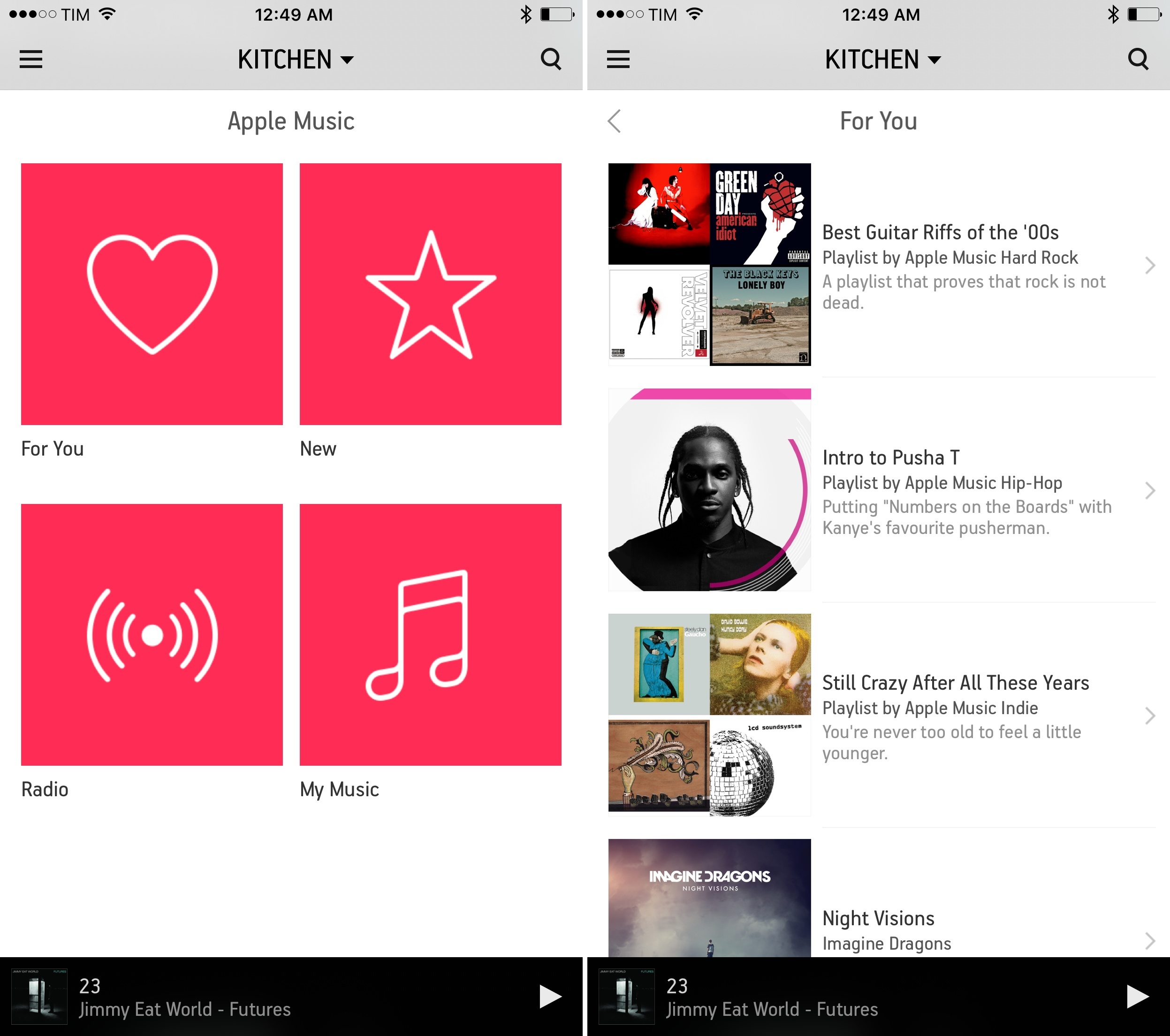
Sonos announced today that Apple Music will be available on Sonos systems worldwide starting Wednesday, Feb. 10. Music fans worldwide will have access to Apple Music features like For You, New, Radio, and My Music, and will also be able to stream the entire Apple Music catalog through Sonos smart speakers tuned for great sound in every room of their homes.

Apple Music on Sonos was tested by hundreds of thousands of listeners through a successful beta program that started in early December. To stream Apple Music on Sonos, customers simply select “Add Music Services” from any Sonos controller app, scroll down to the Apple Music icon, and login.

“The feedback from Apple Music members on Sonos during the beta period has been great,” said Eddy Cue, Apple’s senior vice president of Internet Software and Services. “Sonos plus Apple Music provides an amazing listening experience at home – and we’re excited to offer it to all Sonos customers starting tomorrow.”

Read more


TechTube for Apple TV

Like many others, I’ve developed a habit of binge-browsing YouTube videos and spending a few hours each week on YouTube channels that match my interests. Whether they’re Let’s Plays, music videos, educational stuff, documentaries, or interviews, the variety of content on YouTube provides a constant source of information and entertainment that I find superior to traditional television – or at least more engaging for me.

I haven’t been watching much YouTube on my new Apple TV, though, because I don’t like searching and browsing with the Siri Remote or Remote app; I’d rather use the YouTube app on my iPhone and beam videos to my Chromecast if I find something I want to watch on the big screen. Perhaps dictation will speed up the search process in tvOS 9.2.

TechTube, released earlier this week, is a new tvOS app that brings a curated stream of YouTube videos to the Apple TV with a minimal UI optimized for binge-watching. Once you open TechTube, you’re presented with a swipeable gallery of videos; swipe left, and the thumbnail preview starts playing without having to open the video in full screen; if you’re interested, swipe again, go to the next video, and so forth. Titles are displayed at the top of each preview and there are basic controls once you’ve opened a video in full screen, but that’s about it. There’s no complexity involved – you can’t subscribe to channels, search, or add videos to playlists. TechTube is a lean-back experience created to open the app a couple of times each day, see what’s new, and watch some videos from the selection of available picks.

And that’s the aspect of TechTube I like: I don’t have to find videos to watch. I can just open the app whenever I’m bored and relax for a bit with videos I wouldn’t normally seek out. The team behind TechTube wants to pick videos for “techies, nerds, gadget lovers, and thinkers” on a daily basis, and, so far, the app offers an interesting mix of typical tech content (roundups, gadgets, what’s new in software updates, hands-on, etc.) as well as educational videos and interviews. Scrolling through videos is fun; I don’t have to think about browsing my YouTube subscriptions; and the app is a good showcase of tvOS and simple interactions with the Siri Remote.

I wouldn’t mind having an iOS version of TechTube for those times when I want to sit down with my iPad and take my brain off work for a few minutes. TechTube is available for free on the tvOS App Store.


Improving the iOS Keyboard Switching Experience for Multilingual Users

Wang Ling has an interesting proposal to improve the iOS keyboard experience for international users who frequently switch between keyboards:

If you are a monolingual user you are unlikely to feel the need of a separate group of occasionally-used keyboard. Most of you enable at most two keyboards, your language keyboard and Emoji keyboard. Switching between two keyboards is never an issue because it never incurs unnecessary inconvenience. You always switch to your target keyboard directly and immediately.

However, if you are a multilingual user like me or many other Chinese (I guess also many other English-as-second-language users) users, things are very different. We use both Chinese and English keyboards. We type mixture of Chinese and English very often so we need to switch between the two frequently. If Chinese and English are the only keyboard we use there will be no issues, as explained above. But Emoji is fun and we also want to use it, occasionally.

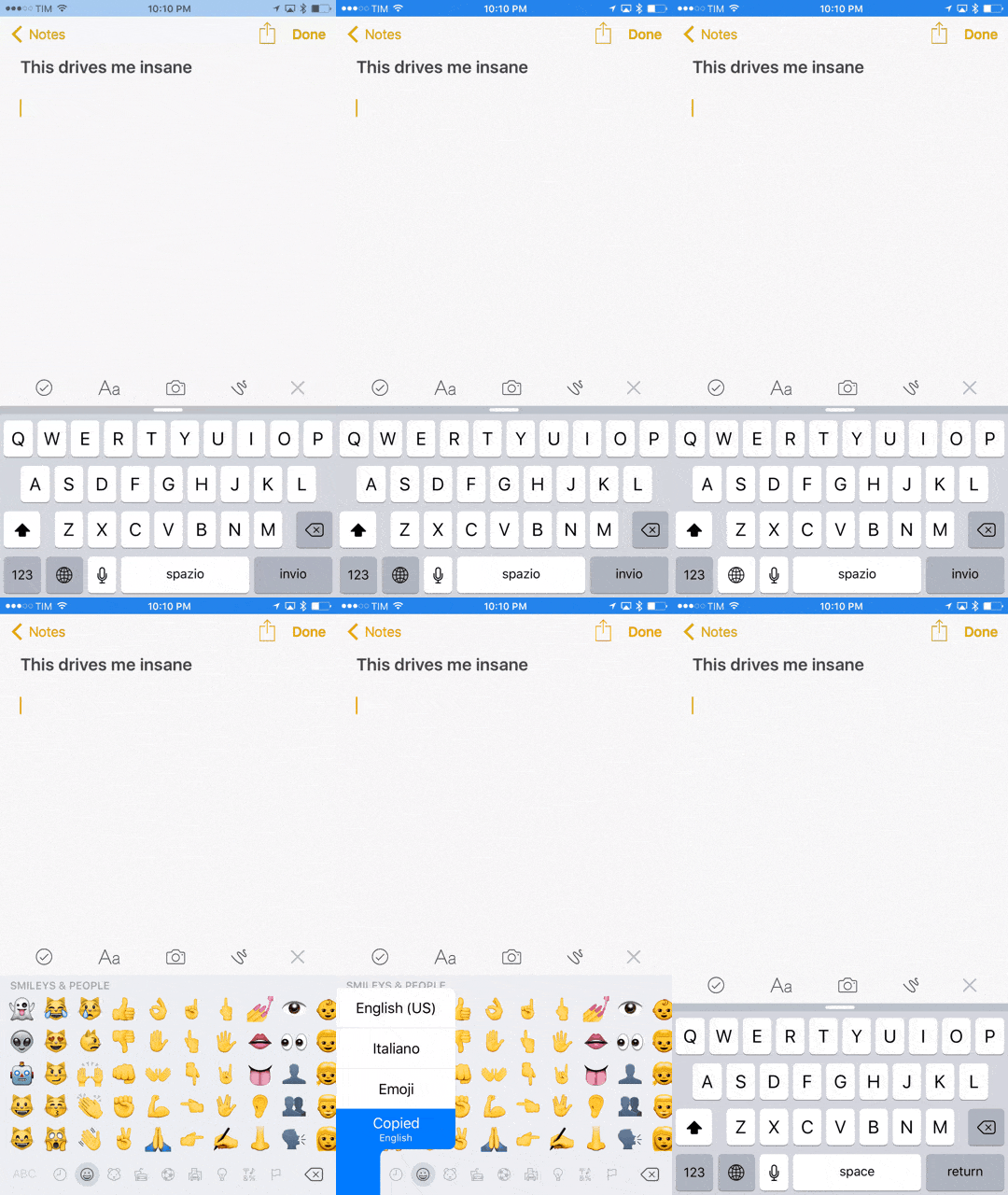
Replace “Chinese” with “Italian”, and that’s me. Every day, I’m constantly switching between the Italian and US English keyboards on my iOS devices and the experience is slow and annoying. Once you throw in a couple of additional keyboards in the mix (I use Emoji and Copied) the only sensible way to switch keyboards is tapping & holding the globe button then sliding over to the keyboard you want to use again – which takes about 1 second in my experience. That doesn’t sound like a lot, but the annoyance adds up; plus, imagine doing that for years. Assuming I switch between English and Italian keyboards 50 times a day (and I’m lowballing here), I can say I lose about 5 hours/year to this keyboard switching dance on iOS.

This won’t seem like a big deal to monolingual users, but trust me – it’s one of the most tedious aspects of working and communicating with others on iOS.

I see two possible solutions: either Apple implements something close to Ling’s idea with separate shortcuts for frequent and occasional keyboards, or, even better, they build a smarter, unified keyboard that automatically recognizes multiple languages at a time (though that obviously wouldn’t work for Chinese and other non-QWERTY keyboards).


Italy, America, and the iPhone

Fascinating analysis by Matt Richman on why the iPhone is less popular in Italy than in the United States:

From September 1st to December 19th of last year, I studied abroad in Rome, Italy. The experience changed my life for the better. Starting as a complete beginner in a foreign country and leaving it 110 days later able to read, write, and speak basic Italian was one of the hardest and most rewarding things I’ve ever done. Anyone with the chance to study abroad should do it.

One of the first things I noticed in Rome was that the iPhone is less popular there than I unconsciously assumed it would be. Coming from the US, where iPhones are extremely prevalent in rich and cosmopolitan areas, I was shocked and confused to see so few of them in Rome.

And I didn’t see too many of them elsewhere in Italy, either. In Florence I saw iPhones in the hands of tourists but rarely in the hands of Florentines, and in Todi, a small town in central Italy, I didn’t see a single resident with an iPhone.

As someone who’s lived in Italy his whole life and writes about Apple for a living, the topic is close to me. I only partially agree with Matt’s points on retail and the iPhone as a status symbol.

While we don’t have chains with thousands of locations such as Walmart or Target in Italy, we do have chains with dozens of stores such as Unieuro and Media World – which often feature their own in-store mini Apple stores with iPhones, iPads, and Macs laid out on Apple Store-like wooden tables. And, it’s easy enough to find iPhones at any electronics or carrier shops inside malls, not to mention smaller independent stores in towns like Viterbo, my hometown. I wouldn’t say that Apple has a third-party retail penetration problem speaking from personal experience – if anything, I’d argue that Apple’s own stores should have a wider presence. It’s relatively easy to find an iPhone at a non-Apple location these days.

As for the status symbol discussion, Matt’s points about fashion and prioritizing other purchases seem likely to me, but I don’t have experience with other countries to compare what I see here. However, I don’t completely buy the argument that iPhones aren’t an important status symbol in Italy. Again, speaking from anecdotal experience, I know and I’ve met lots of people who buy the latest iPhone just because it’s an iPhone – it doesn’t matter which new features or improvements it offers. Having an iPhone is, for better or worse, a fashion statement (I also see that reflected in how many choose to customize their devices with branded cases or other blingy accessories).

I think Matt is absolutely spot-on about iPhone prices. In Italy, iPhones (and Apple devices in general) are expensive, and I wouldn’t be surprised to hear that, statistically, fewer Italian households can afford an iPhone (or multiple ones) compared to American ones. The recession hit Italy hard, and the iPhone is as close to a luxury smartphone as you can get – especially if you choose to buy any iPhone above 16 GB unlocked with no contract.

This last aspect ties into a point Matt didn’t cover: Samsung and Android smartphones (and, to a lesser extent, Windows smartphones). Based on what I’ve seen in Rome and traveling around Italy, Samsung has enjoyed great success with their Galaxy devices over the past few years. Samsung has been quite aggressive with ad campaigns and promotions (discounts) in partnership with the aforementioned chains. Galaxy smartphones aren’t cheap, but there’s usually a good chance you’ll find pretty good deals around; also, there’s a lot of choice in the Galaxy family, which you don’t get with only two new iPhone models released every year.

What I’ve also noticed, particularly in the last two years, is that decent Android smartphones have gotten really cheap here – I have many friends who moved from an iPhone to Huawei phones (another company that’s been running TV commercials aggressively) simply because they needed a new phone but didn’t have the money for a new iPhone and Huawei had a good enough option for much less. If you apply this to hundreds of other Android devices sold in malls and electronic chains, it would explain why, anecdotally, I’m seeing more types of smartphones in the streets of Italy compared to a few years ago.

Matt has raised some interesting points in his article. The more I think about it, though, the more curious I am about stats for used iPhone sales in Italy. Every time I had to sell an iPhone – either to close friends or by posting it online – it took me less than 48 hours.


On Twitter Going Beyond 140 Characters

Earlier today, a report by Re/code’s Kurt Wagner indicated that Twitter is building a feature to let users share text updates longer than 140 characters:

Twitter is building a new feature that will allow users to tweet things longer than the traditional 140-character limit, and the company is targeting a launch date toward the end of Q1, according to multiple sources familiar with the company’s plans. Twitter is currently considering a 10,000 character limit, according to these sources.

Re/code first reported about the feature in September, noting how it would enable users to share long-form content on the service.

After much speculation on Twitter and tech blogs this afternoon, Twitter’s own Jack Dorsey weighed in, funnily enough, with a textshot – a screenshot of text apparently taken from the Notes app on iOS (as Jason Snell points out, a popular way to share text beyond 140 characters).

Read more