Posts in notes

OpenAI’s New Codex App Has the Best ‘Computer Use’ Feature I’ve Ever Tested

Computer use in Codex.

Computer use in Codex.

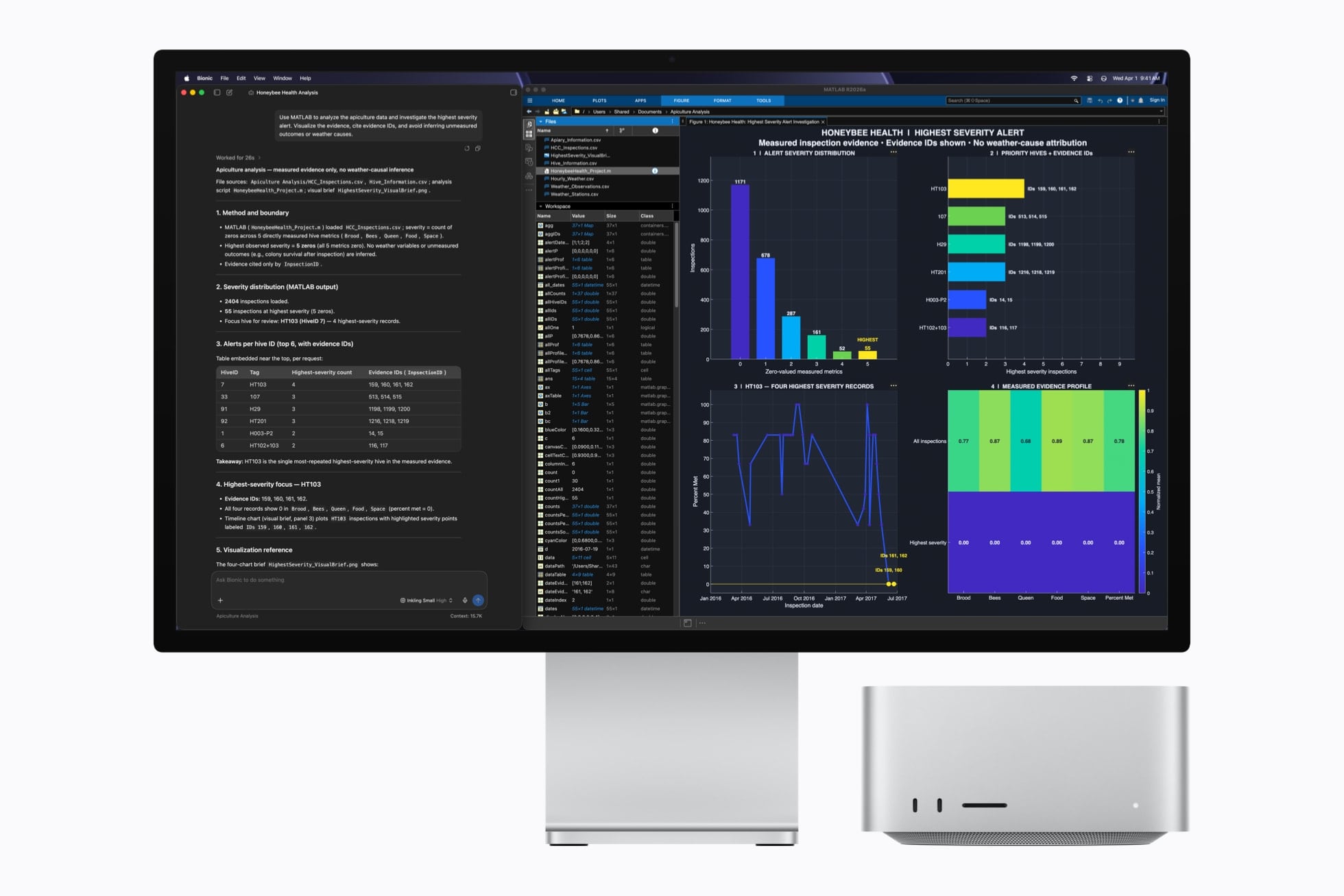
OpenAI rolled out their updated Codex app for Mac yesterday and, among other things, they shipped a native computer use tool for macOS that lets Codex interact with multiple Mac apps in the background using parallel cursors that do not bring apps to the foreground when agents are interacting with them. The feature that OpenAI rolled out in Codex is literally based on the Sky app that I exclusively previewed last year, and which was later acquired by OpenAI along with the team that built it.1

I feel like I’m in a pretty unique position to comment on all this since, as MacStories readers will recall, I was able to test Sky for several months last year before the team went radio-silent and joined OpenAI. Here’s the thing: I’m not exaggerating when I say that Codex now features the best computer use feature I have ever tested in any LLM or desktop agent. In fact, it’s even better than the computer use feature I used in Sky last year: Sky’s computer use was great, but it was considerably slower than Codex’s current one because it was running on Anthropic’s Claude models. With Codex for Mac today, even the (kind of slow) GPT 5.4 is faster than Sky ever was. But, using Codex with fast mode or – for simpler tasks – the Cerebras-hosted GPT-5.3-Codex-Spark model yields dramatically faster performance than Sky for Mac delivered in 2025.

But why is that? Allow me to explain. Most computer use models (such as the one in the Claude app, or even the just-released Personal Computer by Perplexity) rely on a combination of screen-recording capabilities and some AppleScript to either simulate virtual clicks on-screen and perform basic actions inside apps by calling osascript in a virtual shell. Sky was different, and Codex is different, and I can share more details today that I did not elaborate on when I wrote about Sky last year.

We all have Apple’s Accessibility team to thank for the technology that allows Codex’s computer use tool to exist. To build it, the Codex team took advantage of an advanced accessibility feature that allows third-party apps to read the “accessibility hierarchy” (also known as “AX Tree”) of any app open on macOS. My understanding is that this technology was primarily created to allow screen-readers and other assistive tools to work with Mac apps regardless of their automation/scripting features. In this case, it’s been repurposed as a way for Codex to ingest the full contents and hierarchy of any window and, essentially, load it as context for the LLM.

When I was told last year that this was how Sky worked behind the scenes, I instantly knew it reminded me of something, and I was right. We’ve seen the same technology being used before in UI Browser, the excellent (and sadly discontinued) app to inspect the visual hierarchy of any app that’s also powered by screen-reader APIs on macOS. All of this still applies to Codex’s computer use plugin today: pay attention to any chat where you’re using the plugin, and you’ll see 5.4 reason about the “accessibility tree” it wants to parse from any given application.

As someone who’s played around with GUI scripting and UI Browser many times over the years, let me tell you: this is not easy, and these frameworks were not meant for automation. For starters, they return a lot of text about any possible UI element, text field, or button inside a window. That text can be formatted in a variety of ways; it can be so deeply nested inside the XML-like structure returned by the AX framework, you often need to navigate 20 levels deep into a structure to find what you want. But this is what makes Codex’s computer use model different, why the Sky acquisition was a very clever move from OpenAI, and also why the reactions online seem overwhelmingly positive: Codex can “see” more inside apps and can control them more precisely than other models based solely on capturing screenshots, simulating clicks on certain coordinates, and running the occasional AppleScript. Codex can also do those things as fallback measures, but they’re not the primary drivers of its computer use plugin.

It also helps that computer use in Codex is exquisitely designed – not a surprise given OpenAI’s design team and the pedigree of the team behind this feature. The flow for granting permissions to the plugin is the best I’ve ever seen in a third-party Mac app – and it comes directly from Sky, which had the same onboarding experience. What Sky didn’t have is the new virtual cursor: the Codex team designed an entire system for it where the cursor can wiggle to show when the model is thinking, takes playful paths, and derives its color from the system’s wallpaper. I can only think of another company that sweats these kinds of UI details as much as the Codex team did here…and I’ll let you guess where several of Codex’s engineers and designers are, in fact, coming from.

I’ve been working with computer use in Codex all day, and while it is not as fast as a skilled human who knows a particular macOS interface well, it is very good at understanding and controlling any Mac app in the background a bit more slowly, with greater precision than competing features from Anthropic and Perplexity. That makes it ideal to automate busywork in Mac apps that do not offer an API or CLI, or which can’t be fully controlled with AppleScript. Let me give you some practical examples.

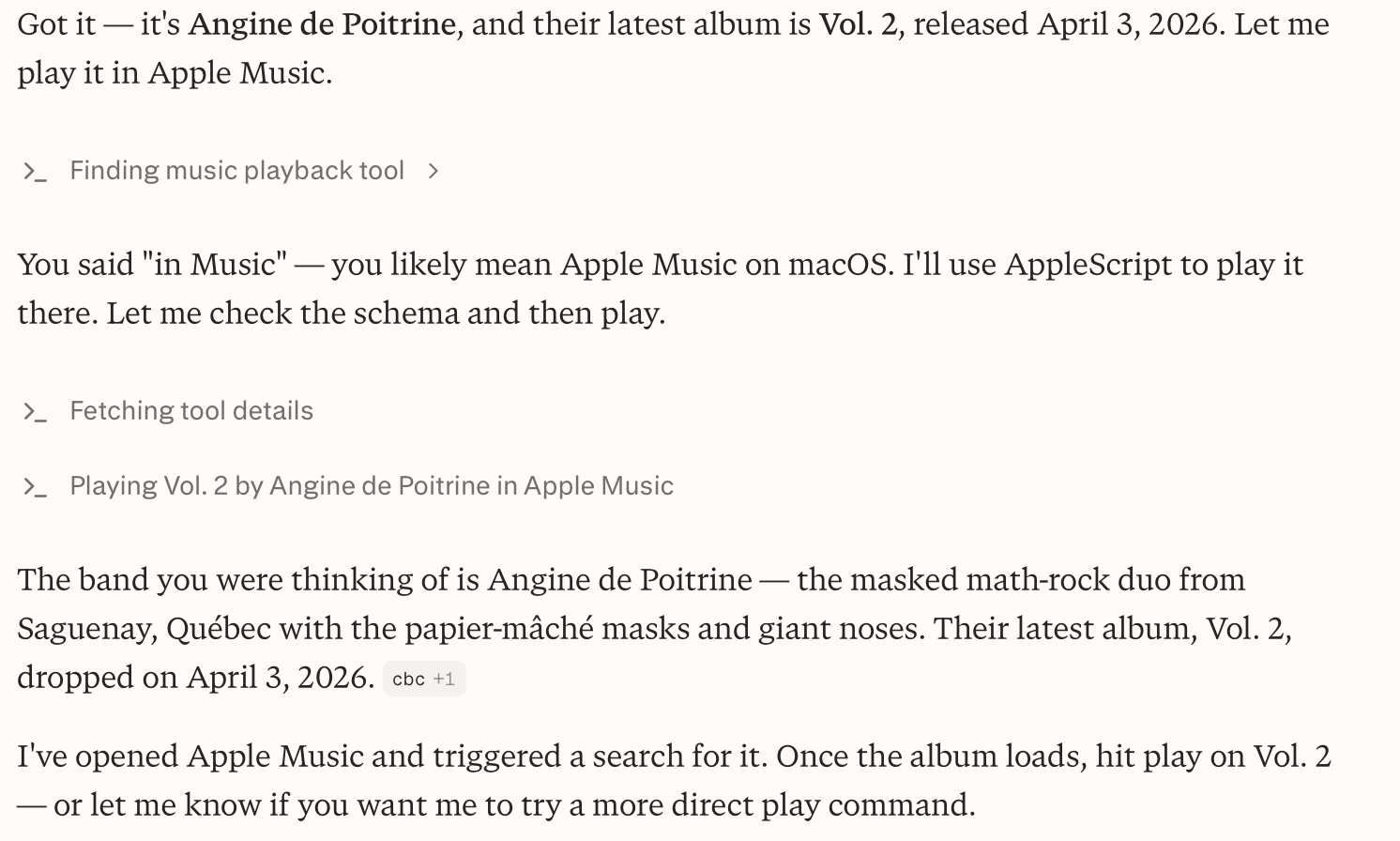
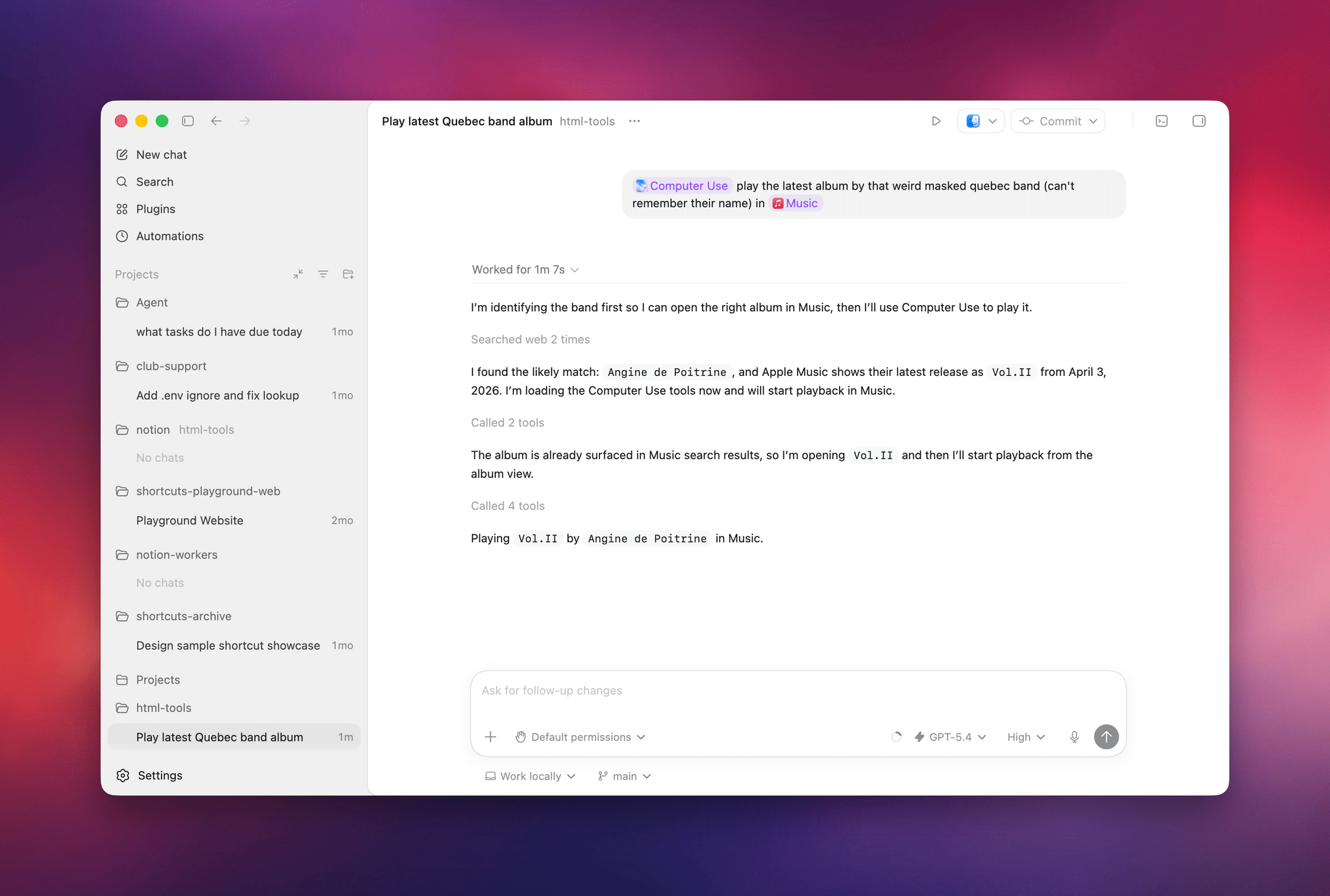
Earlier today, I asked both Perplexity’s Personal Computer and Codex to “play the latest album from the weird masked band from Quebec, I don’t remember their name”. I was referring to the exceptional Angine de Poitrine, of course. Both agents searched the web upfront and pinpointed my request, but when it came to actually controlling the Music app, Personal Computer stopped short of hitting the ‘Play’ button because its AppleScript integration couldn’t do it; Codex went ahead, opened the album with its virtual cursor, and started playing music.

Personal Computer couldn’t hit Play.

Personal Computer couldn’t hit Play.

Codex had no issues playing music in the Music app.

Codex had no issues playing music in the Music app.

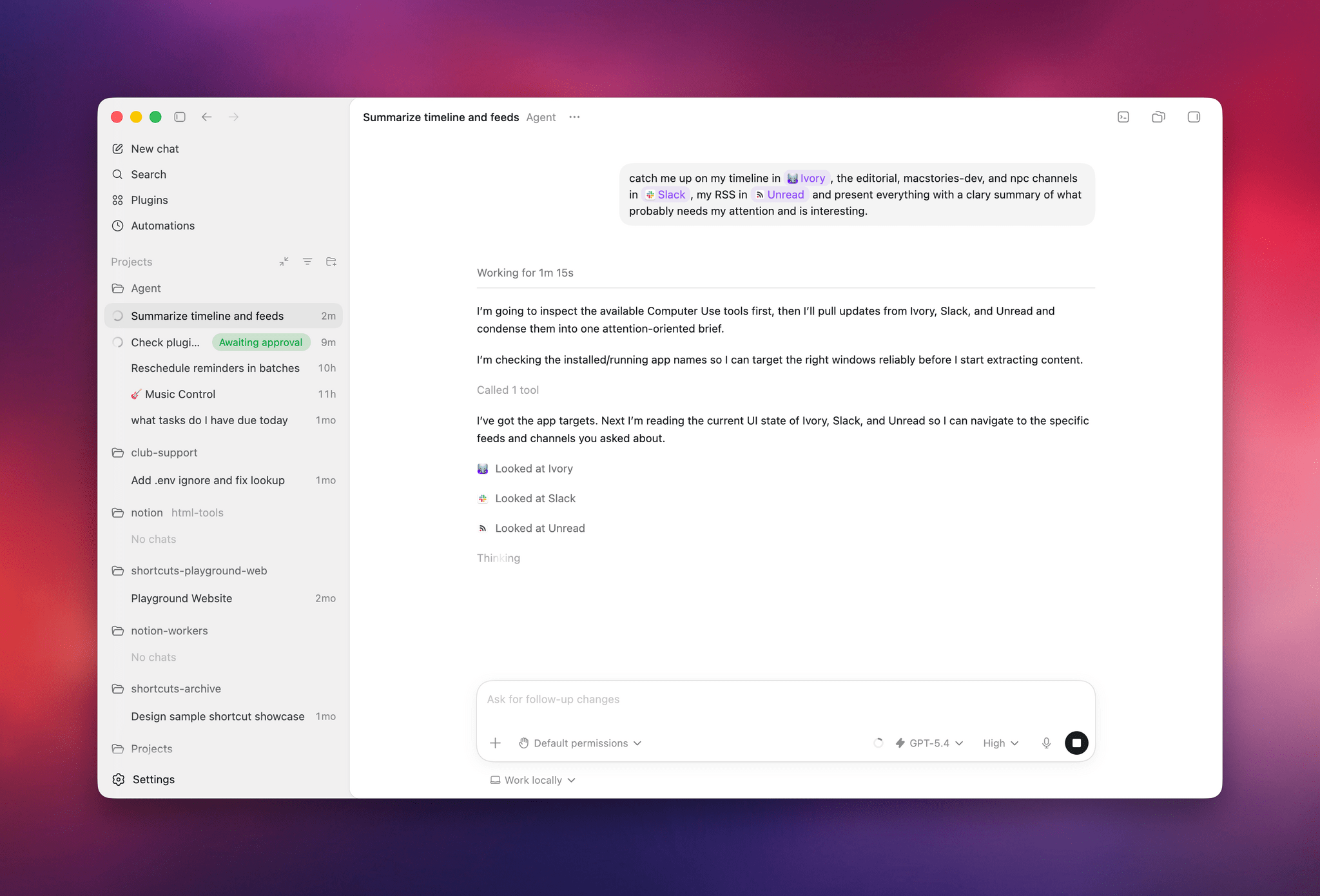
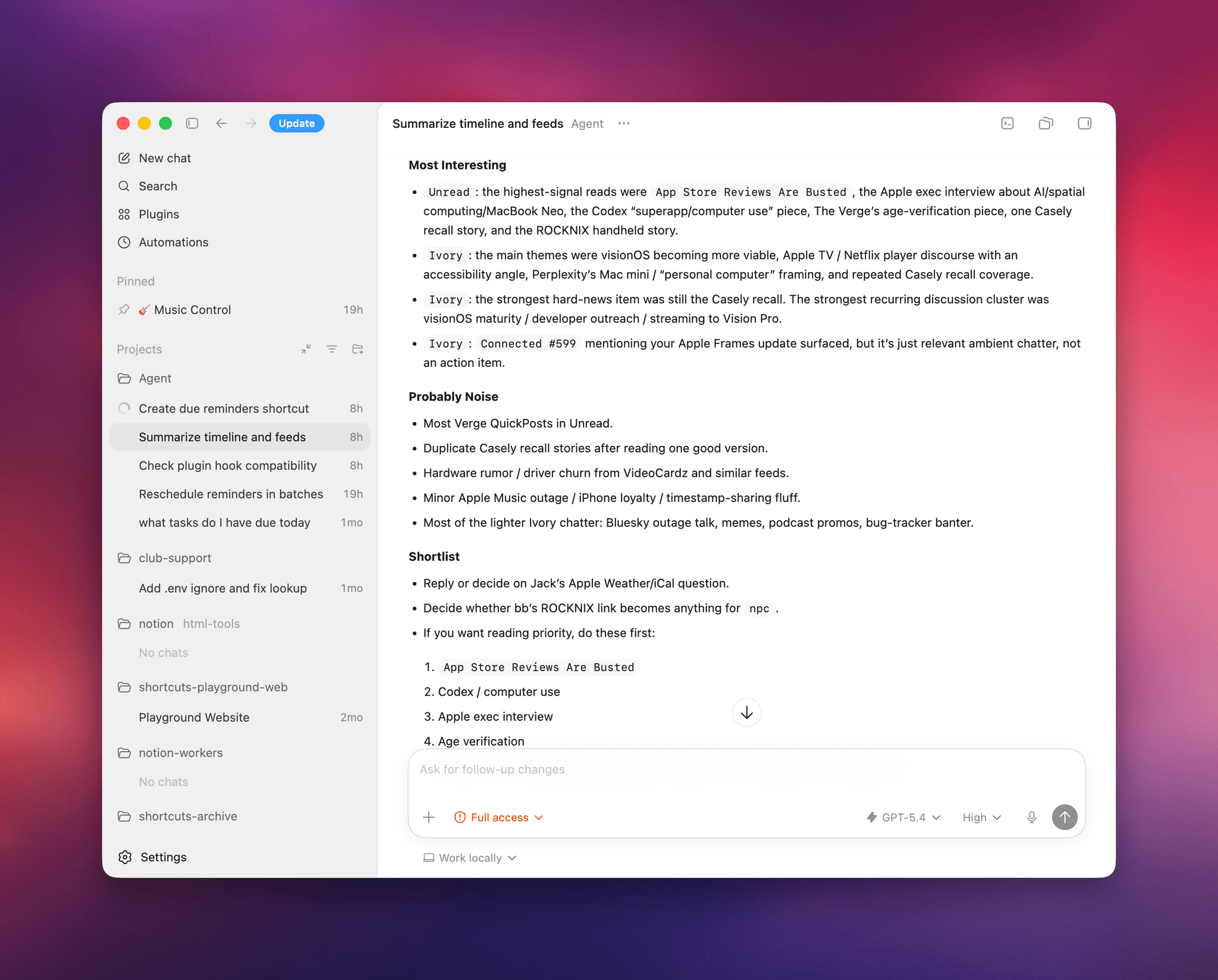
I also tested Codex by asking it to look at specific channels on Slack, my Ivory timeline, and the Unread app and give me a summary of interesting updates I should know about. Codex successfully deployed parallel cursors, started scrolling and clicking around all three apps, and produced a report that included updates gathered from those apps. Could I have scrolled the apps myself, one after the other, the old fashioned way? Sure. But as an “automation” that happened in the background while I was doing my email, it was pretty good.

Codex’s report from three separate apps.

Codex’s report from three separate apps.

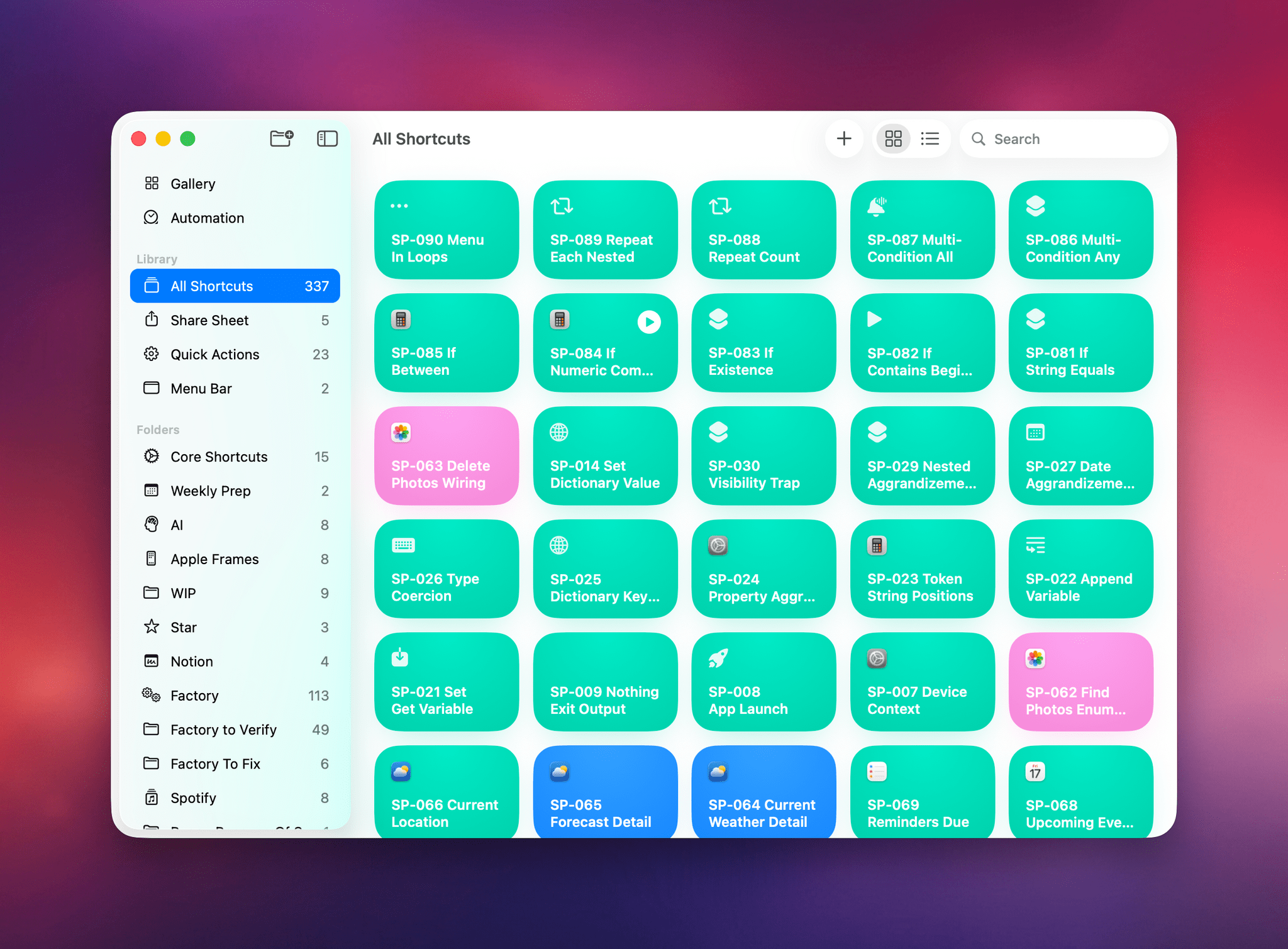
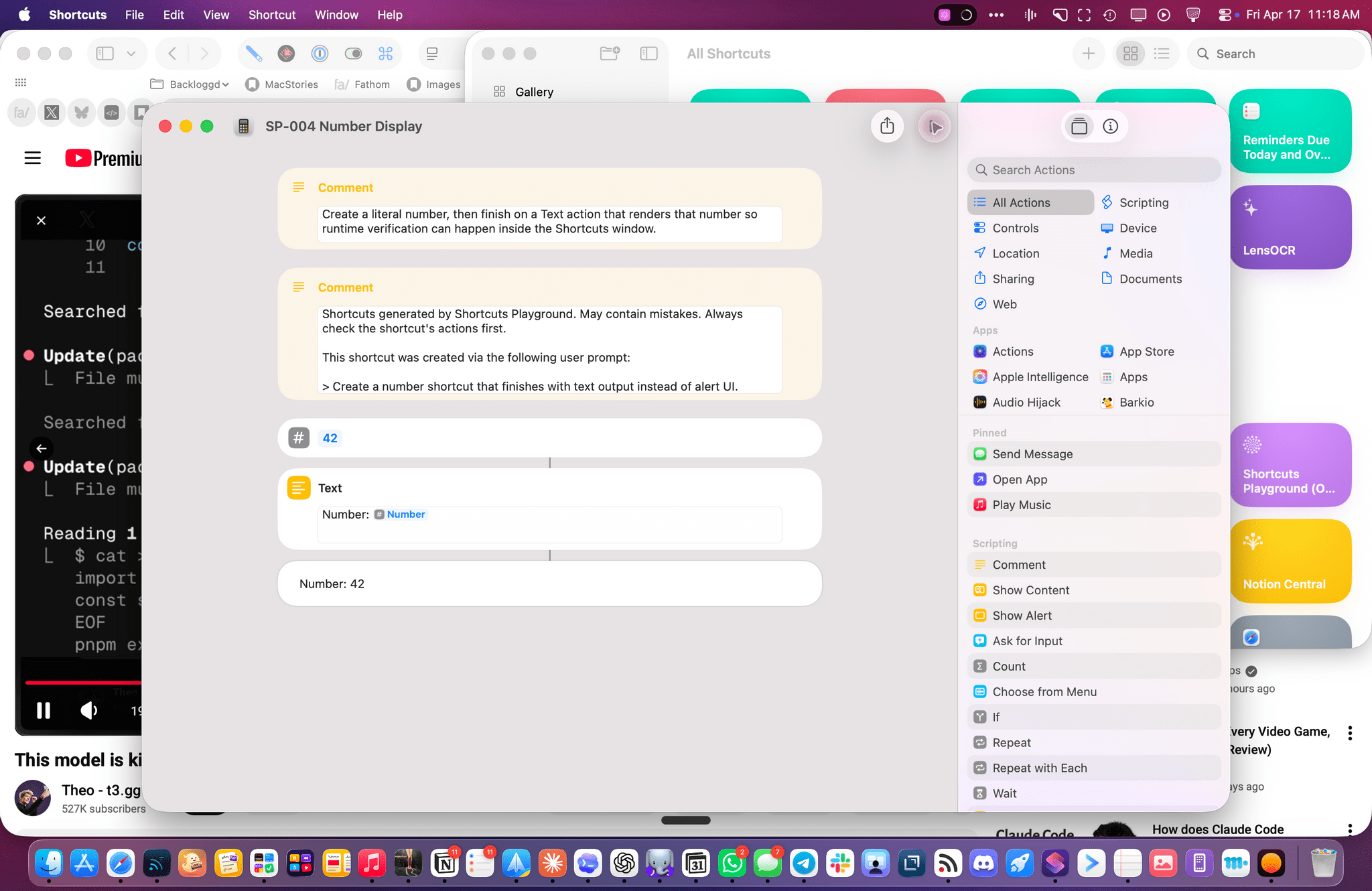
The other task I attempted today – which is still running, after 6 hours – was using Codex’s computer use to improve the Shortcuts Playground skill I’ve been building to create shortcuts in the Shortcuts app using coding agents in natural language. With Codex, I figured I could now ask the agent to run the skill, create shortcuts for me, but also click the resulting .shortcut files in Finder, install them, and test them for me in the Shortcuts app to spot any errors and further improve the skill. Not only was Codex’s computer use plugin able to successfully install dozens of shortcuts, but it also opened each, verified its output, and is currently evaluating what went wrong to improve some of the skill’s guidance and instructions.

Codex installed all these shortcuts via computer use.

Codex installed all these shortcuts via computer use.

The Codex cursor debugging a shortcut for me.

The Codex cursor debugging a shortcut for me.

So, long story short: Codex’s computer use plugin is the state of the art at the moment, and it’s the evolution of a strong foundation that I was able to test last year, which has been further refined and expanded by OpenAI. I’d like to see the company expand this plugin to the main ChatGPT for Mac experience (which is still stuck on the old Work with Apps integration), but, for now, I’ll take this feature inside Codex rather than the slower, and less capable, computer use models from other chatbots. More importantly, I’m happy to see that Sky ended up in good hands who can now deliver this product to the masses.

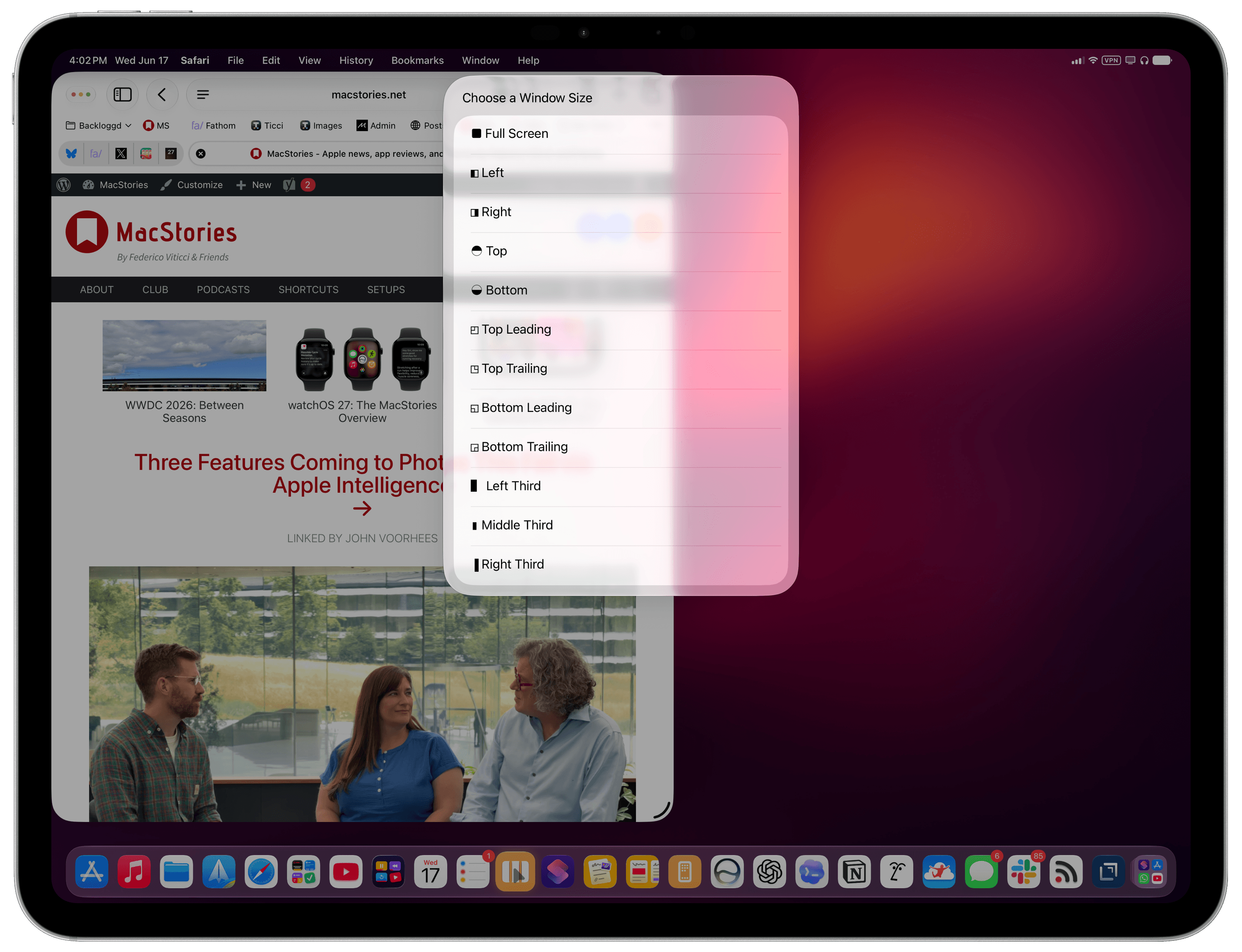
  1. I don’t use the term “literally” in a liberal sense here. When you enable the Computer Use plugin in Codex, you can head over to the app’s config.toml configuration file, open it in a text editor, and you’ll spot this line:
    /Users/username/.codex/plugins/cache/openai-bundled/computer-use/1.0.750/Codex Computer Use.app/Contents/SharedSupport/SkyComputerUseClient.app/Contents/MacOS/SkyComputerUseClient

    Open that folder and, sure enough, there’s an executable for the former Sky “app”, now loaded as a first-party 2plugin that handles the virtual computer interactions for Codex. 


Well, I Guess I Like Safari’s Compact Tab Bar in iPadOS 26.4 (Also: Using Vertical Tabs in Safari for iPad)

We're so back.

We’re so back.

Yours truly, back in September 2021:

In case I haven’t been clear enough above, I’ll be blunt: I don’t understand why the compact tab bar exists on iPad, and I think this design shouldn’t have shipped to customers.

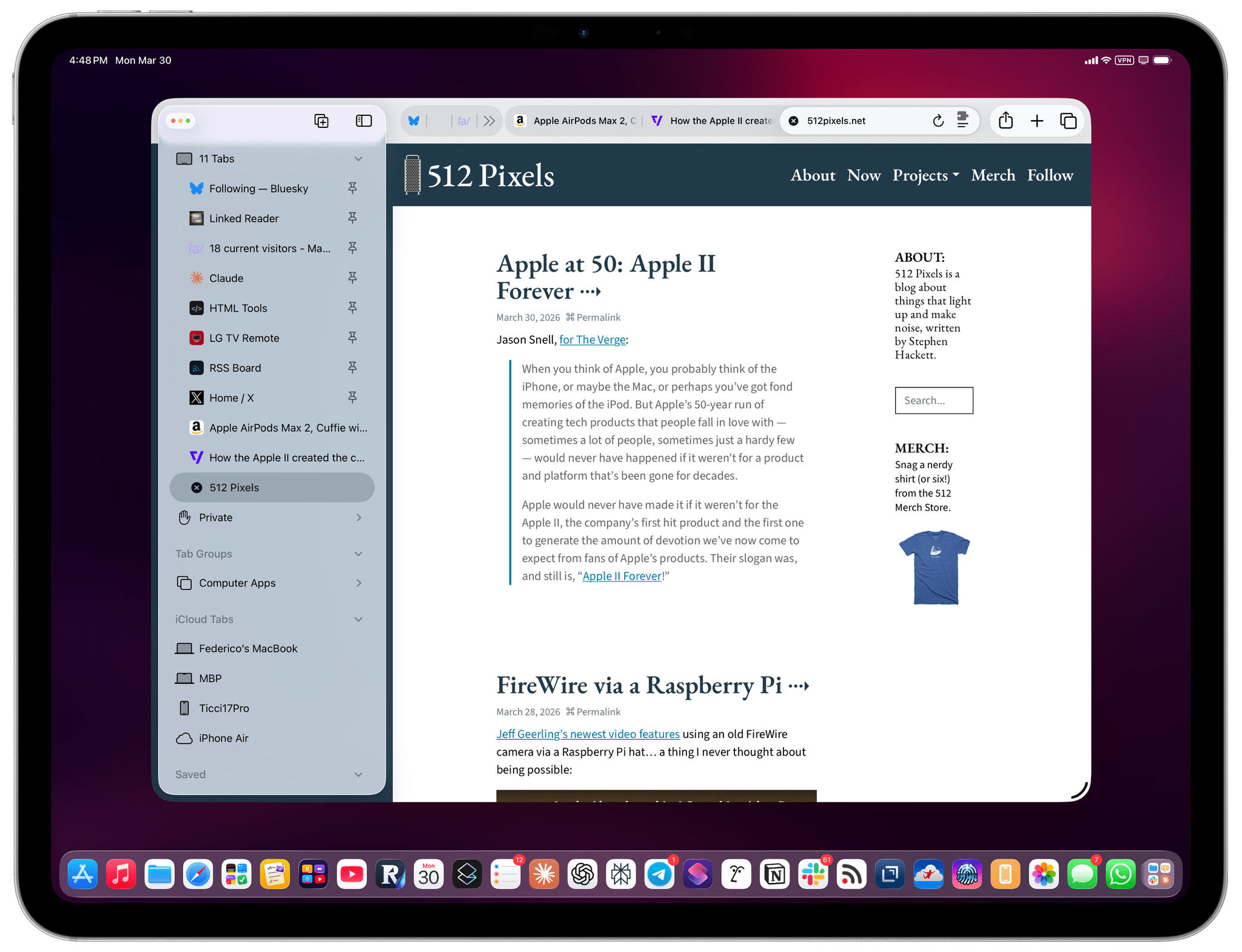
My understanding is that Apple thought the benefit of removing a separate address bar, therefore saving a few vertical pixels on the page, would have made all the compromises we’ve seen so far worth the trade-offs in usability. I think that’s a wrong and mismanaged decision driven by an unmotivated pursuit of an iPhone-like design that has no place on iPad. If slightly increasing vertical space on webpages is Apple’s only argument here in favor of the compact tab bar, you tell me if it’s worth the trouble by judging from the screenshots below.

If, like me, you missed this in the release notes for the recently released iPadOS 26.4, the compact tab bar has returned to Safari for iPad after mysteriously disappearing in iPadOS 26.0. And I’m here to tell you that not only do I not despise it like I did five years ago, but I actually like this mode and have been working with Safari on my 13” iPad Pro like this for the past two weeks.

Read more


The iPhone Fold Doesn’t Need iPadOS to Be a Great “Tablet”

I meant to link this at the beginning of the year, then I forgot, but I guess the story is still as timely as ever given the state of the latest rumors. A few months back, Jason Snell 3D-printed a mockup of the upcoming iPhone Fold (which I still think should be called iPhone Duo), which revealed a surprising design decision:

If these mock-ups are real, this folding iPhone is not going to be what you may have pictured in your head: a modern iPhone, roughly the shape of an iPhone Pro, that folds open to reveal a larger screen inside.

Instead, Apple may be making a device that’s much wider and squatter than existing iPhones when it’s folded up. The mock-ups people are printing show a phone that’s squatter than an iPhone mini and wider than an iPhone Pro Max! If that shape is right, the iPhone Fold will look a bit more like a mini notebook when it’s folded, unlike any iPhone that has ever existed.

And:

The shape makes sense, however, when you imagine what that phone looks like when it’s unfolded: a screen with a 4:3 aspect ratio, the shape of an old-school television and—more importantly—an old-school iPad. In fact, this rumored design would make the unfolded iPhone the shape of an iPad, just slightly smaller than the iPad mini. (The iPad mini’s screen is 8.3 inches when measured diagonally, while this screen is rumored to be 7.76 inches.)

Read more


The AI App Experience Matters More Than Benchmarks Now

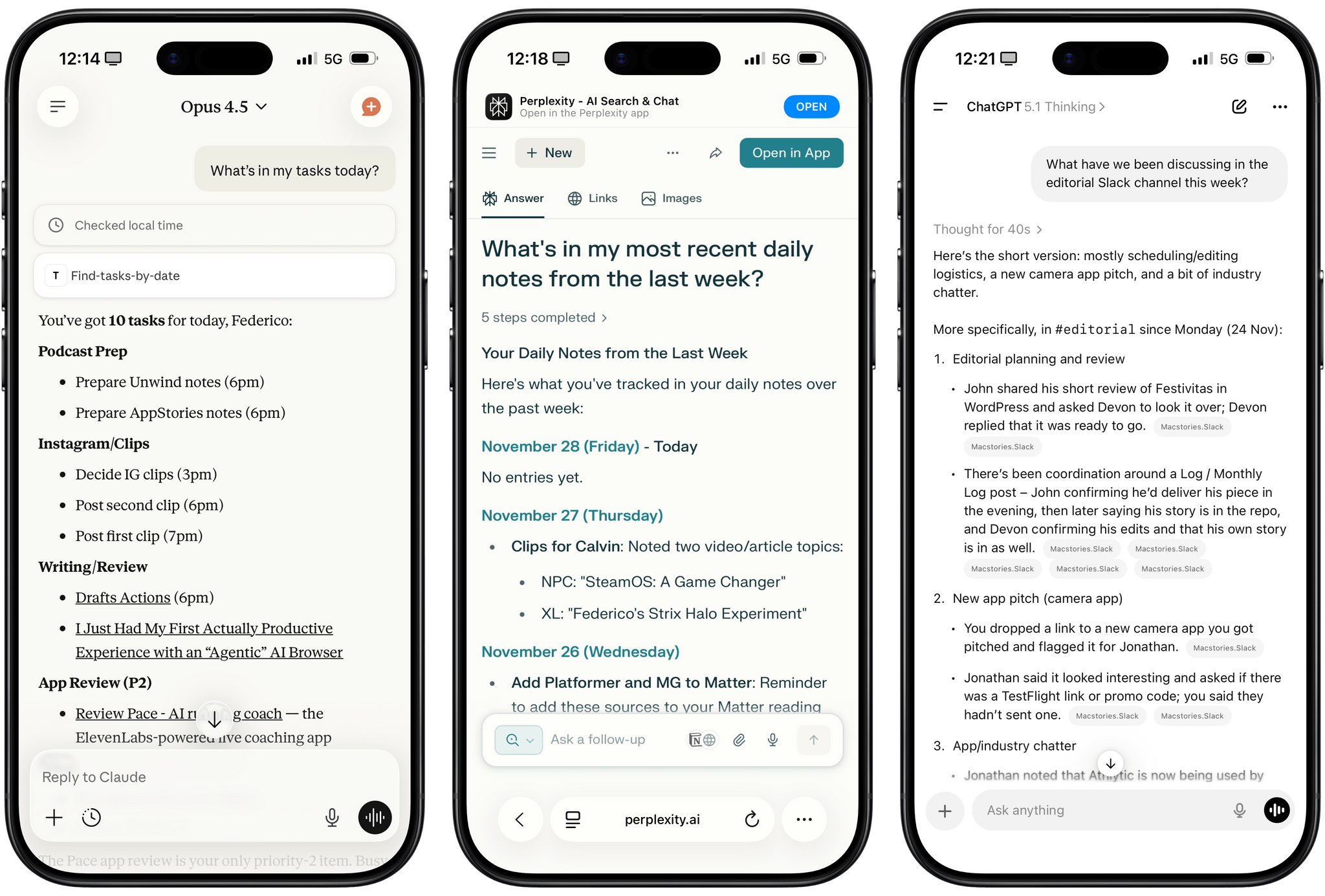
Different experiences with app connectors in Claude, Perplexity, and ChatGPT.

Different experiences with app connectors in Claude, Perplexity, and ChatGPT.

I was catching up on different articles after the release of Claude Opus 4.5 earlier this week, and this part from Simon Willison’s blog post about it stood out to me:

I’m not saying the new model isn’t an improvement on Sonnet 4.5—but I can’t say with confidence that the challenges I posed it were able to identify a meaningful difference in capabilities between the two.

This represents a growing problem for me. My favorite moments in AI are when a new model gives me the ability to do something that simply wasn’t possible before. In the past these have felt a lot more obvious, but today it’s often very difficult to find concrete examples that differentiate the new generation of models from their predecessors.

This is something that I’ve felt every few weeks (with each new model release from the major AI labs) over the past year: if you’re really plugged into this ecosystem, it can be hard to spot meaningful differences between major models on a release-by-release basis. That’s not to say that real progress in intelligence, knowledge, or tool-calling isn’t being made: benchmarks and evaluations performed by established organizations tell a clear story. At the same time, it’s also worth keeping in mind that more companies these days may be optimizing their models for benchmarks to come out on top and, more importantly, that the vast majority of folks don’t have a suite of personal benchmarks to evaluate different models for their workflows. Simon Willison thinks that people who use AI for work should create personalized test suites, which is something I’m going to consider for prompts that I use frequently. I also feel like Ethan Mollick’s advice of picking a reasoning model and checking in every few months to reassess AI progress is probably the best strategy for most people who don’t want to tweak their AI workflows every other week.

Read more


Trying to Make Sense of the Rumored, Gemini-Powered Siri Overhaul

Quite the scoop from Mark Gurman yesterday on what Apple is planning for major Siri improvements in 2026:

Apple Inc. is planning to pay about $1 billion a year for an ultrapowerful 1.2 trillion parameter artificial intelligence model developed by Alphabet Inc.’s Google that would help run its long-promised overhaul of the Siri voice assistant, according to people with knowledge of the matter.

There is a lot to unpack here and I have a lot of questions.

Read more


On MiniMax M2 and LLMs with Interleaved Thinking Steps

MiniMax M2 with interleaved thinking steps and tools in TypingMind.

MiniMax M2 with interleaved thinking steps and tools in TypingMind.

In addition to Kimi K2 (which I recently wrote about here) and GLM-4.6 (which will become an option on Cerebras in a few days, when I’ll play around with it), one of the more interesting open-source LLM releases out of China lately is MiniMax M2. This MoE model (230B parameters, 10B activated at any given time) claims to reach 90% of the performance of Sonnet 4.5…at 8% the cost. You can read more about the model here; Simon Willison blogged about it here; you can also test it with MLX on an Apple silicon Mac.

What I find especially interesting about M2 is that it’s the first model to support interleaved thinking steps in between responses and tool calls, which is something that Anthropic pioneered with Claude Sonnet 4 back in May. Here’s Skyler Miao, head of engineering at MiniMax, in a post on X (unfortunately, most of the open-source AI community is only active there):

As we work more closely with partners, we’ve been surprised how poorly community support interleaved thinking, which is crucial for long, complex agentic tasks. Sonnet 4 introduced it 5 months ago, but adoption is still limited.

We think it’s one of the most important features for agentic models: it makes great use of test-time compute.

The model can reason after each tool call, especially when tool outputs are unexpected. That’s often the hardest part of agentic jobs: you can’t predict what the env returns. With interleaved thinking, the model could reason after get tool outputs, and try to find out a better solution.

We’re now working with partners to enable interleaved thinking in M2 — and hopefully across all capable models.

I’ve been using Claude as my main “production” LLM for the past few months and, as I’ve shared before, I consider the fact that both Sonnet and Haiku think between steps an essential aspect of their agentic nature and integration with third-party apps.

That being said, I have been testing MiniMax M2 on TypingMind in addition to Kimi K2 for the past week and it is, indeed, impressive. I plugged MiniMax M2 into TypingMind using their Anthropic-compatible endpoint; out of the box, the model worked with interleaved thinking and the several plugins I’ve built for myself in TypingMind using Claude. I haven’t used M2 for any vibe-coding tasks yet, but for other research or tool-based queries (like adding notes to Notion and tasks to Todoist), M2 effectively felt like a version of Sonnet not made by Anthropic.

Right now, MiniMax M2 isn’t hosted on any of the fast inference providers; I’ve accessed it via the official MiniMax API endpoint, whose inference speed isn’t that different from Anthropic’s cloud. The possibility of MiniMax M2 on Cerebras or Groq is extremely fascinating, and I hope it’s in the cards for the near future.


AI Experiments: Fast Inference with Groq and Third-Party Tools with Kimi K2 in TypingMind

Kimi K2, hosted on Groq, running in TypingMind with a custom plugin I made.

Kimi K2, hosted on Groq, running in TypingMind with a custom plugin I made.

I’ll talk about this more in depth in Monday’s episode of AppStories (if you’re a Plus subscriber, it’ll be out on Sunday), but I wanted to post a quick note on the site to show off what I’ve been experimenting with this week. I started playing around with TypingMind, a web-based wrapper for all kinds of LLMs (from any provider you want to use), and, in the process, I’ve ended up recreating parts of my Claude setup with third-party apps…at a much, much higher speed. Here, let me show you with a video:

Kimi K2 hosted on Groq on the left.Replay

Read more


Anthropic Releases Haiku 4.5: Sonnet 4 Performance, Twice as Fast

Earlier today, Anthropic released Haiku 4.5, a new version of their “small and fast” model that matches Sonnet 4 performance from five months ago at a fraction of the cost and twice the speed. From their announcement:

What was recently at the frontier is now cheaper and faster. Five months ago, Claude Sonnet 4 was a state-of-the-art model. Today, Claude Haiku 4.5 gives you similar levels of coding performance but at one-third the cost and more than twice the speed.

And:

Claude Sonnet 4.5, released two weeks ago, remains our frontier model and the best coding model in the world. Claude Haiku 4.5 gives users a new option for when they want near-frontier performance with much greater cost-efficiency. It also opens up new ways of using our models together. For example, Sonnet 4.5 can break down a complex problem into multi-step plans, then orchestrate a team of multiple Haiku 4.5s to complete subtasks in parallel.

I’m not a programmer, so I’m not particularly interested in benchmarks for coding tasks and Claude Code integrations. However, as I explained in this Plus segment of AppStories for members, I’m very keen to play around with fast models that considerably reduce inference times to allow for quicker back and forth in conversations. As I detailed on AppStories, I’ve had a solid experience with Cerebras and Bolt for Mac to generate responses at over 1,000 tokens per second.

I have a personal test that I like to try with all modern LLMs that support MCP: how quickly they can append the word “Test” to my daily note in Notion. Based on a few experiments I ran earlier today, Haiku 4.5 seems to be the new state of the art for both following instructions and speed in this simple test.

I ran my tests with LLMs that support MCP-based connectors: Claude and Mistral. Both were given system-level instructions on how to access my daily notes: Claude had the details in its profile personalization screen; in Mistral, I created a dedicated agent with Notion instructions. So, all things being equal, here’s how long it took three different, non-thinking models to run my command:

  • Mistral: 37 seconds
  • Claude Sonnet 4.5: 47 seconds
  • Claude Haiku 4.5: 18 seconds

That is a drastic latency reduction compared to Sonnet 4.5, and it’s especially impressive when we consider how Mistral is using Flash Answers, which is fast inference powered by Cerebras. As I shared on AppStories, it seems to confirm that it’s possible to have speed and reliability for agentic tool-calling without having to use a large model.

I ran other tests with Haiku 4.5 and the Todoist MCP and, similarly, I was able to mark tasks as completed and reschedule them in seconds, with none of the latency I previously observed in Sonnet 4.5 and Opus 4.1. As it stands now, if you’re interested in using LLMs with apps and connectors without having to wait around too long for responses and actions, Haiku 4.5 is the model to try.