This Week's Sponsor:

Dropzone 5

Improve your Drag-and-Drop Workflow


Posts in news

Apple Releases Faster MacBook Air with New Keyboard and Increased Storage Starting at $999 and Doubles Storage on Base-Model Mac minis

Apple has released a new, faster MacBook Air with an updated keyboard and more storage at a lower price. The company also released a minor update to the storage of base-model Mac minis.

According to a press release from the company, the new Air features a 1.2GHz quad-core Core i7 that, with Turbo Boost, can achieve speeds up to 3.8GHz. This is the first time the Air has included a quad-core processor. The laptop also features Intel Iris Plus Graphics, which Apple says are 80% faster than previous models.

The Air’s keyboard has been updated too with a scissor switch-based Magic Keyboard that has 1 mm of key travel and an inverted-T layout of the arrow keys.

The Air's keyboard now uses scissor switches and an inverted-T layout for its arrow keys.

The Air’s keyboard now uses scissor switches and an inverted-T layout for its arrow keys.

The Air, which is available in gold, silver, and space gray, starts at $999, a $100 drop from prior models. Thankfully, Apple has also increased the base storage of the entry-level model from 128GB to 256GB SSD storage, a capacity that will make it easier for users to store photos and other media locally without resorting to external solutions. The new Air can also be configured with up to 2TB of storage, which is twice as much as could be previously configured, and is equipped with Apple’s T2 Security Chip, which ensures a secure boot process and handles Touch ID information.

Apple’s press release highlights the following features too:

  • A three-mic array for more clear voice capture for FaceTime calls with friends and family.
  • The industry-best Force Touch trackpad for precise cursor control and multi-touch navigation.
  • Thunderbolt 3 ports for data transfer, charging and video output in a single connector.
  • Support for up to a 6K external display, a first for the MacBook Air.
  • Advanced stereo speakers for immersive, wide stereo sound for activities like watching Apple TV+ content or playing games in Apple Arcade.

The new Airs can be ordered on apple.com starting today.

Finally, the base configurations of the Mac mini received a small update today. The $799 model now comes with 256GB of storage and the $1,099 configuration has a 512GB SSD.

The MacBook Air has been difficult to recommend because of its previous-generation keyboard. With a new keyboard, increased storage, faster CPU and graphics, all at a lower price-point, the MacBook Air looks like the Mac that will meet most people’s needs.



Updated Powerbeats Earphones Coming Wednesday for $149

Over the past few days a new version of Powerbeats began showing up in retail locations and online. Today, Apple subsidiary Beats made the update official on its website with additional details.

The new Powerbeats, which replace the Powerbeats3, feature 15 hours of battery life (a 3-hour increase) and the latest H1 chip used in the AirPods Pro. With the addition of the H1 chip, the new Powerbeats support hands-free Siri, fast Bluetooth pairing, extended range, and audio sharing. The Powerbeats charge via a Lightning connector and include a ‘Fast Fuel’ feature that provides up to 1.5 hours of battery life from a 5-minute charge.

The design of the Powerbeats has been changed too. The new model resembles the Powerbeats Pro, and unlike the Powerbeats3, the cord connecting the two earphones emerges from the ear hook that sits behind your ear instead of from the front of the earphones. As with the previous model, this update is sweat resistant too. The Powerbeats are available in red, black, and white at launch.

Beats has reduced the retail price of the new Powerbeats to $149, which is $50 less than the previous model. Although they are not yet listed on apple.com or available for purchase on Beats’ website, The Verge says the new Powerbeats will be available this Wednesday, March 18th from Apple, Best Buy, and other Beats retailers.


Apple Releases Guidance on Apps Related to COVID-19 and Explains How to Expedite Their Review

Today, on its developer site, Apple announced how its App Review team is evaluating apps related to COVID-19 to ensure that users can depend on such apps. Apple says:

The App Store should always be a safe and trusted place for users to download apps. Now more than ever that commitment takes on special significance as the world fights the COVID-19 pandemic. Communities around the world are depending on apps to be credible news sources — helping users understand the latest health innovations, find out where they can get help if needed or provide assistance to their neighbors.

To help fulfill these expectations, we’re evaluating apps critically to ensure data sources are reputable and that developers presenting these apps are from recognized entities such as government organizations, health-focused NGOs, companies deeply credentialed in health issues, and medical or educational institutions. Only developers from one of these recognized entities should submit an app related to COVID-19. Entertainment or game apps with COVID-19 as their theme will not be allowed.

Apple also encouraged developers of apps related to COVID-19 to select the ‘Time-Sensitive Event’ option when submitting an expedited review request, so their apps will be prioritized by App Review.

Overnight, Apple CEO Tim Cook announced that retail stores outside Greater China will be closed until March 27th and shared details on the steps Apple is taking to protect the physical health of its employees and retail customers. With this latest announcement, Apple is tackling the pernicious effects of misinformation by pledging to keep it out if the App Store, so customers know they can rely on the apps they download.


Apple Closes Retail Stores Outside Greater China Until March 27th and Outlines Steps It Is Taking to Protect Employees

Apple has released a statement from CEO Tim Cook about the company’s response to COVID-19. Among other things, the company is closing all of its retail locations outside Greater China until March 27, 2020. Cook said:

We will be closing all of our retail stores outside of Greater China until March 27. We are committed to providing exceptional service to our customers. Our online stores are open at www.apple.com, or you can download the Apple Store app on the App Store. For service and support, customers can visit support.apple.com. I want to thank our extraordinary Retail teams for their dedication to enriching our customers’ lives. We are all so grateful to you.

Apple is also moving to flexible work arrangements for employees outside of Greater China, extending leave benefits, and paying hourly workers in line with business as usual operations.

Apple’s retail stores are often crowded, especially on weekends, so it’s good to see the company take these measures for the safety of its customers and employees.


Apple Announces WWDC 2020 Will Be Held Online Only

In a move that comes as no surprise, given the rapid spread of the COVID-19 virus around the world, Apple announced today that WWDC, which has been held at the San Jose McEnery Convention Center for the past few years, will be held online this year. In a press release issued by the company today, Phil Schiller said:

“We are delivering WWDC 2020 this June in an innovative way to millions of developers around the world, bringing the entire developer community together with a new experience. The current health situation has required that we create a new WWDC 2020 format that delivers a full program with an online keynote and sessions, offering a great learning experience for our entire developer community, all around the world. We will be sharing all of the details in the weeks ahead.”

WWDC draws developers from dozens of countries from around the world. However, with around 5,000 attendees crammed into tight convention center quarters and many more visitors in town for events surrounding the conference, the risk to developers, Apple employees, and the San Jose community is too great to hold an in-person event. Instead, sessions will be online in June with exact dates to be announced later. With the conference moving online, Apple is also donating $1 million to local San Jose organizations.

Of course, Apple’s decision is the right one, but having attended WWDC every year since 2013, I will greatly miss the opportunity to see friends who I often only see there and meet with the developers whose apps we write about all year long. However, MacStories readers will enjoy the same kind of comprehensive WWDC coverage we’ve done in the past. Plus, we’re working on some new ideas to build on past years, so stay tuned.


Twitter Launches Brazil Test of Stories-esque ‘Fleets’ Feature

Today Twitter announced a test, limited to Brazil, of a major new feature for the social service: Fleets, which take their inspiration from the Stories feature found on Instagram, Snapchat, and Facebook.

Fleets, short for “fleeting tweets,” live at the top of your timeline just like stories do in other social media apps, and they disappear after 24 hours. Multiple fleets can be written in a day and include text, images, GIFs, and videos, but the way they are interacted with is different than a standard tweet. There’s no way to retweet or reply to someone’s tweet in a public sense; instead, followers can react to a fleet via DM, or a reaction which is sent via DM. Presumably this means that if someone’s DMs are closed, only people they follow can respond to their fleets.

This new test was announced by Twitter Product Lead Kayvon Beykpour in a series of tweets where you can see both images and video of fleets being demoed.

Normally tests of new features, especially ones as limited as this, wouldn’t necessarily merit reporting on because there’s a good chance they may not come to fruition in full release. Fleets, however, are a major new functionality for Twitter and they have clearly had a lot of work poured into them. They’re also a reflection of where other social media services have already moved, making it highly likely that they’ll eventually get a wide release on Twitter, in some form or another.

Although I’m not a big user of ephemeral sharing on other services, and that’s unlikely to change here, I’m nevertheless happy to see Twitter continue pouring work into evolving its product. If fleets do get a worldwide release in the future, I’ll be interested to see if they cause the quality of timelines to improve as tweets are reserved for more important statements while fleets house everything else.


Eero WiFi Routers Add HomeKit Support

Amazon’s Eero routers are the first out of the gate with HomeKit support, which promises to provide greater security to your Internet-connected HomeKit devices.

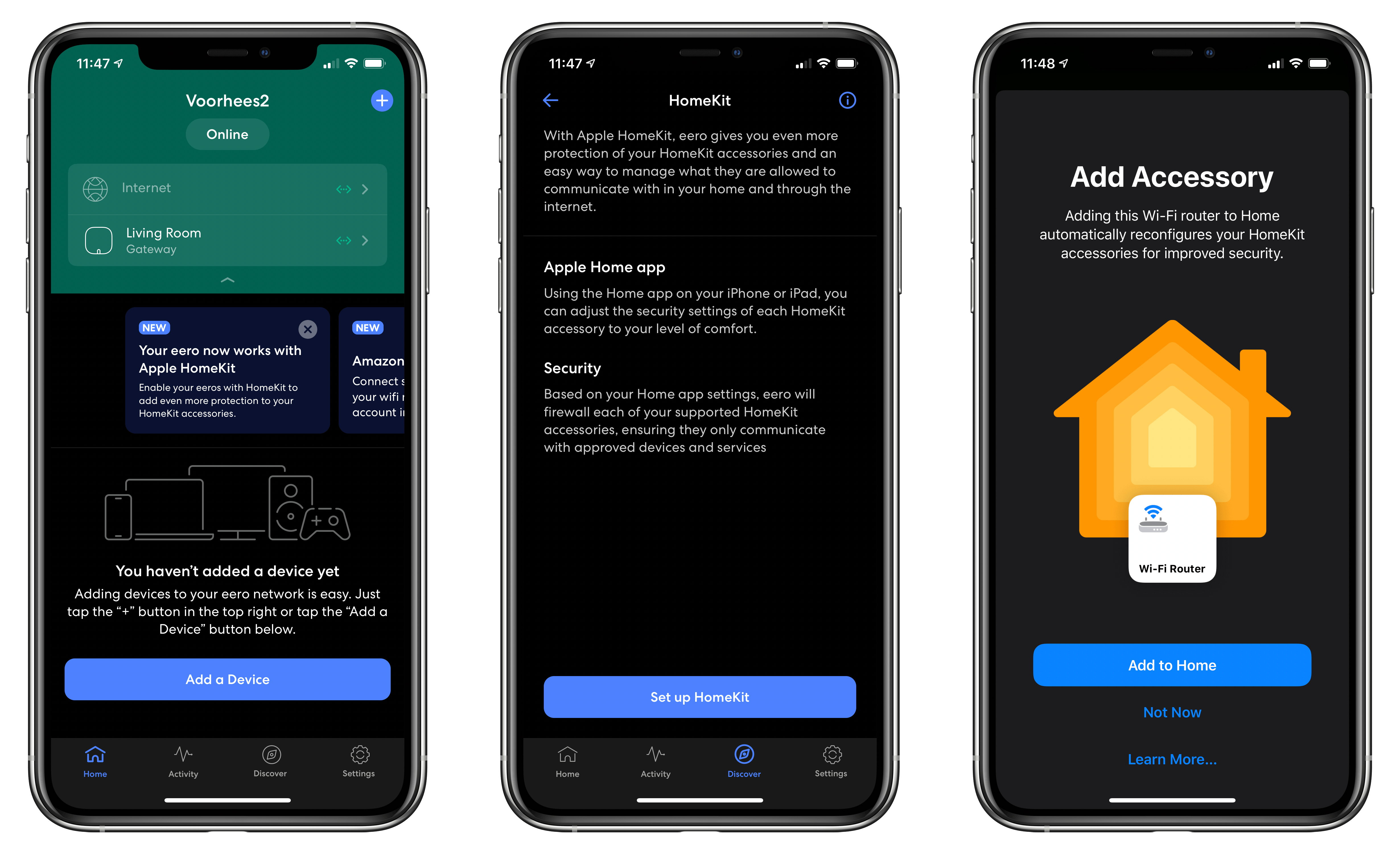
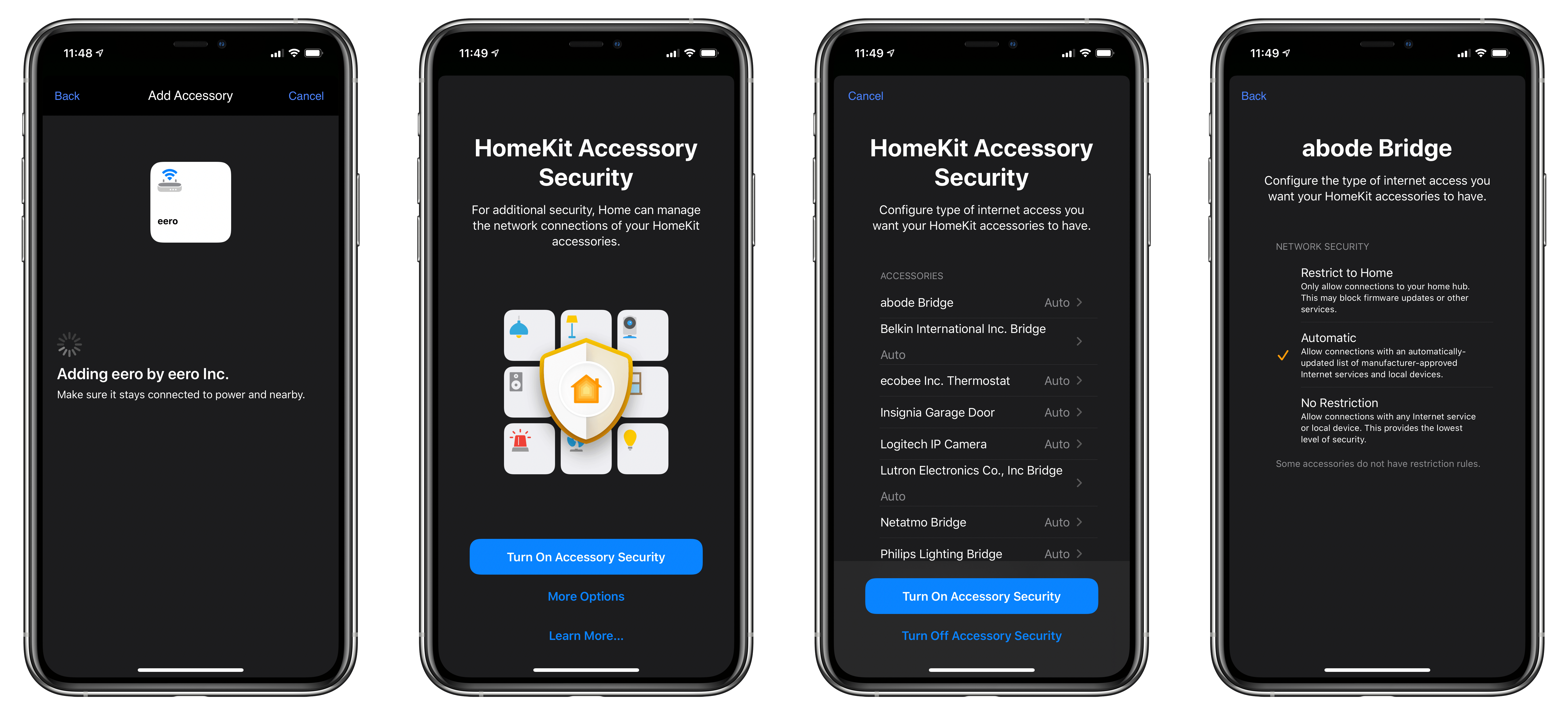
The update, which appeared today via an update to Eero’s iOS app, walks users through the setup process of adding their Eero gateway to the Home app. Along the way, the Eero app explains that enabling HomeKit support allows Eero to firewall off each HomeKit device, so they only communicate with approved devices and services.

Setting up security for HomeKit devices.

Setting up security for HomeKit devices.

Users can set the level of security for each of their HomeKit devices from inside the Eero app’s setup process by choosing ‘More Options’ from HomeKit Accessory Security screen. Alternatively, security settings can be modified from Apple’s Home app. The three security levels available include:

  • Restrict to Home, which only allows connections to your home hub, which the setting warns may block firmware updates or other services.
  • Automatic, which allows connections to manufacturer-approved services and devices
  • No Restriction, which allows connections to any service or device
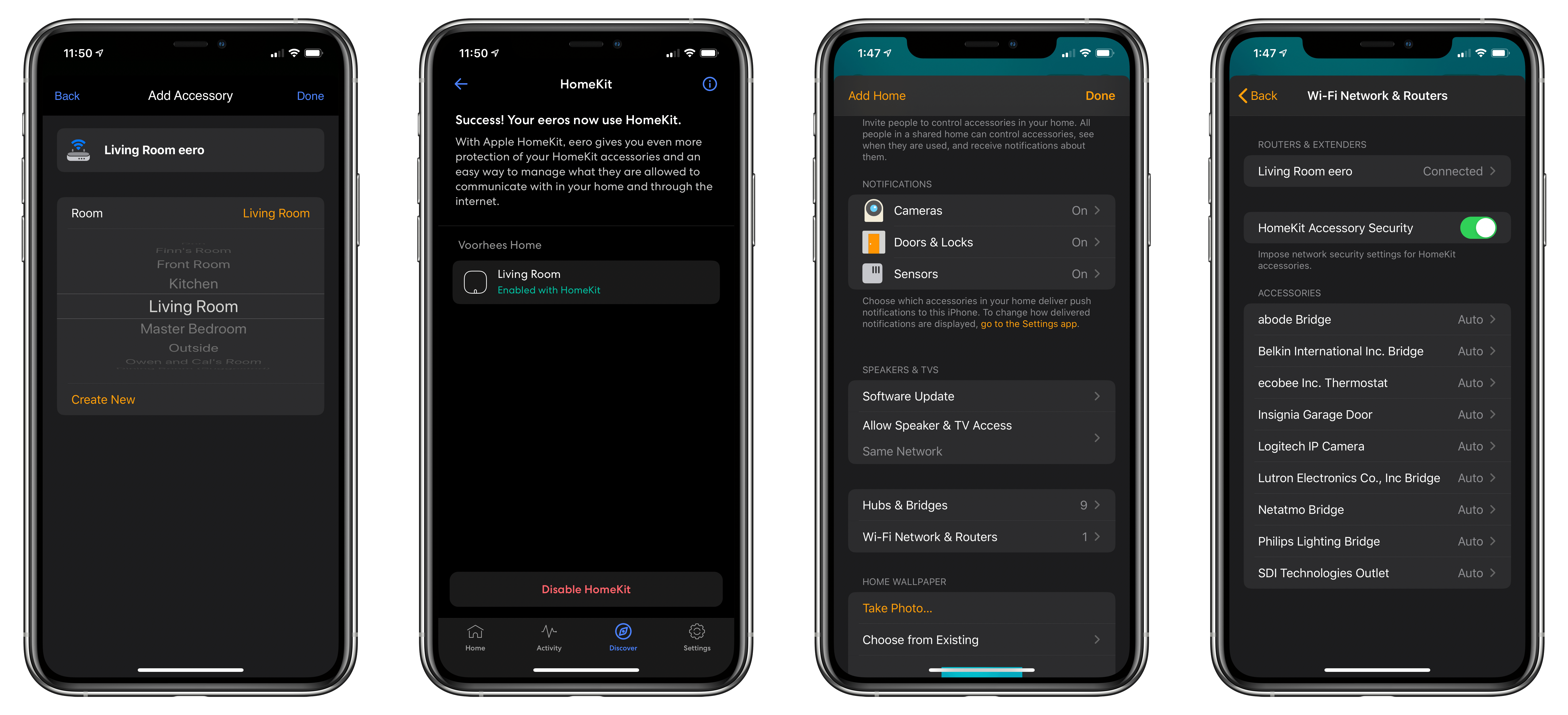
Adding your Eero router to an existing HomeKit room and viewing its settings in the Home app.

Adding your Eero router to an existing HomeKit room and viewing its settings in the Home app.

I don’t currently use an Eero router as my main WiFi router, but I have a spare one, so I gave the setup process a try. The instructions for setting up HomeKit support were clear and easy to follow as you’d expect given Eero’s reputation for simplifying home networking. I wasn’t able to find the Eero router in the Home app initially, but as a reader pointed out, it’s near the bottom of the Home app’s settings that appear when you tap the house icon from the Home tab. I hope more router makers add this to their products soon. The promise of being able to limit access to more sensitive HomeKit devices like cameras and alarm systems is certainly an enticing one.

Eero’s updated app is available on the App Store as a free download.


First Look: RTRO by Moment Vintage Video Camera App

Source: Moment.

Source: Moment.

RTRO by Moment is a brand new vintage video camera app for iOS from the makers of my favorite add-on camera lenses for the iPhone and the excellent Moment Pro Camera app.

The app is a new direction for Moment. The company’s Pro Camera app, combined with its add-on lenses for the iPhone, push the boundaries of what’s possible with the iPhone’s camera. Packed with settings and customizations, the Pro Camera app can create stunning photos and video in the hands of a skilled photographer.

In contrast, RTRO is a video-only camera app focused first and foremost on making fun, short videos for sharing that use filters crafted by photographers to create unique retro looks. It’s those filters, which Moment calls ‘looks,’ paired with a simple, approachable interface that make the app work. It’s easy to get started, fun to use, and the videos the app creates have a unique vibe that makes even the most mundane video more interesting for viewers.

Read more


Twitter Simplifies Adding Tweets to Past Threads

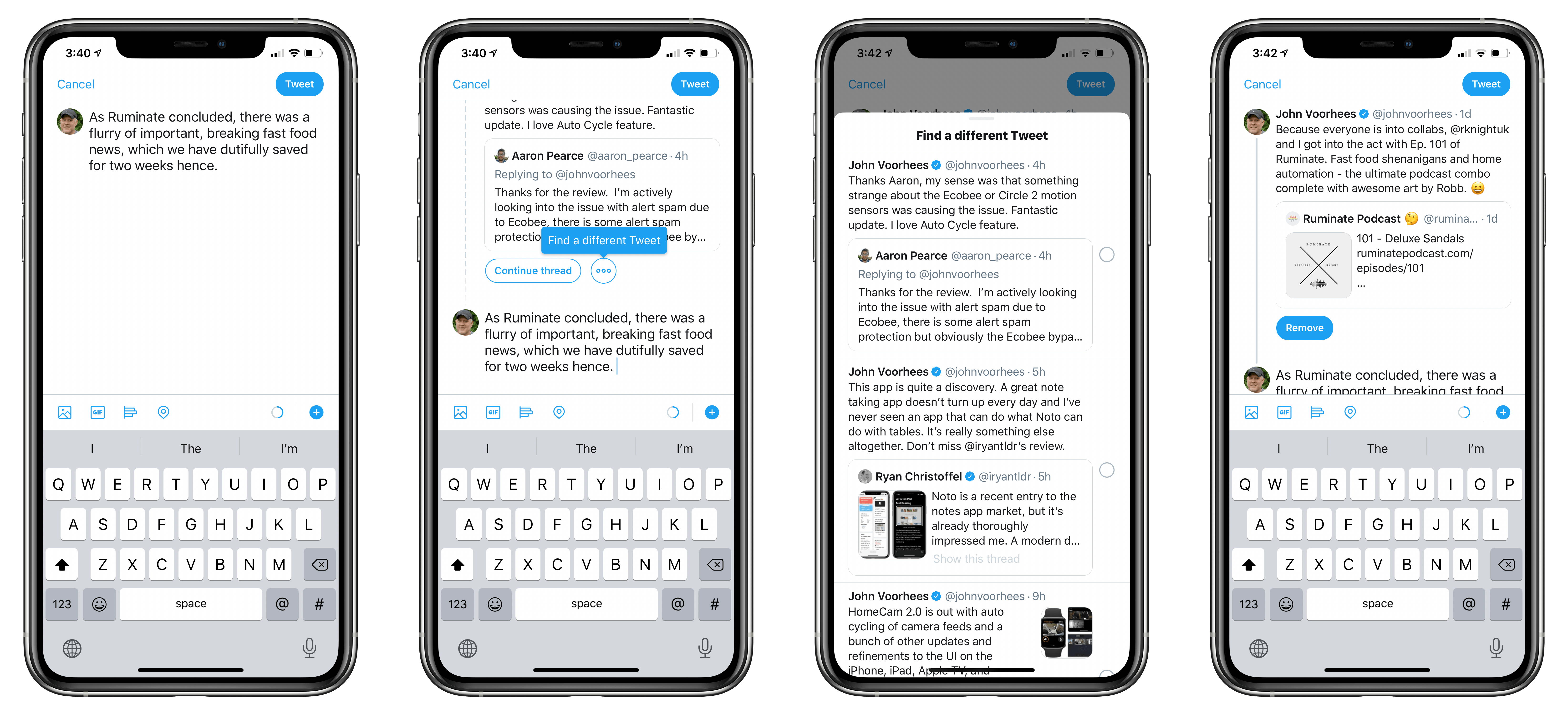
Yesterday, Twitter rolled out a useful new feature that makes it easier to append new tweets to a past thread in its iOS app. Although you could already find an old thread and add to it, the new feature lets you do so from inside the compose field. That way, you can start a fresh tweet and decide after you’ve written it that you want to tack it onto an old thread.

The mechanic is simple. From the tweet compose view, pull down. Your most recent tweet will appear so you can continue it as a thread. Alternatively, there’s also an ellipses button next to ‘Continue Thread’ that you can tap, and all of your tweets come into view in reverse chronological order. Pick one, and the tweet you were composing is added to that thread. If you have second thoughts, there’s still an option to remove the tweet from the thread before tapping the Tweet button and sending the new message.

Twitter announced the feature with a tweet that includes a GIF demonstrating how it works:

https://twitter.com/Twitter/status/1230267622903689225

Features like this have slowly but surely led me to start using the official Twitter app again. It’s been a painful process after years of using third-party Twitter clients, and I’m still doing a lot of my tweet reading in Tweetbot where I have an extensive collection of muted terms. Yet, as my overall time using the service has waned a little, I’ve found that the features that I can’t get from third-party apps have drawn me in more and more.