Posts in mac

Mac App Store Preview: Lyrica

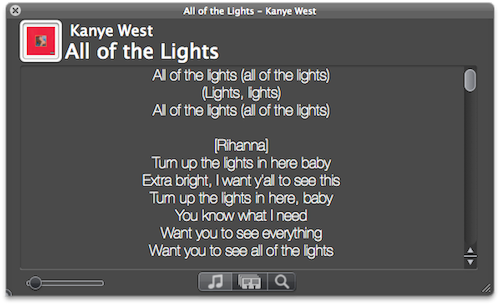
Lyrica is an upcoming new Mac app created by 17 year-old German developer Florian Zand which has been submitted to Apple for approval and should be available on the Mac App Store on January 6. As the name suggests, the app is aimed at fetching and displaying song lyrics – which is a pretty common task, although Lyrica has a few tricks up its sleeve that should grant it a relevant position in the new App Store. First off, the app queries 6 different lyric databases to find the most appropriate lyrics for the songs you’re listening to. Of course, Lyrica automatically takes the music that’s playing in iTunes and contacts the servers on its own. You just have to fire it up and wait a few seconds for the lyrics to show up on screen.

Lyrica can change from a classic OS X grey window to a more unobtrusive translucent black panel that can easily sit on top of any app without getting in the way. If lyrics for a song can’t be found, you can add them manually from the app itself. In addition for “now playing” capabilities, the app can also add lyrics to a specific playlist or your entire iTunes library – that will take a few minutes though, as it’ll have to tag your whole music collection.

We look forward to seeing Lyrica available in the Mac App Store on January 6. More information about the app will be available on the developer’s website here.


Let a SuperHero Back Up Your iPhone While You Sleep

At MacStories, we tend to sync our various Apple gadgets to our Macs quite often because we’re blanketed in apps to review. But you guys might not have to deal with the kind of chaos we deal with between iTunes, 6 shots of espresso, and sync cables, so we’ll offer a middleman.

The Iomega SuperHero cuts out iTunes as a dock you won’t be ashamed to sit your iPhone in. As a bonus, this slick gadget backs up your iPhone so iTunes doesn’t have to! Wake up in the morning knowing that your data is backed up and safe at home - that’s the kind of convenience we aim for right? The SuperHero Backup and Charger is now available for $69.99, and works in combination with Iomega’s SuperHero app for the iPhone.

[Iomega via Gizmodo]


Mac App Store Preview: QuickMark QR Code Reader

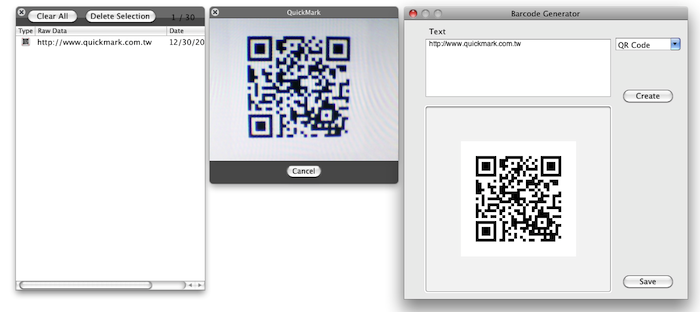
Currently waiting in Apple’s review queue and hopefully launching on the Mac App Store on January 6, QuickMark is a new app that will let your Mac “read” the increasingly popular QR codes. Thanks to the built-in iSight every Mac (which Apple is apparently rebranding as “FaceTime camera”) will be able to recognize 2D barcode images or, if a Mac doesn’t come with an iSight, load an image file and scan it. You can also create your own 2D codes, if you wish.

QuickMark’s reader is capable of doing a bunch of stuff with a correctly scanned code, too. For example, the app can follow a web link with a Mac’s default browser, send an email or add a contact to the Address Book. The app also sports a neat Skype integration as it can send SMS and make a phone call; if you don’t like making phone calls and you’re more for meeting your friends in person, the app can also navigate to a Google Maps’ specific point of interest.

QuickMark for Mac should be available in the App Store soon.


Logitech’s HD Pro Webcam Adds Mac Support - FaceTime in Hi-Def

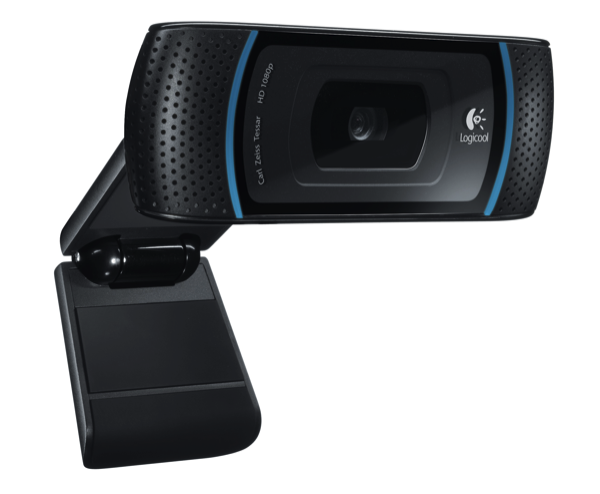
The iSight is okay if you’re casually chatting with friends and family, but why not kick it up a notch with Logitech’s version of Microsoft’s 1080p LifeCam Studio?

The Logitech HD Pro Webcam C910 gains Mac support, allowing you to record 1080p video, while streaming live in glorious 720p. Compatible with Skype, FaceTime, Gmail Voice and Video Chat, the Logitech HD Pro Webcam autofocuses to produce the best images while recording stereo audio thanks to its dual mics. Logitech’s Webcam Software enables simple one-click uploading to Facebook and Youtube as well for sharing those awesome MacStories product reviews, and if you’re into photos, you can snap 10 megapixel shots of that morning mug.

This is a solid offering from Logitech (especially for iMac owners) that brings high-definition to your favorite Macintosh. You can read the full press-release over at BusinessWire for more information. [via BusinessWire]


Mac App Store Preview: Tembo, A New Take On Spotlight

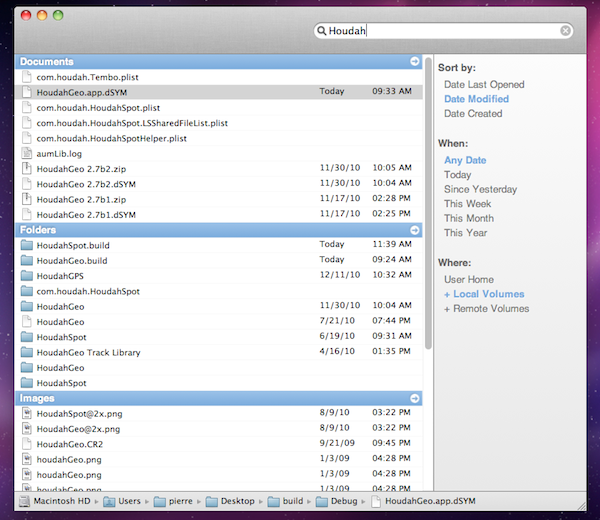
Coming to the Mac App Store this Thursday, Tembo is a new app from the guys behind popular OS X software like HoudahGeo and HoudahSpot that aims at providing a fast, fun and easy interface for Spotlight. Tembo will allow you to easily find music, mail messages, documents and bookmarks through a window that resembles the Spotlight UI you were used to on OS X Tiger.

Search results are grouped by categories, and you can enable, disable or reorder these categories in the app’s Preferences. A top bar for each category in the search results window will let you filter through these results already neatly organized in categories. It’s really powerful, but user-friendly at the same time. Tembo can list up to 2500 items in a single group, and can work as an extension to Mail and iChat to find messages and conversations, or Safari to search through bookmarks and history.

Tembo will be available on January 6 at $20 with a free trial available on the developers’ website.


HandBrake Updates To 0.9.5 In Time For Post-Holiday DVD Ripping

If you’ve been stuck in airport with a luggage case full of DVDs, you might be happy to be returning home to a brand-spankin’ new HandBrake. PowerPC users will no longer be supported from this version on, so don’t update if you’re still toting an old PowerBook. Intel users now have available some delicious new features like dragging and dropping videos onto the main window for scanning, mp3 audio support in mp4 files, improved DVD Main Feature detection, and BluRay disc structure support. Our friends at TUAW noted the latest update wasn’t accessible through the app’s built in updater, so you can check out the remaining release highlights along with a download-link by clicking right-here. You can also check our source below for more information (a commenter noted subtitle-support was still wonky).

[Handbrake 0.9.5 via TUAW]