

Posts in mac
#MacStoriesDeals - Tuesday

Opera Debuts On The Mac App Store
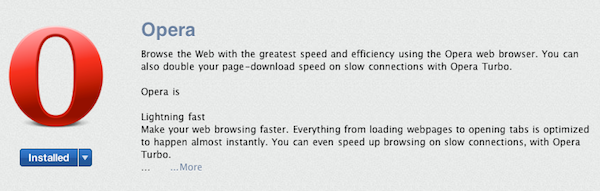
A new release to the Mac App Store today is the Opera web browser that can be downloaded for free. The app seems to be exactly the same as the non Mac App Store version and identifies itself as version 11.01 and build 1206.
The app also includes its Presto layout engine, which would have been thought to be an infringement on Apple’s Mac App Store guidelines that state, “Apps that use non-public APIs will be rejected.” This raises the distinct possibility that browser engines may not fall under the private API category, in which case other browsers could soon be heading to the Mac App Store including Firefox that uses another layout engine called Gecko. Alternatively it is possible that an Apple reviewer has let Opera slip through without realizing, which has happened before with app reviews.
When bringing the Opera browser to the iPhone and iPad, they had run into similar guideline restrictions and were forced to only release Opera Mini that does not use their own browser engine but instead directs traffic through Opera’s servers to compress data. The more fully featured Opera Mobile which is available for Android and other mobile phones could not be released on the iPhone because of its reliance on their own APIs .
Twitterrific 4 Update Hides Dock Icon, Opens Links in Background
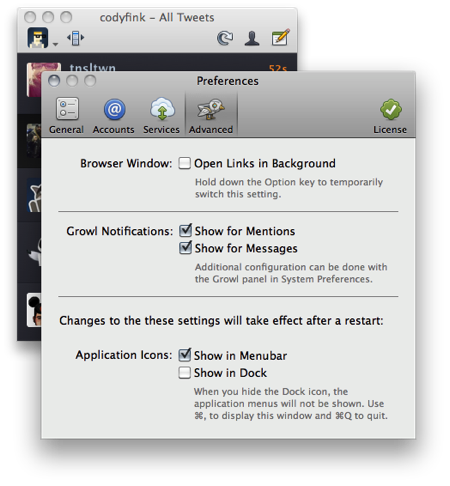
All hands on the Mac App Store! Get your update button ready for Twitterrific 4.0.1, a substantial update to the already awesome Twitter client that’s bringing loads of cool new features. Now supporting key commands for page-up & page-down, you’ll also find a “Full Metal Ollie” who’s ready to take on some of the client’s advanced features. Per your requests, you can now hide Twitterrific in the dock, open links in the background by default, and get notified of important mentions and messages through Growl.
If you don’t yet have Twitterrific, a free version is available at Twitterrific.com with ads, while a full version can be had for $9.99 on the site or on the Mac App Store.
#MacStoriesDeals - Monday

Boot Camp Only Supports Windows 7 For New MacBook Pros
An Apple support note released on Friday has revealed that Boot Camp will only work with Windows 7 on the new MacBook Pros that were released last week, with drivers for Windows XP and Vista not supplied.
This follows a trend that was set by the Late 2010 MacBook Air that likewise didn’t include drivers for Windows XP and Vista. It would be assumed that Apple has stopped developing Boot Camp drivers for XP and Vista and all new Macs will solely support Windows 7.
[Via ZDNet]
Lion’s Podcast Publisher Is Podcasting Made Dead Simple
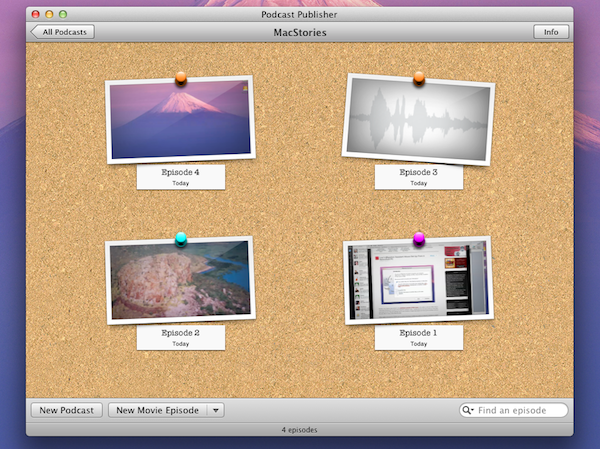
Apple has a pretty diverse set of content creation applications from the much loved iLife consumer suite of applications to the more professional packages such as Final Cut Pro and Logic Studio. In OS X Lion, they have added Podcast Publisher, it’s a really simple and handy utility that will allow anyone to quickly make an audio or video Podcast and share it with the world.
Podcast Publisher lets you create video or audio podcasts; you can either import the audio or video or choose to record it from within the app. If you choose to record from within the app it gives you the options of recording from your Mac’s iSight camera, recording a screencast or recording audio from a microphone. Once the video or audio is captured you have the basic ability to trim the audio or video.
Once an episode of the Podcast has been completed it can be exported to your desktop, iTunes library, shared through Mail or sent to a Podcast library server or remote workflow. Jump the break for some more pictures of Podcast Producer.
[Via 9to5 Mac]
Lion’s Migration Assistant Allows Set Up From A Networked PC
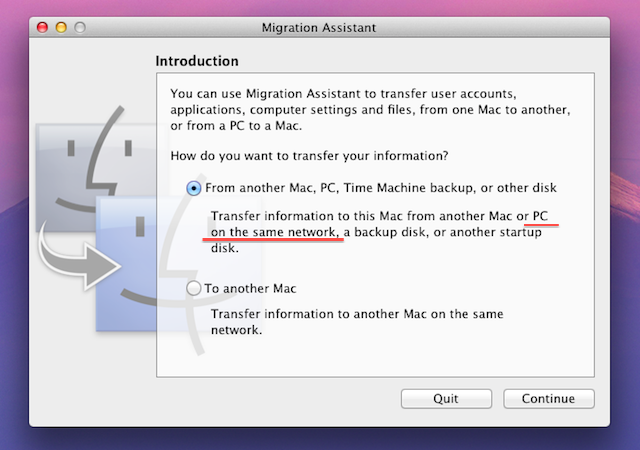
Another new feature discovered in the developer preview of OS X Lion is the ability to set up a Mac from a networked Windows PC as part of the Migration Assistant utility. Traditionally the only way to set up a new Mac and import all your files and settings was to use FireWire’s Target Disk Mode and hook up the old Mac or PC to the new Mac or use a Time Machine disk.
When Apple removed the FireWire port on some of its Macs it added the ability for Migration Assistant to import from a networked Mac, but not a PC. The Migration Assistant in the developer preview of OS X 10.7 Lion now brings the ability for new Mac users to set up Lion with data and settings from an existing Windows-based PC. The only caveat being that it requires a Migration Assistant helper client to be running on the Windows machine. For developers wishing to test this out, you’ll need to download that helper client from Apple’s developer site.
[Via AppleInsider]
Turn Twitter Noise Into Signal With Our Smartr For iPhone Giveaway!

MacStorians are incredibly Twitter savvy (most of them - we won’t discriminate if you don’t use Twitter), and for the power users who want to turn Twitter into a pure information feed, Smartr is a super client for getting micro-information on the go. Remove annoying Foursquare checkins, save articles for later reading, show page previews instead of links, and do it all with multiple Twitter accounts for business and personal use. We’re giving away five copies of Smartr to our delicious readers, and it’s incredibly simple to join in on the fun. Beforehand you might want to check out Federico’s glowing review, naming Smartr as, “Flipboard for the iPhone.”
Buy Todolicious Today, Donate To The New Zealand Red Cross
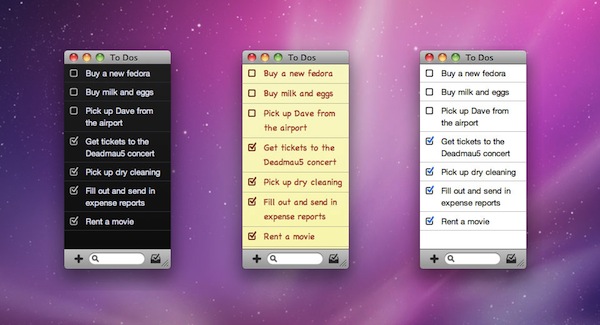
Mac app Todolicious by Mustacheware was one of the first Mac App Store-exclusive apps we covered ahead of the launch of the new Store and, overall, an elegant to-do manager for the Mac that makes it easy to jot down tasks with an intuitive keyboard-based panel you can invoke at any time. With the choice of multiple themes and cute sound notifications for completed tasks, Todolicious still is one of the “best new apps” available in the Mac App Store (also mysteriously not featured by Apple since January 6th).
An update to Todolicious was released today adding a new editing engine and an option to delete completed to-dos, but that’s not what we want to focus on right now. The update is great and adds a bunch of much requested fixes, but what we think is absolutely worth of your consideration is the fact that Mustacheware decided to donate 100% of sales today to the New Zealand Red Cross in response of the earthquake that occurred on February 21. If you buy Todolicious today (February 25), you’ll give your contribution to the victims of the earthquake and, at the same time, you’ll end up with a sweet application on your Mac.
So head over the Mac App Store now, and download Todolicious.