Posts in mac

Opera Tries to Be Relevant Again With Slick “Tab Stacking” Feature, Extensions and More

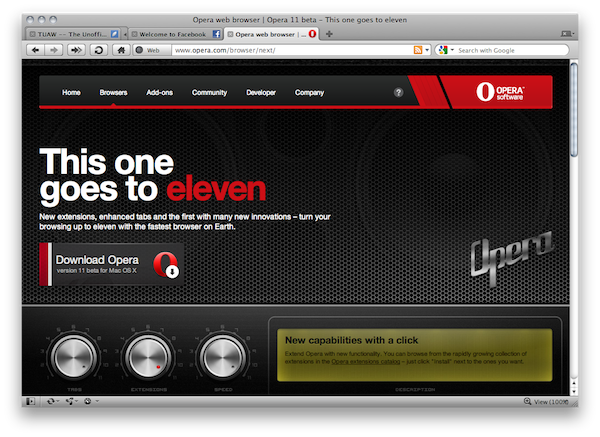
For all those of you who have always been interested in trying Opera but never quite made the switch, perhaps it’s time to reconsider. Today the Opera team shipped version 11 beta, which adds a lot of new features to the already innovative (yet not so popular) browser including what the team says to be a revolutionary “tab stacking” functionality.

Think of tab stacking as “tab grouping” ported to the address bar: if you click and hold on a tab, you can drag it onto another one to create a “stack”, which is basically a group of tabs aimed at uncluttering your browser window. Say you want to group all your social networking sites or TSA-related links in one place, now Opera lets you do that with stacks. The implementation on OS X is nice, although I wished stacks had some sort of 3D” effect, where one would easily understand how many tabs are in each stacks. Instead, you get an expand button that indicates a tab is a stack. Animations are cool. Read more


GTA Trilogy for Mac Now Available

So you’re downloading iOS 4.2.1 for your iPad and the Apple TV is waiting an iOS 4.2 as well, but what about the Mac today? Well, there’s no software update in sight, but at least you can give it some Grand Theft Auto love.

As we previously reported, today Rockstar released GTA Trilogy for Mac, a package that contains the original GTA III, Vice City and San Andreas – all capable of running natively on your Mac. Read more


Mac OS X 10.6.5 Update Fixes MacBook Air Graphic Issues

A few weeks ago we reported of the graphic issues and kernel panics many users were experiencing on the new MacBook Airs. The issues got quickly reporte to Apple, which acknowledged them in a document leaked by BGR. With the latest Mac OS X 10.6.5 update, it seems like the issues have been fixed.

As Apple writes in a support document:

Symptoms

After waking from sleep, your MacBook Air display may flicker or fade from light to dark repeatedly.

Resolution

Download and apply the Mac OS X v10.6.5 update to resolve this issue.

You can go download 10.6.5 from Software Update or Apple’s website, and watch a video of the aforementioned MacBook Air graphic issues below.


Flight Control HD Now Available On The Mac via Steam

Just as promised two days ago, Firemint released Flight Control HD for Mac today. The game is available at 3,99 Euros via Steam, and it’s been published under the SteamPlay label so you’ll be able to play it both on a Mac and a PC – without having to buy it twice.

You’re an air traffic controller at an increasingly busy airport; just point and drag aircraft to their landing zones with your mouse or trackpad. Sounds easy? It isn’t! You’ll need nerves of steel and smart strategy to keep the chaos under control. Flight Control HD has been especially redesigned for PC and Mac, with updated graphics and an even tougher new challenge – the Steam exclusive Stunt map where you can increase your score by flying through the gates before landing!

The Mac version of Flight Control comes with an exclusive map and also features Steam achievements and leaderboards. Flight Control HD is coming to the Mac App Store as well.


Holiday Deals for Office for Mac 2011

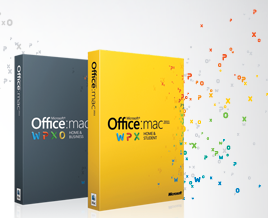
Office for Mac 2011 was released at the end of last month and it seems like it’s a pretty  solid release users who purchased it are really enjoying. With the holiday season around the corner (I wish we had something like Black Friday here in Italy), the Office for Mac team decided it would be appropriate to offer from sweet discounts on its brand new suite.

So this year Apple, Best Buy, and Mac Mall shoppers can save $20 on purchases of Office for Mac 2011 Home & Student. Amazon customers will receive $40 off, which is a great deal. These offers are available Thursday, November 25 – Monday, November 29.

We’ll update this post once the links to purchase the suite on Amazon will go live.

• Apple Stores (US & Canada): $20 off Home & Student Family Pack for $129 (regularly $149 ERP).
• Best Buy and MacMall (US): $20 off Home & Student 1-pack for $99 (regularly $119 ERP) and $20 off Home & Student Family Pack for $129 (regularly $149 ERP).
• Amazon (US): $40 off the Home & Student 1-pack for $79 (regularly $119 ERP) and Home & Student Family Pack for $109 (regularly $149 ERP).
• OfficeforMac.com (US): $20 off Home & Student Family Pack for $129 (regularly $149 ERP).


Borderlands: Game of the Year Edition Coming To The Mac On December 3rd

Popular PC and console game Borderlands is coming to the Mac, The Loop reports. Feral Interactive announced its plans to bring the “Game of the Year” edition of its game to Macs in December, though it’s not clear whether the new version will be also be sold on Steam or not.

A first-person shooter spliced with the DNA of a role-playing game, Borderlands takes you to the scarred desert surface of planet Pandora. Ravaged and abandoned by mega-mining corporations, and populated by prison convicts, miscreants and bloodthirsty alien monsters, it’s a hostile land. You’re a fortune hunter determined to find and open the mythical ‘Vault’, an alien artefact of unimaginable power. Luckily for you,Borderlands’ random content generation system means you’ve got guns. Lots of guns.

The game can be pre-ordered here at £35 (around $55), but if you don’t want to wait and prefer to run the game via Boot Camp, you can buy the Game of the Year edition for PC on Amazon at $49.


Zen Bound 2 Now On The Mac via Steam

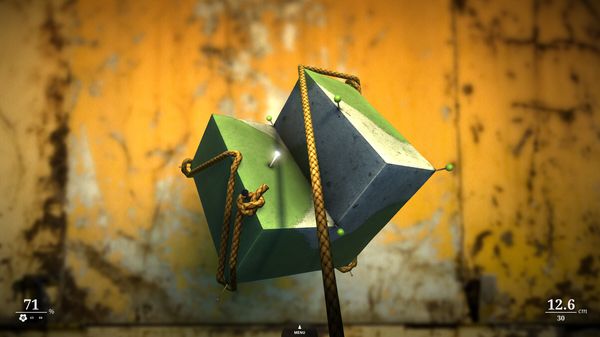
This summer, there was this friend of mine at the camping – Marco – who regularly came asking for my iPhone 4 to play one game: Zen Bound 2. He had become addicted to it since I first showed the app to him, and he turned out to be so good at covering creepy wood shapes with paint that I had to make him stop. Seriously, I uninstalled the app.

For those who of you unaware of the total awesomeness of Zen Bound 2, here’s the gist: in this game you have to wrap a rope around wood objects, the rope covers them with paint, you have to cover objects with a certain percentage of paint to complete a level. Absurd, simple. A must-have available at $2.99 for iPhone and iPad with Game Center support and Retina graphics. Read more


360|MacDev Conference, 15% Off Registration Price

The 360|MacDev is a new conference aimed at OS X developers and the whole Apple developer community. Although I won’t be able to attend the event, I have talked with the folks behind it and it’s surely one of this year’s events you don’t want to miss. The conference will take place in Denver, Colorado at the Crowne Plaza Downtown on Dec. 10 and Dec. 11. You can check out the full schedule here.

From the official website:

We’re a conference company, focused on develoepr community. Our goal is to bring the best and brightest in the developer community together for 2 days of incredible sessions, awesome parties, good times, and learning. If you don’t leave Saturday night (Or sunday night if you take in a day of skiing), with more ideas than you know what to do with, we’re not doing our jobs!

This winter you can get your fill of Cocoa development awesomeness, and even some skiing if you’re up for it! We’ll be bringing together the best of the community . Join us in Denver, CO.

The discount code “MacStories15” will take 15% off the registration price. You can also check out the list of speakers here. If you’re a developer and you want to attend a great event to get in touch with the community and fellow OS X developers, the 360|MacDev conference is the perfect place to start.


Enable Keyword Filtering In Tweetie for Mac With a Preference Panel

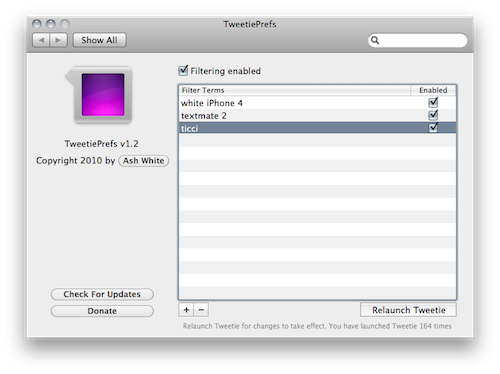
Tweetie for Mac users have been able to activate keyword filtering for more than a year using a simple Terminal hack. For all those who prefer a graphical interface to a command line hack, however, TweetiePrefs is here to help.

Developed by Ash White and available for free here, TweetiePrefs lives in System Preferences and allows you to easily create, delete and activate filters for Tweetie. Every time you’ll create or delete a filter, you’ll have to relaunch Tweetie for changes to take effect.

Works fine, and it’s easy to use. Give it a try.