Posts in Linked

Connected, Episode 289: Let Me Remember My Opinion

On this week’s episode of Connected:

This week, Myke talks about a sell on Cinema Displays, then the guys move on discuss Federico’s recent iPad article on modularity, the possibilities of widgets in iOS 14 and Stephen’s Mac Madness winner and picks.

You can listen below (and find the show notes here).

AppStories+ Deeper into the world of apps
0:00
01:26:18

Connected, Episode 289

AppStories+ Deeper into the world of apps

Sponsored by:

  • Pingdom: Start monitoring your website performance and availability today, and get instant alerts when an outage occurs or a site transaction fails. Use offer code CONNECTED to get 30% off. Offer expires on January 31, 2021.
  • Squarespace: Make your next move. Enter offer code CONNECTED at checkout to get 10% off your first purchase.
  • Boll & Branch: The Softest Organic Sheets & Luxury Bedding. Save $50. Try them for 30 days in a risk free trial.
Permalink

AppStories, Episode 157 – Research Tools

This week on AppStories, we recap the MacStories’ iPad at 10 coverage and then compare notes on the research apps we use and approaches we take when working on a big project.

Sponsored by:

  • Diarly – Modern Digital Diary. Enter here by April 10, 2020, for a chance to win one of fifteen copies of Diarly.
  • Linode – Cloud Hosting and Linux Servers. Get a $20 credit.

https://www.macstories.net/podcasts/appstories/episodes/157/embed/

Permalink

Connected, Episode 288: The God of Beginnings, Gates, Transitions and Duality

On this week’s episode of Connected:

Mac Madness is down to the final two machines, and Myke explains why it is all Stephen’s fault. Then, Federico takes everyone on a tour of high-resolution audio apps for the iPhone and iPad … which are all wild. Lastly, we check the temperature of the room on Apple’s Dark Sky acquisition.

You can listen below (and find the show notes here).

AppStories+ Deeper into the world of apps
0:00
01:32:05

Connected, Episode 288

AppStories+ Deeper into the world of apps

Sponsored by:

  • PDFpen, from Smile : The ultimate tool for editing PDFs on the Mac.
  • Pingdom: Start monitoring your website performance and availability today, and get instant alerts when an outage occurs or a site transaction fails. Use offer code CONNECTED to get 30% off. Offer expires on January 31, 2021.
  • Ahrefs: SEO Tools & Resources To Grow Your Search Traffic. Get a 7-day trial for just $7.
Permalink

Adapt, Episode 22: Cursors and Keyboards in iPadOS 13.4

On this week’s episode of Adapt:

It’s been a big two weeks for iPad news. Federico and Ryan discuss the new iPad Pro and Magic Keyboard, then go deep on mouse and trackpad support and full keyboard access in iPadOS 13.4.

You can listen below (and find the show notes here), and don’t forget to send us questions using #AskAdapt and by tagging our Twitter account.

AppStories+ Deeper into the world of apps
0:00
01:11:46

Adapt, Episode 22

AppStories+ Deeper into the world of apps

Sponsored by:

  • Pingdom: Start monitoring your website performance and availability today, and get instant alerts when an outage occurs or a site transaction fails. Use offer code ADAPT to get 30% off. Offer expires on January 31, 2021.
  • Sanebox: Clean up your inbox in minutes. Sign up for a two-week free trial and a $25 credit.
Permalink

John Gruber’s Explanation of the Apparent Prime Video Deal Between Apple and Amazon

Yesterday, as reported by 9to5Mac and other publications, Amazon updated its Prime Video app to permit video purchases and rentals without using Apple’s In-App Purchase system in some circumstances. It wasn’t clear what was going on at first because some users saw what looked like an Amazon checkout process, while others got an Apple checkout flow. To add to the confusion, Apple issued a statement that said Amazon Prime is using “an established program for premium subscription video entertainment providers.”

John Gruber did some investigating and has an excellent explanation on Daring Fireball on how the deal between Amazon and Apple seems to work. As Gruber explains, If you’re signed in to the Amazon Prime app with an Amazon account and are a full Prime or Prime Video member, renting or purchasing video uses an Amazon checkout process. Otherwise, Apple’s In-App Purchase system is used, which interestingly, can also be used to sign up for a Prime Video subscription.

Gruber makes a compelling and detailed case for what seems to be going on:

So the deal seems to be this:

  • The Prime Video app supports every feature that makes a third-party subscription video service a first-class citizen in Apple’s multi-device TV ecosystem.
  • For users with existing Prime subscriptions, or new subscriptions made on Amazon’s website, Amazon now gets to bill them directly for movie rentals and purchases made in the app, giving Apple no cut of the transactions.
  • Users can subscribe to Prime Video in-app using an iTunes subscription, giving Apple a recurring cut, and leaving subscription management in Apple’s hands.
  • For users without a Prime subscription, or with a Prime subscription made through the app, Amazon now bills them for purchases and rentals through Apple’s In-App Purchase mechanism, giving Apple a cut.

Based on a few reasonable assumptions, Gruber concludes that the deal is a win for Apple, Amazon, and also consumers who get a first-rate app experience that includes the ability to buy and rent TV shows and movies in the Prime Video app for the first time.

I hope we see more deals like this. Having Prime Video available in Apple’s TV app where it’s included in the Up Next section of the app and being able to rent and buy content without resorting to a web browser makes for a much better overall experience for users looking for something to watch.

Permalink

AppStories, Episode 156 – iPad at 10: The History and Emerging Modularity of Apple’s Tablet

This week on AppStories, we kick off MacStories’ celebration of the 10th anniversary of the iPad’s launch with an episode that reflects on the device’s history, its place in Apple’s product lineup, and the iPad as a modular computing device.

Sponsored by:

  • Concepts – Where Ideas Take Shape
  • Direct Mail – Create and send great-looking email newsletters with Direct Mail, an easy-to-use email marketing app designed exclusively for the Mac.

https://www.macstories.net/podcasts/appstories/episodes/156/embed/

Permalink

Apple Music Debuting New Album Banners in Library Tab

Source: MacRumors

Source: MacRumors

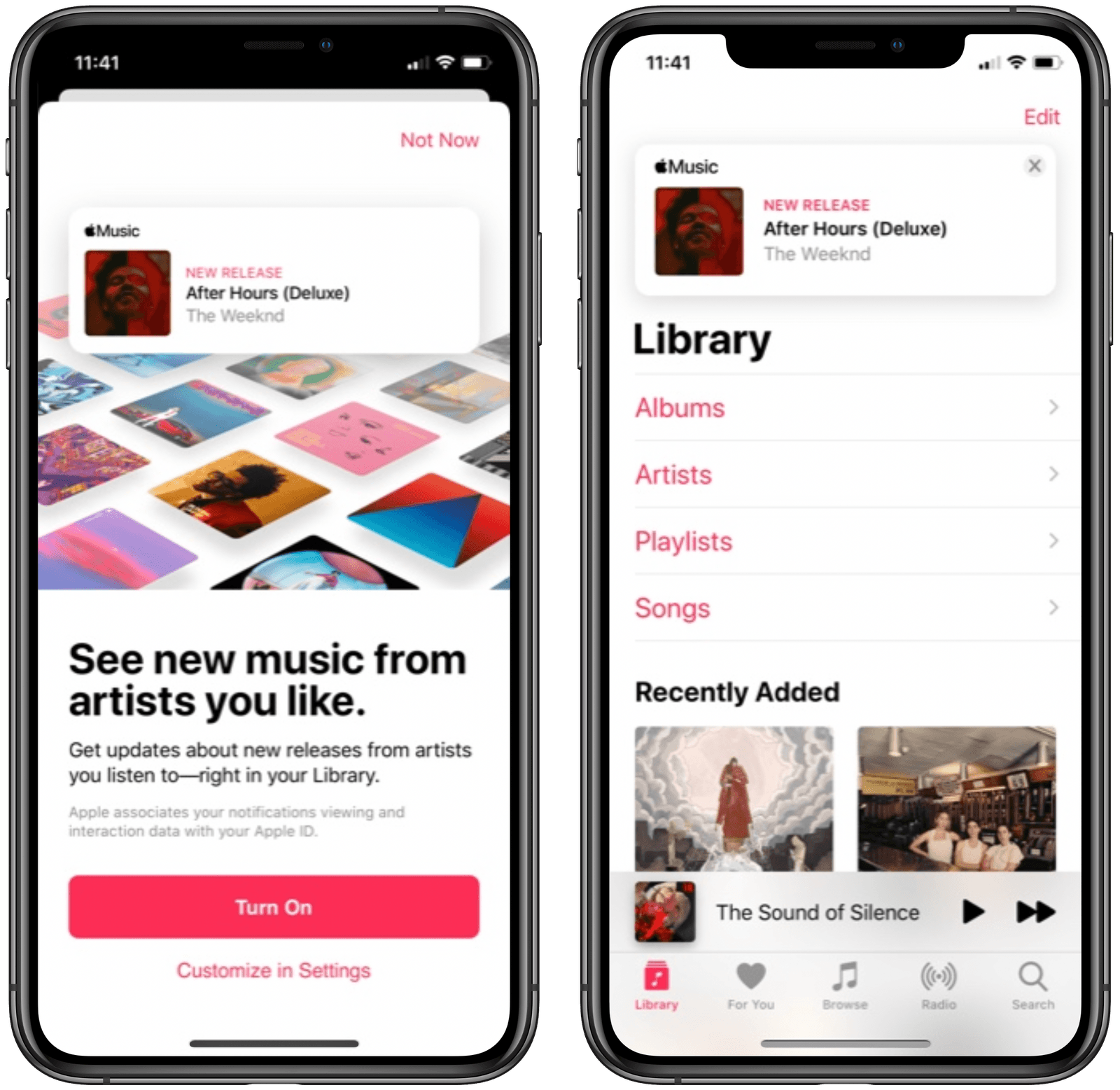
Mitchel Broussard at MacRumors reports on a new Apple Music feature that’s been spotted rolling out to a limited set of users:

Apple today is rolling out a new feature to Apple Music users, prominently displaying new albums, EPs, and videos from their favorite artists at the top of the Library tab in iOS.

The new feature first appears as a splash page in ‌Apple Music‌ on iOS, telling users that they can “see new music from artists you like.” This will let you get updates about new releases from artists you listen to, with notifications appearing above your library of albums and playlists.

Apple Music has long offered push notifications for new releases from artists you enjoy, but for me and everyone else I know, those are wildly inconsistent. Because of that, I’ve grown to depend on the excellent app MusicHarbor instead, which is much more trustworthy.

I like the idea of seeing new releases right inside the Library tab, but will wait and see whether they prove reliable or not. Based on my prior experience with Apple Music notifications, I wouldn’t be surprised to see banners for new albums show up even after I’ve saved those albums to my library. I’d happily be proven wrong, though, so here’s hoping this new method of music updates means Apple has also paid attention to the engine running the feature.

Permalink

Connected, Episode 287: Rub a Dub Dub, My Friend

On this week’s episode of Connected:

The early reviews of the 2020 iPad Pro and new MacBook Air are in, and Myke treats the group with an unboxing experience. Federico asks the world for help, while Stephen is bringing joy — and pain — to the Mac community. Also, our impressions of iOS 13.4 and some media we’re enjoying while being stuck at home.

You can listen below (and find the show notes here).

AppStories+ Deeper into the world of apps
0:00
01:52:29

Connected, Episode 287

AppStories+ Deeper into the world of apps

Sponsored by:

  • Pingdom: Start monitoring your website performance and availability today, and get instant alerts when an outage occurs or a site transaction fails. Use offer code CONNECTED to get 30% off. Offer expires on January 31, 2021.
  • TextExpander, from Smile: Unlock your productivity with TextExpander. Get 20% off with your first year.
  • Hover: Make a name for yourself. Get 10% off any domain name.
  • Mack Weldon: Smart underwear for smart guys. Get 20% off your first order with the code WEIRDFISH.
Permalink

Apple’s Human Interface Guidelines on Pointers for iPadOS

Speaking of the design considerations that went into iPadOS’ cursor, I suggest reading Apple’s new HIG document on the dynamic/adaptive pointer:

iPadOS 13.4 introduces dynamic pointer effects and behaviors that enhance the experience of using a pointing device with iPad. As people use a pointing device, iPadOS automatically adapts the pointer to the current context, providing rich visual feedback and just the right level of precision needed to enhance productivity and simplify common tasks.

The iPadOS pointing system gives people an additional way to interact with apps and content — it doesn’t replace touch. Some people may continue to use touch only, while others may prefer to use the pointer or a combination of both. Let people choose how to interact with your app, and avoid condensing your interface or making changes that require them to use the pointer.

And this part on “pointer magnetism”:

In addition to bringing focus to elements through pointer transformations and content effects, iPadOS can also help people target an element by making the element appear to attract the pointer. People can experience this magnetic effect when they move the pointer close to an element and when they flick the pointer toward an element.

When people move the pointer close to an element, the system starts transforming the pointer’s shape as soon as it reaches an element’s hit region. Because the hit region typically extends beyond an element’s visible boundaries, the pointer begins to transform before it appears to touch the element, creating the illusion that the element is pulling the pointer toward it.

Thoughtful, detailed read (as usual per Apple’s HIG) with illustrations that help get a sense of what’s possible with pointer customization (it doesn’t look like the Keynote update with cursor support mentioned in the document is out yet). Reading this, it’s clear that Apple didn’t simply bring the Mac’s cursor to the iPad – they started from the basic idea and redesigned it around a different platform.

Permalink