This Week's Sponsor:

Copilot Money

The Apple Editor’s Choice App for Managing Your Money


Posts in Linked

Unread 3.3

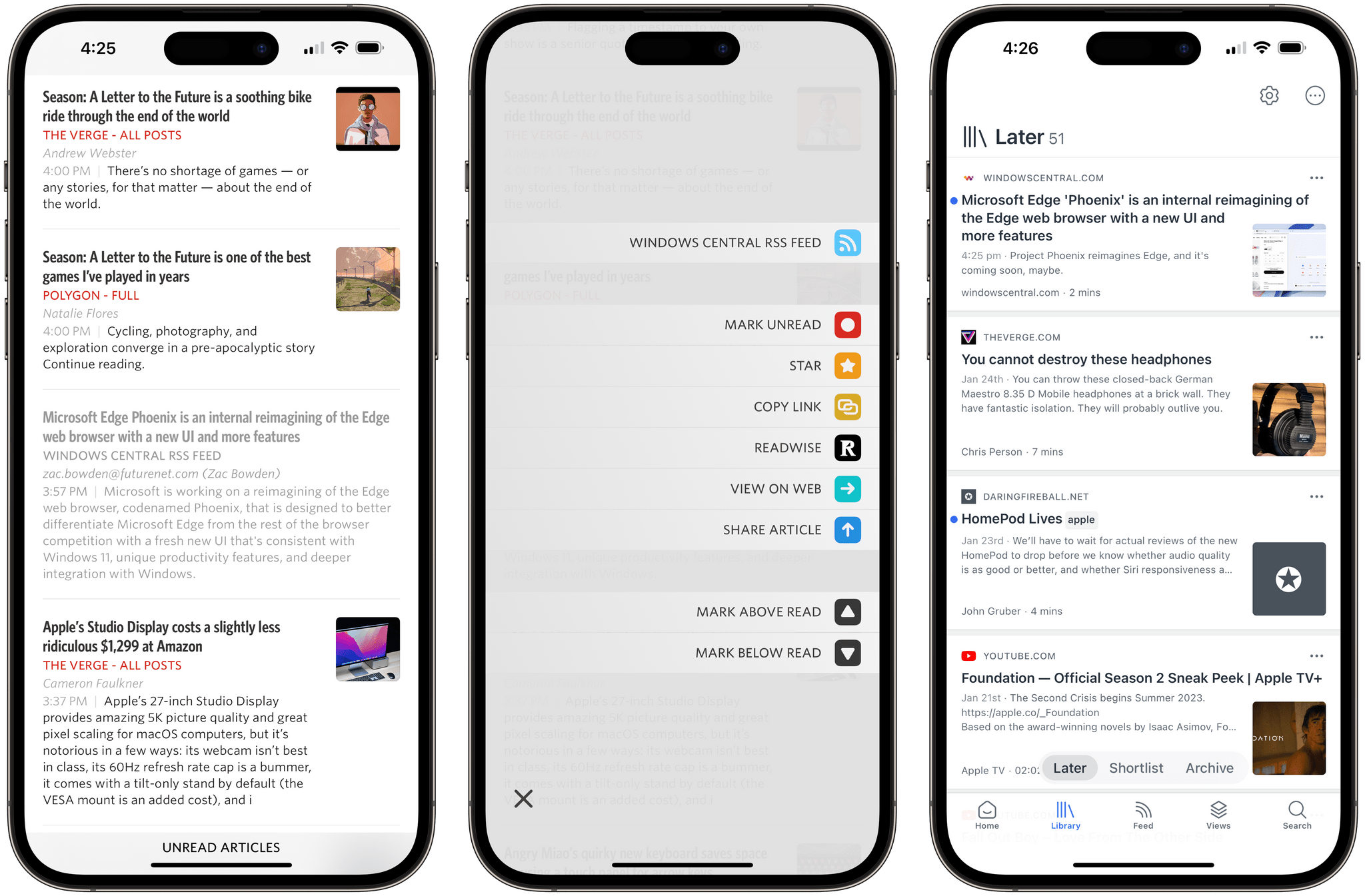
Saving an article from Unread to Readwise Reader.

Saving an article from Unread to Readwise Reader.

Unread, the elegant RSS reader by Golden Hill Software that we’ve covered before on MacStories, received its 3.3 update today, and it’s an interesting one I’ve been playing around with for the past week. There are two features I want to mention.

The first one is the ability to set up an article action to instantly send a headline from the article list in the app to Readwise Reader. As I explained on AppStories, I decided to go all-in with Reader as my read-later app (at least for now), and this Unread integration makes it incredibly easy to save articles for later. Sure, the Readwise Reader extension in the share sheet is one of the best ones I’ve seen for a read-later app (you can triage and tag articles directly from the share sheet), but if you’re in a hurry and checking out headlines on your phone, the one-tap custom action in Unread is phenomenal. To start using it, you need to be an Unread subscriber and paste in your Readwise API token.

The second feature is the ability to save any webpage from Safari as an article in Unread, even if you’re not subscribed to that website’s RSS feed. Essentially, this is a way to turn Unread into a quasi-read-later tool: the app’s parser will extract text and images from the webpage, which will be then be saved as a ‘Saved Article’ in Unread Cloud, Local feeds, or NewsBlur, or as a ‘Page’ in Feedbin.

If you’re a new Readwise Reader user, I recommend checking out Unread 3.3, which is available on the App Store for iPhone and iPad.

Permalink

Micro.blog, Mastodon, and Ivory

Manton Reece has a fantastic explanation of the underpinnings of Micro.blog and Mastodon and how they work with third-party clients like Ivory, which Federico reviewed yesterday.

Manton’s post is in response to questions about why Micro.blog work with Tapbots’ Ivory since both Micro.blog and Mastodon implement the ActivityPub standard. The answer is that ActivityPub is primarily a service-level server-to-server API that allows Micro.blog and Mastodon servers to interact with each other. However, clients like Ivory use a different Mastodon API for reading and writing Mastodon posts that doesn’t match up feature-for-feature with Micro.blog. Manton explains the problems that causes:

Could Micro.blog implement the Mastodon API, thereby allowing Ivory to connect to Micro.blog as if it was a Mastodon server? Technically yes, but doing so would introduce a couple problems. By design, Micro.blog does not have exactly the same features as Mastodon. We left out boosts, trends, and follower counts, and added other things that are outside the scope of Mastodon.

If Micro.blog worked with Ivory, what would the UI look like when the features didn’t exactly match up? It would be confusing. Ivory would appear broken and it would disrupt the experience we’re going for with Micro.blog’s community.

That isn’t to say that signing into Micro.blog from Ivory to read and post to Micro.blog in the future is impossible. However, as Manton points out, it will require further experimentation and, ultimately, coordination with third-party apps while keeping an eye on preserving Micro.blog’s identity. Because, after all, Micro.blog and Mastodon are two distinct services that approach social media with different philosophies that are reflected in their designs. Interoperability is appealing on the surface, but not if it comes at the expense of the unique features that users of Micro.blog or any other service have come to expect and rely on.

Permalink

AppStories, Episode 312 – Read-Later Apps

This week on AppStories, we look at the history of read-later apps, the many similarities and differences between them, and today’s read-later apps, like Matter and Reader, as well as link organizers, such as GoodLinks and Anybox.

Sponsored by:

  • Fitbod – Get stronger, faster with a fitness plan that fits you. Get 25% off your membership.
  • Squarespace – Make your next move. Enter offer code APPSTORIES at checkout to get 10% off your first purchase..
  • Pillow – Sleeping better, made simple.

On AppStories+, we share our themes for 2023.

We deliver AppStories+ to subscribers with bonus content, ad-free, and at a high bitrate early every week.

To learn more about the benefits included with an AppStories+ subscription, visit our Plans page, or read the AppStories+ FAQ.

Permalink

The Trouble with Mixing Realities

Mark Gurman recently reported that Apple’s much-rumored headset will combine AR and VR technologies, which Brendon Bigley argues could be the wrong approach:

… I don’t think the road to mass adoption of virtual reality actually starts with virtual reality, it starts instead with augmented reality — a technology that can quickly prove its function if presented in a frictionless way. While even the best VR headsets demand isolation and escapism, a hypothetical product focused first and foremost on augmented reality would be all about enhancing the world around you rather than hiding from it.

Brendon’s story nails something that has been nagging me about recent headset rumors. The iPhone was a hit because it took things we already did at a desk with a computer and put them on a device we could take with us everywhere we go, expanding the contexts where those activities could be done. As Brendon observes, the Apple Watch did something similar with notifications. AR feels like something that fits in the same category – an enhancement of things we already do – while VR is inherently limiting, shutting you off from the physical world.

Like Brendon, it’s not that I’m not excited about the prospect of an Apple headset or the long-term prospects for virtual reality as a technology, but given where the technology is today, it does seem as though jumping into VR alongside AR could muddy the waters for both technologies. Of course, we’re all still working off of speculation and rumors. I have so many questions still and can’t wait to see what Apple has in store for us, hopefully later this year.

Permalink

MKBHD on Apple’s Processing Techniques for iPhone Photos

In his latest video, MKBHD eloquently summarized and explained something that I’ve personally felt for the past few years: pictures taken on modern iPhones often look sort-of washed out and samey, like much of the contrast and highlights from real life were lost somewhere along the way during HDR processing, Deep Fusion, or whatever Apple is calling their photography engine these days. From the video (which I’m embedding below), in the part where Marques notes how the iPhone completely ignored a light source that was pointing at one side of his face:

Look at how they completely removed the shadow from half of my face. I am clearly being lit from a source that’s to the side of me, and that’s part of reality. But in the iPhone’s reality you cannot tell, at least from my face, where the light is coming from. Every once in a while you get weird stuff like this, and it all comes back to the fact that it’s software making choices.

That’s precisely the issue here. The iPhone’s camera hardware is outstanding, but how iOS interprets and remixes the data it gets fed from the camera often leads to results that I find…boring and uninspired unless I manually touch them up with edits and effects. I like how Brendon Bigley put it:

Over time though, it’s become more and more evident that the software side of iOS has been mangling what should be great images taken with a great sensor and superbly crafted lenses. To be clear: The RAW files produced by this system in apps like Halide are stunning. But there’s something lost in translation when it comes to the stock Camera app and the ways in which it handles images from every day use.

Don’t miss the comparison shots between the Pixel 7 Pro and iPhone 14 Pro in MKBHD’s video. As an experiment for the next few weeks, I’m going to try what Brendon suggested and use the Rich Contrast photographic style on my iPhone 14 Pro Max.

Permalink

Samsung and Dell Take Aim at the Mac Monitor Market

Dell's upcoming 6K UltraSharp display. Source: Dell.

Dell’s upcoming 6K UltraSharp display. Source: Dell.

Dan Seifert writing for The Verge explains why this year’s CES has been such an exciting one for Mac users:

Though there have been many monitors marketed toward MacBook owners over the years, with features such as USB-C connectivity, high-wattage charging, and nicer than average designs, they’ve typically all had traditional 4K panels and sub-par pixel densities, as opposed to the higher-resolution displays that Apple puts in its devices. There was always a compromise required with one of those other monitors if you hooked a MacBook up to it.

Other than LG’s UltraFine displays, which had quality-control issues over the years, Mac users had no display options that matched the resolutions found on MacBook Pros or the 5K iMac. That changed with Apple’s Pro Display XDR and the Studio display, but both displays arrived with extremely high price tags.

That’s why monitors announced by Samsung and Dell at CES this week are so encouraging. Prices haven’t been set yet, but it’s a safe bet that they will be competitive with Apple’s.

The Samsung ViewFinity S9. Source: Samsung.

The Samsung ViewFinity S9. Source: Samsung.

Both displays promise functionality not found in Apple’s displays too. Samsung’s 5K ViewFinity S9 goes toe-to-toe with the Studio Display’s specs and adds a bunch of ports not available on Apple’s display.

Dell seems to be aiming directly at the Pro Display XDR. As Seifert explains:

Perhaps more interesting is the new Dell UltraSharp 32, the first monitor I’m aware of that matches the Pro Display XDR’s 32-inch size and 6K resolution. It doesn’t have the same HDR-capable local dimming display technology as the XDR, instead using an IPS Black panel sourced from LG, but it comes with integrated speakers, microphones, and a beefy 4K webcam, all of which are lacking from Apple’s high-end option. The UltraSharp 32 may be best described as a bigger version of the Studio Display, as it provides all of the necessary desk peripherals most people need but with a larger — just as sharp — panel. The Dell also tops out at 600 nits of brightness (the same as the Studio Display and Samsung’s S9) and comes with a whole litany of ports, including two Thunderbolt 4 (with up to 140W of power delivery), HDMI 2.1, ethernet, and four USB-A ports. It’s basically a complete Thunderbolt dock built into the back of the display.

I’m a big fan of Apple’s Studio Display, but its price was a hard pill to swallow and a factor that I’m sure has limited its appeal significantly. It remains to be seen how Samsung and Dell will price their monitors, but it’s good to see choice and competition comes to the high-resolution monitors that so many Mac users have wanted for so long.

Permalink

Apple Books Begins Offering AI-Based Book Narration

The Guardian reported today that audiobooks ‘Narrated by Apple Books’ have begun showing up in the Apple Books store. The audiobooks are narrated by AI-generated voices that Apple has picked to complement the genre of the books.

As 9to5Mac points out in its coverage, the feature was first announced last month on the Apple Books for Authors website, which offers details about the process for generating an AI-narrated audiobook. The website also explains that Apple is working with two outside publishers to produce the audiobooks. Currently, the program is limited to fiction and romance novels, plus a limited number of nonfiction and self-development titles. Samples of the voices available for each genre are linked on the site and are worth trying. Although the voices are clearly artificial, they’re some of the best I’ve heard from any service.

Although the narration used for the new ‘Narrated by Apple Books’ is synthesized using artificial intelligence, the production of a book is far from automated, with very specific criteria for eligible books and a one to two-month turnaround time. Still, it will be interesting to see how ‘Narrated by Apple Books’ affects the broader audiobook market. Audiobooks are expensive to produce, so I expect Apple’s new program will open up the option to more authors than before. However, as with other AI services, Apple’s could put voice actors out of work as its quality improves.

Permalink

Apple Contributes Magnetic Coupling Tech to the Qi Charging Standard

Sean Hollister of The Verge reports that Apple is contributing aspects of its MagSafe charging technology to the Qi wireless charging standard, which will bring magnetic coupling to Qi2-compatible mobile phones, including Android phones. According to Hollister’s interview with Paul Golden, a spokesperson for the Wireless Power Consortium:

There’s no reason to think a future Qi2 charger wouldn’t work seamlessly and identically with both Android and iPhones, Golden says when I ask. That’s because Apple, a WPC “steering member” (and chair of the board of directors) is contributing essentially the same “magnetic power profile” as MagSafe to the new Qi2 standard.

Hollister also reports that faster charging speeds are next on the Wireless Power Consortium’s to-do list:

That’s not all the WPC is working on, either! While the Qi2.0 release is largely just about adding magnets — it’s still primarily for phones, still tops out at 15 watts, still has the same foreign object detection, etc — the WPC intends to take advantage of guaranteed magnetic coupling to give us faster charging speeds, too. “When we finish with the spec for Qi2, we’ll immediately start working on a significantly higher power profile level for the next version of Qi2,” says Golden.

I’m glad to see Apple contributing to the Qi standard. Very few third-party manufacturers are using the official MagSafe standard, which usually means they charge more slowly. By standardizing the underlying magnetic connection and focusing next on charging speeds, we’ll hopefully see broader adoption of faster wireless charging across mobile phone accessories.

Permalink

Dark Sky Predicts Its Last Storm

With the turn of the New Year, Apple closed down Dark Sky for good. Apple acquired the app in 2020 and left it up and running until January 1st as it incorporated the app’s radar and real-time forecast features into its own Weather app. Dark Sky’s API, which was used by many third-party weather apps, was discontinued at the end of 2021 and was subsumed within Apple’s own WeatherKit API, which debuted last fall.

Over the holidays, Slate took a look at the app’s indie success story, which began with a successful Kickstarter campaign in 2011 that raised $40,000. One thing that I didn’t realize about Dark Sky is that its short-term precipitation forecasts were based solely on analysis of radar images, which didn’t win it fans among meteorologists:

Indeed, Dark Sky’s big innovation wasn’t simply that its map was gorgeous and user-friendly: The radar map was the forecast. Instead of pulling information about air pressure and humidity and temperature and calculating all of the messy variables that contribute to the weather—a multi-hundred-billion-dollars-a-year international enterprise of satellites, weather stations, balloons, buoys, and an army of scientists working in tandem around the world (see Blum’s book)—Dark Sky simply monitored changes to the shape, size, speed, and direction of shapes on a radar map and fast-forwarded those images. “It wasn’t meteorology,” Blum said. “It was just graphics practice.”

I hadn’t used Dark Sky in years when Apple bought it, except as a data source in other weather apps. Its forecasts may not have been as nuanced or accurate as a meteorologist’s, but there’s no denying its cultural impact on the world of apps, which is why I’ll be tucking this story away in my app history archives.

Permalink