

These numbers should serve to show you the power and nearly limitless earning potential of Nintendo franchises, and this is why you should never take anyone seriously when they suggest that Nintendo games should come to iOS or Android devices as a way to boost revenue. Anyone who thinks Nintendo would be better off selling $3 versions of games that now move 10 million units at $40, often selling multiple copies to the same family, is insane.
Posts in Linked
A Ship In Troubled Waters→
YouTube 2.2→
The official YouTube app for iOS received an update earlier today. You can now choose the quality of videos you want to stream (tap the new icon on the video player); unfortunately, after two months, the app still isn’t built for iOS 7.
Previously, YouTube announced that an update set to be released in November will add a new feature to download videos for offline watching.
Nike+ Move App For the iPhone 5S to Arrive on November 6th→
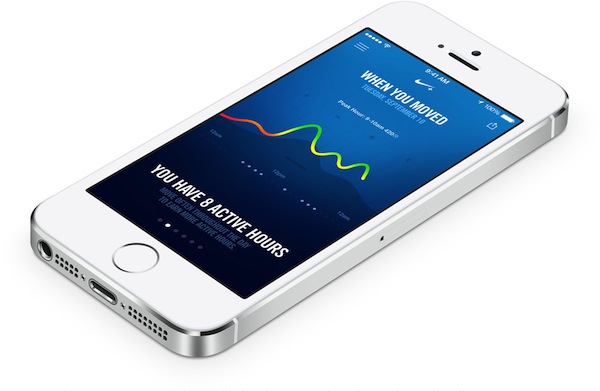
Announced alongside the new Fuelband SE was an update to Nike+ Running, and the new Nike+ Move app which Phil Schiller showed off during September’s iPhone 5c + 5s Keynote. The Nike+ Move running app is a sort of “Fuelband lite”, being previously detailed by Engadget as being an introductory experience into the Nike+ ecosystem. From today’s press release:
Nike+ Move App
Launched by Apple at their recent event, the Nike+ Move App is an introductory NikeFuel experience for iPhone 5S users. Nike+ Move measures when, where and how you moved and uses NikeFuel to motivate you. Nike+ Move then lets you compare your movement with that of your friends or other Nike+ Move users around you.
The Nike+ Move app will be free to download on the App Store.
A Tour Of The Panic Office→
Everything about the Panic office looks amazing to me. The 8-bit office signage with Samus Aran for “Women”? That’s perfect.
Burberry CEO Angela Ahrendts to Join Apple as Senior Vice President of Retail and Online Stores→
Late last night, Apple announced that Burberry CEO Angela Ahrendts will join Apple in the spring of 2014 in the newly created position of Senior Vice President of Retail and Online Stores. The position of SVP of Retail was vacant since John Browett’s departure from the company last year.
I am thrilled that Angela will be joining our team,” said Cook. “She shares our values and our focus on innovation, and she places the same strong emphasis as we do on the customer experience. She has shown herself to be an extraordinary leader throughout her career and has a proven track record.
As noted by Macworld’s Jason Snell, the hire won’t likely come cheap for Apple:
Last year she was the highest paid CEO on the London Stock Exchange’s FTSE 100, with total pay of roughly $27 million. (That included stock options; her current Burberry salary is reportedly just under $11 million.) But Apple’s retail presence is amazingly lucrative and clearly needs to remain a focus for the company.
Below, a video of Ahrendts discussing her past eight years at Burberry with Chairman Sir John Peace and future CEO Christopher Bailey.
And last, a video of Ahrendts discussing “Human Energy” at her TEDxHollywood talk from April 2013.
Play Games Using The iPhone 5c Case→
Speaking of Australia, how cool is this game by Stuart Hall and Dave McKinney? It is a variation of the classic four-in-a-row game that uses the iPhone 5c’s case as a grid, cleverly taking advantage of the case’s dots to show interface elements and let you tap on the screen.
The game is called Flipcase and it’s free on the App Store. It also uses UIKit Dynamics for some delightful animations and physics effects. Very clever.
How Australian Developers Are Dealing with iOS 7→
Alec Fraser has a good interview with some Australian app developers about iOS 7 and the new APIs. Many of my favorite apps and games have been created in Australia, and I love that these developers are getting more recognition with iOS 7.
An Interesting iOS App Store Upgrade Example→
In the end, I probably would have paid the full price for the new version even though it’s really only a re-skin of the old version. But I still applaud their cleverness. They’ve given their customers a way to feel good about an upgrade and apparently found a way to do it without relying on typical IAP unlocks to power their business.
My understanding is that the app comes with three separate In-App Purchases: two for a discounted upgrade, and one for people who don’t have previous versions of the app installed. If old versions are recognized by the app on the same device, the discounted upgrade IAP is activated; otherwise, the app only shows the full-price, $9.99 IAP to “unlock” the new app.
It’s not exactly a straightforward process and I’m not sure that Apple is a fan of the idea of having a standalone “Upgrade” app, but it’s clever considering the App Store’s limitations. I’d be curious to know how well this goes for Headlight Software.
Macminicolo [Sponsor]→
Our thanks to Macminicolo for sponsoring MacStories this week with their Mavericks promo.
The Mac mini gets better and better as a server and Macminicolo has been hosting them since they started this niche market in 2005. They host your Mac mini in a very high end data center where you can use it for all kinds of things. They’re known for their personal service and impeccable uptime.
To celebrate the release of Mavericks, they have a promotion running through the end of October. They’ll host your Mac mini for just $10/mo for nine months. More info here.
If you’ve been hosting a server from your office or home, here is a great chance to enjoy the benefits of a data center.
Federico’s note: I have been using two Mac minis at Macminicolo for the past year, for both personal (media server and automation) and work purposes (MacStories), and I couldn’t be happier. Great service and great support.