Posts in Linked

The Unexpected Costs of Background Fetch

David Smith talks about how one of iOS 7’s most important features can unexpectedly increase costs for developers, as data is more frequently requested in the background.

My first example of this was when I added Background Fetch to Check the Weather. A weather app’s primary function is displaying up-to-the-minute, constantly changing data so in my initial iOS 7 update I experimented with adding highly frequent background updates. The result was far more dramatic than I’d expected. […]
Permalink

Units is a Highly Customizable Unit Converter

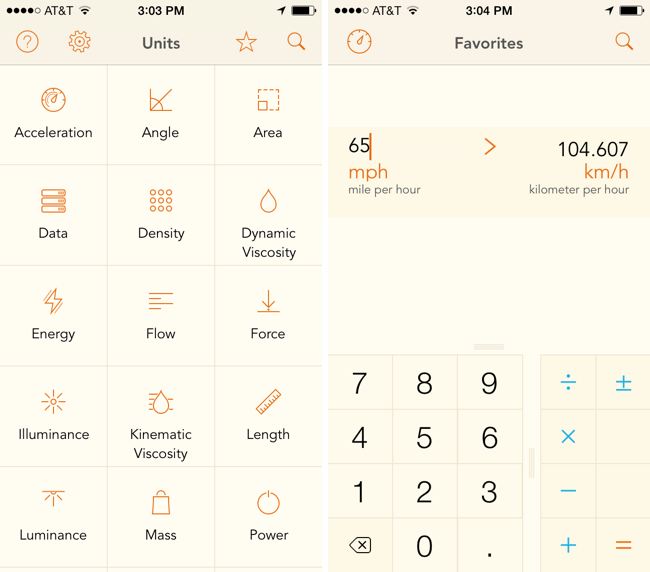
Units avoids needless scrolling through its sizable library of measurements by letting you search and favorite pairs of units, which saves oft-used conversions in a personalized list. The app can make conversions for just about anything you can think of, like units of data, force, luminance, and time. Like similar converters, the design is split between two columns of units, which you simply line up to make a conversion. A basic calculator is built into the app so you can perform basic operations like adding and multiplying. The app is fully customizable, letting you change the font, font color, and background color, so you can mix and match styles to your liking. The app’s $2.99 on the App Store.

Units doesn’t convert currencies, so for that you may want to check out Banca instead.

Permalink


Flappy Bird Clone Made with Pythonista On iOS


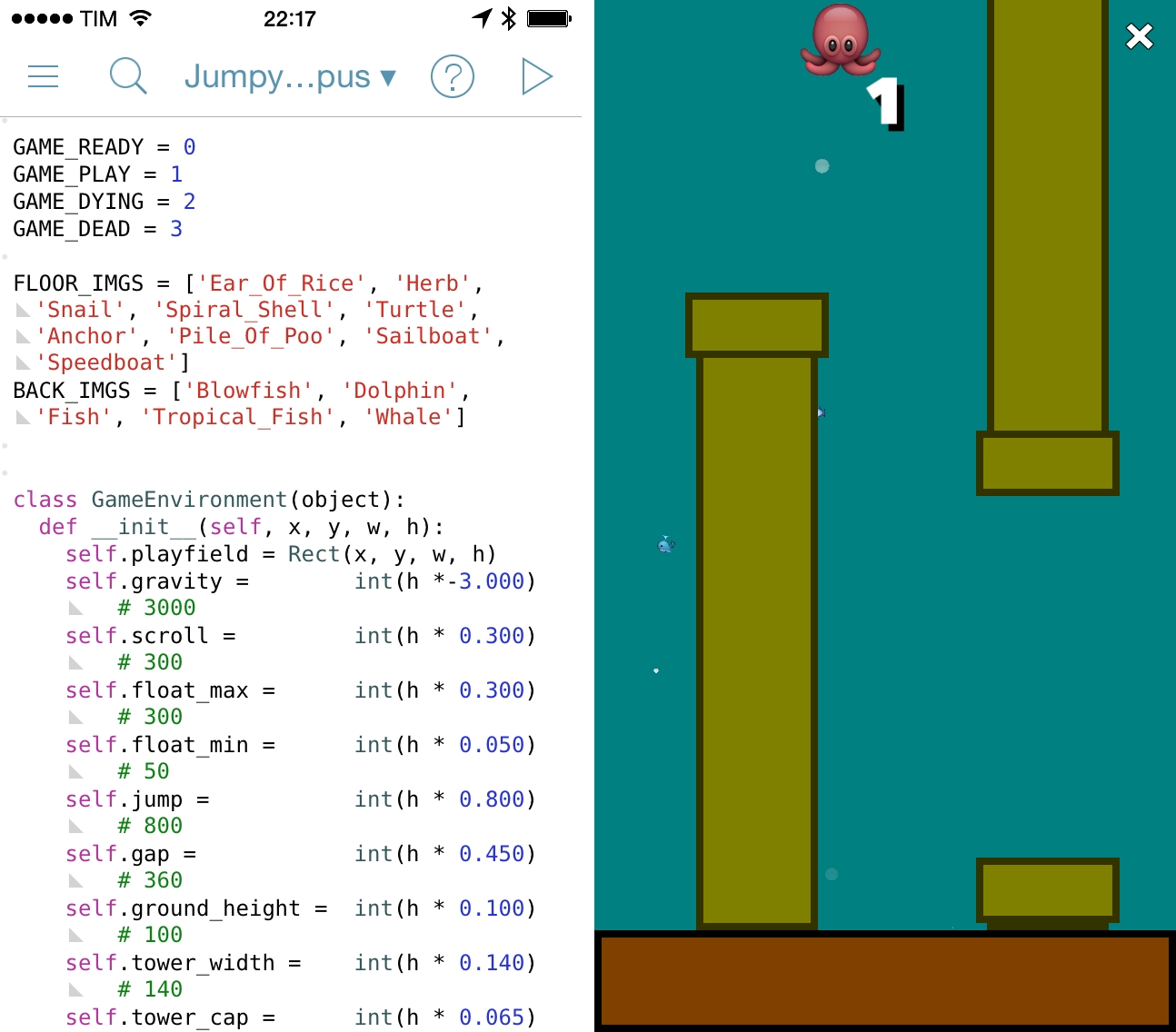
Following the unfortunate demise of Flappy Bird, hundreds of developers are rushing to release clones of the game on the App Store. Over at the Pythonista forums, however, user “bashedcrab” has created a working clone of Flappy Bird called “Jumpy Octopus”, made entirely with Pythonista (pictured above).

This started out as a Flappy Bird clone (can be done in under 100 lines of Pythonista), but I let my son do a bit of a redesign. He decided an underwater setting involving an Octopus was much more enjoyable.

The game play and physics are tuned to replicate the original Flappy Bird as closely as possible, so it is hard! If you want to make it a bit more fun for young kids, make the gap larger (Default is 360. 450 is much easier but still a challenge for young kids).

The game is available as a Python script here, which can be copied in a new file in Pythonista and run to play the game. Jumpy Octopus has sounds, keeps tracks of high scores, and uses iOS emojis as characters for the underwater setting. Of all the Flappy Bird clones that are coming out, this is an impressive open-source implementation based on Pythonista’s game creation features.

Permalink

Troubleshooting and Replacing a SSD in a MacBook Air

Dan Moren of Macworld, faced with a failing SSD in his MacBook Air, took up his screwdriver and fixed his own laptop without need of the Genius Bar. Better yet, he saved some cash and got comfortable doing repairs in the process. The article has lots of good links to tools and guides you’ll need to get the job done. Really, working on the innards of your Mac or PC isn’t all that scary, and while Apple’s guts are largely proprietary, removing the rear case is to get to components is a lot simpler than it used to be.

I’ve had my fair share of drives die, and I can vouch for SuperDuper being one of the most invaluable pieces of software on my Mac. While you’re waiting for your new SSD for your MacBook Air to come in, you can just boot up off an external drive and keep working like nothing happened — provided your SuperDuper backup is up-to-date of course.

Permalink

The First Professional Athlete to Record a Competition with Google Glass

Alyssa Bereznak of Yahoo Tech writes has a report on Jason Belmonte, a professional bowler who recorded himself bowling a perfect game during competition using Google Glass. He’s an advocate of the technology, and has been using it to showcase his skills and give fans a new perspective.

Though Google’s PR team has been promoting “stories” that tout Glass’ technical capabilities for firefighters and DJs alike, the typical Explorer’s experience tends to be less mind-blowing than you might think. As Belmonte is neither a developer nor a darling of the Glass PR team, his capabilities in the bowling alley are essentially limited to recording his firsthand experience. Even live-streaming on TV, which is something he’s hoping to start doing during competitions, isn’t at the HD resolution he’d prefer.

Instead, he’s begun uploading his post-game footage for networks to splice in with recaps of the game. On a recent bowling program, ESPN cut straight to Belmonte’s Google Glass perspective — something he’s nicknamed Belmo Vision — during a game.

Permalink

Cactus for Mac Speeds Up Local Web Development

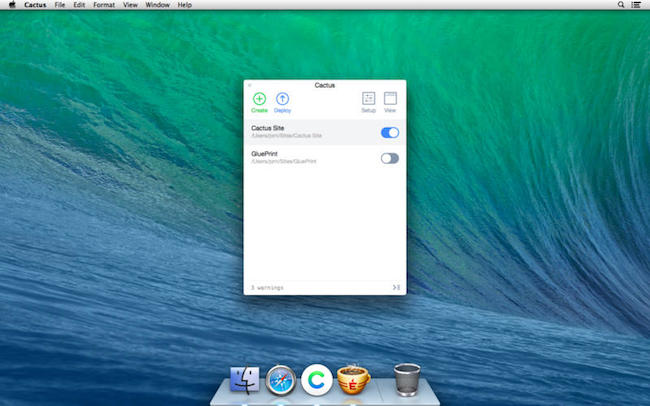
Cactus speeds up web development by creating a project folder on your Mac, where you can create websites locally without having to install a local development environment like XAMPP. With Cactus, you can get a head start on your blog or portfolio page by selecting from a variety of templates, which establishes some basic site structure for what you want to accomplish. Cactus supports languages like Markdown, SCSS and SASS, and CoffeeScript, and lets you add functionality to your site with simple python scripts (or plugins). With your site developed, Cactus sets up your domain and deploys to Amazon S3. Alternatively, you can export your finished project if you’re hosting the website yourself.

Cactus is $29.99 on the Mac App Store, and a demo is available to download.

Permalink

StorageStatus Keeps You Notified of Disk Activity on Your Mac

StorageStatus keeps you informed of when your internal and external drives spin up and spin down, when devices have been connected and disconnected, and how long drives have been active or sleeping. It’s designed to be a modern replacement for Apple’s SpindownHD utility, making it useful for monitoring power consumption when mobile, or diagnosing why hard drives might start up when they’re not supposed to. The app is $0.99 through February on the Mac App Store.

Permalink

PolyFauna: An Audio and Visual Experiment from Radiohead for iOS and Android

Thom Yorke on Radiohead’s Dead Air Space:

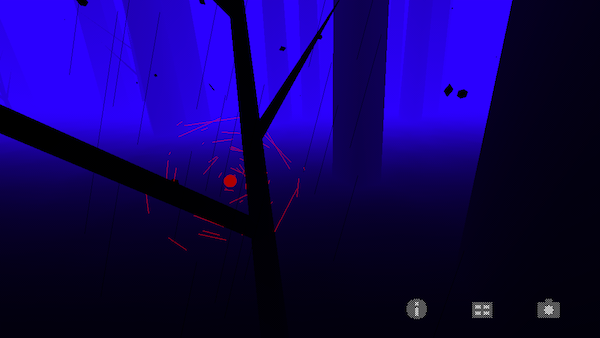
PolyFauna is an experimental collaboration between us (Radiohead) & Universal Everything, born out of The King of Limbs sessions and using the imagery and the sounds from the song Bloom.

It comes from an interest in early computer life-experiments and the imagined creatures of our subconscious.

In some ways, PolyFauna reminds me of Proteus. The app is free to download in the App Store.

[Hat tip: Macgasm]

Permalink