This Week's Sponsor:

Dropzone 5

Improve your Drag-and-Drop Workflow


Posts in Linked

The Secret History of the Apple Watch

Good story by David Pierce at Wired on the history of the Apple Watch and the design process at Apple.

The article includes quotes from Kevin Lynch and Alan Dye, plus screenshots of the Apple Watch UI and San Francisco font. This tidbit caught my attention as it suggests Apple tested and discarded a timeline interface – one of the selling points of the Pebble Time.

As the testing went on, it became evident that the key to making the Watch work was speed. An interaction could last only five seconds, 10 at most. They simplified some features and took others out entirely because they just couldn’t be done quickly enough. Lynch and team had to reengineer the Watch’s software twice before it was sufficiently fast. An early version of the software served you information in a timeline, flowing chronologically from top to bottom. That idea never made it off campus; the ideas that will ship on April 24 are focused on streamlining the time it takes a user to figure out whether something is worth paying attention to.

Permalink

Redesigning Twitter Profiles

Over at the Twitter blog, Sana Rao has an interesting post on the design process of Twitter profiles for mobile devices and desktop. Some fascinating numbers:

On web we saw a 6x increase in the number of Tweet impressions from logged-out visitors browsing profiles and a 2x increase in the number of logged-out visitors who saw an impression of the profiles.

On iOS, the most remarkable change was a 38% increase in people visiting the new profiles and a massive 6x increase in users visiting the media timeline. Similarly, on Android we saw a 128% increase in people visiting profiles and over 2x increase in people visiting and scrolling on the media timeline.

I like Twitter profiles on the iPhone. The profile view (and many other features) could use some love on the iPad, though.

Permalink

Apple Opens Watch App Submissions for All Developers

After approving Watch apps from select developers last week, Apple has begun accepting submissions for Watch apps from all registered iOS developers. From the company’s developer blog:

It’s time. Apple Watch will be in the hands of customers on April 24. Get your WatchKit apps ready and submit them for review now.

Apple has also created a new webpage titled ‘Preparing Your App Submission for Apple Watch’ with details on what developers should do before submitting an Apple Watch app to the App Store. There are some interesting tidbits on this page, such as limitations for app previews, which must show only iPhone apps:

Your app preview may only use footage of your iPhone app, and footage must stay within the app. Do not change your preview to show your WatchKit app.

And a note that suggests apps from third-party developers will be approved before April 24 and therefore used by people with a pre-release Watch unit:

Once your WatchKit app is approved and released by Apple, your existing iPhone users will receive the app update and customers will see your WatchKit extension icon and description on the App Store. A small group of people who currently have an Apple Watch will be able to use your WatchKit app before April 24, so make sure your back end systems are ready.

As I wrote last week, releasing Watch apps before the April 24 launch is a smart move from Apple:

For the first time in several years, a new Apple product will be reviewed by people who have access to third-party apps from the App Store. When the iPhone launched, there was no App Store; when the iPad launched, reviewers didn’t have access to public downloads from the iPad App Store.

That won’t be the case with Apple Watch, and this is a clever choice from Apple. Because the Watch is many things, it needs apps to offer a more complete picture of its potential. By approving the first Watch apps this week, reviewers (and customers at the try-on sessions in the retail stores) will get access to a selection of third-party apps that can show how the Watch will integrate in everyday life through the apps they already use.

Permalink

‘How My App Ended up in an Apple Ad’

Robleh Jama is the founder of Tiny Hearts, an indie iOS development company that ended up having one of their apps, Quick Fit, featured in an Apple commercial (this one). In an article for Fast Company, he shares some details of the selection process as well as good advice for developers. I liked this bit about localization (which is reflected in the app’s performance in international markets):

One of the best decisions we made early on was to support multiple languages with Quick Fit and Wake Alarm. We focused on the key regions Apple recommends in its internationalization guidelines. Apps are a global phenomenon with millions of non-English-speaking users. We didn’t want to limit our goal of helping people get fit to just English speakers, so we localized our app’s interface, description, and even screenshots.

Permalink

Tim Cook: Pro-Discrimination ‘Religious Freedom’ Laws Are Dangerous

Tim Cook in The Washington Post today:

There’s something very dangerous happening in states across the country.

A wave of legislation, introduced in more than two dozen states, would allow people to discriminate against their neighbors. Some, such as the bill enacted in Indiana last week that drew a national outcry and one passed in Arkansas, say individuals can cite their personal religious beliefs to refuse service to a customer or resist a state nondiscrimination law.

Cook’s op-ed in The Washington Post comes after Indiana’s ‘Religious Freedom Restoration Act’, which allows businesses to deny service to same-sex couples, was signed into law last week.

I encourage you all to read the full op-ed, Cook does a remarkable job at highlighting just why these laws are dangerous. His final paragraph is particularly powerful:

This isn’t a political issue. It isn’t a religious issue. This is about how we treat each other as human beings. Opposing discrimination takes courage. With the lives and dignity of so many people at stake, it’s time for all of us to be courageous.

Permalink

Virtual: Attract the Clickers

This week Federico shares stories of his new PS4 and The Last of Us.

Fun episode of Virtual this week, especially if your definition of fun involves listening to someone who hasn’t owned a PlayStation in years gush about modern games and controllers. You can listen here.

Sponsored by:

  • Harry’s: An exceptional shave at a fraction of the price. Use code VIRTUAL for $5 off your first purchase
Permalink

Connected: I Misplaced That Civil War

This week, Stephen, Myke and Federico talk about some Italian history, TeleText’s current state in Sweden and then answer listener questions.

Q&A episodes are always fun, and you can listen to this week’s Connected here.

Speaking of Connected, we launched our new t-shirts earlier today. I love the new design – longtime listeners will instantly get the inside joke – and we’re doing a limited run. Get yours here and make sure to beta test it for a few weeks before any judgement.

Permalink

First Apple Watch Apps Available on the App Store

Ahead of the Apple Watch release next month, Apple has begun approving the first wave of Watch apps from a selected group of developers. Here’s Juli Clover, reporting for MacRumors:

As of today, several popular iOS apps have been updated with built-in Apple Watch apps, including Evernote, Dark Sky, Things, and Target.

Additional apps with Apple Watch support will be rolling out over the course of the day, giving us a first look at how many of the apps on the device will function. We’ll be updating this post with a list of Apple Watch apps that are available as they come out in the App Store.

See iDownloadBlog for a running list of the updated apps.

I received two Watch app updates on my iPhone – Evernote and Lifesum. In both cases, the apps are indicative of the kind of functionality that will be enabled in the initial group of Apple Watch apps. Evernote will let you dictate new notes, view existing ones, set reminders and receive notifications, and even search for notes in your account. Lifesum will bring “simple” food tracking to your wrist, plus suggestions, exercise reminders, and daily tips to live healthy. I’m curious to see how iPhone apps will bring a subset of their functionality to the Watch, and especially how quickly I’ll find a balance between useful notifications and annoying interruptions.

I also think timing is interesting. For the first time in several years, a new Apple product will be reviewed by people who have access to third-party apps from the App Store. When the iPhone launched, there was no App Store; when the iPad launched, reviewers didn’t have access to public downloads from the iPad App Store.

That won’t be the case with Apple Watch, and this is a clever choice from Apple. Because the Watch is many things, it needs apps to offer a more complete picture of its potential. By approving the first Watch apps this week, reviewers (and customers at the try-on sessions in the retail stores) will get access to a selection of third-party apps that can show how the Watch will integrate in everyday life through the apps they already use.

Smart move, and good timing.

Permalink

Instapaper 6.2 Adds Speed Reading, Textshots

Nice Instapaper update released today: the app’s extension has been sped up (again), Instant Sync has been added (it uses silent notifications on iOS to fetch new articles in the background), and you can now get through your read-later list with speed reading. I’ve never been a fan of speed reading, but I like how Betaworks integrated it as a feature inside Instapaper. The extension is much faster in the new version, and it seems to be on par with the speed of Pocket’s share extension.

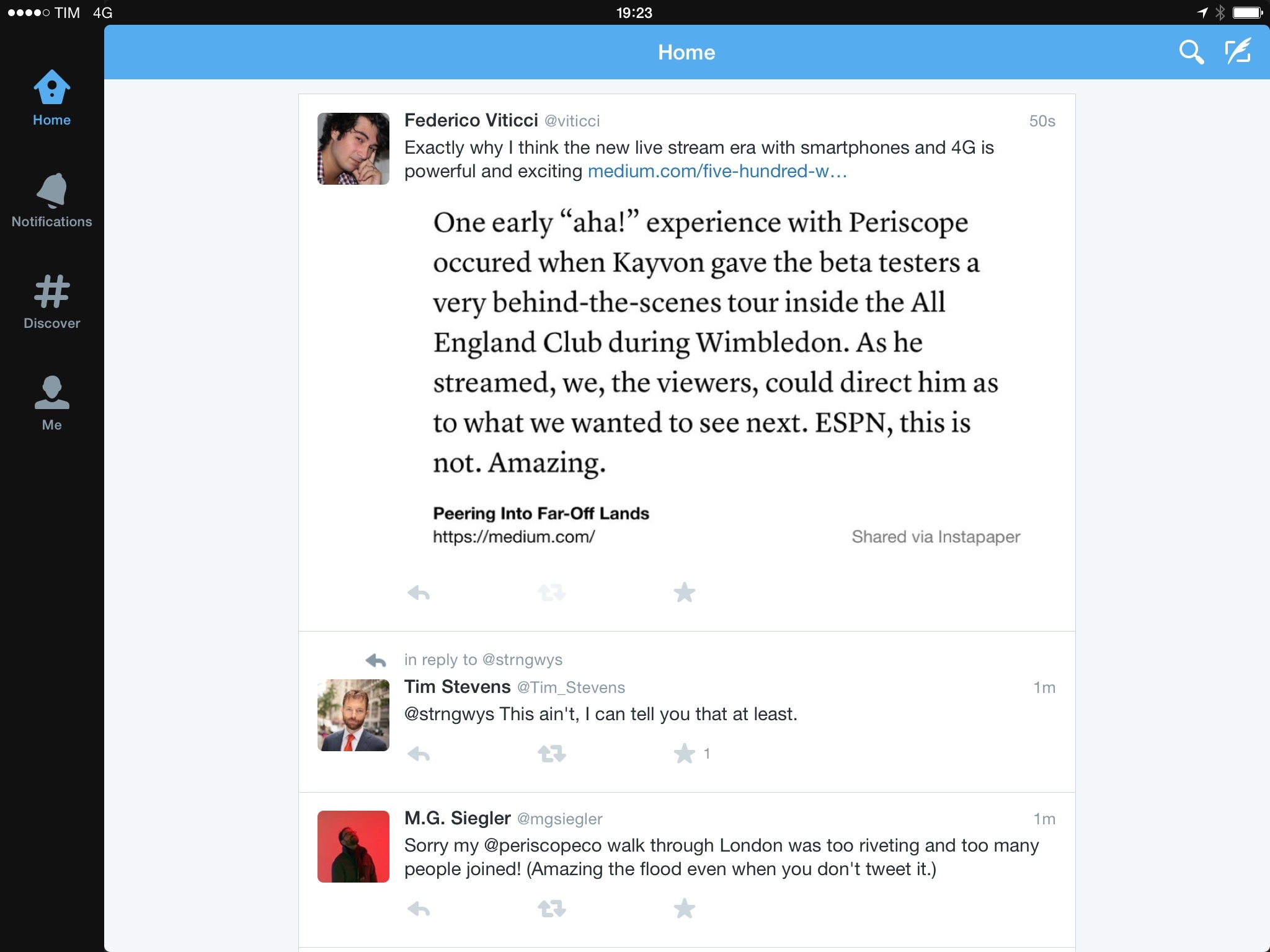
Along the lines of integration, Instapaper 6.2 also lets you generate textshots for Twitter directly from the app. There are some excellent touches in how Instapaper handled textshots: they’re generated via software (so you won’t end up with images cluttering the Camera Roll) and they preserve the current font and theme selection.

A textshot generated by Instapaper and perfectly previewed inline on Twitter.

A textshot generated by Instapaper and perfectly previewed inline on Twitter.

Furthermore, Instapaper also attempts to guess the best aspect ratio to avoid truncation on Twitter. All this, I think, makes it one of the finest implementations of textshots to date. Bonus points for making it easy to tweet a text selection with the Share button of the copy & paste menu.

Betaworks keeps doing good work on Instapaper. Version 6.2 is available now on the App Store.

Permalink