This Week's Sponsor:

Dropzone 5

Improve your Drag-and-Drop Workflow


Posts in iPhone

Creators Of “The Glif” Share The Story Behind Their Popular iPhone Accessory

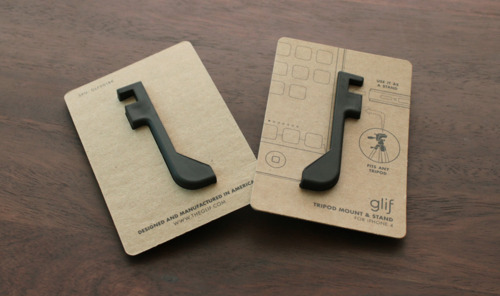
The Glif is a tripod mount / stand for the iPhone we have covered on MacStories quite a few times in the past months. Several accessories are announced and released every day; none of them goes from idea to the market in 5 months. None of them comes from an idea of two guys with no marketing, retail or manufacturing experience.

The Glif quickly jumped from cool Kickstarter project to Internet all-star thanks to the dozens of blogs and publications that thought the accessory was cool and deserved to be noticed by people in order to be manufactured and then sold. The creators have now posted an interesting “behind the scenes” article with all the details, pictures and videos of the Glif, from idea to actual product.

From the beginning, it was clear that simplicity was going to be a key tenet of our design. Not just for philosophical reasons, but to keep the design focused, and quite frankly, achievable. We knew that any complication to the manufacturing (moving parts, assembly, etc.) would make the project less likely to succeed.

After a round of sketching, we arrived at the general shape rather quickly: something that affixes to the corner of the phone and runs along the long edge, with a tripod screw roughly centered on that edge. One key component of our early design was a small peg located inside the shoe of the Glif, meant to be inserted into the headphone jack for extra stability. We were both in love with this feature, but in an example of killing your darlings, realized the design was better served (and more versatile) without it.

In case you haven’t considered a Glif yet, go check out the website here. This neat accessory with double functionality can be yours for just $20.

Access Extra Content and Perks

Founded in 2015, Club MacStories has delivered exclusive content every week for nearly a decade.

What started with weekly and monthly email newsletters has blossomed into a family of memberships designed for every MacStories fan.

Learn more here and from our Club FAQs.

Club MacStories: Weekly and monthly newsletters via email and the web that are brimming with apps, tips, automation workflows, longform writing, early access to the MacStories Unwind podcast, periodic giveaways, and more;

Club MacStories+: Everything that Club MacStories offers, plus an active Discord community, advanced search and custom RSS features for exploring the Club’s entire back catalog, bonus columns, and dozens of app discounts;

Club Premier: All of the above and AppStories+, an extended version of our flagship podcast that’s delivered early, ad-free, and in high-bitrate audio.

Learn more here and from our Club FAQs.


Vyne, An iPhone Stand Wrapped Around You

It looks like a snake, and when I first saw it I have to admit I thought it looked weird. But after looking at some products shots and thinking about the possible implementations of the Vyne, I can see it being used in some specific situations. Like hands-free, portable video calling. The creators of the accessory say the Vyne is “constructed of a flexible elastomer neck and plastic clip” that “allows users to easily watch movies, slideshows, and video calls in a variety of configurations”.

The Vyne, indeed, can be wrapped around your neck while you’re busy cooking in the kitchen and still you want to talk with your wife via FaceTime. Or perhaps you want to check on recipe how-tos on Youtube without touching the screen with your fingers.

It looks different, but I believe it can be quite handy. The Vyne is just a concept, but would you buy one?  [via TNW]

Access Extra Content and Perks

Founded in 2015, Club MacStories has delivered exclusive content every week for nearly a decade.

What started with weekly and monthly email newsletters has blossomed into a family of memberships designed for every MacStories fan.

Learn more here and from our Club FAQs.

Club MacStories: Weekly and monthly newsletters via email and the web that are brimming with apps, tips, automation workflows, longform writing, early access to the MacStories Unwind podcast, periodic giveaways, and more;

Club MacStories+: Everything that Club MacStories offers, plus an active Discord community, advanced search and custom RSS features for exploring the Club’s entire back catalog, bonus columns, and dozens of app discounts;

Club Premier: All of the above and AppStories+, an extended version of our flagship podcast that’s delivered early, ad-free, and in high-bitrate audio.

Learn more here and from our Club FAQs.


#MacStoriesDeals - Monday

Let’s hope Steve Job’s health improves quickly! Here’s today’s deals on iOS, Mac, and Mac App Store apps that are on sale for a limited time, so get ‘em while they’re hot! Read more

Access Extra Content and Perks

Founded in 2015, Club MacStories has delivered exclusive content every week for nearly a decade.

What started with weekly and monthly email newsletters has blossomed into a family of memberships designed for every MacStories fan.

Learn more here and from our Club FAQs.

Club MacStories: Weekly and monthly newsletters via email and the web that are brimming with apps, tips, automation workflows, longform writing, early access to the MacStories Unwind podcast, periodic giveaways, and more;

Club MacStories+: Everything that Club MacStories offers, plus an active Discord community, advanced search and custom RSS features for exploring the Club’s entire back catalog, bonus columns, and dozens of app discounts;

Club Premier: All of the above and AppStories+, an extended version of our flagship podcast that’s delivered early, ad-free, and in high-bitrate audio.

Learn more here and from our Club FAQs.


iPhone Hack Enables FaceTime on Unsupported Carriers

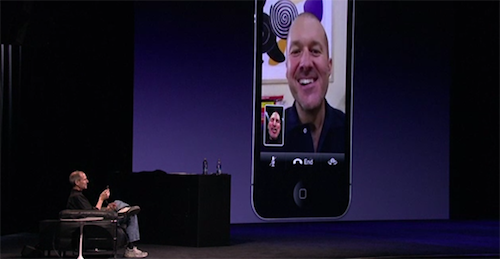
iPhone owners who have been trying to use the device on unsupported carriers like T-Mobile in the U.S. through an unlock procedure have noticed the FaceTime functionality doesn’t work. Even if the iPhone can work on other “unofficially supported” GSM networks, FaceTime is still tied to specific carriers selected by Apple and can’t get activated by standard unlocking tools.

MiTime is an app recently updated to work with iOS 4.1 and iOS 4.2.1 that allows users to easily activate FaceTime on unsupported carriers. The app will force the iPhone to send two international SMS messages to enable FaceTime on a network that’s not officially backed by Apple.

The hack should be working with any GSM carrier and is available in Cydia. You can follow the instructions on how to install MiTime over at iPhone Download Blog.

Access Extra Content and Perks

Founded in 2015, Club MacStories has delivered exclusive content every week for nearly a decade.

What started with weekly and monthly email newsletters has blossomed into a family of memberships designed for every MacStories fan.

Learn more here and from our Club FAQs.

Club MacStories: Weekly and monthly newsletters via email and the web that are brimming with apps, tips, automation workflows, longform writing, early access to the MacStories Unwind podcast, periodic giveaways, and more;

Club MacStories+: Everything that Club MacStories offers, plus an active Discord community, advanced search and custom RSS features for exploring the Club’s entire back catalog, bonus columns, and dozens of app discounts;

Club Premier: All of the above and AppStories+, an extended version of our flagship podcast that’s delivered early, ad-free, and in high-bitrate audio.

Learn more here and from our Club FAQs.


Save MP3s On Your Device with YouTubeToMp3 [Cydia]

YouTubeToMp3 is a new tweak available for free in Cydia that, as the name suggests, allows you to save MP3 audio files on your jailbroken iOS device through Youtube. It may happen sometimes, in fact, that you stumble upon a live performance of your favorite artist on YouTube and you can’t find the single audio files anywhere else; in the past, we reviewed Grappler for Mac, a utility for OS X that allows you to convert videos from the popular video service to audio files also compatible with iTunes.

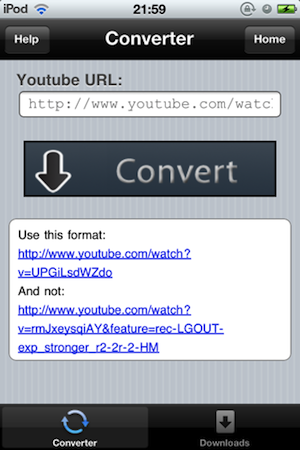
YouTubeToMp3 only needs the URL of the video you’d like to save and a tap on “Convert”. The UI isn’t exactly great, but the tweak gets its job done by saving .mp3 files into /var/mobile/Media/Downloads. You can manage files from the utility itself, too.

YouTubeToMp3 is available under BigBoss repo and it’s compatible with the iPhone and iPod touch.

Access Extra Content and Perks

Founded in 2015, Club MacStories has delivered exclusive content every week for nearly a decade.

What started with weekly and monthly email newsletters has blossomed into a family of memberships designed for every MacStories fan.

Learn more here and from our Club FAQs.

Club MacStories: Weekly and monthly newsletters via email and the web that are brimming with apps, tips, automation workflows, longform writing, early access to the MacStories Unwind podcast, periodic giveaways, and more;

Club MacStories+: Everything that Club MacStories offers, plus an active Discord community, advanced search and custom RSS features for exploring the Club’s entire back catalog, bonus columns, and dozens of app discounts;

Club Premier: All of the above and AppStories+, an extended version of our flagship podcast that’s delivered early, ad-free, and in high-bitrate audio.

Learn more here and from our Club FAQs.


#MacStoriesDeals - Friday

Pew Pew Pew! Here’s today’s deals on iOS, Mac, and Mac App Store apps that are on sale for a limited time, so get ‘em while they’re hot! Read more

Access Extra Content and Perks

Founded in 2015, Club MacStories has delivered exclusive content every week for nearly a decade.

What started with weekly and monthly email newsletters has blossomed into a family of memberships designed for every MacStories fan.

Learn more here and from our Club FAQs.

Club MacStories: Weekly and monthly newsletters via email and the web that are brimming with apps, tips, automation workflows, longform writing, early access to the MacStories Unwind podcast, periodic giveaways, and more;

Club MacStories+: Everything that Club MacStories offers, plus an active Discord community, advanced search and custom RSS features for exploring the Club’s entire back catalog, bonus columns, and dozens of app discounts;

Club Premier: All of the above and AppStories+, an extended version of our flagship podcast that’s delivered early, ad-free, and in high-bitrate audio.

Learn more here and from our Club FAQs.


The External Touchscreen That Can Control An iPhone

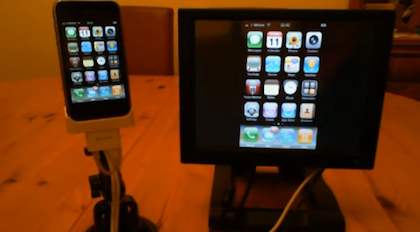
Geeks and modders have been looking for a way to control an iPhone or iPod touch from an external touch input for years. And when we say “a way to control”, we actually mean “an easy way to let the setup work”. In the past years, we’ve seen hundreds of individuals coming up with incredibly complex configurations that revolved around dozens of cables, jailbreak, dock stations, screens and modifications to the original iPhone software. What Mr. Romin has achieved is a rather simple, affordable and easy to understand method to get the iPhone to mirror its screen on an external monitor, and have the monitor capable of controlling the iPhone itself via touch.

With a Lilliput FA1042 touchscreen, an iPhone, a Belkin AV dock adapter cable and a software called “Centrafuse” he managed to get this two-way mirroring and controlling system to work. The iPhone’s Springboard is blown up on the screen in standard mode, but Youtube videos, for example, play in fullscreen mode on the external panel with controls visible on the iPhone.

Check out the demo video below. Read more

Access Extra Content and Perks

Founded in 2015, Club MacStories has delivered exclusive content every week for nearly a decade.

What started with weekly and monthly email newsletters has blossomed into a family of memberships designed for every MacStories fan.

Learn more here and from our Club FAQs.

Club MacStories: Weekly and monthly newsletters via email and the web that are brimming with apps, tips, automation workflows, longform writing, early access to the MacStories Unwind podcast, periodic giveaways, and more;

Club MacStories+: Everything that Club MacStories offers, plus an active Discord community, advanced search and custom RSS features for exploring the Club’s entire back catalog, bonus columns, and dozens of app discounts;

Club Premier: All of the above and AppStories+, an extended version of our flagship podcast that’s delivered early, ad-free, and in high-bitrate audio.

Learn more here and from our Club FAQs.


#MacStoriesDeals - Thursday

More Mac App Store deals coming soon! Anyway, here’s today’s deals on iOS & Mac (Store) apps that are on sale for a limited time, so get ‘em while they’re hot! Read more

Access Extra Content and Perks

Founded in 2015, Club MacStories has delivered exclusive content every week for nearly a decade.

What started with weekly and monthly email newsletters has blossomed into a family of memberships designed for every MacStories fan.

Learn more here and from our Club FAQs.

Club MacStories: Weekly and monthly newsletters via email and the web that are brimming with apps, tips, automation workflows, longform writing, early access to the MacStories Unwind podcast, periodic giveaways, and more;

Club MacStories+: Everything that Club MacStories offers, plus an active Discord community, advanced search and custom RSS features for exploring the Club’s entire back catalog, bonus columns, and dozens of app discounts;

Club Premier: All of the above and AppStories+, an extended version of our flagship podcast that’s delivered early, ad-free, and in high-bitrate audio.

Learn more here and from our Club FAQs.


You Can Now Watch PBS Shows on Your iPhone

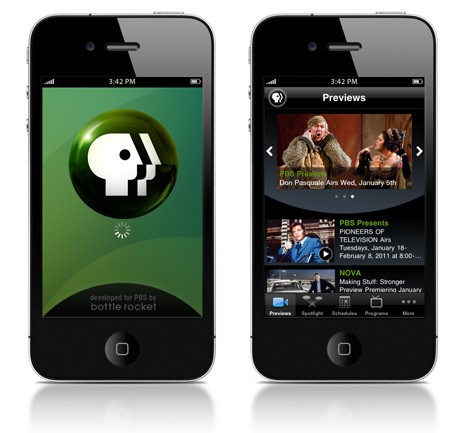
Back in October, we reported that PBS redesigned their website with an online player, and a new iPad app. They also said an iPhone and iPod Touch app were coming in Novem… well, January to be exact. PBS has finally announced the iPhone and iPod touch version of their iPad app. It looks great and it’s (you guessed it) free. Just like the iPad counterpart, you can watch full-length PBS productions wherever you are. It features over 300 videos: full length episodes, segments and previews with new content updated every day.

  • PBS primetime programs: Antiques Roadshow, Frontline, History Detectives, Masterpiece, Nature, Need to Know, Nova, Secrets of the Dead, and more.
  • PBS NewsHour segments.
  • Austin City Limits song performances.
  • Special clips and full-length episodes from the PBS special CIRCUS.
  • Original online series, including Nova ScienceNOW’s “Secret Life of Scientists” and “FutureStates” from INDEPENDENT LENS.

Read more

Access Extra Content and Perks

Founded in 2015, Club MacStories has delivered exclusive content every week for nearly a decade.

What started with weekly and monthly email newsletters has blossomed into a family of memberships designed for every MacStories fan.

Learn more here and from our Club FAQs.

Club MacStories: Weekly and monthly newsletters via email and the web that are brimming with apps, tips, automation workflows, longform writing, early access to the MacStories Unwind podcast, periodic giveaways, and more;

Club MacStories+: Everything that Club MacStories offers, plus an active Discord community, advanced search and custom RSS features for exploring the Club’s entire back catalog, bonus columns, and dozens of app discounts;

Club Premier: All of the above and AppStories+, an extended version of our flagship podcast that’s delivered early, ad-free, and in high-bitrate audio.

Learn more here and from our Club FAQs.