

Here are today’s @MacStoriesDeals on iOS, Mac, and Mac App Store apps that are on sale for a limited time, so get them before they end!
Posts in iPhone
#MacStoriesDeals - Monday

Access Extra Content and Perks
Founded in 2015, Club MacStories has delivered exclusive content every week for nearly a decade.
What started with weekly and monthly email newsletters has blossomed into a family of memberships designed for every MacStories fan.
Club MacStories: Weekly and monthly newsletters via email and the web that are brimming with apps, tips, automation workflows, longform writing, early access to the MacStories Unwind podcast, periodic giveaways, and more;
Club MacStories+: Everything that Club MacStories offers, plus an active Discord community, advanced search and custom RSS features for exploring the Club’s entire back catalog, bonus columns, and dozens of app discounts;
Club Premier: All of the above and AppStories+, an extended version of our flagship podcast that’s delivered early, ad-free, and in high-bitrate audio.
#MacStoriesDeals - Friday

Here are today’s @MacStoriesDeals on iOS, Mac, and Mac App Store apps that are on sale for a limited time, so get them before they end!
Access Extra Content and Perks
Founded in 2015, Club MacStories has delivered exclusive content every week for nearly a decade.
What started with weekly and monthly email newsletters has blossomed into a family of memberships designed for every MacStories fan.
Club MacStories: Weekly and monthly newsletters via email and the web that are brimming with apps, tips, automation workflows, longform writing, early access to the MacStories Unwind podcast, periodic giveaways, and more;
Club MacStories+: Everything that Club MacStories offers, plus an active Discord community, advanced search and custom RSS features for exploring the Club’s entire back catalog, bonus columns, and dozens of app discounts;
Club Premier: All of the above and AppStories+, an extended version of our flagship podcast that’s delivered early, ad-free, and in high-bitrate audio.
Home Improvement Store, Lowe’s, Deploying 42,000 iPhones

US home improvement and appliance retailer, Lowe’s, has revealed that it is undertaking a significant technological upgrade over the coming months. In addition to overhauling its website, the store is replacing decade old technology in its stores by deploying new technology and products such as iPhones.
The store chain is spending a record amount on technology over this fiscal year, replacing 72,000 computer screens with flat panels, adding WiFi to stores for customers to use and purchasing more than 42,000 iPhones (that’s 25 for every one of Lowe’s 1700 stores). The iPhones will replace scanner guns from the 1990s and staff will now be able to check product information or even view how-to videos, right as they stand next to the customer.
“Forget about the competition, we are playing catch-up with the customer psyche,” Mike Brown, Lowe’s Chief Information Officer, said.
The iPhones will also eventually be enabled to do more tasks including calling customers or suppliers, emailing, text-messaging as well as processing credit card purchases - similar to how the iPod Touch is used by Apple in their retail stores.
[Via Bloomberg]
Access Extra Content and Perks
Founded in 2015, Club MacStories has delivered exclusive content every week for nearly a decade.
What started with weekly and monthly email newsletters has blossomed into a family of memberships designed for every MacStories fan.
Club MacStories: Weekly and monthly newsletters via email and the web that are brimming with apps, tips, automation workflows, longform writing, early access to the MacStories Unwind podcast, periodic giveaways, and more;
Club MacStories+: Everything that Club MacStories offers, plus an active Discord community, advanced search and custom RSS features for exploring the Club’s entire back catalog, bonus columns, and dozens of app discounts;
Club Premier: All of the above and AppStories+, an extended version of our flagship podcast that’s delivered early, ad-free, and in high-bitrate audio.
#MacStoriesDeals - Thursday

Here are today’s @MacStoriesDeals on iOS, Mac, and Mac App Store apps that are on sale for a limited time, so get them before they end!
Access Extra Content and Perks
Founded in 2015, Club MacStories has delivered exclusive content every week for nearly a decade.
What started with weekly and monthly email newsletters has blossomed into a family of memberships designed for every MacStories fan.
Club MacStories: Weekly and monthly newsletters via email and the web that are brimming with apps, tips, automation workflows, longform writing, early access to the MacStories Unwind podcast, periodic giveaways, and more;
Club MacStories+: Everything that Club MacStories offers, plus an active Discord community, advanced search and custom RSS features for exploring the Club’s entire back catalog, bonus columns, and dozens of app discounts;
Club Premier: All of the above and AppStories+, an extended version of our flagship podcast that’s delivered early, ad-free, and in high-bitrate audio.
Adobe Unveils “Carousel” To Sync & Edit Photos Across Mac and iOS
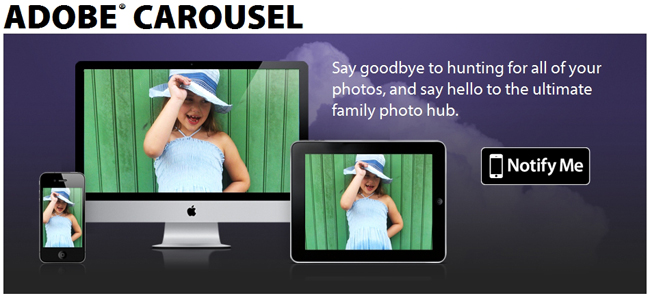
Today Adobe introduced a new product that could bring photographers’ favorite Adobe app, Lightroom, to a reality; it’s called Carousel. Carousel could be Adobe’s answer to Apple’s Photo Stream service, although Adobe’s solution is not integrated into the OS like Apple’s iCloud service. Carousel will let you enhance and share all of your photos across your Mac and iOS devices (Android & Windows versions are in development).
Carousel “brings a highly tuned version of the Lightroom/Camera Raw engine to mobile devices, combining it with excellent multi-device syncing.” Other Carousel options are:
- You get access to all your images on all your devices.
- All edits are non-destructive: tweak a setting on one device & you’ll see the edit ripple through your other devices.
- It’s easy to collaborate with friends & family: people you invite to share a photo catalog can view photos, add new ones, apply adjustments and preset “looks,” and flag favorites.
- You can easily publish to social networks like Facebook, Twitter, and Tumblr.
The iOS and Mac versions are not yet available but based on John Nack’s blog post, it may have already been submitted to Apple. All the applications will be free but the service will be subscription based - $9.99 a month or $99.99 a year will get you unlimited storage and photos but if you’re an early adopter the price will be $5.99 a month or $59.99 a year.
The ability to edit your photos and have them sync everywhere is a feature that Apple’s Photo Stream does not currently have, it simply syncs photos taken with your iOS camera to the stream but it will be free.
Demo video after the break.
Access Extra Content and Perks
Founded in 2015, Club MacStories has delivered exclusive content every week for nearly a decade.
What started with weekly and monthly email newsletters has blossomed into a family of memberships designed for every MacStories fan.
Club MacStories: Weekly and monthly newsletters via email and the web that are brimming with apps, tips, automation workflows, longform writing, early access to the MacStories Unwind podcast, periodic giveaways, and more;
Club MacStories+: Everything that Club MacStories offers, plus an active Discord community, advanced search and custom RSS features for exploring the Club’s entire back catalog, bonus columns, and dozens of app discounts;
Club Premier: All of the above and AppStories+, an extended version of our flagship podcast that’s delivered early, ad-free, and in high-bitrate audio.
#MacStoriesDeals - Wednesday

Here are today’s @MacStoriesDeals on iOS, Mac, and Mac App Store apps that are on sale for a limited time, so get them before they end!
Access Extra Content and Perks
Founded in 2015, Club MacStories has delivered exclusive content every week for nearly a decade.
What started with weekly and monthly email newsletters has blossomed into a family of memberships designed for every MacStories fan.
Club MacStories: Weekly and monthly newsletters via email and the web that are brimming with apps, tips, automation workflows, longform writing, early access to the MacStories Unwind podcast, periodic giveaways, and more;
Club MacStories+: Everything that Club MacStories offers, plus an active Discord community, advanced search and custom RSS features for exploring the Club’s entire back catalog, bonus columns, and dozens of app discounts;
Club Premier: All of the above and AppStories+, an extended version of our flagship podcast that’s delivered early, ad-free, and in high-bitrate audio.
#MacStoriesDeals - Tuesday

Here are today’s @MacStoriesDeals on iOS, Mac, and Mac App Store apps that are on sale for a limited time, so get them before they end!
Access Extra Content and Perks
Founded in 2015, Club MacStories has delivered exclusive content every week for nearly a decade.
What started with weekly and monthly email newsletters has blossomed into a family of memberships designed for every MacStories fan.
Club MacStories: Weekly and monthly newsletters via email and the web that are brimming with apps, tips, automation workflows, longform writing, early access to the MacStories Unwind podcast, periodic giveaways, and more;
Club MacStories+: Everything that Club MacStories offers, plus an active Discord community, advanced search and custom RSS features for exploring the Club’s entire back catalog, bonus columns, and dozens of app discounts;
Club Premier: All of the above and AppStories+, an extended version of our flagship podcast that’s delivered early, ad-free, and in high-bitrate audio.
Acquire Connects Your iOS Camera Directly to Photoshop
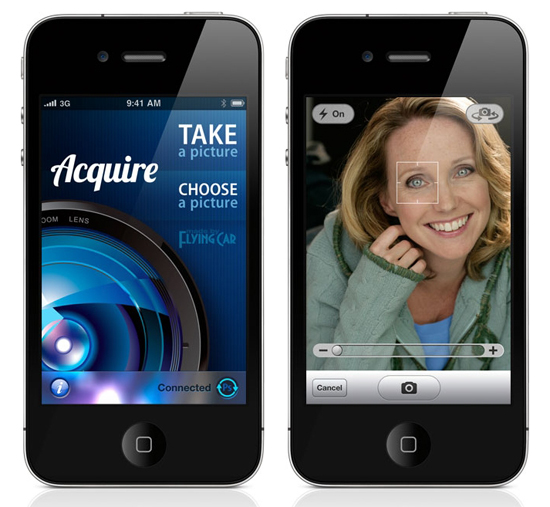
Acquire, by FlyingCarLTD, is an iOS app that lets you shoot images from your iOS camera directly into Photoshop CS5.
Acquire is simple and instantly sends images from your iOS device’s camera into Adobe Photoshop CS5 over a WiFi network. With Adobe’s Remote Connect feature, an image taken with an iPhone, iPad or iPod touch is instantly and wirelessly transmitted into Photoshop so you can work with it automatically, no importing needed.
There are many iOS photo apps that let you edit or add effects to an image in the phone but many times edits are permanent and the original image is lost. If you like a more professional and do-it-yourself approach with your iOS camera images, all the tools and effects you’ll ever need are right there with your mouse or trackpad.
“Whether you are a photographer who wants to immediately evaluate the quality of an iPhone photo, an artist who needs a quick image for reference, a manager who needs to add a digital signature to a receipt for email, or a developer who needs to instantly ingest screen shots from your iOS device, Acquire is the perfect tool for you.”
Acquire is only $1.99 in the iTunes store and is available now. An app that works with an Adobe product and it’s only $2? Color me sold. [via John Nack]
Access Extra Content and Perks
Founded in 2015, Club MacStories has delivered exclusive content every week for nearly a decade.
What started with weekly and monthly email newsletters has blossomed into a family of memberships designed for every MacStories fan.
Club MacStories: Weekly and monthly newsletters via email and the web that are brimming with apps, tips, automation workflows, longform writing, early access to the MacStories Unwind podcast, periodic giveaways, and more;
Club MacStories+: Everything that Club MacStories offers, plus an active Discord community, advanced search and custom RSS features for exploring the Club’s entire back catalog, bonus columns, and dozens of app discounts;
Club Premier: All of the above and AppStories+, an extended version of our flagship podcast that’s delivered early, ad-free, and in high-bitrate audio.
Did An Apple Investigator Pose as a Police Officer to Search for Missing iPhone Prototype?

On Wednesday, we reported a repeat of last year’s iPhone disaster - an iPhone prototype lost in a bar. According to the website, Apple never filed a police report based on such loss, likely from an employee field-testing the unit, although it “sparked a scramble by Apple security” in an effort to recover it quickly. The story just got one hundred times more interesting: the SF Weekly has followed up with a new report claiming that Apple security personnel may have posed as the police during the search of Sergio Calderón’s home. Impersonating a police officer is a criminal offense, even if you are a security guard. On the flip side, the police could’ve improperly assisted in the investigation without documenting their work corectly.
[Sergio] Calderón said that at about 6 p.m. six people – four men and two women – wearing badges of some kind showed up at his door. “They said, ‘Hey, Sergio, we’re from the San Francisco Police Department.’” He said they asked him whether he had been at Cava 22 over the weekend (he had) and told him that they had traced a lost iPhone to his home using GPS.
At no point, he said, did any of the visitors say they were working on behalf of Apple or say they were looking for an iPhone 5 prototype.
Calderón is claming that he allowed the team of investigators to search his home and automobile and even check his computer to see if a missing iPhone prototype had been synced with it. The investigators walked away empty handed but told Calderón they would give him $300 to return the phone or could offer information on the device’s whereabouts.
As the visitors left, one of them – a man named “Tony” – gave Calderón his phone number and asked him to call if he had further information about the lost phone. Calderón shared the man’s phone number with SF Weekly.
The phone was answered by Anthony Colon, who confirmed to us he is an employee of Apple but declined to comment further. According to a public profile on the website LinkedIn, Colon, a former San Jose Police sergeant, is employed as a “senior investigator” at Apple.
A spokesman for the SFPD is concerned about the supposed series of events and they will be investigating the incident. This story keeps getting more crazy by the day! What’s next, a movie deal? But in all seriousness, Apple is taking this very seriously.
UPDATE: Anthony Colon’s LinkedIn profile has been deleted but MacRumors saved a screenshot of it and we also have a link to the cached version of his LinkedIn profile page.
[via MacRumors]
Image via Taste Tequila
Access Extra Content and Perks
Founded in 2015, Club MacStories has delivered exclusive content every week for nearly a decade.
What started with weekly and monthly email newsletters has blossomed into a family of memberships designed for every MacStories fan.
Club MacStories: Weekly and monthly newsletters via email and the web that are brimming with apps, tips, automation workflows, longform writing, early access to the MacStories Unwind podcast, periodic giveaways, and more;
Club MacStories+: Everything that Club MacStories offers, plus an active Discord community, advanced search and custom RSS features for exploring the Club’s entire back catalog, bonus columns, and dozens of app discounts;
Club Premier: All of the above and AppStories+, an extended version of our flagship podcast that’s delivered early, ad-free, and in high-bitrate audio.