

Here are today’s @MacStoriesDeals on iOS, Mac, and Mac App Store apps that are on sale for a limited time, so get them before they end!
Posts in iPhone
#MacStoriesDeals - Thursday

Access Extra Content and Perks
Founded in 2015, Club MacStories has delivered exclusive content every week for nearly a decade.
What started with weekly and monthly email newsletters has blossomed into a family of memberships designed for every MacStories fan.
Club MacStories: Weekly and monthly newsletters via email and the web that are brimming with apps, tips, automation workflows, longform writing, early access to the MacStories Unwind podcast, periodic giveaways, and more;
Club MacStories+: Everything that Club MacStories offers, plus an active Discord community, advanced search and custom RSS features for exploring the Club’s entire back catalog, bonus columns, and dozens of app discounts;
Club Premier: All of the above and AppStories+, an extended version of our flagship podcast that’s delivered early, ad-free, and in high-bitrate audio.
Instacast 1.4: This Is What iCloud Can Do

If you have a day job and had just started upgrading your iOS devices when you got home yesterday evening, it’s likely haven’t even spent a few hours with iCloud yet. The premise is pretty amazing, even if the initial majority of it is between iOS devices. If you think automatically syncing spreadsheets and documents across iCloud from your iPad to iPhone is cool, that’s just the tip of the iceberg. Beyond document syncing, iCloud opens up a world of added convenience that wasn’t available previously. Just think about being able to sync your Angry Birds progress between devices. But we can take that even further. What if we could sync something like RSS feeds between devices? Now you’re thinkin’.
Instacast goes beyond simply syncing your lists of podcasts. It remembers to update which episodes you’ve marked as played, it remembers to add new podcasts you’ve subscribed to across devices, and it even remembers what episode you were listening to. The last item is the magical part: it syncs track position and loads that episode you were listening to in the now playing window if you pause the podcast and want to pick up from another device later. Resuming a podcast is as simple as tapping the up arrow after a refresh. Now this? This is amazinger.
This is one of the best use cases for iCloud. Instacast syncs lots of data to keep everything in sync. While there’s not much I can add beyond Martin’s blog post on Vemedio, the wow-factor can’t be emphasized enough.
With the amount of data being synced, there are some things to remember about Instacast’s iCloud sync. Geeks will immediately try, two devices in hand, to see how instant syncing is. If you don’t allow Instacast to get its data in the cloud, you may run into conflicts where your impatience could overwrite the changes you wanted to save. I imagine this is more true for big podcast libraries. You treat it like you treat Tweet Marker — it’s all designed to be very casual. With that said, syncing shouldn’t take five minutes, but I wouldn’t expect it to be split-second instant. A pull-to-refresh will sync changes down from iCloud while uploading takes place automatically.
Instacast 1.4 has a new audio engine inside for iOS 5 compatibility, bringing back scrolling titles on the lock screen (a bigger deal if you were an early iOS 5 adopter) and adding Apple TV support for AirPlay. If you want to get caught up on what Instacast does and how great it really is, check out our previous reviews.
You can read more about the 1.4 update on Vemedio, and download the update for free from the App Store (it’s only $1.99 for new customers).
Access Extra Content and Perks
Founded in 2015, Club MacStories has delivered exclusive content every week for nearly a decade.
What started with weekly and monthly email newsletters has blossomed into a family of memberships designed for every MacStories fan.
Club MacStories: Weekly and monthly newsletters via email and the web that are brimming with apps, tips, automation workflows, longform writing, early access to the MacStories Unwind podcast, periodic giveaways, and more;
Club MacStories+: Everything that Club MacStories offers, plus an active Discord community, advanced search and custom RSS features for exploring the Club’s entire back catalog, bonus columns, and dozens of app discounts;
Club Premier: All of the above and AppStories+, an extended version of our flagship podcast that’s delivered early, ad-free, and in high-bitrate audio.
Apple’s Cards Makes Sending Memories Simple and Easy

Send beautiful letterpress cards to your friends and family with your iPhone or iPod touch via Apple’s Cards, the surprise app unveiled last week during the iPhone 4S keynote. Cards, now available on the iTunes App Store, features a series of thankful, seasonal, celebrational, and travel templates which you can browse via a carousel. New cards slide into view as you navigate the app with your finger, with incomplete cards being saved to a drafts area which can be accessed through the navigation bar.

Presented cards are customizable, enabling users to change the title information, the inside of the card, and the envelope before sending their card for $2.99 within the United States, and $4.99 internationally. Unique edit views make the customization process feel on par with the editing techniques seen in iWork. Pictures can be taken on the fly or chosen from your photo library, then cropped and resized on the card face. Text can be completely rewritten for a personal touch on the inside of the card you’ve chosen, allowing you to personalize messages for a truley unique card.
Cards is a free download in the iTunes App Store.
Access Extra Content and Perks
Founded in 2015, Club MacStories has delivered exclusive content every week for nearly a decade.
What started with weekly and monthly email newsletters has blossomed into a family of memberships designed for every MacStories fan.
Club MacStories: Weekly and monthly newsletters via email and the web that are brimming with apps, tips, automation workflows, longform writing, early access to the MacStories Unwind podcast, periodic giveaways, and more;
Club MacStories+: Everything that Club MacStories offers, plus an active Discord community, advanced search and custom RSS features for exploring the Club’s entire back catalog, bonus columns, and dozens of app discounts;
Club Premier: All of the above and AppStories+, an extended version of our flagship podcast that’s delivered early, ad-free, and in high-bitrate audio.
Apple Launches ‘iTunes Movie Trailers’ for iOS

No, not a website! Apple has released an app to preview upcoming movies in the vein of Movies Now. Featuring the same previews you’d find at iTunes Movie Trailers on the web, the iOS app allows you to preview beautiful movie posters, find movies at local movie theaters (either by theater or by movie), and check on upcoming releases by previewing a built-in calendar. Per trailer, movie details can be reveleaed that contains the cast and synopsis for the films you’re interested in seeing. You can tweet or email to share, or add the film to your favorites for later recollection.
You can download the universal application from the iTunes App Store for free. More screenshots past the break.
Access Extra Content and Perks
Founded in 2015, Club MacStories has delivered exclusive content every week for nearly a decade.
What started with weekly and monthly email newsletters has blossomed into a family of memberships designed for every MacStories fan.
Club MacStories: Weekly and monthly newsletters via email and the web that are brimming with apps, tips, automation workflows, longform writing, early access to the MacStories Unwind podcast, periodic giveaways, and more;
Club MacStories+: Everything that Club MacStories offers, plus an active Discord community, advanced search and custom RSS features for exploring the Club’s entire back catalog, bonus columns, and dozens of app discounts;
Club Premier: All of the above and AppStories+, an extended version of our flagship podcast that’s delivered early, ad-free, and in high-bitrate audio.
iPhone 4S Review Roundup
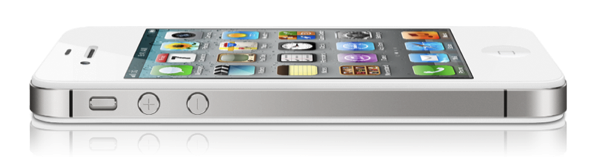
What’s the overall consensus of the iPhone 4S? Photos are noticeably superior to the iPhone 4, Siri works well (though has some limitations), and the phone itself is a whole lot faster thanks the A5 chip. Combine that with the dual antenna (the first of its kind) that’s eliminated previous problem areas for the reviewers, and we have a spectacular upgrade.
And then there’s the antenna. Now that metal band surrounding the iPhone contains two antennae for your cellular services, and when you’re on a call, the handset will automatically switch to the antenna that’s pulling a stronger signal.
From my experience, talking on an iPhone 4S on AT&T sounds noticeably clearer than it did on past iPhones I’ve owned. In areas with good reception, the handset still hasn’t dropped a call. And no, I haven’t experienced any degraded call performance when holding the phone “the wrong way.”
Speech recognition. Crazy good, transformative, category-redefining speech recognition.
Apple won’t admit that it’s using a version of Dragon Dictation, the free iPhone app, but there doesn’t seem to be much doubt; it works and behaves identically. (For example, it occasionally seems to process your utterance but then types nothing at all, just as the Dragon app does.) This version is infinitely better, though, because it’s a built-in keyboard button, not a separate app.
Apps that used to take a longer time to perform a task — applying a filter in Camera+, for example — now work much faster. More generally, every app seems to load quite a bit faster. The best way to see this is to load the Settings app that is built into iOS. On the iPhone 4, it can take up to 3 seconds to load. On the iPhone 4S, it loads in less than a second. And the 4S is faster at switching between apps when multi-tasking.
The iPhone 4 antenna issue probably garnered more attention than the true scope of the problem deserved. Lots of cell phones have attenuation issues. In more than a year of heavy iPhone 4 use, I’ve rarely changed how I held the phone in hopes of getting a better cellular signal. It happened, yes, but no more than a half-dozen times. Still, I am happy to report that it seems that Apple has eradicated this problem entirely. If you shied away from the iPhone 4 because of attenuation issues, it’s safe to go back in the water.
One thing I particularly noticed was the animations when launching and switching apps. When an app is launched or closed, it is supposed to zoom in or out — this wasn’t always evident in previous versions of the iPhone.
The iPhone 4 would sometimes show animations, but a lot of the time, an app would just appear.
The increased performance of the iPhone 4S is great news for developers. They have been pushing the envelope of Apple’s hardware, releasing more complex, graphics intensive apps that require this power.
The iPhone 4S took some of the nicest, cleanest photos I’ve ever seen from a mobile device. If you’ve ever thought about using a phone as a replacement for your point and shoot, feel free to start taking that concept seriously. The 4S produced crisp, balanced, colorful photos that were surprisingly low-noise and never over-saturated.
The result is video you might not think has been filmed on a phone. One of the issues users often experience when filming on their handsets is jerkiness in the final clip, with the quest to make a lighter smartphone also creating one which is too easy to move around in video mode. Apple’s digital image stabilization does a great job of smoothing things, though, without leaving things over-processed. Add in the on-device editing – either basic trimming as standard, or using the optional iMovie for iPhone app – and the iPhone 4S proves itself more than worthy of a place in the photographer’s pocket.
The system understands multiple, colloquial forms of a question. I asked, “Will the weather get worse today?” and Siri answered, “I don’t think the weather is going to get worse” and displayed a weather chart. You can check stock prices, addresses, map directions and much more. It also answers in a friendly fashion, saying things like “Coming right up” or “I’m not sure what you said, Walt.” And it has some cute answers built in. When I asked it “What’s the best phone?” it said, “Wait… there are other phones?”
Access Extra Content and Perks
Founded in 2015, Club MacStories has delivered exclusive content every week for nearly a decade.
What started with weekly and monthly email newsletters has blossomed into a family of memberships designed for every MacStories fan.
Club MacStories: Weekly and monthly newsletters via email and the web that are brimming with apps, tips, automation workflows, longform writing, early access to the MacStories Unwind podcast, periodic giveaways, and more;
Club MacStories+: Everything that Club MacStories offers, plus an active Discord community, advanced search and custom RSS features for exploring the Club’s entire back catalog, bonus columns, and dozens of app discounts;
Club Premier: All of the above and AppStories+, an extended version of our flagship podcast that’s delivered early, ad-free, and in high-bitrate audio.
#MacStoriesDeals - Tuesday

Here are today’s @MacStoriesDeals on iOS, Mac, and Mac App Store apps that are on sale for a limited time, so get them before they end!
Access Extra Content and Perks
Founded in 2015, Club MacStories has delivered exclusive content every week for nearly a decade.
What started with weekly and monthly email newsletters has blossomed into a family of memberships designed for every MacStories fan.
Club MacStories: Weekly and monthly newsletters via email and the web that are brimming with apps, tips, automation workflows, longform writing, early access to the MacStories Unwind podcast, periodic giveaways, and more;
Club MacStories+: Everything that Club MacStories offers, plus an active Discord community, advanced search and custom RSS features for exploring the Club’s entire back catalog, bonus columns, and dozens of app discounts;
Club Premier: All of the above and AppStories+, an extended version of our flagship podcast that’s delivered early, ad-free, and in high-bitrate audio.
#MacStoriesDeals - Monday

Here are today’s @MacStoriesDeals on iOS, Mac, and Mac App Store apps that are on sale for a limited time, so get them before they end!
Access Extra Content and Perks
Founded in 2015, Club MacStories has delivered exclusive content every week for nearly a decade.
What started with weekly and monthly email newsletters has blossomed into a family of memberships designed for every MacStories fan.
Club MacStories: Weekly and monthly newsletters via email and the web that are brimming with apps, tips, automation workflows, longform writing, early access to the MacStories Unwind podcast, periodic giveaways, and more;
Club MacStories+: Everything that Club MacStories offers, plus an active Discord community, advanced search and custom RSS features for exploring the Club’s entire back catalog, bonus columns, and dozens of app discounts;
Club Premier: All of the above and AppStories+, an extended version of our flagship podcast that’s delivered early, ad-free, and in high-bitrate audio.
AT&T Sees 200,000 Pre-orders Of The iPhone 4S, Sprint Very Pleased With Demand
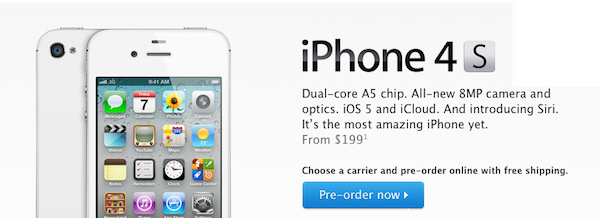
AT&T said late yesterday that it has seen 200,000 pre-orders of Apple’s iPhone 4S, breaking its record for first-day pre-orders. Speaking to AllThingsD, an AT&T representative said “AT&T has seen extraordinary demand for iPhone 4S, with more than 200,000 preorders in the first 12 hours alone, the most successful iPhone launch we’ve ever had”.
Sprint, who is selling the iPhone for the first time this week, was also pleased with results although they didn’t reveal numbers. “We are very, very pleased with the initial first day of iPhone 4S preorders,” Sprint Vice President of Product Development Fared Adib said in a statement. “Today’s sales and the overall customer experience greatly exceeded our expectations.”
Meanwhile if you are now looking to pre-order the iPhone 4S from the online Apple Store, you’ll have to put up with delayed shipping times. Apple now claims that new orders (of any model) will take 1-2 weeks for shipping (from the October 14th date).
[Via AllThingsD]
Access Extra Content and Perks
Founded in 2015, Club MacStories has delivered exclusive content every week for nearly a decade.
What started with weekly and monthly email newsletters has blossomed into a family of memberships designed for every MacStories fan.
Club MacStories: Weekly and monthly newsletters via email and the web that are brimming with apps, tips, automation workflows, longform writing, early access to the MacStories Unwind podcast, periodic giveaways, and more;
Club MacStories+: Everything that Club MacStories offers, plus an active Discord community, advanced search and custom RSS features for exploring the Club’s entire back catalog, bonus columns, and dozens of app discounts;
Club Premier: All of the above and AppStories+, an extended version of our flagship podcast that’s delivered early, ad-free, and in high-bitrate audio.
iPhone 4S Now Available for Pre-order
The iPhone 4S is now avaialble for pre-order at Apple.com | UPDATE: store.apple.com is struggling to process orders due to high demand. See below for carrier websites as alternatives.
- AT&T: We’re hearing reports that their site isn’t any better off than Apple’s. You can give it shot — we also hear that due to the volume of requests, Apple is sending customers reservation #’s to complete their orders at a later time.
- Sprint: When we last checked, Apple was telling new Sprint customers to visit retail stores (only previous customers are eligible to upgrade to the iPhone 4S). Sprint’s website, however, is taking orders for new customers and offers AppleCare+ for $99, and will ship Oct 14th - 15th if you get in.
- Verizon: Verizon’s site is holding up well (you can probably check out now without issues), but they don’t offer the $99 AppleCare+ plan (there are monthly Verizon equipment plans instead, and you can decline insurance).
It’s dangerous to go alone. With Siri, it’s like having your own Navi in your cap. It understands natural speech, and has the capability to learn your voice over time. Siri is your personal assistant, and is only avaialble on the iPhone 4S.
With the 4S, available in white and black in 16 GB, 32 GB, and 64 GB models ($199, $299, $399 respectively) on AT&T, Sprint, and Verizon, you’re bound to find adventure with limitless access to the world’s GSM networks no matter what carrier you choose. But no sword is good without a shield. Apple’s AppleCare+ will give you up to two occurrences of aciddental damage for quick repairs.
The iPhone 4S is everything you could have wanted in the iPhone 5. Dual-core 1 GHz A5 processor. 8 MP camera customed designed to give you the sharpest pictures. A brand new antenna that switches to give you the best signal. And the best part? It’ll be on your doormat in a week.
* * *
On the fence? I personally consider the iPhone 4S to be a significant upgrade in both hardware and software. iOS 5 may be old news for the geeks “beta-testing” the software over the summer, but in reality it’s brand new software that adds many layers of functionality to Apple’s mobile devices. Combined with the the iPhone 4S, you’re getting everything you wanted in the iPhone 5, sans the screen you were promised by wild rumors and speculation, and not by Apple.
Remember the 3GS update? It was a serious update, and we’re seeing the same thing happen to the 4S. If you have an iPhone 3G or 3GS, I wholeheartedly recommend the update. It’s everything you love about your Apple phone, but better. If you’re hung up on the plan, I suggest reading our very brief rundown. TiPb says that the iPhone 4S upgrade is a no-brainer for anything less than the iPhone 4.
If you need additional convincing, Jim Dalrymple can help.
Access Extra Content and Perks
Founded in 2015, Club MacStories has delivered exclusive content every week for nearly a decade.
What started with weekly and monthly email newsletters has blossomed into a family of memberships designed for every MacStories fan.
Club MacStories: Weekly and monthly newsletters via email and the web that are brimming with apps, tips, automation workflows, longform writing, early access to the MacStories Unwind podcast, periodic giveaways, and more;
Club MacStories+: Everything that Club MacStories offers, plus an active Discord community, advanced search and custom RSS features for exploring the Club’s entire back catalog, bonus columns, and dozens of app discounts;
Club Premier: All of the above and AppStories+, an extended version of our flagship podcast that’s delivered early, ad-free, and in high-bitrate audio.