Posts in iPhone

iOS 5.1 Beta Blocks Shortcuts to System Settings

Shorcuts

Shorcuts

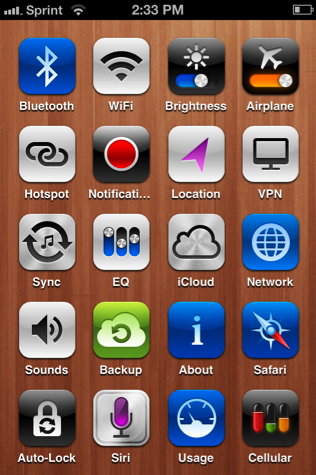
I manage bluetooth constantly on my iOS devices, thanks in part to the JAMBOX. Jeff Broderick’s iPhone Settings Shortcuts provide a much needed shortcut to Bluetooth settings that are otherwise buried. Where iOS doesn’t provide quick access to much beyond volume and brightness sliders, Android has always an advantage when it comes to managing settings between widgets or toggles in the notification tray. Being able to turn off the 3G signal and leave my phone on Wi-Fi was something I did in the evenings with my Droid to avoid late night phone calls and text messages, while still receiving incoming email and Twitter notifications to read in the morning. A silent phone’s display will still light up when rang.

As of the iOS 5.1 beta that was recently released, Apple’s blocking access to the Settings app through these Home screen shortcuts. Clearly I’m not a typical iPhone user, but even if I was, so what if I want to clutter my Home screen with harmless shortcuts? I don’t understand the motivation to kill off a feature like this unless it’s a security concern.

These setting shortcuts are great because they provide a clear and easily labeled path to things I want to change or manage. I can’t say the same about the Settings app, especially if something is buried in a submenu under ‘General’.

iOS 5.1 isn’t final yet, but there’s a pretty good chance system setting shortcuts are going to remained blocked. If these kinds of shortcuts are important to you, then you may want to hold off on the update when it’s seeded to the public.

[Cult of Mac via TiPb]

Access Extra Content and Perks

Founded in 2015, Club MacStories has delivered exclusive content every week for nearly a decade.

What started with weekly and monthly email newsletters has blossomed into a family of memberships designed for every MacStories fan.

Learn more here and from our Club FAQs.

Club MacStories: Weekly and monthly newsletters via email and the web that are brimming with apps, tips, automation workflows, longform writing, early access to the MacStories Unwind podcast, periodic giveaways, and more;

Club MacStories+: Everything that Club MacStories offers, plus an active Discord community, advanced search and custom RSS features for exploring the Club’s entire back catalog, bonus columns, and dozens of app discounts;

Club Premier: All of the above and AppStories+, an extended version of our flagship podcast that’s delivered early, ad-free, and in high-bitrate audio.

Learn more here and from our Club FAQs.


#MacStoriesDeals - Thursday

Here are today’s @MacStoriesDeals on iOS, Mac, and Mac App Store apps that are on sale for a limited time, so get them before they end!

Read more

Access Extra Content and Perks

Founded in 2015, Club MacStories has delivered exclusive content every week for nearly a decade.

What started with weekly and monthly email newsletters has blossomed into a family of memberships designed for every MacStories fan.

Learn more here and from our Club FAQs.

Club MacStories: Weekly and monthly newsletters via email and the web that are brimming with apps, tips, automation workflows, longform writing, early access to the MacStories Unwind podcast, periodic giveaways, and more;

Club MacStories+: Everything that Club MacStories offers, plus an active Discord community, advanced search and custom RSS features for exploring the Club’s entire back catalog, bonus columns, and dozens of app discounts;

Club Premier: All of the above and AppStories+, an extended version of our flagship podcast that’s delivered early, ad-free, and in high-bitrate audio.

Learn more here and from our Club FAQs.


#MacStoriesDeals - Wednesday

Here are today’s @MacStoriesDeals on iOS, Mac, and Mac App Store apps that are on sale for a limited time, so get them before they end!

Read more

Access Extra Content and Perks

Founded in 2015, Club MacStories has delivered exclusive content every week for nearly a decade.

What started with weekly and monthly email newsletters has blossomed into a family of memberships designed for every MacStories fan.

Learn more here and from our Club FAQs.

Club MacStories: Weekly and monthly newsletters via email and the web that are brimming with apps, tips, automation workflows, longform writing, early access to the MacStories Unwind podcast, periodic giveaways, and more;

Club MacStories+: Everything that Club MacStories offers, plus an active Discord community, advanced search and custom RSS features for exploring the Club’s entire back catalog, bonus columns, and dozens of app discounts;

Club Premier: All of the above and AppStories+, an extended version of our flagship podcast that’s delivered early, ad-free, and in high-bitrate audio.

Learn more here and from our Club FAQs.


Jailbreakers: Hide the Store Button in the Music App

NoStoreButton on Cydia

NoStoreButton on Cydia

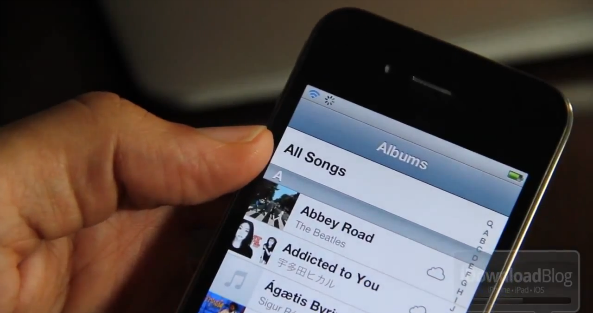
Apple’s Music app is pretty fair when it comes to finding and playing back your favorite tunes, but occasionally I’ll accidentally press the integrated Store button as I try to back out of the Albums view. In getting a Store button where I expect a back button (of course I’m probably doing it wrong), why not just remove it altogether?

If you’re jailbroken, Cydia has a self explanatory tweak that’ll do just that. Download NoStoreButton, respring, and relaunch the Music app to find the Store button hidden for good. The tweak is free to download, and iDownloadBlog walks you through the process with a video tutorial on their website.

[via iDownloadBlog]

Access Extra Content and Perks

Founded in 2015, Club MacStories has delivered exclusive content every week for nearly a decade.

What started with weekly and monthly email newsletters has blossomed into a family of memberships designed for every MacStories fan.

Learn more here and from our Club FAQs.

Club MacStories: Weekly and monthly newsletters via email and the web that are brimming with apps, tips, automation workflows, longform writing, early access to the MacStories Unwind podcast, periodic giveaways, and more;

Club MacStories+: Everything that Club MacStories offers, plus an active Discord community, advanced search and custom RSS features for exploring the Club’s entire back catalog, bonus columns, and dozens of app discounts;

Club Premier: All of the above and AppStories+, an extended version of our flagship podcast that’s delivered early, ad-free, and in high-bitrate audio.

Learn more here and from our Club FAQs.


#MacStoriesDeals - Tuesday

Here are today’s @MacStoriesDeals on iOS, Mac, and Mac App Store apps that are on sale for a limited time, so get them before they end!

Read more

Access Extra Content and Perks

Founded in 2015, Club MacStories has delivered exclusive content every week for nearly a decade.

What started with weekly and monthly email newsletters has blossomed into a family of memberships designed for every MacStories fan.

Learn more here and from our Club FAQs.

Club MacStories: Weekly and monthly newsletters via email and the web that are brimming with apps, tips, automation workflows, longform writing, early access to the MacStories Unwind podcast, periodic giveaways, and more;

Club MacStories+: Everything that Club MacStories offers, plus an active Discord community, advanced search and custom RSS features for exploring the Club’s entire back catalog, bonus columns, and dozens of app discounts;

Club Premier: All of the above and AppStories+, an extended version of our flagship podcast that’s delivered early, ad-free, and in high-bitrate audio.

Learn more here and from our Club FAQs.


You can Totally Snap iPhone Photos with your Headphones

I still take photographs the old fashioned way, but photographers with a tripod and mount will love this tip. From the Why Didn’t I Try This department, OS X Hints shares that you can use the volume up button on the included Apple headphones to snap a picture. Photographers who don’t want to be hands on with their iPhones when taking photographs will appreciate having free remote bundled in with their iPhones — those headphones don’t need to be in your ear after all.

Perhaps the best part is that this can be paired with Bluetooth devices! I’m not sure if every headset with volume controls will work (as the buttons need to map correctly to the iPhone), but if a Bluetooth headset can increase the iPhone’s volume it should work.

You can turn your bluetooth headset into an instant wireless remote.

A steady photograph is ultimately a cleaner photograph. You can reduce a lot of camera noise, improve the quality of the picture, and take better night photographs by simply steadying your iPhone. If you have the kit available to prop your iPhone for photographs, then getting even more hands off will really help make the different between a good photograph and a great one. The iPhone 4S camera is among the best in class for smartphones, and what better way to utilize as a semi-professional device than to use what we already have available as a remote shutter release? It’s an excellent tip, and if you hadn’t already tried this, consider it a worthy addition to your knowledge noggin.

Quick note: Camera+ recently got its volume-snap back, and it works here too. Don’t forget about the GLIF (shown above) for easy iPhone mounting to your favorite tripod.

[OS X Tips via Macgasm]

Note: We published this tip in our initial iOS 5 tips roundup, but none-the-less it’s a great reminder for new iPhone 4 and iPhone 4S owners.

Access Extra Content and Perks

Founded in 2015, Club MacStories has delivered exclusive content every week for nearly a decade.

What started with weekly and monthly email newsletters has blossomed into a family of memberships designed for every MacStories fan.

Learn more here and from our Club FAQs.

Club MacStories: Weekly and monthly newsletters via email and the web that are brimming with apps, tips, automation workflows, longform writing, early access to the MacStories Unwind podcast, periodic giveaways, and more;

Club MacStories+: Everything that Club MacStories offers, plus an active Discord community, advanced search and custom RSS features for exploring the Club’s entire back catalog, bonus columns, and dozens of app discounts;

Club Premier: All of the above and AppStories+, an extended version of our flagship podcast that’s delivered early, ad-free, and in high-bitrate audio.

Learn more here and from our Club FAQs.


References To Unreleased iPhone, iPad And Apple TV Found In iOS 5.1 Beta

Late yesterday Apple released the first beta of iOS 5.1 to developers and over the past few hours a number of people have been digging around to see whats new. A few readers and contributors to 9to5 Mac have found that the new beta includes references to a new Apple TV, a new iPhone and a new iPad.

The unreleased Apple TV that is referenced in iOS 5.1 features an identifier of “3,1” and a codename of “J33”. As for the iPhone, a new identifier of “5,1” has been found - that if it comes to fruition, would suggest a new iPhone with major internal changes. Finally, two new identifiers have been found for new iPad models. First there is a “2,4” model, one that 9to5 Mac suggests could be for a WiMAX Sprint iPad or potentially a TD-LTE model for China. The other new identifier is “3,3”, which follows on from previous discoveries of the iPad “3,1” and “3,2” identifiers that have been found earlier this year.

Whilst these references are added purposively, it is important to remember that not all the references will correspond to a device that Apple actually launches in the future. Furthermore, little if any information is revealed about the potential devices by these identifiers - except for the fact they exist to some degree within Apple.

[Via 9to5 Mac (1) (2) (3)]

Access Extra Content and Perks

Founded in 2015, Club MacStories has delivered exclusive content every week for nearly a decade.

What started with weekly and monthly email newsletters has blossomed into a family of memberships designed for every MacStories fan.

Learn more here and from our Club FAQs.

Club MacStories: Weekly and monthly newsletters via email and the web that are brimming with apps, tips, automation workflows, longform writing, early access to the MacStories Unwind podcast, periodic giveaways, and more;

Club MacStories+: Everything that Club MacStories offers, plus an active Discord community, advanced search and custom RSS features for exploring the Club’s entire back catalog, bonus columns, and dozens of app discounts;

Club Premier: All of the above and AppStories+, an extended version of our flagship podcast that’s delivered early, ad-free, and in high-bitrate audio.

Learn more here and from our Club FAQs.


#MacStoriesDeals - Cyber Monday

It’s Cyber Monday! Many of the Black Friday deals are still active, so we’ve kept them in today’s post. Here are today’s @MacStoriesDeals on iOS, Mac, and Mac App Store apps that are on sale for a limited time, so get them before they end!

Read more

Access Extra Content and Perks

Founded in 2015, Club MacStories has delivered exclusive content every week for nearly a decade.

What started with weekly and monthly email newsletters has blossomed into a family of memberships designed for every MacStories fan.

Learn more here and from our Club FAQs.

Club MacStories: Weekly and monthly newsletters via email and the web that are brimming with apps, tips, automation workflows, longform writing, early access to the MacStories Unwind podcast, periodic giveaways, and more;

Club MacStories+: Everything that Club MacStories offers, plus an active Discord community, advanced search and custom RSS features for exploring the Club’s entire back catalog, bonus columns, and dozens of app discounts;

Club Premier: All of the above and AppStories+, an extended version of our flagship podcast that’s delivered early, ad-free, and in high-bitrate audio.

Learn more here and from our Club FAQs.


MacStories Interviews: Ryan Rigney

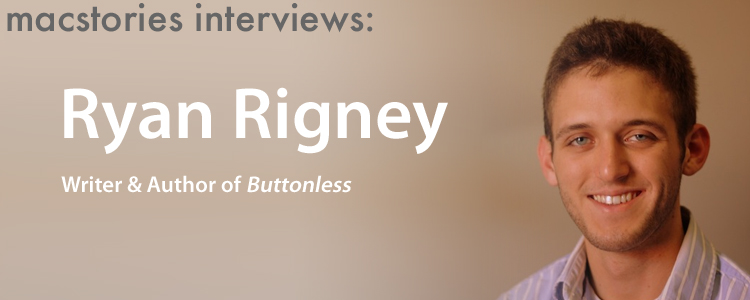
MacStories Interviews was a series of interviews with well-known developers, bloggers, journalists and geeks that we published late last year. We’ve revived the format to interview Ryan Rigney, author of  Buttonless, a new book about iOS games that is launching on December 13th. We’ll have a full review of the book when it is released, but in the meantime we thought it would be interesting to hear more from the author himself.

MacStories: Hey Ryan! Could you introduce yourself to the readers who haven’t heard about you or haven’t read any of your work before?

Sure! I’m a freelance writer who has written for a number of gaming outlets, most notably GamePro, PC Gamer, and Gamasutra. I’ve mostly written about iOS gaming, but I’m also a big console gamer so I’ve done a good bit of writing about those types of games as well. Just this week GamePro published my review of Minecraft!

MacStories: So tell us a bit more about your new book, Buttonless. What made you decide you wanted to write this book?

Over the past few years I’ve been so focused on iOS and written so much about iOS games that it’s become something of an obsession. I’ve reviewed hundreds of iPhone and iPad games, interviewed scores of developers, and purchased far too many apps. I pretty much came to the realization that I possessed enough experience and knowledge to write a book, and then began brainstorming ideas. It took a while for me to figure out that I wanted to put so much of the focus on “the stories behind the games,” though.

MacStories: Did you find it difficult finding a publisher willing to help you write this book given it is such a new industry that may appear very “niche”?

Actually, A K Peters/CRC Press was the first publisher I approached. In my pitch, I shared with them a bunch of numbers that I had stumbled across––how many hundreds of millions of iOS devices are out there, and how many people are buying these games. The truth is, it’s really not a niche. iOS gaming is now the most popular form of portable gaming, and it’s only getting bigger. Maybe if I had tried to write a book about 3DS games, the publisher would have needed more convincing haha!

Read more

Access Extra Content and Perks

Founded in 2015, Club MacStories has delivered exclusive content every week for nearly a decade.

What started with weekly and monthly email newsletters has blossomed into a family of memberships designed for every MacStories fan.

Learn more here and from our Club FAQs.

Club MacStories: Weekly and monthly newsletters via email and the web that are brimming with apps, tips, automation workflows, longform writing, early access to the MacStories Unwind podcast, periodic giveaways, and more;

Club MacStories+: Everything that Club MacStories offers, plus an active Discord community, advanced search and custom RSS features for exploring the Club’s entire back catalog, bonus columns, and dozens of app discounts;

Club Premier: All of the above and AppStories+, an extended version of our flagship podcast that’s delivered early, ad-free, and in high-bitrate audio.

Learn more here and from our Club FAQs.