

iOS 6 was released yesterday, here’s a link to all of our coverage. Here are today’s @MacStoriesDeals on hardware, iOS, and Mac apps that are on sale for a limited time, so get them before they end!
Read more
Posts in iPhone
#MacStoriesDeals - Thursday

Access Extra Content and Perks
Founded in 2015, Club MacStories has delivered exclusive content every week for nearly a decade.
What started with weekly and monthly email newsletters has blossomed into a family of memberships designed for every MacStories fan.
Club MacStories: Weekly and monthly newsletters via email and the web that are brimming with apps, tips, automation workflows, longform writing, early access to the MacStories Unwind podcast, periodic giveaways, and more;
Club MacStories+: Everything that Club MacStories offers, plus an active Discord community, advanced search and custom RSS features for exploring the Club’s entire back catalog, bonus columns, and dozens of app discounts;
Club Premier: All of the above and AppStories+, an extended version of our flagship podcast that’s delivered early, ad-free, and in high-bitrate audio.
Windows Users Get the Bare Minimum for iCloud→
Windows Users Get the Bare Minimum for iCloud
Andrew Cunningham for Ars Technica:
iCloud for Windows remains an effort aimed mostly at iOS users who also have Windows PCs. Between the new Control Panel and iCloud.com, it’s possible for these people to keep their mail, calendars, contacts, reminders, notes, and iWork documents accessible, but it works less well alongside Macs, especially since neither the Windows control panel nor the Web portal allow you to access documents and data created in applications that aren’t Pages, Numbers, or Keynote.
Despite having a Windows box, iCloud has never been something I wanted to use on it. Just as Apple maintains iTunes for Windows, they maintain some semblance of support for iPad, iPhone, and iPod touch customers by giving Windows users a basic iCloud implementation that, at least in style, mirrors the iCloud pane in System Preferences.
Obviously you can’t open a document with a .pages extension in Windows, but there weird restrictions with e-mail, calendars, and tasks for example, which requires Outlook 2007 or 2010. Syncing bookmarks still requires Internet Explorer. With iCloud data being buried in iCloud > Storage & Backup > Manage Store in the iOS Settings app, there’s really no need for home (i.e. not enterprise) Windows users to even consider installing iCloud onto their Windows machines unless Calendar and e-mail syncing is a must. Even your iOS device can be backed up to iCloud, obviating the need for iTunes unless you have slow upstream bandwidth with your home Internet connection.
Although… As everything on iOS is mirrored into Photo Stream as of iOS 5, Windows users can take advantage of one fringe benefit — Photo Stream photos can be dumped into any folder of your choice, making Dropbox a suitable location if you’d like to have your photos on all of your devices. (Mac users wanting to move photos from iPhoto to Dropbox may want to check out Federico’s guide.)
#MacStoriesDeals - Friday

Here are today’s @MacStoriesDeals on hardware, iOS, and Mac apps that are on sale for a limited time, so get them before they end!
Read more
Access Extra Content and Perks
Founded in 2015, Club MacStories has delivered exclusive content every week for nearly a decade.
What started with weekly and monthly email newsletters has blossomed into a family of memberships designed for every MacStories fan.
Club MacStories: Weekly and monthly newsletters via email and the web that are brimming with apps, tips, automation workflows, longform writing, early access to the MacStories Unwind podcast, periodic giveaways, and more;
Club MacStories+: Everything that Club MacStories offers, plus an active Discord community, advanced search and custom RSS features for exploring the Club’s entire back catalog, bonus columns, and dozens of app discounts;
Club Premier: All of the above and AppStories+, an extended version of our flagship podcast that’s delivered early, ad-free, and in high-bitrate audio.
iPhone 5 Now Available for Pre-order

The iPhone 5 is now available for pre-order at Apple.com. Fortunately, it does not require missiles or the Morph Ball to obtain.
Ordering the iPhone 5 tonight? Your best bet is Apple’s Online Store. Even better is the Apple Store app, which might fetch you a new iPhone faster than the guy who’s waiting for the web server to respond to his order request. Last year lots of people had good luck with the carrier’s online stores for the 4S, Sprint (after a short delay) and Verizon especially. We’ve listed the United State’s carrier’s stores below so you can hopefully order without hassle.
The iPhone 5 is an awesome power-up for anyone on the iPhone 3GS or the iPhone 4. The iPhone 5 is super thin and lightweight, has a larger 4-inch display, and has twice as much horsepower as the iPhone 4S thanks to its A6 processor. Available in white and black in 16 GB, 32 GB, and 64 GB models ($199, $299, $399 respectively) on AT&T, Sprint, and Verizon, the iPhone 5 is equipped to utilize the incredible speed of LTE wireless networks without sacrificing battery life. With an improved 8 MP camera that takes pictures 40% faster than the iPhone 4S, includes wideband audio for clearer calls (carrier support coming soon), an even more vibrant Retina display, and packaged with Apple’s completely redesigned EarPods, the iPhone 5 isn’t just a incremental upgrade. It’s redesigned from the ground up.
* * *
Don’t know if you want to upgrade? The iPhone 5 is bound to be a fantastic phone, but having the latest and greatest isn’t necessary, especially if you have the iPhone 4S (and you guys bought that knowing you would be locked in for the two-year long haul… riiiight?). The iPhone 5 has no differentiating features in iOS 6 over the 4S — you’ll have Panorama and all of Siri’s latest features. Having LTE would be nice, as would be having apps launch faster and games look prettier, but I’m betting you’ll see the upgrades you care about — more battery-life and a significantly improved camera — with the iPhone 5S or whatever the heck Apple names it. (After all, they did break the space-name-time-continuum by naming their 6th phone the iPhone 5.) Plus, you’ll feel good when you leap-frog the iPhone 5 owners next year. Boom. Circle of life.
If you have an iPhone 3GS or iPhone 4 (most of you) that’s due for an upgrade, of course you should upgrade — the iPhone 4S was a significant update a year ago, so you guys are really gonna feel how much faster iOS is with an even newer iPhone. No questions asked, do it. I can’t help you with picking a color though.
If you happen to be someone who got a free 3GS or a $100 iPhone 4 recently (and will be locked-in to a contract for a while), you can at least have some solace: you’ll still be getting iOS 6, but not necessarily all of the features (no Siri). Depending when your contract ends or full upgrade eligibility begins, I recommend waiting for Apple’s next flagship iPhone and ordering it then. That way, you’ll get on Apple’s cycle, won’t have to worry as much about being out of date, and won’t be behind the curve on software if Apple pulls another feature-X-won’t-work-on-older-phones bit as Apple did with Siri between the iPhone 4 and 4S.
Access Extra Content and Perks
Founded in 2015, Club MacStories has delivered exclusive content every week for nearly a decade.
What started with weekly and monthly email newsletters has blossomed into a family of memberships designed for every MacStories fan.
Club MacStories: Weekly and monthly newsletters via email and the web that are brimming with apps, tips, automation workflows, longform writing, early access to the MacStories Unwind podcast, periodic giveaways, and more;
Club MacStories+: Everything that Club MacStories offers, plus an active Discord community, advanced search and custom RSS features for exploring the Club’s entire back catalog, bonus columns, and dozens of app discounts;
Club Premier: All of the above and AppStories+, an extended version of our flagship podcast that’s delivered early, ad-free, and in high-bitrate audio.
Yerba Buena Poster Created By Stretching App Icons, Download A Recreated Version As A Wallpaper
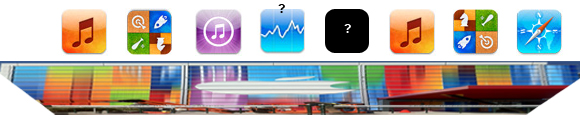
On Friday, workers put up the traditional event banners on the Yerba Buena building in which Apple is holding its special media event next Wednesday. You can have a look at the banners here, but as an eagle-eyed reader of MacRumors realised, it seems as if Apple made the poster by stretching various app icons vertically. Another one of MacRumor’s readers, roosternugget, put together a little graphic to indicate which apps were most likely used (see below). It’s pretty clever by Apple’s designers to stretch iPhone app icons vertically and use it as the event poster, given we expect the iPhone 5 itself to feature a vertically larger (or “stretched) display. If you recall, Apple also had fun with the media event invitation which subtly features a shadow with the number “5” coming down from the number 12.
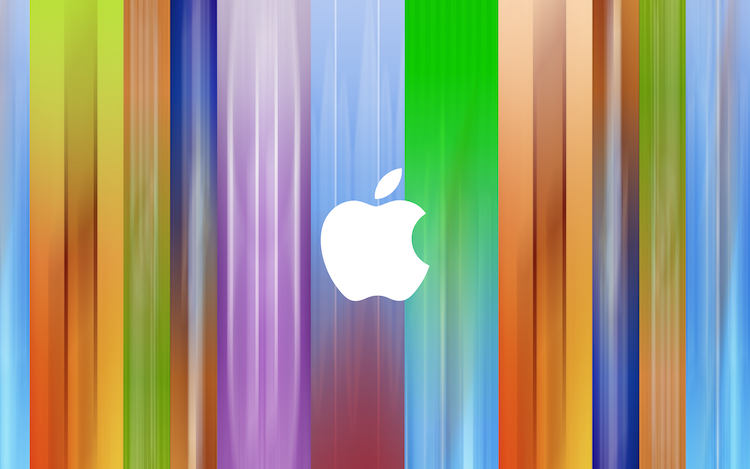
With this knowledge, I decided to open Photoshop and do my best to recreate the event poster. Now it certainly isn’t a perfect recreation but I’ve done my best and it comes close to the banner featured in a photo below. I’ve created multiple versions with and without the Apple logo and for various screen resolutions so that you can use it as a wallpaper, including the following:
- [16:10] 2880 x 1800 - aka. Retina MacBook Pro
- [16:9] 2880 x 1620
- [5:4] 1280 x 1024
- iPhone 4/4S
- iPhone 5
- iPad (Retina)
Download the wallpapers (.zip archive)
Direct links for iOS devices:

Access Extra Content and Perks
Founded in 2015, Club MacStories has delivered exclusive content every week for nearly a decade.
What started with weekly and monthly email newsletters has blossomed into a family of memberships designed for every MacStories fan.
Club MacStories: Weekly and monthly newsletters via email and the web that are brimming with apps, tips, automation workflows, longform writing, early access to the MacStories Unwind podcast, periodic giveaways, and more;
Club MacStories+: Everything that Club MacStories offers, plus an active Discord community, advanced search and custom RSS features for exploring the Club’s entire back catalog, bonus columns, and dozens of app discounts;
Club Premier: All of the above and AppStories+, an extended version of our flagship podcast that’s delivered early, ad-free, and in high-bitrate audio.
#MacStoriesDeals - Friday

Here are today’s @MacStoriesDeals on hardware, iOS, and Mac apps that are on sale for a limited time, so get them before they end!
Read more
Access Extra Content and Perks
Founded in 2015, Club MacStories has delivered exclusive content every week for nearly a decade.
What started with weekly and monthly email newsletters has blossomed into a family of memberships designed for every MacStories fan.
Club MacStories: Weekly and monthly newsletters via email and the web that are brimming with apps, tips, automation workflows, longform writing, early access to the MacStories Unwind podcast, periodic giveaways, and more;
Club MacStories+: Everything that Club MacStories offers, plus an active Discord community, advanced search and custom RSS features for exploring the Club’s entire back catalog, bonus columns, and dozens of app discounts;
Club Premier: All of the above and AppStories+, an extended version of our flagship podcast that’s delivered early, ad-free, and in high-bitrate audio.
#MacStoriesDeals - Thursday

If you missed our Mountain Lion coverage, be sure to check it out. Here are today’s @MacStoriesDeals on hardware, iOS, and Mac apps that are on sale for a limited time, so get them before they end!
Read more
Access Extra Content and Perks
Founded in 2015, Club MacStories has delivered exclusive content every week for nearly a decade.
What started with weekly and monthly email newsletters has blossomed into a family of memberships designed for every MacStories fan.
Club MacStories: Weekly and monthly newsletters via email and the web that are brimming with apps, tips, automation workflows, longform writing, early access to the MacStories Unwind podcast, periodic giveaways, and more;
Club MacStories+: Everything that Club MacStories offers, plus an active Discord community, advanced search and custom RSS features for exploring the Club’s entire back catalog, bonus columns, and dozens of app discounts;
Club Premier: All of the above and AppStories+, an extended version of our flagship podcast that’s delivered early, ad-free, and in high-bitrate audio.
#MacStoriesDeals - Tuesday

If you missed our Mountain Lion coverage, be sure to check it out. Here are today’s @MacStoriesDeals on hardware, iOS, and Mac apps that are on sale for a limited time, so get them before they end!
Read more
Access Extra Content and Perks
Founded in 2015, Club MacStories has delivered exclusive content every week for nearly a decade.
What started with weekly and monthly email newsletters has blossomed into a family of memberships designed for every MacStories fan.
Club MacStories: Weekly and monthly newsletters via email and the web that are brimming with apps, tips, automation workflows, longform writing, early access to the MacStories Unwind podcast, periodic giveaways, and more;
Club MacStories+: Everything that Club MacStories offers, plus an active Discord community, advanced search and custom RSS features for exploring the Club’s entire back catalog, bonus columns, and dozens of app discounts;
Club Premier: All of the above and AppStories+, an extended version of our flagship podcast that’s delivered early, ad-free, and in high-bitrate audio.
#MacStoriesDeals - Wednesday

If you missed our Mountain Lion coverage, be sure to check it out. Here are today’s @MacStoriesDeals on hardware, iOS, and Mac apps that are on sale for a limited time, so get them before they end!
Read more
Access Extra Content and Perks
Founded in 2015, Club MacStories has delivered exclusive content every week for nearly a decade.
What started with weekly and monthly email newsletters has blossomed into a family of memberships designed for every MacStories fan.
Club MacStories: Weekly and monthly newsletters via email and the web that are brimming with apps, tips, automation workflows, longform writing, early access to the MacStories Unwind podcast, periodic giveaways, and more;
Club MacStories+: Everything that Club MacStories offers, plus an active Discord community, advanced search and custom RSS features for exploring the Club’s entire back catalog, bonus columns, and dozens of app discounts;
Club Premier: All of the above and AppStories+, an extended version of our flagship podcast that’s delivered early, ad-free, and in high-bitrate audio.