This Week's Sponsor:

Dropzone 5

Improve your Drag-and-Drop Workflow


Posts in iPhone

So That’s an iPhone Inside A Keyboard

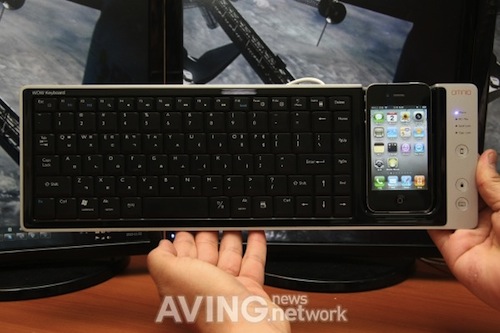
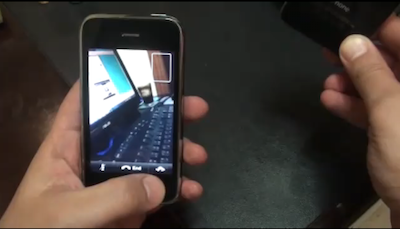
Ever wanted to be able to have your iPhone sitting next to your keyboard? I mean, not really just next to your keyboard – docked into your keyboard. No? Come on. Think about the possibilities: you could easily jump from keyboard keys to the iPhone’s multitouch gestures, flick through your lolcat photo collection while doing some serious emacs text editing or constantly pinch and zoom on that small screen when you’re feeling bored. Still thinking you don’t want one?

Well in all seriousness, I’m not sure what this Omnio WOWKeys keyboard for iPhone (3GS and 4) is supposed to do either. Engadget reports:

What you’re looking at is a Made for iPhone keyboard called WOWKeys from Omnio. The $100 USB keyboard / iPhone (3GS or 4) dock is Mac or PC compatible (note the cohabitation of the Windows flag and Command key in the prototype images after the break) featuring 15 hotkeys designed for iPhone use.

And they said iOS devices didn’t come with physical keyboards.
Korean Carrier Allegedly Confirms CDMA iPhone Rumors

According to The Korea Herald, Choi Joo-sick, senior vice president of Korean carrier LG Uplus, confirmed in a conference call last that they’re “in talks with Apple” for  CDMA iPhone.

LG Uplus Corp., the smallest mobile- phone operator in Korea, said it is in talks with Apple Inc. to offer the CDMA iPhone in the domestic market. LG Uplus is negotiating about a change to the electronic circuits to make CDMA iPhones for the company, senior vice president Choi Joo-sick said on a conference call, available on the company’s website.

The company said Friday that its third-quarter earnings tumbled 94.9 percent from a year ago on increased marketing expenses.

Much has been said about the alleged CDMA iPhone / Verizon iPhone set to ship in early 2011 on multiple carriers worldwide. Korean rumors follow the speculations that Apple might be willing to implement CDMA technology as a way to reach more users and gain more market share in Asian countries.

BGR reported last month that the rumored Verizon iPhone has hit “testing stage” and it’s basically ready for massive production.


You Can Now Use FaceTime On The iPhone 3GS

As previewed earlier today, FaceIt 3GS is a new Cydia tweak developed by iPhoneIslam which allows you to have FaceTime calls on older iPhone 3GS models, even if they don’t officially support FaceTime nor do they come with a front-facing camera.

The tweak simply enables FaceTime in the Settings app and lets you use the standard 3GS camera to capture what’s around you in a video call. To install the tweak, open Cydia (your device must be jailbroken) and install the following source:

http://apps.iphoneislam.com

Hit “Add” and wait for Cydia to refresh. Then search for FaceIt 3GS and install it. Reboot your iPhone, and you’ll find the FaceTime functionality inside the Settings app, just like on the iPhone 4 or the latest iPod Touch. Insert your number, wait for activation and your device will be ready to go.

iPhoneIslam demoes the tweak in action in the video below. iPhone 3GS owners and jailbreakers, you know what to do.


Parallax Brings Panoramic Wallpapers To The iPhone | Cydia Store

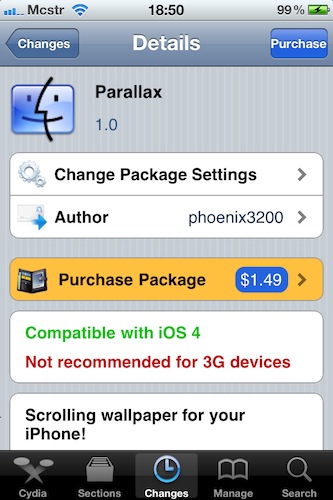
A new tweak available in the Cydia Store, Parallax, allows you to set a panoramic wallpaper as background on your iPhone Springboard and enjoy all the details of the wallpaper scrolling behind your icons.

All you have to do is upload on your iPhone some widescreen wallpapers (the ones that iOS would usually “cut” to fit the smaller screen of the iPhone) and select the auto scroll speed (or manual adjustment) in the tweak’s preferences inside the Settings app.

As you can see in the video below, the tweak seems pretty stable and fast. Installation on older 3G devices, however, isn’t recommended. Parallax is available at $1.49 under BigBoss repository. Read more


iOS 4.2 on iPhone 3G: Much Better [Video]

The guys over at TiPB thought it was about time to take a second look at the 2008 iPhone 3G and see how it would perform on the upcoming new version of iOS, the iOS 4.2 Apple is rumored to be releasing sometime this week. They installed the GM build on the iPhone 3G, and as you can see in the video Apple’s engineers really did everything they could to optimize the OS for the slower device (it’s got a Samsung ARM 412 MHz processor and 128MB of RAM).

Scrolling seems smooth and fast, typing is ok, there are a couple of slowdowns when trying to pinch and zoom on webpages but no big deal. When iOS 4.0 came out in June iPhone 3G users were left out in the cold with a terribly slow OS that didn’t run exactly “well” on their devices. I saw one and trust me, it was slow as hell

iOS 4.1 made things slightly better, but it looks like 4.2 it’s going to be the ultimate optimized operating system for 3G. And it wouldn’t be surprised if it was the last one, too.


Hacker Enables FaceTime on iPhone 3GS [Video]

iPhone development group iPhoneislam (the same guys behind FaceTime Hacktivator) managed to get FaceTime up and running on an iPhone 3GS – without video transmission. As you can see in the video below, the developer installs a tweak called FaceIt-3GS on the device, which can receive calls. They haven’t figured out a way to use the 3GS camera yet, but I guess the hack will be complete and available in Cydia soon.

Without a front-facing camera, FaceTime doesn’t make much sense. Still, it’ll be useful for those die-hard 3GS users that want FaceTime, with a trade-off.

[Thanks, khlaed] Read more


MacStories Weekly Game: Time Geeks

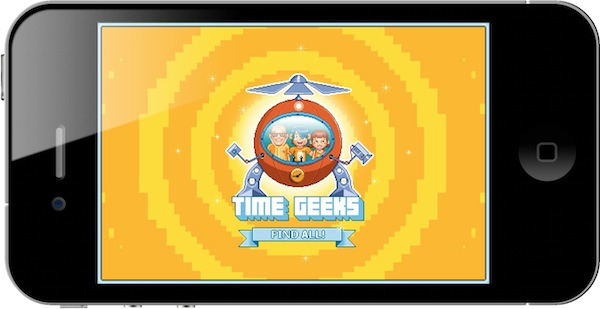
Time Geeks is a classic seek and find game like the ones we used to play in the 80s and early 90s. Those games where you’re given something to find, and the level isn’t completed until you find it. Simple rules. Simple gameplay. So how do you reinvent the genre today, with an App Store overloaded with 3D FPS and zombies games? By making it fun, geek, great-looking and cheap.

At $0.99 in the App Store, I’m not afraid to say Time Geeks is my new favorite game on the iPhone. Read more


Google Rolling Out Instant Search for iPhone

Update: official blog post from Google.

In September we announced that we were working to bring Google Instant to mobile, and today we’re making a beta version available to most iPhone and Android devices in the U.S. To try it out, go to google.com in your phone’s browser and tap the Google Instant “Turn on” link beneath the search box (if you don’t see the “Turn on” link, try waiting a moment and then refresh the page).

Like the desktop version of Google Instant, when you type on your mobile device you’ll see predictions of what you might be searching for. If you type [anse], for example, you should see [ansel adams] along with other predictions.

We hope you’ll enjoy using Google Instant for mobile as much as we enjoyed making it. It’s currently available for Android 2.2 (“Froyo”) devices and iPhones and iPods running iOS 4 in the U.S. in English.

According to a screenshot posted by 9to5mac, Google has started rolling out the Instant search to iOS devices. In the screenshot, you can see it’s labelled as “beta” and you have the option to turn it off. Read more


IMDb Releases Improved iPhone and iPad App

Movie, TV and celebrity database IMDb released earlier today a brand new version of its official iOS app for iPhone and iPad.

Version 2.0 of IMDb for iOS brings a lot of bug fixes and overall performance improvements, a redesigned dashboard with the latest news from a variety of media sources, support for movie showtimes in 13 more countries including Canada and UK, possibility to rate movies and TV shows using your IMDb account.

As TechCrunch reports, IMDb released an iPad app shortly after the iPad came out and it was very successful. The 2.0 update (universal for iPhone and iPad) anticipates the major redesign the website is undergoing at the moment.

IMDb for iPhone and iPad is available for free here. Check out the full 2.0 changelog below. Read more