This Week's Sponsor:

Dropzone 5

Improve your Drag-and-Drop Workflow


Posts in iPhone

Flight Control for iPhone Update: Online Multiplayer, Voice Chat

Flight Control, popular iPhone game from award-winning development studio Firemint, was updated a few hours ago to version 1.9.2. As promised by Firemint developers before the public release of iOS 4.2 in November, this update follows “HD” iPad version and introduces support for online multiplayer through Game Center, with the possibility to start a voice chat with your opponent.

You can invite a friend to play, or let the app search for a random match in Game Center. The voice chat option is turned off by default but can be activated at any time. I just tried the online multiplayer mode with one of my Game Center contacts and it works pretty well, although I noticed some lags.

Flight Control is available at $0.99 in the App Store. Check out the full changelog below. Read more
Google Latitude App Starts Rolling Out In International App Stores [Update: Pulled?]

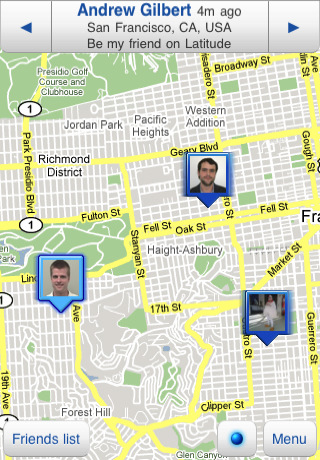
As noted by TechCrunch a few minutes ago, Google released its official Latitude app for the iPhone in the Japanese App Store. The app is available there but, actually, we can see it already online in a few other international stores such as the Italian, French and German ones. My guess is, Google isn’t limiting this to Europe and / or Japan but iTunes is simply slow to register the changes. The app is propagating.

Google Latitude for iPhone lets you check on your friends’ location. You can see your friends on a map and see who’s nearby so you can meet up, share your own location from the mobile app, tweak the privacy settings to share only your city. You can also disable the automatic background updating. Google’s Latitude service has been available for Android devices for a while now, but couldn’t make it to iOS due to Apple’s limitations…or something. Basically, Google announced they wouldn’t bring Latitude to the iPhone when Google Voice was a no-no either, but things are different now. There is an official Google Voice app in the App Store. Until today, Latitude has been a web-only service.

iOS 4 is required for background updating. Go check out the app while we’re updating this post with more screenshots and details. Full app description below. Read more


A Cydia Tweak That Somehow Fixed My iPhone’s Proximity Sensor Issues

Either a persistent iOS bug that hasn’t been fixed on iOS 4.2.1 or a real issue on my device, the proximity sensor isn’t working well on my iPhone 4. I accidentally drop and / or mute calls every once in a while, but not because or low signal or a bad interface scheme I don’t understand: when I bring the iPhone to my ear during a call, the proximity sensor doesn’t dim the screen and prevent skin contact on phone’s buttons as it should. It doesn’t happen all the time but when it does – it’s pretty annoying.

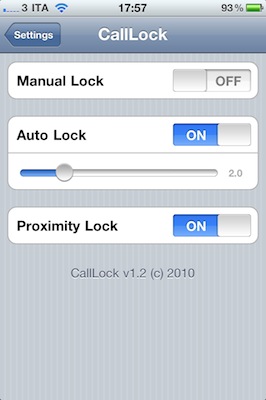
A new tweak available in the Cydia Store at $0.99, CallLock, changes the behavior of the power button during an outgoing / incoming call to make sure that the phone is actually locked, so that the faulty proximity sensor won’t get in the way and no accidental taps will be registered. CallLock locks the iPhone during a call, simple as that.

CallLock comes with two activation methods: manual and auto-lock. The auto mode will lock the iPhone’s screen as soon as a call is connect, manual will override iOS’ default settings to make the power button lock a call, and not end it.

I found CallLock to be a good compromise when it comes to avoiding calls to be dropped and muted, even though you’ll have to unlock your iPhone after each call. If you can accept the trade-off, CallLock is available at $0.99 in the Big Boss’ repository.


Find My iPhone App Helps Police Track Down Thief In Singapore

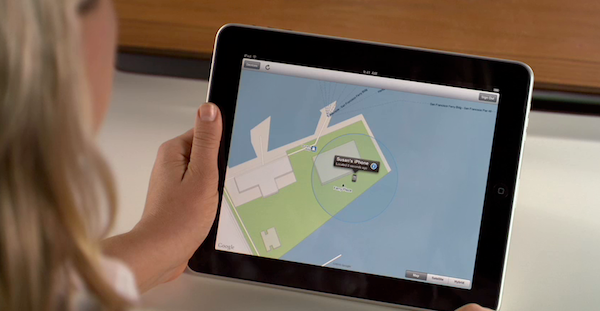
We have heard stories like this one before, and it looks like Apple’s Find My iPhone service keeps on helping police and iPhone owners track down thieves. The latest story comes from Singapore, where the Straits Times is reporting a 18-year-old Malaysian man was tracked down by the police thanks to Find My iPhone in less than 48 hours.

Early on Sunday morning, the 36-year-old victim was walking along Lim Liak Street when an unknown man approached her from behind and snatched away her iPhone which she was holding.

After the victim lodged a report, the ‘Find My iPhone’ application was used to help the police track down the suspect.

With the release of iOS 4.2 in November, Apple made Find my iPhone free. The service officially supports only last generation devices, but it’s quite easy to set up on older units.


Swarm Light: iPhone-Controlled LED Chandelier [Video]

This falls under the category of neat installations powered by an iOS device we have covered so many times here on MacStories. The Swam Light is a $180,000 LED chandelier based on an algorithm originally meant to analyze the behavior of bees. The LED that power the chandelier, in fact, are organized in a series of grids and lit up to display “simulated collective movement” – or, the movement of groups of insects.

What’s cool is that the creators of the installation, rAndom International, developed an iPhone controller in-house to handle operations remotely. The iPhone app can dim lights and switch between the various modes implemented in the Swarm Light.

Check out the video below. [via TUAW] Read more


Slow Down: An App That Will Make You Slow Down Your Car, With Music

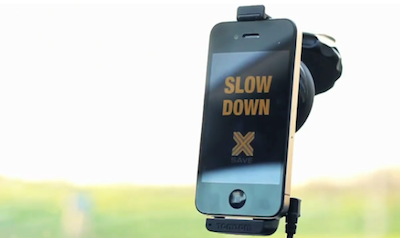
This is an app I’m completely supporting, as it’s been developed and promoted by the Belgian organization OVK, Parents of Children Killed in Road Accidents. Slow Down, available for free in the App Store, will make you slow down your car by slowing down the music you’re listening to while driving.

Thanks to a combination of GPS to retrieve a road’s driving speed limit and access to the iPod library on your iPhone, Slow Down will remind you when you need to slow by slowing down a song or completely stop its playback. Simple and genius at the same time, as as I said – a concept I’m seriously rooting for.

Go download the app here. Then use it.[Engadget via OVK] Read more


Fring Update: Full-Screen Video Calling, “Dynamic Video Quality”

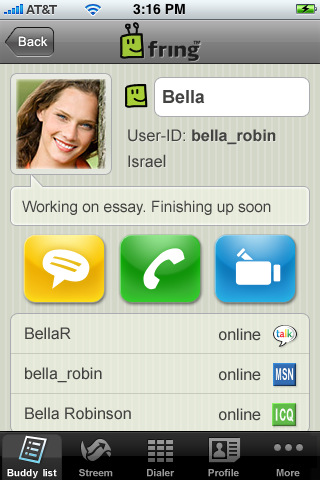
Fring, a popular VoIP service that allows you make regular phone calls, video calls and chat, released an update to their official iPhone client today which brings a number of new features and fixes.

First off, fring is introducing a new video calling technology called DVQ (Dynamic Video Quality) that automatically adjusts the quality of a video calling session according to your bandwidth in order to provide an always-good experience. I’m testing it on 3G and, admittedly, it works pretty well. There’s also a new video quality indicator that enables you to check on the quality of the connection in real-time. Neat. Read more