This Week's Sponsor:

Dropzone 5

Improve your Drag-and-Drop Workflow


Posts in iPhone

Let a SuperHero Back Up Your iPhone While You Sleep

At MacStories, we tend to sync our various Apple gadgets to our Macs quite often because we’re blanketed in apps to review. But you guys might not have to deal with the kind of chaos we deal with between iTunes, 6 shots of espresso, and sync cables, so we’ll offer a middleman.

The Iomega SuperHero cuts out iTunes as a dock you won’t be ashamed to sit your iPhone in. As a bonus, this slick gadget backs up your iPhone so iTunes doesn’t have to! Wake up in the morning knowing that your data is backed up and safe at home - that’s the kind of convenience we aim for right? The SuperHero Backup and Charger is now available for $69.99, and works in combination with Iomega’s SuperHero app for the iPhone.

[Iomega via Gizmodo]

Access Extra Content and Perks

Founded in 2015, Club MacStories has delivered exclusive content every week for nearly a decade.

What started with weekly and monthly email newsletters has blossomed into a family of memberships designed for every MacStories fan.

Learn more here and from our Club FAQs.

Club MacStories: Weekly and monthly newsletters via email and the web that are brimming with apps, tips, automation workflows, longform writing, early access to the MacStories Unwind podcast, periodic giveaways, and more;

Club MacStories+: Everything that Club MacStories offers, plus an active Discord community, advanced search and custom RSS features for exploring the Club’s entire back catalog, bonus columns, and dozens of app discounts;

Club Premier: All of the above and AppStories+, an extended version of our flagship podcast that’s delivered early, ad-free, and in high-bitrate audio.

Learn more here and from our Club FAQs.


iPhone 4 Becomes A Skateboard

On iOS, a device becomes the app it’s currently running. Are you using a calculator app? The iPhone looks like a digital calculator then. A GPS map? A TV remote? Full-screen apps can turn an iOS device into, well, anything. What about hardware accessories, though? Can a rather simple accessory like a case turn an iPhone into something else?

The Skateboard Series for iPhone 4 is a new case available on Etsy made out of laser-cut grip tape and actual wood. It looks like a mini-skateboard, only it’s an iPhone and it doesn’t have wheels. Build quality looks impressive, too.

When combined with a wood grain vinyl edge wrap this design actually gives your iPhone 4 the illusion of being a skateboard, all you need now are the wheels. The only advice we can give you is not to slide this phone against your grandma’s table because this material is very rough.

Whether or not you think the grip tape on the back of the device could make it a little harder to get it out of your pockets, this mod can be yours for only $20. Available now on Etsy. [via Reddit]

Access Extra Content and Perks

Founded in 2015, Club MacStories has delivered exclusive content every week for nearly a decade.

What started with weekly and monthly email newsletters has blossomed into a family of memberships designed for every MacStories fan.

Learn more here and from our Club FAQs.

Club MacStories: Weekly and monthly newsletters via email and the web that are brimming with apps, tips, automation workflows, longform writing, early access to the MacStories Unwind podcast, periodic giveaways, and more;

Club MacStories+: Everything that Club MacStories offers, plus an active Discord community, advanced search and custom RSS features for exploring the Club’s entire back catalog, bonus columns, and dozens of app discounts;

Club Premier: All of the above and AppStories+, an extended version of our flagship podcast that’s delivered early, ad-free, and in high-bitrate audio.

Learn more here and from our Club FAQs.


Eye Scope Adds 8x Optical Zoom To Your iPhone

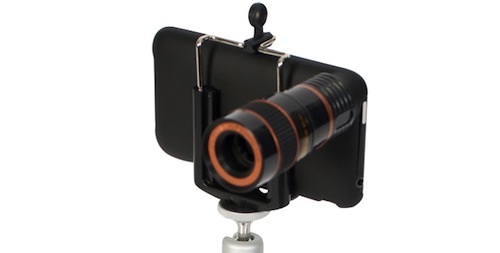
If you’ve ever wished you could spy on your neighbor’s house or simply take better photos of distant objects with your iPhone (yes, we’re going to pretend your never thought of spying on people using an Apple device), you might want to consider the Eye Scope, a $45 (£29) accessory that can add 8x optical zoom to the iPhone’s lens.

Available for iPhone 3G / 3GS / 4 owners,the Eye Scope is basically a case with an attached optical lens that promises to cover 246 meters ahead of you and your iPhone. Not bad, huh? In the package, you’ll also get a tripod mount and a lens cloth to keep everything clean and well focused.

If you want to go ahead and buy it, the Eye Scope for iPhone is available on online retailer Firebox. [via Ubergizmo]

Access Extra Content and Perks

Founded in 2015, Club MacStories has delivered exclusive content every week for nearly a decade.

What started with weekly and monthly email newsletters has blossomed into a family of memberships designed for every MacStories fan.

Learn more here and from our Club FAQs.

Club MacStories: Weekly and monthly newsletters via email and the web that are brimming with apps, tips, automation workflows, longform writing, early access to the MacStories Unwind podcast, periodic giveaways, and more;

Club MacStories+: Everything that Club MacStories offers, plus an active Discord community, advanced search and custom RSS features for exploring the Club’s entire back catalog, bonus columns, and dozens of app discounts;

Club Premier: All of the above and AppStories+, an extended version of our flagship podcast that’s delivered early, ad-free, and in high-bitrate audio.

Learn more here and from our Club FAQs.


Merriam-Webster Dictionary App Adds Dragon Voice Recognition

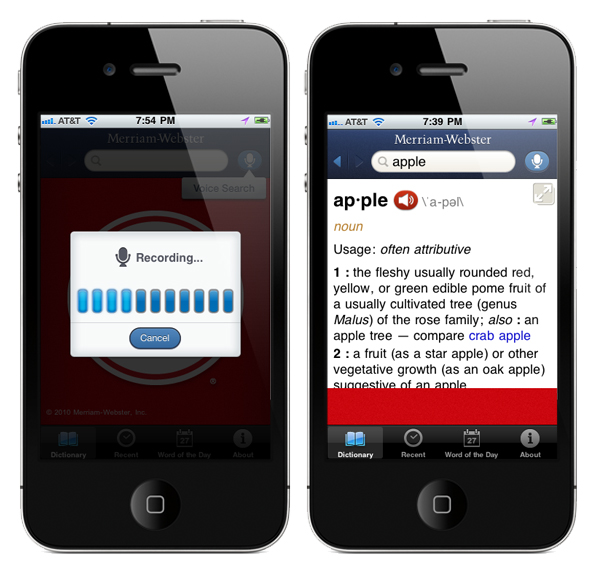
Merriam-Webster launched a free, ad-supported iPhone dictionary app in mid-December. The dictionary app can pronounce words by pressing the speaker icon in the red button but did you know that you can speak a word for it to search for too? A few weeks ago, they updated it with voice search, first for a free iPhone dictionary app. Just press the microphone in the blue button next to the search text box and it activates the new voice search.

The built-in voice search is powered by Nuance Communications’ very popular Dragon voice recognition technology and it’s very accurate but you would expect nothing less from Dragon. Simply look up a word by speaking it directly into your iPhone. You don’t need a connection to the internet, so it’s very iPod Touch friendly. The UI is polished and the ads don’t distract you too badly; Reader Mode is very cool - it shows you a definition in full screen, landscape or portrait, hiding both the header and the footer.

Voice search is an example of the kind of innovation that Merriam-Webster has been bringing to the dictionary business for more than 150 years,” says President and Publisher John M. Morse. “And with the mobile platform being the fastest growing part of our business, we’re pleased to bring our content to wherever our audience happens to be.

Read more

Access Extra Content and Perks

Founded in 2015, Club MacStories has delivered exclusive content every week for nearly a decade.

What started with weekly and monthly email newsletters has blossomed into a family of memberships designed for every MacStories fan.

Learn more here and from our Club FAQs.

Club MacStories: Weekly and monthly newsletters via email and the web that are brimming with apps, tips, automation workflows, longform writing, early access to the MacStories Unwind podcast, periodic giveaways, and more;

Club MacStories+: Everything that Club MacStories offers, plus an active Discord community, advanced search and custom RSS features for exploring the Club’s entire back catalog, bonus columns, and dozens of app discounts;

Club Premier: All of the above and AppStories+, an extended version of our flagship podcast that’s delivered early, ad-free, and in high-bitrate audio.

Learn more here and from our Club FAQs.


iPhone Alarm Still Not Working? Try A Reboot or Reset

The New Year broke the iPhone’s built-in alarm clock app. After much of a backlash on the Internet (and too good reason, people depend on alarms to wake up in the morning and, you know, do stuff like go to work) and a temporary fix that involved setting a repeating alarm on the device, Apple then reassured everyone that the bug would auto-magically fix itself on Januar 3rd. That didn’t happen for many, as seen both on Reuters and Apple’s own Discussion boards. If you’re running an iPhone or iPod touch and you still can’t manage to get the device to work with alarms, the solution might be easier than you think.

Several users on Apple Discussions are suggesting that a simple power cycle (reboot) or “soft reset” can fix the iPhone software to work correctly with alarms after January 3rd. By “soft reset” they mean the procedure that involves pressing both the sleep / wake and home buttons until the Apple logo appears on screen. This will force the iPhone to dump its temporary stored files and should fix the alarm clock app woes. If you rebooted your iPhone before today and it didn’t fix the problems, do it again now.

The clock app on my iPhone 4 (with iOS 4.2.1) is working just fine both with single and repeating alarms, but I think a reboot or two happened in these past days. I have a jailbroken device so reboots and “resprings” are very frequent. If you’re still experiencing the alarm issues, you can give the method above a try and report back.

Access Extra Content and Perks

Founded in 2015, Club MacStories has delivered exclusive content every week for nearly a decade.

What started with weekly and monthly email newsletters has blossomed into a family of memberships designed for every MacStories fan.

Learn more here and from our Club FAQs.

Club MacStories: Weekly and monthly newsletters via email and the web that are brimming with apps, tips, automation workflows, longform writing, early access to the MacStories Unwind podcast, periodic giveaways, and more;

Club MacStories+: Everything that Club MacStories offers, plus an active Discord community, advanced search and custom RSS features for exploring the Club’s entire back catalog, bonus columns, and dozens of app discounts;

Club Premier: All of the above and AppStories+, an extended version of our flagship podcast that’s delivered early, ad-free, and in high-bitrate audio.

Learn more here and from our Club FAQs.


Layar Reality Browser Updated to Version 4.0

Layar was one of the first “augmented reality” apps in Apple’s App Store before all the competitors showed up. It’s had a few UI overhauls and the most recent is nice. Layar shows what is around you by displaying real time digital information on top of the real world as seen through the camera of your mobile phone. Layar augments the real world as seen through your mobile phone, based on your location. The idea is simple: Layar works by using a combination of the mobile phone’s camera, compass and GPS data to identify the user’s location and field of view, retrieve data based on those geographical coordinates, and overlay that data over the camera view.

Refresher video after the break.

What’s New in Version 4.0:

  • Layers now support new interactive features
  • The Camera View interface has been redesigned
  • The Camera View is stabilized using the gyroscope on iPhone 4.

Read more

Access Extra Content and Perks

Founded in 2015, Club MacStories has delivered exclusive content every week for nearly a decade.

What started with weekly and monthly email newsletters has blossomed into a family of memberships designed for every MacStories fan.

Learn more here and from our Club FAQs.

Club MacStories: Weekly and monthly newsletters via email and the web that are brimming with apps, tips, automation workflows, longform writing, early access to the MacStories Unwind podcast, periodic giveaways, and more;

Club MacStories+: Everything that Club MacStories offers, plus an active Discord community, advanced search and custom RSS features for exploring the Club’s entire back catalog, bonus columns, and dozens of app discounts;

Club Premier: All of the above and AppStories+, an extended version of our flagship podcast that’s delivered early, ad-free, and in high-bitrate audio.

Learn more here and from our Club FAQs.


#MacStoriesDeals - Monday

Happy New Years! Back to work, ughh, but here’s some great deals for today on iOS & Mac apps that are on sale for a limited time, so get ‘em while they’re hot! Read more

Access Extra Content and Perks

Founded in 2015, Club MacStories has delivered exclusive content every week for nearly a decade.

What started with weekly and monthly email newsletters has blossomed into a family of memberships designed for every MacStories fan.

Learn more here and from our Club FAQs.

Club MacStories: Weekly and monthly newsletters via email and the web that are brimming with apps, tips, automation workflows, longform writing, early access to the MacStories Unwind podcast, periodic giveaways, and more;

Club MacStories+: Everything that Club MacStories offers, plus an active Discord community, advanced search and custom RSS features for exploring the Club’s entire back catalog, bonus columns, and dozens of app discounts;

Club Premier: All of the above and AppStories+, an extended version of our flagship podcast that’s delivered early, ad-free, and in high-bitrate audio.

Learn more here and from our Club FAQs.


Apple Approves Another BitTorrent App, A Native Transmission Client

Apple has a strict policy on iOS apps that come with any mention of the BitTorrent file transfer protocol. Even if BitTorrent is not illegal by itself, Apple doesn’t want its name to be associated with it. Apps that had found their way past the app review team and into the App Store were quickly removed from sale. It happened with IS Drive in October.

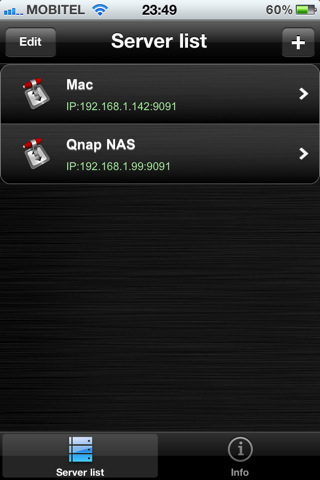
iControlBits by developer Luka Hlastec is a native mobile client for popular BitTorrent app Transmission, available for Mac, Windows and Linux users. Transmission, by default, allows you to check on active downloads using a mobile web interface that’s accessible from iOS devices, but it doesn’t have an official app in the App Store. iControlBits, a native front-end that relies on Transmission’s RPC protocol, offers a faster alternative to the web view and it lets view ongoing transfers, pause and resume downloads and even browse active downloads to a NAS server remotely. You can’t initiate new downloads from the app, but the developer says he’s working on it for a future update. In an interview to TorrentFreak, the developer admits he created the app mainly for himself as he didn’t like the way Transmission for Mac let you see downloads through a slow webapp. iControlBits, however, allows you to change and set speed limits without having to use Transmission on the desktop; all you have to do is enable remote access.

It is unclear whether or not Apple will pull iControlBits from the App Store, but if you’re in need for a remote Transmission client to manage your torrents, go download it now. The app is available at $1.99 in the App Store.

Access Extra Content and Perks

Founded in 2015, Club MacStories has delivered exclusive content every week for nearly a decade.

What started with weekly and monthly email newsletters has blossomed into a family of memberships designed for every MacStories fan.

Learn more here and from our Club FAQs.

Club MacStories: Weekly and monthly newsletters via email and the web that are brimming with apps, tips, automation workflows, longform writing, early access to the MacStories Unwind podcast, periodic giveaways, and more;

Club MacStories+: Everything that Club MacStories offers, plus an active Discord community, advanced search and custom RSS features for exploring the Club’s entire back catalog, bonus columns, and dozens of app discounts;

Club Premier: All of the above and AppStories+, an extended version of our flagship podcast that’s delivered early, ad-free, and in high-bitrate audio.

Learn more here and from our Club FAQs.


With Airplay Speaker Still Missing, iHome Announces Bevvy Of New Products For iPhone, iPad

iHome is a favorite of mine when it comes to finding a good bedroom clock/radio & speaker for my iPod touch. Expanding the line to include Apple’s iPad, you can expect a whole slew of iHome gadgetry to arrive later this year to support your army of iDevices you likely received over the holidays. A couple products really stuck out to Federico and I, so instead of going through iHome’s entire catalogue of product-sauce which you can review at iLounge, we’ll share our favorites past the break.

Read more

Access Extra Content and Perks

Founded in 2015, Club MacStories has delivered exclusive content every week for nearly a decade.

What started with weekly and monthly email newsletters has blossomed into a family of memberships designed for every MacStories fan.

Learn more here and from our Club FAQs.

Club MacStories: Weekly and monthly newsletters via email and the web that are brimming with apps, tips, automation workflows, longform writing, early access to the MacStories Unwind podcast, periodic giveaways, and more;

Club MacStories+: Everything that Club MacStories offers, plus an active Discord community, advanced search and custom RSS features for exploring the Club’s entire back catalog, bonus columns, and dozens of app discounts;

Club Premier: All of the above and AppStories+, an extended version of our flagship podcast that’s delivered early, ad-free, and in high-bitrate audio.

Learn more here and from our Club FAQs.