Federico Viticci

10758 posts on MacStories since April 2009

Federico is the founder and Editor-in-Chief of MacStories, where he writes about Apple with a focus on apps, developers, iPad, and iOS productivity. He founded MacStories in April 2009 and has been writing about Apple since. Federico is also the co-host of AppStories, a weekly podcast exploring the world of apps, Unwind, a fun exploration of media and more, and NPC: Next Portable Console, a show about portable gaming and the handheld revolution.

Pizza Compass

Genius idea, great promo video:

Pizza Compass is a $0.99 app that lets you find pizza joints nearby. Unlike other discovery apps for local businesses, Pizza Compass uses a slice of pizza…as a compass to show the distance from a pizza joint. You can turn the slice of pizza around, and tap on a pizza joint’s name to open an embedded Foursquare page.

I have downloaded the app, and it’s surprisingly full of accurate results for Viterbo; however, local results don’t seem to feature opening and closing times here, so the bottom bar that’s supposed to be color-coded is grayed out for me.

Get Pizza Compass here.

Permalink


Tally and x-callback-url

Greg Pierce:

Tally 1.1 adds x-callback-url support to our quick-counting app for iPhone. Tally supports two actions, “increment” and “decrement” – with full support of callbacks. This allows Tally to be included in automation workflows with Drafts and other apps – should you feel like you need to keep track of how many times you executed a workflow or similar.

I’ve never had a use for Tally, but this update looks interesting. If, for instance, you were to use a Draft 3.0 action to append text to an Evernote journal, you could integrate Tally to count the times the action is fired every day – perhaps by triggering everything from a Launch Center Pro timed notification.

If you’re looking for more examples, Eric Pramono has some good ones.

Permalink

The Later Box

An interesting workflow by Jeff Hunsberger:

What Mailbox pointed out to me is that I need is a Later box. A place to stick emails that I don’t want jamming up my Inbox but I really do need to act on “later”. Ideally, the number of emails flagged in this way should be relatively few. If it is more than a handful, it is probably pointing to a different kind of problem – the last thing I need is an interim archive. I need two things – a place to hold emails until I return to my Mac and the discipline and discernment to act on them when I get there.

I like the idea of using Keyboard Maestro to automatically put emails back in the Inbox every day. I use Triage on a daily basis now, but I’m curious to see how Mailbox will change under Dropbox.

Permalink

There’s an Ad for That

A good take by Harry Marks on the differences between Apple and Samsung ads. You know where I stand.

Towards the end, I especially liked this bit:

It’s been rumored that iOS 7 is going to bring a drastic overhaul to the UX, including a new home screen and enhanced features. This will inevitably bring a level of complication users haven’t had to deal with yet. Seeing as how this is Apple we’re talking about, I doubt these updated bells and whistles will be difficult to trigger, but there will most likely be a bit of a learning curve in the beginning. Every familiar paradigm starts out as something new and unknown.

I don’t know how much ads can be an effective teaching tool for users, but I agree: there will be a new learning curve, but some changes are necessary.

Permalink

iOS 7 Wishes

There’s a lot of talk about WWDC and a “flat” design style coming to iOS, but I’m more concerned about iOS’ functionality than its looks. While I am certainly intrigued by the possibility of a major visual refresh, I think changing a few textures doesn’t ultimately do any good if the process isn’t accompanied by an equal focus on improving and revamping the iOS user experience.

For the past year, I have been increasingly using my iPad as my primary device for leisure and work. I still use my Mac, but the iPad is where I do most of my reading, research, and writing. When I can’t use my iPad, I rely on the iPhone (and the same setup of apps) to discover links, save items for later, and process my email inbox.

I know what I would like to see in iOS 7 because I have been using iOS devices every day. Like every year, I have put together a list of new features, changes, and fixes I’d like to see in the next version of iOS. Some of them revolve around “big picture” concepts, some are more practical minor fixes, but all of them would contribute to improving my daily iOS experience. I think the following list contains ideas that aren’t too absurd – many of them have been appearing in pre-WWDC wish lists for years now. You can take a look at my iOS 6 article from last year to see how it went. Read more


Rovio Introduces “Rovio Accounts” For Syncing Game Progress

Rovio:

Some of you may have noticed a new feature in your Rovio games called Rovio Account. Our fans have been asking for a way to play their game on different phones or tablets without losing their progress when changing the device. This is exactly what Rovio Account lets you do!

Another developer who ends up shipping an in-house implementation that doesn’t rely on iCloud or Game Center. For Rovio, I guess that cross-platform syncing was also an important factor to consider.

More details are available in the FAQ.

Permalink

Today Weather Gets Dark Sky Alerts, Forecast.io Support

Today Weather

Today Weather

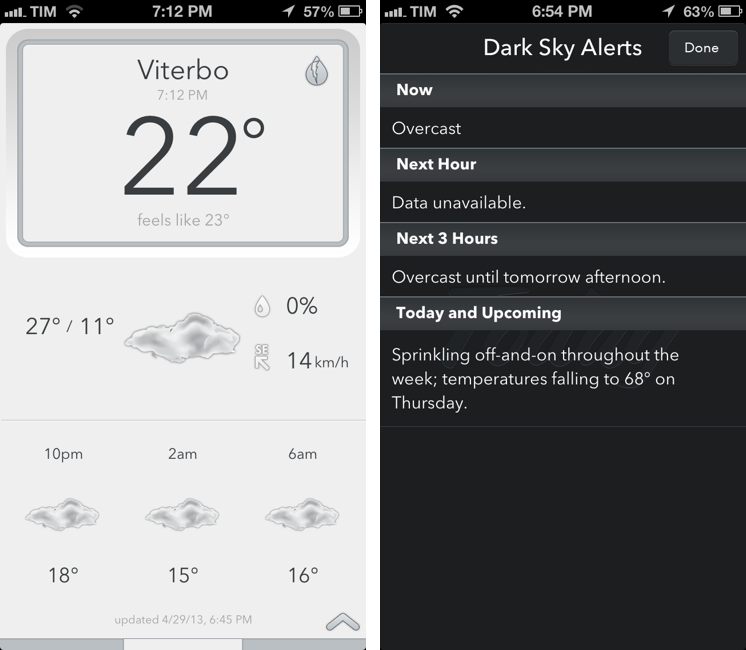
Savvy Apps’ Today Weather, my favorite iOS weather app, has been updated today to include support for Dark Sky alerts and Forecast.io, the Dark Sky Company’s recently launched weather service that comes with an API for third-party developers. Available as a $0.99 In-App Purchase, support for Forecast won’t turn Today Weather into an interface for Forecast Lines (another product from the Dark Sky Company, focused on displaying weather trends), but instead it’ll simply enable Forecast.io as a new weather source alongside Weather Underground.

While the Dark Sky iPhone app is primarily limited to North America, Forecast.io is a global weather service that aggregates data (temperature, pressure, forecasts, etc.) from various sources, statistically providing “the most accurate forecast possible for a given location”. I have been testing Today Weather with Forecast.io for the past month, and results were more accurate than Weather Underground for the Italian locations I tried: Viterbo (where I live), Montalto di Castro, and Rome. Weather Underground has been reliable in the past, but Forecast.io data had a series of minor differences that, eventually, proved to be true; admittedly, it wasn’t a major divergence in terms of temperatures and forecasts, but still accurate.

Dark Sky alerts are equally interesting: sitting in the top right corner of a location’s summary veiw, they provide a handy summary for Now, Next Hour, Next 3 Hours, and “Today and Upcoming” forecasts. I am a fan of Dark Sky’s human-readable text summaries, but, alas, temperatures haven’t been localized to Celsius (I believe this is a Dark Sky API limitation), and, at least for my saved locations, there’s not much information available for Next Hour and Next 3 Hours. I am sure that, for countries with better availability of weather tracking services and data providers, Today Weather’s Dark Sky alerts will offer even better summaries.

I like Today Weather and I’m a fan of The Dark Sky Company’s work on Dark Sky and Forecast. The $0.99 In-App Purchase is a no-brainer if you want to try Forecast.io’s data into Savvy Apps’ solid weather client.


Pocket Adds Drafts Sharing

After an update that added support for Quotebook, Pocket for iOS has been updated today to let users send text to Agile Tortoise’s Drafts.

In the current implementation, the app will send an article’s title and shortened URL if no text is selected; if there is a text selection, Pocket will send quoted text and shortened URL to Drafts. I like it, but I wish there was a setting to send the shared link with its original, non-shortened URL.

I’m very glad Pocket added Drafts integration. In this way, you can tweak my Evernote workflows to, say, append bits of text to a single note.

Permalink